Financial Operations
AP Automation for Small Business: An Implementation Guide
A step-by-step guide to AP automation for small business. Learn to assess readiness, choose a vendor, implement, and measure ROI to save time and cash.
ByJumpstart Partners, CPA, QuickBooks ProAdvisor
··19 min readYou're probably handling payables in the cracks of the day. A vendor invoice lands in your inbox, your ops lead Slacks a screenshot of another one, and someone pings you asking whether a bill should be paid now or next week. Approvals happen between meetings. The bookkeeping gets updated later. Cash decisions get made with partial information.
That setup works longer than it should. Then growth exposes it. You start paying some invoices late, approving others twice, and losing any clean view of what's due this week versus what can wait. For a business in the $1M to $5M ARR range, that isn't just an admin problem. It's a profitability problem, a cash flow problem, and a control problem.
AP automation for small business matters because it changes three things at once. It lowers processing cost, tightens financial controls, and gives you better timing over cash leaving the business. That's the strategic case. Not flashy software. Better decisions.
Table of Contents
- The Real Cost of Manual Accounts Payable
- Assessing Your Readiness for AP Automation
- Choosing the Right AP Automation Solution
- Your 8-Week Implementation Roadmap
- Calculating Your ROI and Measuring Success
- Warning Signs Common Implementation Pitfalls
The Real Cost of Manual Accounts Payable
It's 9:30 p.m. You're clearing invoices from your phone, trying to remember which bill is urgent, which one needs a department head's signoff, and which vendor already sent a second reminder. That routine looks harmless. It weakens cash control, slows your close, and leaves too much of your payables process dependent on memory.
What manual AP actually costs you
The clearest benchmark is still processing cost. Goldman Sachs estimates the total cost to manually process a single invoice is $22.26 for small businesses, falling to $6.89 in automated systems, yielding roughly 70% in net savings. The Institute of Finance & Management reports costs drop from $8.78 to $1.77 per invoice with high automation levels.
That matters, but labor savings are not the main strategic point for a founder.
Manual AP distorts cash decisions. Bills get approved in clumps instead of against due dates, discount windows, and cash priorities. Finance spends time chasing coding errors and missing approvals instead of controlling payment timing. Month-end close turns into cleanup work because AP data is incomplete, late, or stuck in inboxes. If you are already investing in broader business process automation for Australian SMEs, AP is one of the fastest places to improve both control and cash visibility.
Practical rule: If your AP process depends on someone remembering what to approve, when to pay it, and where to code it, you do not have a controllable process.
That is a significant financial risk. Manual AP makes it harder to pay the right bill on the right day for the right reason.
A worked example for a growing firm
Take a services firm processing 100 invoices a month.
| Scenario | Cost per invoice | Monthly processing cost | Annual processing cost |
|---|---|---|---|
| Manual AP | $22.26 | $2,226.00 | $26,712.00 |
| Automated AP | $6.89 | $689.00 | $8,268.00 |
| Difference | $15.37 | $1,537.00 | $18,444.00 |
That gap is meaningful. But founders should focus on what sits behind it.
With manual AP, your team pays some invoices early because they finally got approved, pays others late because no one had clean visibility, and loses confidence in weekly cash forecasting because liabilities are not captured consistently. That is how margin gets squeezed without showing up as a single line item. You miss early payment discounts, absorb avoidable late fees, and hold more cash in reserve because your payables timing is unreliable.
For a small business trying to scale, AP automation is a control system first and an efficiency tool second. It gives you cleaner approval discipline, better due-date visibility, and tighter control over when cash leaves the business. If you want a broader breakdown of the operational and financial upside, this overview of accounts payable automation benefits is worth reviewing.
Assessing Your Readiness for AP Automation
Most advice on AP automation for small business is lazy. It tells you to wait until you hit some invoice threshold. That's bad advice.
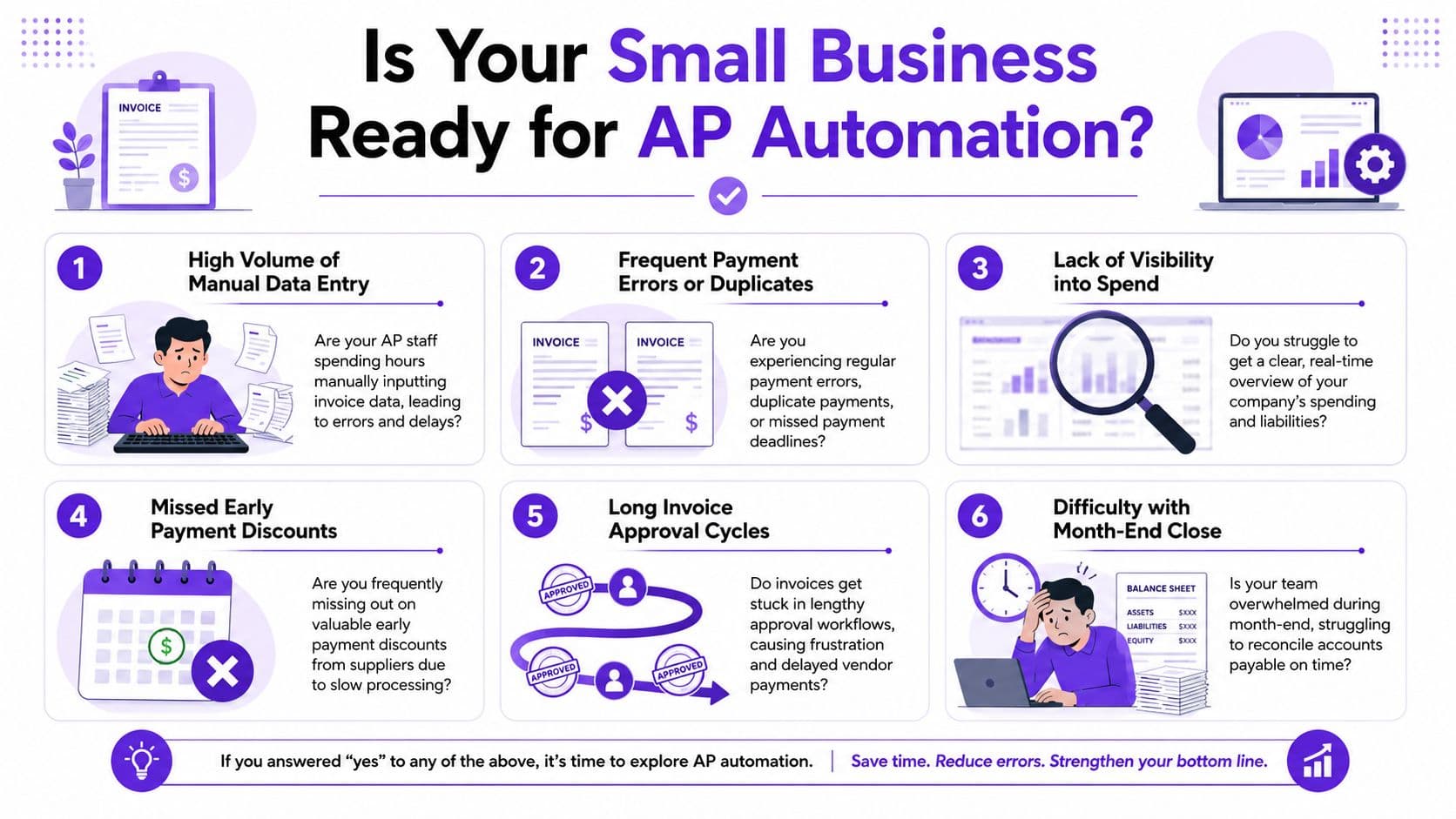
Stop using the 100 invoice rule
You don't need a high invoice count to justify automation. You need friction, approval risk, weak visibility, or cash timing problems.
A SaaS company with recurring software bills, contractors, ad spend, and multiple department approvers can need automation earlier than a simpler business with higher volume. Complexity beats volume as the primary trigger.
The best evidence on this point is blunt. For small teams processing 20 to 99 invoices monthly, the ROI is often better by starting with AI-powered email extraction alone rather than full workflow platforms. Research shows that 68% of small businesses abandon implementations due to excessive onboarding complexity when they try to over-engineer a solution for their scale.
That means two things. First, small businesses can benefit earlier than is commonly assumed. Second, plenty of them choose too much software, too soon.
A practical readiness checklist
Use this checklist instead of a volume rule.
- Your approvals live in email or Slack. Bills get approved informally, and nobody can see the full audit trail without digging.
- You can't see committed cash clearly. You know your bank balance, but you don't have a clean, current list of approved but unpaid invoices.
- Month-end close gets jammed by AP cleanup. Your bookkeeper or controller spends the close chasing invoices, coding, and payment status.
- You're adding departments, entities, or spend owners. Complexity is rising faster than your finance process.
- You're preparing for diligence. Fundraising, lending reviews, or an audit expose weak approval controls fast.
- You've outgrown founder approvals. If everything over a certain amount still needs your personal review, you need structured controls, not more inbox time.
For teams thinking about controls, AP automation should sit beside basic internal control design. Segregating who enters, approves, and releases payments matters just as much as digitizing the workflow. This primer on segregation of duties is a practical place to tighten that foundation.
You're ready for automation when manual AP starts distorting decisions, not when you hit an arbitrary invoice count.
If you process on the lower end of that range, start narrow. Use extraction first. Get invoices captured, coded, and visible. Add layered approval workflows only when your team can support them.
Choosing the Right AP Automation Solution
Most founders shop for AP tools the wrong way. They compare feature lists instead of choosing the operating model they want.
Three paths and their trade offs
You have three practical options. Standalone capture tools. Integrated AP platforms. Outsourced AP management.
| Approach | Best for | Implementation effort | Control depth | Scalability | Watch out for |
|---|---|---|---|---|---|
| Standalone tools | Smaller teams that need invoice capture first | Low to moderate | Basic | Moderate | Limited approval design |
| Integrated platforms | Businesses with recurring workflows and multi-step approvals | Moderate | Strong | High | More setup and policy work |
| Outsourced services | Founders who want the process run well, not just software installed | Moderate on your side, heavier on provider side | Strong if well designed | High | Depends on provider quality |
Standalone tools usually focus on OCR, email ingestion, and coding support. Integrated platforms handle approval routing, sync to systems like QuickBooks, Xero, or NetSuite, and support stronger controls. Outsourced services wrap process design, execution, and oversight around the tooling.
If you're evaluating where automation delivers value beyond labor savings, this piece on how to achieve real business value with invoice automation is useful because it frames automation as an operating decision, not just a software purchase.
What I'd choose by business model
Here's the practical version.
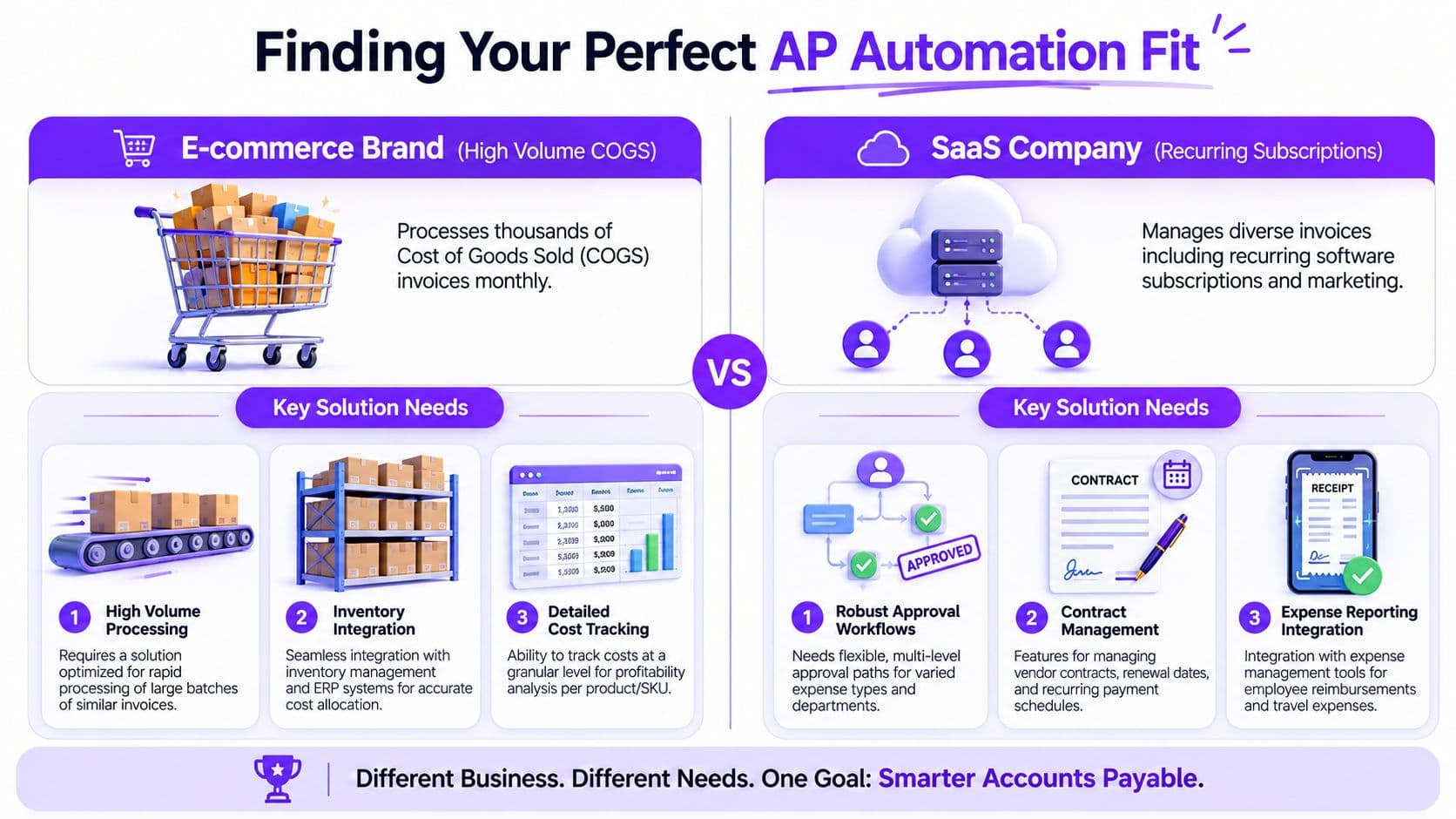
| Business type | Typical AP pattern | Best fit |
|---|---|---|
| SaaS company | Recurring subscriptions, contractors, software vendors, marketing spend | Integrated platform with approval logic and recurring bill controls |
| Digital agency | Vendor invoices tied to clients, freelancers, media spend, project costs | Platform or outsourced setup with strong coding rules and approval routing |
| Professional services firm | Lower volume but higher importance of coding accuracy and partner approvals | Start with extraction if simpler, move to integrated workflow as complexity rises |
| E-commerce or DTC brand | Large vendor counts, inventory-related bills, operational purchasing | More robust integrated platform with ERP and inventory alignment |
My opinion is simple. If you're a founder-led business under meaningful time pressure, don't confuse “more features” with “better fit.” Start with the lightest system that fixes your current bottleneck.
For software comparisons, this roundup of the best accounts payable automation software can help you narrow the shortlist.
Your 8-Week Implementation Roadmap
Monday morning. A founder approves a batch of bills from their phone, cash is tighter than expected by Wednesday, and no one can explain which payments were urgent, which were duplicated, or which could have waited another week. That is the core implementation problem AP automation should solve. The goal is not faster data entry. The goal is tighter cash control, cleaner approvals, and a payables process that can scale without exposing margin to avoidable errors.
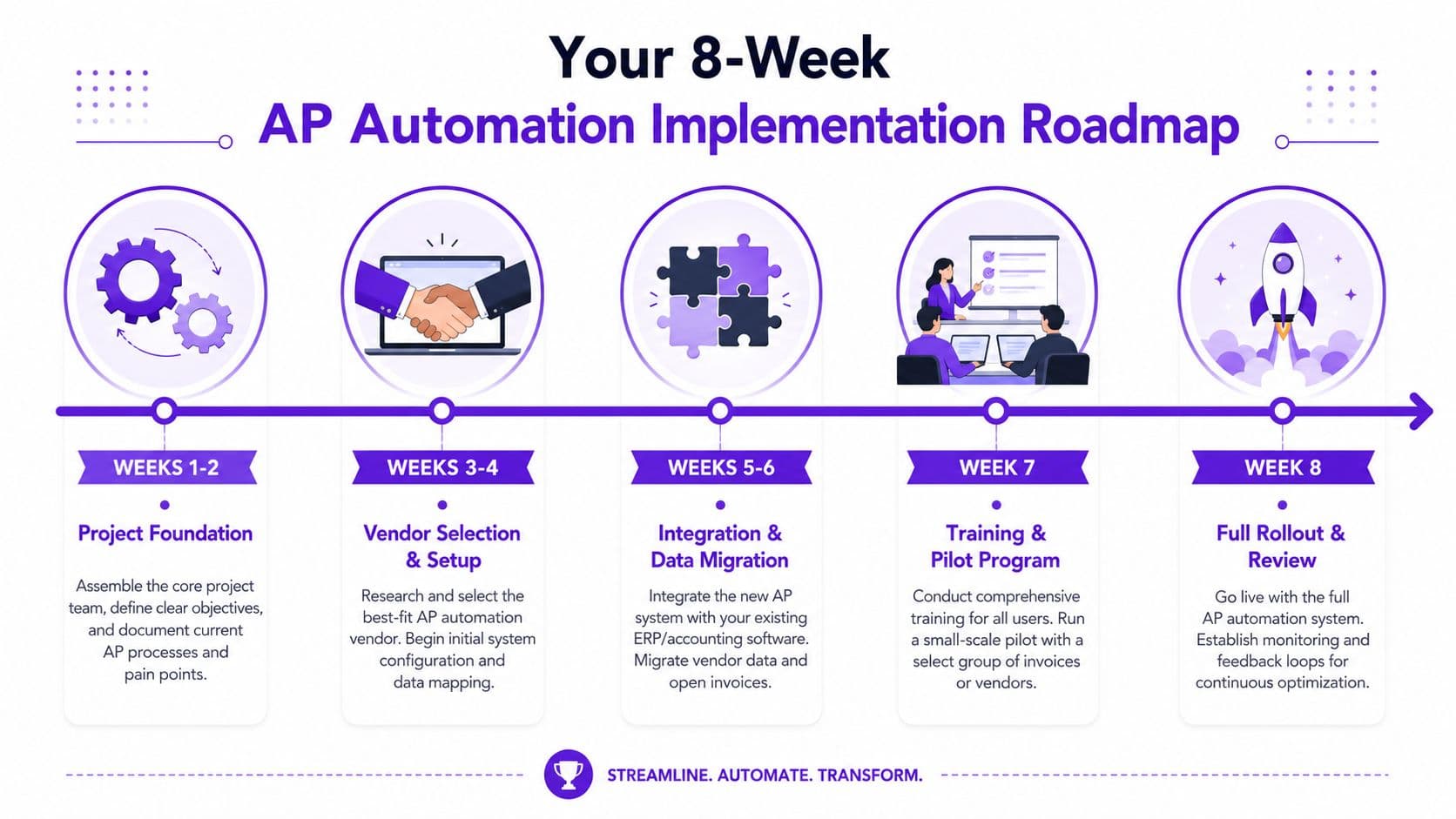
Weeks 1 to 2 foundation and process mapping
Start with the current process, not the software demo.
A best-practice AP automation implementation follows an 8-week methodology. Weeks 1 to 2 involve discovery and process mapping. That matches what I'd recommend for a growing business. If you skip this stage, you will automate bad habits and lock weak controls into the new workflow.
Document the facts:
- How invoices arrive. Inbox, vendor portals, recurring bills, employee submissions, and credit memos.
- Who touches each invoice. AP clerk, bookkeeper, department lead, founder, controller.
- Where approvals slow down. Missing coding, unclear owners, late approvers, duplicate submissions.
- How payment timing gets decided. Contract terms, vendor pressure, cash balance, or pure guesswork.
Then make the control decisions that matter.
Set approval thresholds by dollar amount and spend type. Decide which invoices can pass straight through, which need department review, and which require finance signoff. Define your source of truth for vendor records, GL coding, and payment status. If those rules are fuzzy, your reporting will be fuzzy too.
A hands-on AP setup project can save weeks here because someone has to own workflow design, field mapping, and accounting alignment. If you need that support, review what a dedicated AP setup project should include.
Weeks 3 to 4 rule design and system configuration
This is the build phase. Keep it narrow and practical.
Configure invoice capture, approval routing, coding logic, and payment controls around your real operating model. A services firm may need partner approvals and class tracking. An e-commerce business may need tighter vendor naming rules and inventory-related coding. A SaaS company may need recurring bill logic and software spend controls.
Do not try to automate every exception on day one. Build for the 70 to 80 percent of invoices that should follow a predictable path. That gets you quicker adoption and better control over cash outflows. Edge cases can stay manual until the team sees stable results.
Your checklist for this phase:
| Configuration area | Decision to make |
|---|---|
| Invoice intake | Which channels feed the system and who monitors failures |
| Approval rules | Dollar thresholds, department owners, escalation paths |
| Coding logic | Default GL accounts, dimensions, vendor-specific rules |
| Payment controls | Who can release payments, when, and under what review |
| Audit trail | What must be logged for approvals, edits, and overrides |
Weeks 5 to 6 integration and pilot
The pilot is where you test operational discipline, not just software behavior.
Before you start, clean up vendor records, confirm GL mappings, and verify payment methods. Bad master data creates fake implementation problems. Good master data shows whether the workflow is doing its job.
Here's a useful explanation of the rollout sequence:
Use the pilot to answer four questions:
| Pilot area | What to verify |
|---|---|
| GL coding | Invoices post to the right accounts and dimensions |
| Approval routing | Bills reach the right approvers without manual chasing |
| Payment scheduling | Due dates support cash planning instead of reactive payments |
| Exception handling | The team knows how to resolve mismatches, missing data, and duplicates |
Run the manual process in parallel during the pilot. Compare results. If coding accuracy, approval speed, or payment timing gets worse, fix the rules before broader rollout.
This stage is also where founders should start looking at cash flow impact. Are you gaining better visibility into upcoming payables by week? Are early-pay discounts visible? Are rushed payments dropping? Those are strategic wins. They matter more than whether one clerk saves a few clicks.
Weeks 7 to 8 go live and optimization
Go live is the start of management, not the end of the project.
A realistic target in the first two weeks is a stable automation rate that handles routine invoices cleanly and pushes real exceptions to people who can resolve them. That is how you build trust in the system and strengthen control over outgoing cash.
Focus on these reviews every day after launch:
- Automation rate. Low performance usually points to weak rules, poor invoice intake, or bad vendor data.
- Exception queues. Repeated issues show you where process discipline is missing.
- Approval delays. Human bottlenecks often become the main cause of late payments after launch.
- Payment timing. Check whether the team is paying according to terms and cash priorities, not old habits.
Train approvers again. Then enforce the process. If managers keep approving by email, texting accounting, or bypassing controls for familiar vendors, the system will not deliver the cash visibility or audit discipline you paid for.
That's the standard I'd use for a growing SaaS company, agency, or professional services firm. Structured. Slightly boring. Very effective.
Calculating Your ROI and Measuring Success
You approve a software bill on Monday, a contractor invoice on Wednesday, and a rent payment on Friday. Then you look at the bank balance and realize you still do not have a clean view of what is due next week, what can wait, and where cash is leaking through late fees, duplicate payments, or missed discounts. That is why ROI for AP automation should be measured in cash control first and labor savings second.
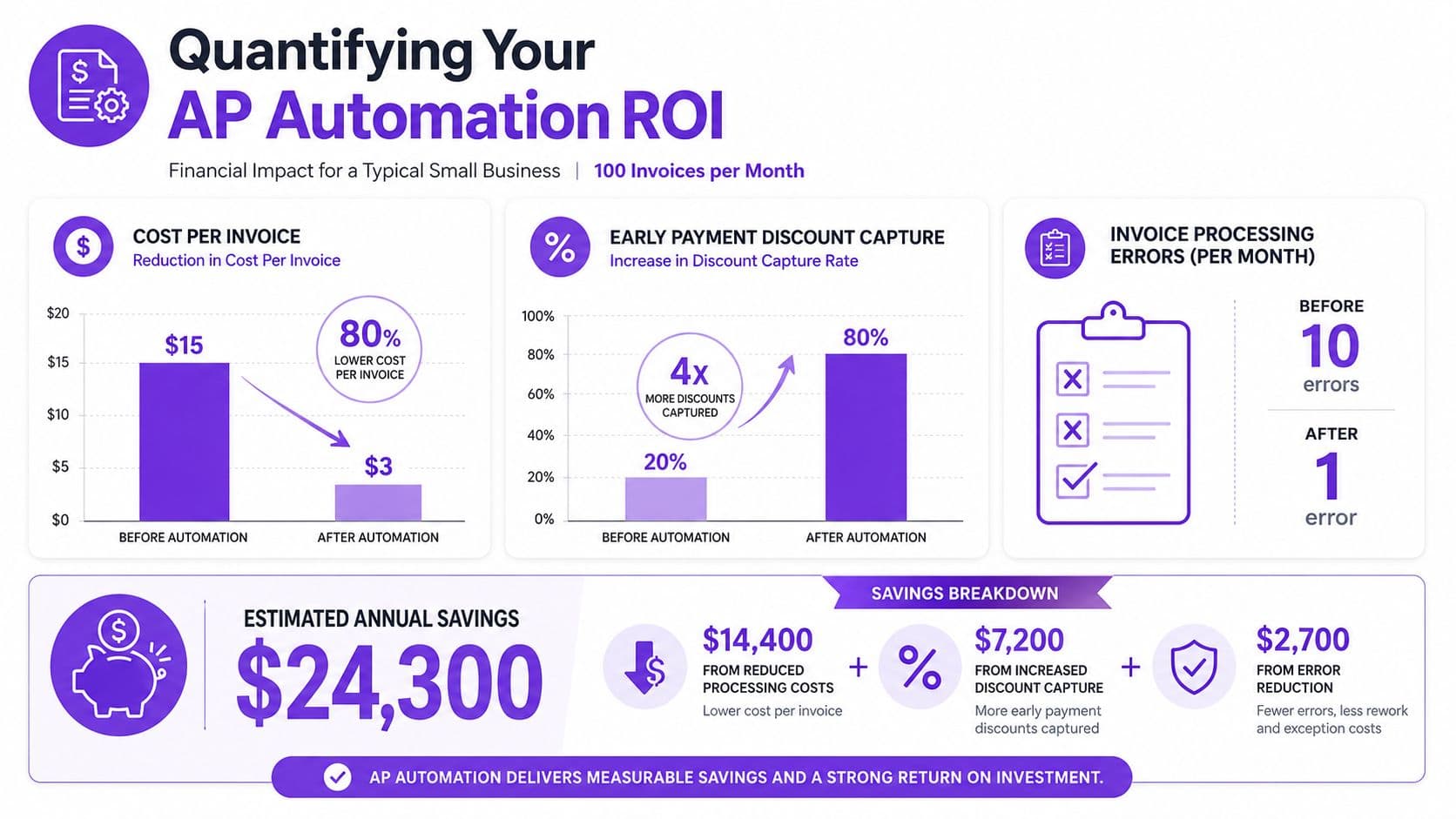
A simple ROI model with real numbers
Start with your current invoice volume and build the case from conservative savings, not vendor promises.
Use the benchmark noted earlier in this guide that puts direct savings at roughly $6.98 per invoice. For a business processing 200 invoices per month, the math is simple.
Annual invoice volume:
200 invoices × 12 months = 2,400 invoices
Annual savings using the $6.98 benchmark:
2,400 × $6.98 = $16,752
That gives you a floor, not a ceiling.
Now compare that to the manual-versus-automated cost gap referenced earlier in the article:
- Manual annual cost at $22.26 per invoice: 2,400 × $22.26 = $53,424
- Automated annual cost at $6.89 per invoice: 2,400 × $6.89 = $16,536
- Annual difference: $36,888
Those figures create a useful decision range. If your business sits near the low end, AP automation still pays for itself. If you are closer to the high end, staying manual is a cash management mistake, not a neutral choice.
| ROI method | Annual invoices | Savings per invoice | Estimated annual savings |
|---|---|---|---|
| Average savings benchmark | 2,400 | $6.98 | $16,752 |
| Manual vs automated cost gap | 2,400 | $15.37 | $36,888 |
Here is the part founders often miss. The processing savings matter, but the stronger return comes from better payment timing. If your team can see approved but unpaid bills by week, hold non-urgent payments until the right date, and consistently catch early-pay discounts, AP automation improves working capital. That is a finance outcome. It protects margin and gives you more room to hire, buy inventory, or extend runway without reaching for outside capital.
For leaders thinking about broader operational implications, these examples of how firms streamline operations in the East Midlands are useful because they show where automation creates business value beyond isolated task savings.
What to track after go live
Track success with a short operating dashboard. Review it weekly at first, then monthly once the process is stable.
- Cost per invoice. Confirm the economics improved.
- Invoice cycle time. Shorter cycle times reduce late payments and approval drag.
- Automation rate. More touchless invoices means lower admin load and better scale.
- Exception rate. Repeated exceptions point to weak rules, poor vendor data, or approval confusion.
- Approved but unpaid balance. This is your forward cash view.
- Discounts captured and late fees avoided. These numbers show whether the process is improving payment discipline.
One more metric belongs on the founder dashboard. Track payment timing against actual cash priorities. If automation helps you pay on terms instead of paying early out of habit or late out of chaos, that is a direct cash flow win.
If you want to evaluate the investment the same way you would any finance decision, use a break-even analysis template for software and process investments.
Good AP automation lowers processing cost and gives you control over when cash leaves the business. That second benefit is usually worth more.
Warning Signs Common Implementation Pitfalls
The technology is rarely the reason AP automation stalls. Process failure is the usual culprit.
Red flag one dirty vendor data
If your vendor file is messy, automation will scale the mess.
A stunning 42% of AP implementation failures stem from duplicate vendors or stale bank details in the vendor master file, requiring pre-migration audits that most how-to guides omit. That's one of the most useful implementation facts finance teams ignore.
Your pre-migration cleanup should include:
- Duplicate vendor review. Merge vendors with inconsistent spellings or duplicate records.
- Bank detail validation. Confirm current payment instructions before loading them into the new process.
- Tax and remittance checks. Make sure the right legal entity and payment destination are attached to the right supplier.
- Inactive vendor purge. Archive vendors you no longer use so they don't clutter approvals or cause mistakes.
If you skip this work, the software will faithfully automate bad records.
Red flag two weak change management
Founders often assume AP staff will embrace the new process because it removes manual work. That's not how it plays out. People resist systems they didn't help design, especially when exceptions and approval logic affect their daily work.
The solution is simple. Involve the actual operators early. Let them define the pain points, test the routing rules, and help shape exception handling. Your controller, bookkeeper, or AP lead should own the operational detail, not just sit through demos after decisions are already made.
A clean rollout depends on team buy-in. If the people processing invoices don't trust the workflow, they'll route work around it.
Red flag three no exception process
Every AP automation setup has exceptions. Some invoices arrive with incomplete data. Some don't match vendor records. Some need judgment.
That's why your exception path matters as much as your straight-through path.
A practical exception design includes:
| Exception type | Required action |
|---|---|
| Missing vendor data | Route to finance for vendor master verification |
| Incorrect coding or department | Return for recoding with audit trail |
| Approval mismatch | Escalate to designated approver based on policy |
| Unusual payment request | Hold for leadership or finance review |
If you don't define those paths upfront, the team improvises. Improvisation is exactly what you were trying to eliminate.
If your AP process still depends on inboxes, memory, and founder approvals, it's time to fix it. Jumpstart Partners helps growing businesses build cleaner AP workflows, stronger controls, and better cash visibility without over-engineering the finance stack. If you want a practical implementation plan, not a software sales pitch, talk to their team.