Financial Operations
Key Accounts Payable Automation Benefits Your Firm Needs
Discover the top accounts payable automation benefits for your business. Learn how to cut costs, reduce errors, improve cash flow, and calculate your ROI.
ByJumpstart Partners, CPA, QuickBooks ProAdvisor
··15 min readIf you're still treating accounts payable as admin work, you're underestimating the drag it's putting on your business. Top-performing organizations spend just $1.42 per invoice on AP, while inefficient businesses spend $6.00 per invoice, a gap tied directly to automation adoption, according to RPi Consultants. For a founder running a SaaS company, agency, or services firm in the $500K to $20M range, that gap isn't bookkeeping trivia. It's margin leakage.
The bigger mistake is assuming software alone fixes it. It doesn't. A sloppy AP process automated too early becomes a faster sloppy process. That's why many AP initiatives stall, frustrate your team, and fail to deliver the ROI vendors promise.
If you're trying to scale without adding unnecessary headcount, AP is one of the fastest places to clean up cost, speed, and control. If you want broader insights on back-office automation, the same principle applies across finance operations. Standardize first, automate second. For a deeper look at workflow issues specifically inside AP, this guide on improving the accounts payable process is a useful companion.
Table of Contents
- Why Your Manual AP Process Is Silently Killing Growth
- The Hidden Costs of Sticking with Manual Accounts Payable
- Calculating the Financial ROI of AP Automation
- Beyond Cost Savings Strategic and Operational Benefits
- How AP Automation Drives Success in SaaS and Agencies
- Avoiding Failure How to Implement AP Automation Correctly
- Your Action Plan for Automating Accounts Payable
Why Your Manual AP Process Is Silently Killing Growth
Companies that process invoices efficiently spend far less per invoice than companies stuck in email chains, spreadsheets, and manual entry. That gap is not an accounting footnote. It is a growth problem.
If invoices arrive by email, get forwarded for approval, and end up keyed into QuickBooks, Xero, or NetSuite by hand, your finance team is doing work a system should handle. You pay for that twice. First in labor. Then again in slower decisions, weaker cash visibility, and preventable cleanup during close.
Here is the part founders miss. Bad AP usually does not fail in a dramatic way. It drags on hiring plans, vendor relationships, and reporting discipline because nobody has standardized how invoices are submitted, coded, approved, and paid. Software alone does not fix that. A large share of AP automation pilots fail because the company installs a tool on top of a broken process instead of fixing the process first.
A simple example
If your business processes 500 invoices a month, small inefficiencies become real money fast. A few extra minutes to chase approvals, re-enter fields, correct coding, and answer vendor questions adds up every single month. Over a year, that routine friction can absorb tens of thousands of dollars of finance capacity that should be spent on forecasting, margin control, and board reporting.
That is why I tell founders to start with workflow discipline, not vendor demos. Define one intake channel. Set approval thresholds. Standardize coding rules. Document exceptions. Then automate the repeatable steps. If you need a practical framework, this guide to improving your accounts payable process is the right starting point.
A manual AP process also creates a false sense of control. The work feels hands-on, so leaders assume it is safer. In practice, it is harder to see what is waiting for approval, what has already been committed, and where a payment is stuck. That makes cash planning weaker and month-end more chaotic.
The fix is straightforward. Clean up the process before you buy more software. Founders who want a broader view of repetitive work across finance and operations can also review these insights on back-office automation.
If your controller stays late before close, your ops lead chases approvers on Slack, or vendors follow up on invoices your team thought were handled, your AP process is already too expensive. That friction signals that your finance function is operating like a smaller company than the one you're trying to build.
The Hidden Costs of Sticking with Manual Accounts Payable
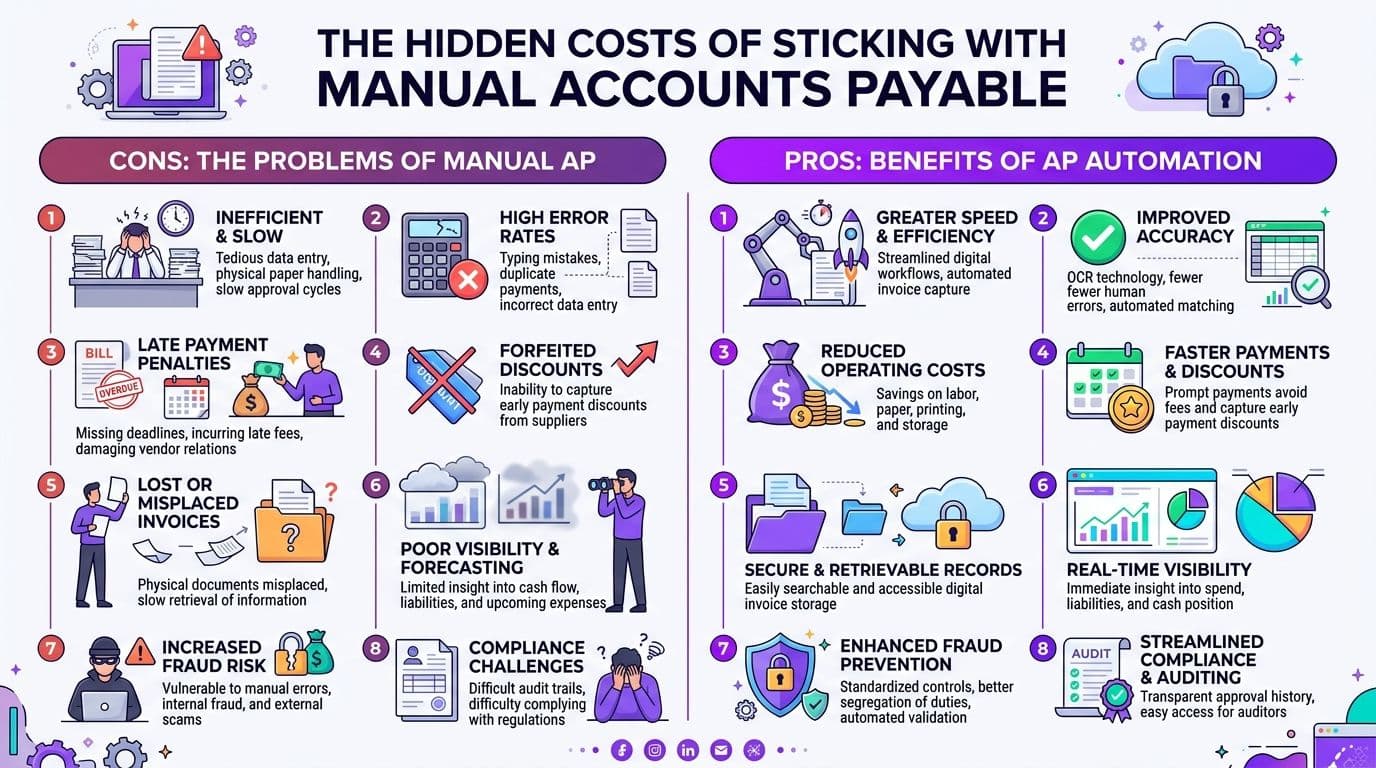
Most founders look at AP and see payroll cost. That's only one layer of the problem. The bigger cost is the mess manual work creates around payment timing, controls, and team capacity.
Where the money actually leaks
The obvious cost is labor. Someone receives the invoice, codes it, routes it, follows up, re-enters details, and checks whether it got paid. But the expensive part is what happens around that labor.
Invoices get buried in inboxes. Approvers miss them. Payment dates slip. The finance team loses visibility into what's approved, what's pending, and what's about to hit cash. If you've added multiple payment tools, spreadsheets, and approval workarounds over time, it's worth looking at platforms built around AI for compliant payments and CX because fragmented systems create avoidable control problems.
Manual AP also creates error correction work. Duplicate entries, coding mistakes, and approval confusion don't just create accounting issues. They trigger rework during close, supplier friction, and internal noise.
When your AP team spends time asking "Has this been approved?" or "Did we already pay this?" you're paying twice for the same invoice. Once to process it, and again to untangle it.
If you're evaluating whether your workflow is broken, this walkthrough on how to automate accounts payable is a good reality check.
Red flags you should take seriously
You don't need a full audit to see whether your AP process is hurting you. Look for these signs:
- Invoices sit too long: Bills wait in email threads, on desktops, or in Slack messages before anyone acts.
- Approvals depend on memory: Your team has to remind managers manually instead of using a defined routing workflow.
- Cash visibility is weak: You can't quickly see what has been received, approved, scheduled, or disputed.
- Coding is inconsistent: Similar expenses hit different accounts or classes depending on who entered them.
- Vendor questions keep surfacing: Suppliers follow up because your team can't give clear payment status.
- Close gets harder every month: AP clean-up piles into month-end instead of being handled in real time.
- Your finance team sounds exhausted: Repetitive AP work drains attention from reporting, planning, and actual analysis.
Manual AP doesn't stay contained inside AP. It spills into forecasting, close quality, vendor management, and team morale.
Calculating the Financial ROI of AP Automation
APP2P Network data cited by NetSuite puts the gap in plain English. Processing 5,000 invoices manually costs about $64,500 per month. An automated AP operation costs about $8,850. That is an 85% reduction, or more than $55,000 a month in avoidable operating cost.
That headline number gets founders interested. The real decision point is whether your process is standardized enough to capture it.
A worked example using real invoice economics
Use the same benchmark at a smaller scale. If your company processes 500 invoices per month, the math still matters.
Based on the NetSuite benchmark:
- Manual cost per invoice: $64,500 ÷ 5,000 = $12.90
- Automated cost per invoice: $8,850 ÷ 5,000 = $1.77
Applied to 500 invoices per month:
- Manual monthly AP cost: 500 × $12.90 = $6,450
- Automated monthly AP cost: 500 × $1.77 = $885
- Monthly savings: $5,565
- Annual savings: $5,565 × 12 = $66,780
That is the clean, direct processing ROI.
The same NetSuite analysis also notes that automation reduces Days Payable Outstanding by approximately 18%, equal to an average of 5.55 days on invoice settlement. Faster routing and approval give you more control over payment timing. That matters if you want to capture early-pay discounts, avoid late fees, and stop paying vendors based on whoever yelled loudest in email.
Now the part founders miss. Software does not create those savings on its own. If your invoice intake is inconsistent, approval rules live in people's heads, and coding varies by preparer, your pilot can stall before you reach steady-state savings. That is why AP automation fails so often in practice. The problem is rarely the tool. The problem is a messy process getting pushed through a faster pipe.
Use a simple ROI test before you buy anything. Start with invoice volume, current labor time, error correction time, approval lag, and exception rate. Then ask one harder question: do you have a standard process for invoice receipt, coding, approval, and payment release? If the answer is no, fix that first. This break-even analysis guide will help you turn those inputs into a board-ready investment case.
CFO view: Buy AP automation after you standardize the workflow. Otherwise you are paying for software and keeping the same chaos.
Manual vs automated AP cost comparison
| Metric | Manual AP Process | Automated AP Process |
|---|---|---|
| Invoices per month | 500 | 500 |
| Cost per invoice based on APP2P Network data cited by NetSuite | $12.90 | $1.77 |
| Monthly processing cost | $6,450 | $885 |
| Annual processing cost | $77,400 | $10,620 |
| Annual difference | $66,780 saved |
A $66,780 annual savings number gets attention. Standardized approvals, clean coding rules, and a controlled intake process are what let you keep it. Without that foundation, the ROI model looks good in a demo and disappoints in production.
Beyond Cost Savings Strategic and Operational Benefits
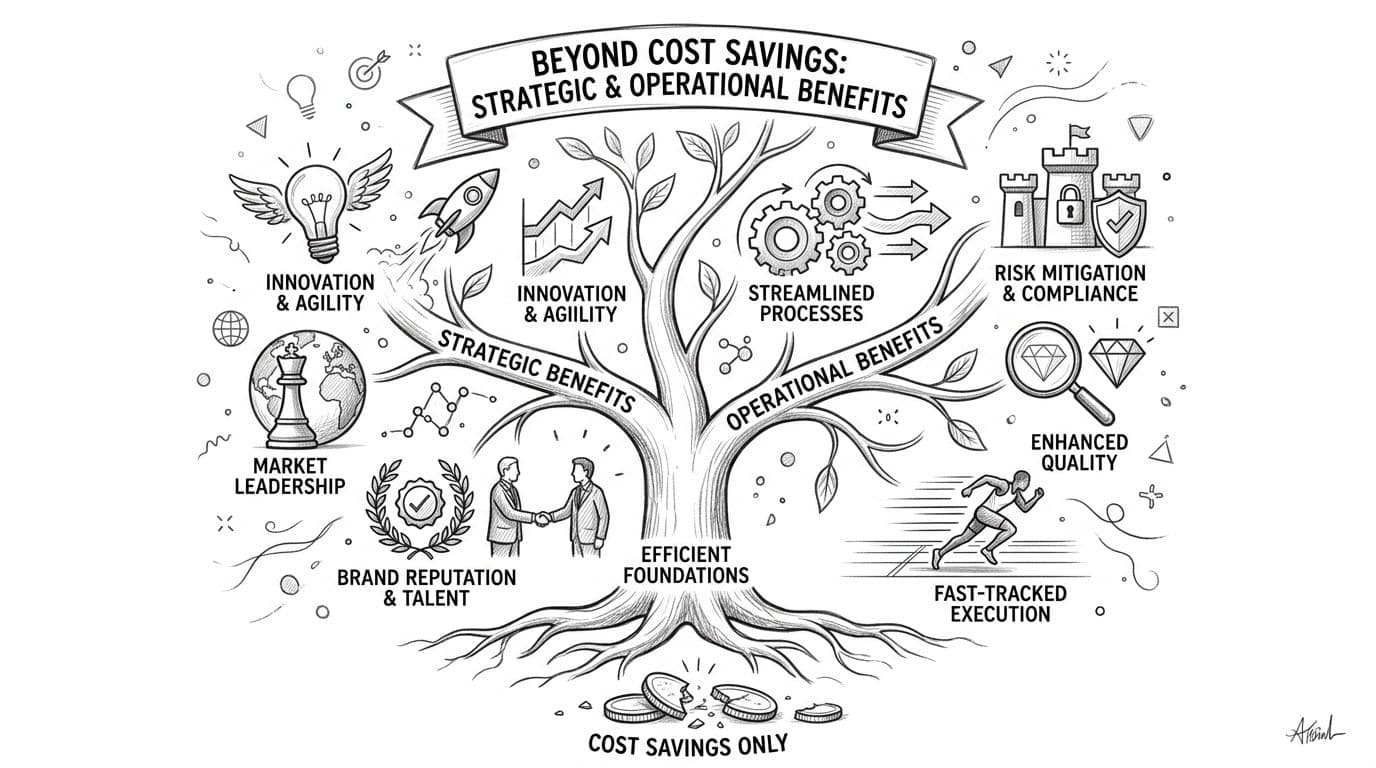
The best accounts payable automation benefits aren't limited to lower processing cost. The bigger win is what your finance team gets to stop doing.
What your finance team gets back
According to BILL, surveyed customers report saving an average of 50% of their total time dedicated to accounts payable after implementing automation. The same source says automation can reduce human error by up to 50%.
That matters because AP work is full of low-value repetition. Data entry, chasing approvals, checking invoice status, and rekeying vendor details don't help you understand margin, cash runway, or hiring capacity. They just consume the people you need for those jobs.
Brex reports that companies implementing AP automation process 3 to 4 times more invoices per employee without adding headcount in its review of AP automation performance trends. That's the scalability founders prioritize. Growth without back-office sprawl.
JPMorgan also notes that AP automation uses AI and machine learning to support touchless processing, reduce processing costs by up to 50%, and improve control through validation and matching in its overview of AP automation benefits to the accounts payable process.
Why morale matters more than founders think
Most AP articles ignore the people side. That's a mistake.
A Paylocity study found that 34% of finance employees cite repetitive data entry as their top source of burnout, and organizations using AP automation reported a 22% reduction in finance team turnover within 12 months.
"Repetitive data entry" was the top source of burnout for 34% of finance employees, according to Paylocity.
If you've ever had to replace a strong bookkeeper, senior accountant, or controller, you already know turnover isn't just an HR problem. It delays close, weakens controls, and forces you to retrain someone on vendor history, approval logic, and accounting judgment that lived in one person's head.
Automation fixes more than task flow. It upgrades the role. Your team spends less time pushing invoices and more time reviewing spend patterns, supporting cash planning, and tightening financial operations.
How AP Automation Drives Success in SaaS and Agencies
The value of AP automation changes by business model. The mechanics are different in SaaS, agencies, and e-commerce. The underlying point is the same. Better AP creates cleaner financial visibility.
SaaS visibility and cleaner coding
In SaaS, recurring software vendors, cloud infrastructure bills, contractors, and implementation expenses pile up fast. Manual AP usually means one person tries to remember how each vendor should be coded across departments, products, or cost centers.
An automated workflow fixes routing and coding discipline. A bill from your hosting provider goes where it belongs. A contractor invoice tied to implementation support doesn't get lumped into a generic expense bucket. That gives you a clearer read on operating spend and cleaner reporting when you're discussing gross margin or burn with investors.
Agency margin control and client profitability
Agencies have a different pain point. Expenses often need to map to clients, retainers, or projects. Manual coding introduces inconsistency, especially when media, freelancers, software, and pass-through costs are moving quickly.
When AP automation is set up well, invoices route with the right client and expense logic attached. That supports stronger job costing and cleaner margin analysis. If you're trying to tighten project profitability, these accounts payable best practices are worth reviewing alongside automation decisions.
E-commerce complexity without spreadsheet chaos
E-commerce teams juggle supplier invoices, freight, fulfillment, apps, and marketing vendors. The challenge isn't just volume. It's classification and timing.
Manual AP usually leads to spreadsheet side systems because the accounting file alone doesn't give enough clarity. Automation helps centralize approval flow and invoice capture so your team isn't building a shadow process outside the ledger. That's how you keep AP from turning into an operations bottleneck as order volume grows.
Avoiding Failure How to Implement AP Automation Correctly
Here's the part software vendors gloss over. Buying AP automation software doesn't guarantee a better AP process.
Why software-first implementations break
According to Bottomline's summary of Ardent Partners' 2025 benchmark report, 40% of mid-market companies that rushed AP automation without first standardizing invoice workflows experienced pilot failures, including duplicate payments and ERP misalignment.
That's the overlooked risk in this whole category.
If your vendor list is messy, approval thresholds are unclear, coding logic is inconsistent, or your team handles exceptions differently by person, automation doesn't solve that. It scales the inconsistency. The software routes faster, but it routes confusion.
Don't automate workarounds. Remove them first.
This is especially important if you're running QuickBooks, Xero, or NetSuite with multiple approvers, location-based spend, or department coding that has evolved informally over time. If your team needs deeper technical help on integration or workflow architecture, some firms choose to hire dedicated AI automation engineers to support systems work. The key is still process design, not tool enthusiasm.
The implementation sequence that works
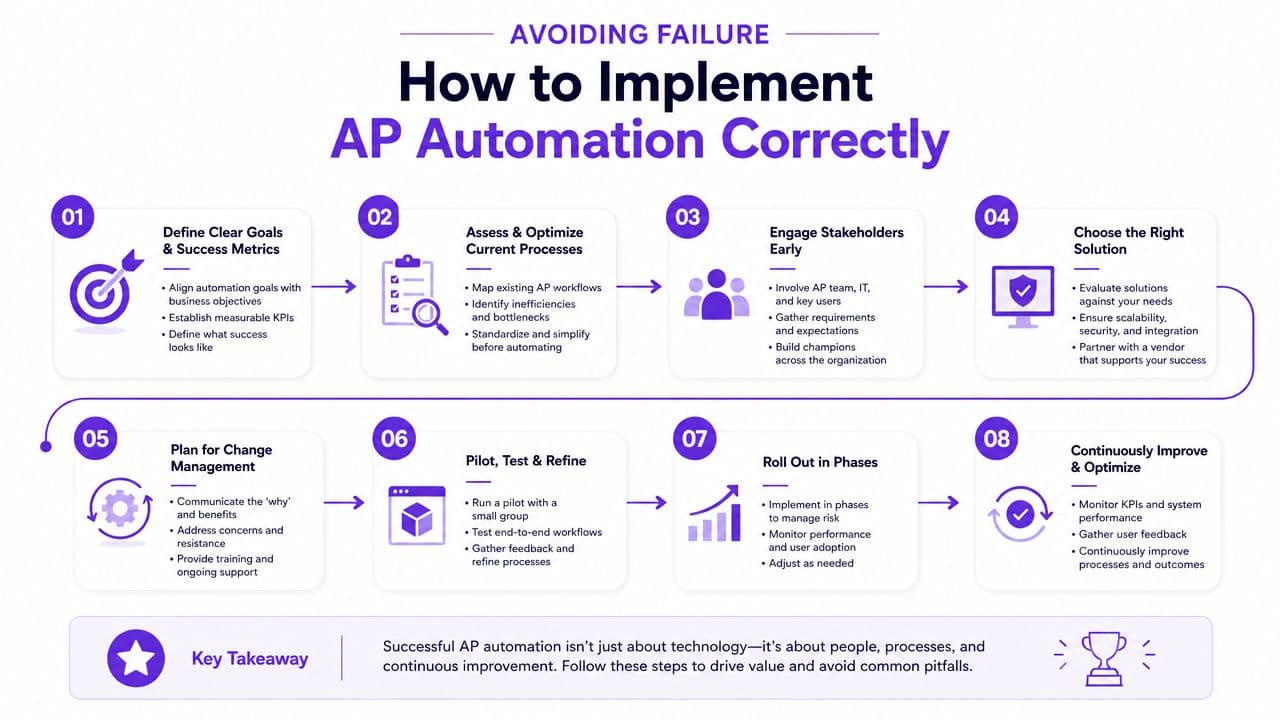
A clean AP rollout follows an operational sequence:
-
Standardize your intake Decide where invoices enter the business. One inbox, one upload path, one rule set.
-
Clean up your vendor file Remove duplicates, confirm payment details, and tighten naming conventions.
-
Define approval rules Set thresholds, approvers, backups, and exceptions in writing.
-
Map coding logic Align expense accounts, departments, classes, clients, and projects before configuration.
-
Test your accounting integration Don't assume your sync logic is right. Validate how bills, payments, and statuses flow into QuickBooks, Xero, or NetSuite.
-
Train for exceptions Straight-through processing gets attention. Exception handling determines whether the system works.
The common objection is, "We're too small for this." That's backward. Smaller firms feel process breakdowns faster because fewer people absorb the mistakes.
The other objection is, "We'll fix the process after the software goes live." That's how pilot projects fail. Standardize first. Then automate.
Your Action Plan for Automating Accounts Payable
If your AP process still relies on email forwarding, manual keying, and follow-up messages, don't overcomplicate the fix. Start with discipline, not software demos.
-
Audit your current AP workflow
Trace one invoice from receipt to payment. Note every handoff, approval delay, spreadsheet, and manual entry point. Then calculate your current cost per invoice. -
Build the ROI case with your own volume
Use your monthly invoice count and compare it against benchmark processing economics. If your current process is manual, the savings case is usually obvious once you do the math. -
Standardize before you automate
Clean the vendor list, define approval rules, lock down coding logic, and choose the system of record. If you're still comparing tools, this guide to best accounts payable automation software is a practical place to start. -
Pick an execution path You can implement internally, or you can work with a finance partner who owns the workflow design, controls, and rollout with you. What matters is that someone is accountable for making the process work.
Accounts payable isn't a side process anymore. It's a controllable lever for margin, speed, and scale. Fix it now, before your invoice volume grows and the mess gets more expensive.
If you want a clean AP process without building it alone, Jumpstart Partners helps growing SaaS companies, agencies, and service firms tighten workflows, improve controls, and automate back-office finance operations with a US-based CPA team. If your current AP process is slowing close, creating cash visibility issues, or wasting team capacity, schedule a consultation and get a direct assessment of what's broken and how to fix it.