Financial Operations
How to Automate Accounts Payable: Cut Costs, Scale
Learn how to automate accounts payable with our guide for founders. Integrate with QuickBooks, cut costs, and scale your business efficiently.
ByJumpstart Partners, CPA, QuickBooks ProAdvisor
··18 min readIf you're still treating accounts payable as clerical work, you're leaving money and control on the table. Manual AP doesn't just slow your team down. It delays approvals, obscures cash commitments, and weakens the financial visibility you need when you're hiring, fundraising, or trying to close the month without surprises.
For growing SaaS companies, agencies, and service firms, AP automation is one of the fastest finance upgrades you can make because it attacks both cost and execution at the same time. The key is doing it in a way that fits your stack, your approval logic, and your reporting needs.
Your Manual AP Process Is Costing You More Than You Think
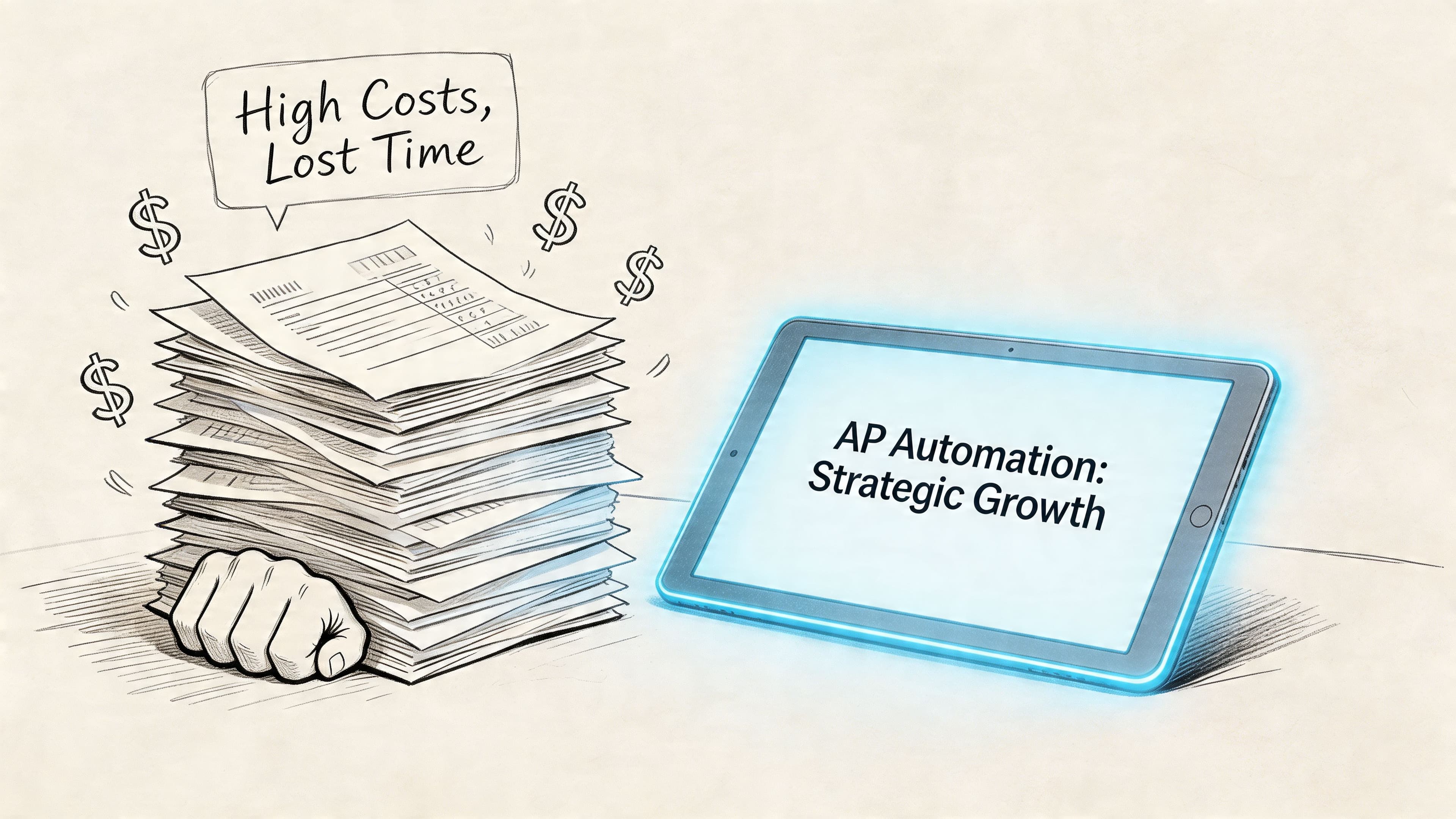
Manual invoice processing costs an average of $15 per invoice and takes 14.6 days, while automation can reduce costs to as low as $2.78 per invoice and bring processing time down to 3.1 days, according to these AP automation benchmarks. The same benchmark set also notes that 66% of organizations still manually enter invoices into ERP systems.
That should get your attention.
If you're processing vendor bills in email, forwarding PDFs for approval in Slack, keying data into QuickBooks or NetSuite, and then chasing someone to approve payment, your AP process isn't just inefficient. It's introducing avoidable delay into cash planning and close.
What founders usually miss
Most founders see AP as a back-office task. That view is wrong. AP controls when liabilities hit the books, how quickly expenses are coded, and whether your team can trust weekly cash numbers.
When AP is manual, these problems show up fast:
- Cash visibility gets distorted because invoices sit in inboxes instead of hitting your system on time.
- Approvals drag because no one owns routing and escalation.
- Month-end closes slow down because accruals and vendor balances need cleanup.
- Finance staff burn time on data pulls instead of review and decision support.
If that last point sounds familiar, you should also look at how teams automate reports and stop wasting time on manual data pulls. AP cleanup and reporting automation usually belong in the same conversation because bad AP data creates bad management reporting.
What good looks like
A modern AP process is simple to describe:
| Manual AP | Automated AP |
|---|---|
| Invoices arrive in scattered inboxes | Invoices route into one intake channel |
| Team keys data by hand | OCR and AI extract invoice data |
| Managers approve by email or chat | Rules-based approval workflows route automatically |
| Finance matches invoices manually | System performs automated matching and flags exceptions |
| Payments run in batches with poor visibility | Digital payments and synced status updates improve control |
You don't need perfection on day one. You do need a process that captures invoices centrally, routes approvals consistently, and syncs cleanly with your accounting system.
For a deeper look at where manual AP breaks down operationally, review this guide on improving the accounts payable process. The biggest issue usually isn't effort. It's inconsistency.
Practical rule: If an invoice can enter your business without hitting a controlled workflow, your AP process isn't automated. It's just partially digitized.
Calculating the ROI of AP Automation
Here's the simplest way to think about how to automate accounts payable. Start with labor and processing cost. If the numbers work there, the strategic upside is a bonus.
According to SAP Concur's 2025 takeaways, automation boosts productivity from 5 to 30 invoices per hour, saves 70 to 80% of AP time, and for a business processing 500 invoices a month can reclaim over 80 hours of manual work in this AP automation trends summary.
A worked example for a $5M business
Take a $5M SaaS company or agency processing 500 invoices per month.
That equals:
- 500 invoices per month
- 6,000 invoices per year
Now use the cost-per-invoice figures already established earlier.
| Metric | Manual AP | Automated AP |
|---|---|---|
| Annual invoice volume | 6,000 | 6,000 |
| Cost per invoice | $15 | $2.78 |
| Annual processing cost | $90,000 | $16,680 |
That creates annual direct processing savings of $73,320.
Now add the time recovery. Concur states that a business at this invoice volume can reclaim over 80 hours of manual work. Use that conservatively as monthly time recovered.
| Time impact | Value |
|---|---|
| Hours reclaimed per month | 80+ |
| Hours reclaimed per year | 960+ |
I won't invent an hourly labor rate. You know your team's actual cost. Multiply those 960+ annual hours by your loaded AP, bookkeeper, controller, or finance manager rate, and the labor case gets stronger very quickly.
Why the payback is usually obvious
If you're asking whether AP automation is "worth it," you're usually comparing software cost to the wrong baseline. The baseline isn't your current software spend. It's the total cost of manual handling, review, rekeying, correction, follow-up, and delayed close.
A helpful outside perspective on the savings logic is this breakdown of Invoice Processing ROI. Use it as a supplemental model, then plug in your own invoice volume and internal labor cost.
You should also compare those savings against the broader finance burden in your business. This overview of the cost of accounting is useful because AP rarely sits in isolation. Manual AP usually drives extra bookkeeping work, more controller review, and more cleanup during close.
What ROI misses if you only look at labor
The direct savings are real. They are not the whole story.
Automation also improves:
- Close quality because expenses are coded and approved earlier
- Cash planning because liabilities are visible before payment week
- Vendor management because status is easier to track
- Team efficiency because finance spends more time reviewing exceptions than entering data
Most teams underestimate AP automation because they count data entry savings and ignore the cleanup work that manual AP creates downstream.
A common objection is that smaller companies should wait until volume is much higher. I disagree. If you're already feeling approval delays, coding inconsistency, or unreliable payable balances, you're big enough to automate. Waiting just gives you more broken process to unwind later.
Designing Your Modern AP Automation Architecture
You don't need a flashy AP tool. You need the right architecture.
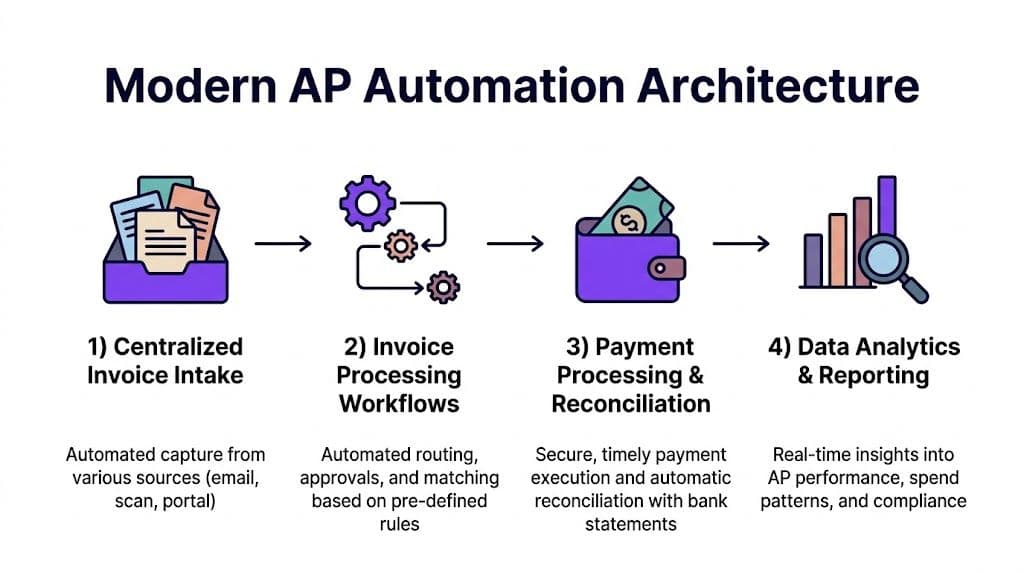
Most AP projects fail because buyers focus on invoice capture and demos with pretty dashboards. That isn't the hard part. The hard part is turning incoming invoices into clean accounting data, routing them through the right approval path, and pushing the result into QuickBooks, Xero, or NetSuite without creating rework.
"Founders often fixate on OCR accuracy, but the real value comes from the intelligence of the approval workflow and the quality of the ERP sync," says a finance lead at Jumpstart Partners.
Centralized invoice intake
Every invoice needs one controlled entry point. That can be an AP inbox, vendor portal, or direct system feed. What matters is consistency.
If invoices still arrive through personal inboxes, text messages, or scattered shared drives, your process is already compromised. Centralized intake creates the audit trail and eliminates the first layer of chaos.
Good intake design should:
- Capture every format including PDF, email attachments, and vendor uploads
- Separate AP from personal inboxes so invoices don't disappear with vacation or turnover
- Tag source and receipt date to support follow-up and audit review
Intelligent capture and data extraction
OCR and AI matter, but only if you use them to reduce downstream manual work. Corpay's AP best practices note that advanced AP automation can achieve 99.5% data extraction accuracy, and AI-driven three-way matching cuts processing errors by 70% and time by 60% in this AP automation best practices resource.
That means your system should do more than read header fields. It should also learn vendor formats, recognize recurring coding patterns, and improve from corrections.
What to insist on during evaluation:
- Header and line-item extraction that works on your real invoices, not sample files
- Duplicate detection across invoice numbers, amounts, and vendor patterns
- Historical coding support so recurring spend maps correctly
Matching and approvals
At this point, AP either becomes scalable or stays fragile.
For businesses with purchase orders, automated three-way matching should compare the invoice, PO, and receipt before anyone pays. For businesses without formal PO discipline, you still need rule-based review that routes exceptions instead of dumping everything into finance.
Build approval logic around risk, not hierarchy alone.
| Invoice type | Recommended workflow |
|---|---|
| Low-risk recurring vendor bill | Auto-route and fast-track approval |
| New vendor or unusual amount | Route to requester, manager, then finance |
| PO-backed invoice | Match first, then route only exceptions |
| High-risk payment request | Require multi-level review and segregation of duties |
Payment execution and ERP sync
The final step is where many teams break the process. They automate capture, then export data manually into the ERP. That's not automation. That's a prettier inbox.
You need bi-directional sync between your AP platform and your accounting system. Vendor records, chart of accounts, classes, departments, payment status, and invoice images should stay aligned.
If you're comparing tools, this shortlist of accounts payable automation software options can help frame the evaluation. The right tool depends less on brand and more on how well it handles your workflow logic and accounting structure.
What to reject immediately: any platform that demos well but requires your team to maintain parallel approval records outside the accounting workflow.
Your 90-Day Implementation Playbook
Don't roll AP automation out across the whole company at once. That's how you create bad data faster.
The right implementation is phased, controlled, and measurable. Thomson Reuters notes that a phased pilot implementation achieves 90% user adoption and delivers 40% faster processing within the pilot group, and that shadow reporting helps validate automated output against manual work before full rollout in this AP automation rollout guidance.
The rule for execution
Assign one owner. Not a committee.
Your controller, finance manager, outsourced finance lead, or operations lead should own the project end to end. They coordinate requirements, run demos using real invoices, decide workflow logic, and approve the pilot design.
Sample 90-Day AP Automation Project Timeline
| Phase | Timeline | Key Activities | Owner |
|---|---|---|---|
| Discovery and process mapping | Days 1-30 | Document current invoice flow, identify approval bottlenecks, list ERP and payment integrations, define coding rules, gather sample invoices for demos | Finance lead |
| Vendor selection and workflow design | Days 15-30 | Run demos with real invoices, test approval routing, confirm ERP sync requirements, define exception handling and user roles | Finance lead with operations support |
| Configuration and integration | Days 31-60 | Set up chart of accounts mapping, vendor sync, user permissions, approval logic, intake channels, and payment workflows | Implementation owner plus vendor |
| Pilot launch | Days 46-75 | Launch with one department, one entity, or a limited vendor set, run shadow reporting against manual process, review exceptions daily | AP owner or controller |
| Full rollout and training | Days 76-90 | Expand to all invoice sources, train requesters and approvers, retire old email-based approvals, monitor adoption and exception trends | Finance lead |
| Optimization | Days 76-90 and ongoing | Tighten approval rules, refine coding defaults, reduce exceptions, standardize vendor onboarding and documentation | Controller or outsourced finance partner |
What happens in each month
Month one focuses on reality, not software
Map the process you have. Not the one in your SOP.
Track where invoices come in, who codes them, how approvals happen, where delays occur, and which bills need special handling. If your team can't explain the current workflow in plain language, automation will expose that confusion immediately.
Use real invoices in every vendor demo. Include:
- Recurring software bills
- Multi-line vendor invoices
- PO-backed invoices if you use POs
- Bills that require department or client allocation
- Edge cases that regularly break your close
Month two is where discipline matters
This is the setup month. Clean your vendor master. Tighten your chart of accounts. Lock down approval authority. Confirm who can create vendors, who can approve invoices, and who can release payments.
This is also the time to define exception handling. If an invoice is missing a PO, has the wrong amount, or comes from a new vendor, the system should route it clearly. It shouldn't depend on someone "just noticing."
Shadow reporting is the simplest way to de-risk implementation. Run the automated process beside the manual one until coding, approvals, and posting behavior match.
Month three is rollout, not hope
Go live in stages. Start with trained users and documented approval rules. Then widen the rollout only after the pilot results are stable.
The biggest mistake in this phase is keeping old workarounds alive. If managers can still approve by email or send invoices directly to an individual on the finance team, adoption drops and data quality follows.
If you want outside support for tool setup, workflow design, and rollout, this AP system setup project is one example of a fixed-scope implementation model. The value isn't just installing software. It's designing the controls and sync logic correctly from the start.
Warning signs during implementation
- Users bypass the intake channel
- Approvers ask finance to "just code it for me"
- Vendor records duplicate during sync
- Invoices post without consistent department or class mapping
- Pilot exceptions keep growing instead of shrinking
If you see those patterns, pause and fix the workflow before expanding rollout.
Integrating AP Systems with QuickBooks, NetSuite, and Xero
Most AP automation projects don't fail because OCR is weak. They fail because the accounting sync is sloppy.
That's the part generic guides gloss over. SaaS companies, agencies, and e-commerce brands don't run simple expense books. You have subscription software vendors, deferred cost considerations, project allocations, multi-entity reporting, Stripe payouts, Shopify activity, and often a month-end close that depends on clean dimensional coding.
A 2025 survey found that 63% of finance teams in tech firms spend over 10 hours weekly on invoice-ERP mismatches, and only 20% achieve smooth integration without custom coding, according to this review of AP bottlenecks and integration issues.
Where the sync breaks
QuickBooks, NetSuite, and Xero can all support strong AP workflows. But each one gets messy if the integration design is lazy.
Common failure points include:
- Vendor master mismatch when the AP tool creates names that don't match ERP records
- Chart of accounts drift when coding options differ between systems
- Department, class, or location errors that break management reporting
- Payment status mismatch when bills are marked differently across systems
- Attachment loss when invoice images don't sync back to the accounting record
For agencies, project or client coding is often the problem. For SaaS companies, recurring software spend and entity-level allocation usually create the most rework. For e-commerce brands, platform fees and operational vendor bills can get coded inconsistently when the AP system isn't aligned with how the books are reviewed each month.
Red flags you shouldn't ignore
| Red flag | Why it matters |
|---|---|
| Your AP tool syncs bills but not supporting documents | Audit trail and reviewer context disappear |
| Approval happens outside the ERP-linked workflow | You create control gaps and duplicate work |
| The tool can't handle class, department, or location mapping cleanly | KPI reporting gets distorted |
| New vendors can be created without review | Fraud and duplicate vendor risk goes up |
| Payment status doesn't sync back reliably | Cash forecasting becomes less trustworthy |
You should also test how the system handles your real edge cases. A polished demo means nothing if it breaks on a vendor invoice with multiple lines, mixed tax treatment, or cross-entity allocation.
This walkthrough is helpful if you want to see the integration challenge in a more visual format.
What good integration design looks like
A solid AP integration should do three things well:
- Push clean bill data into the ERP with the right account, vendor, and dimension mapping.
- Pull reference data back from the ERP so the AP platform uses current vendors, coding options, and approval context.
- Preserve one source of truth for invoice image, status, and payment record.
Outsourced finance help often earns its keep. Internal IT can connect systems. Finance operators understand what the sync needs to preserve for close, reporting, controls, and audit readiness.
If you're serious about how to automate accounts payable, don't buy software first and "figure out integration later." Define your accounting architecture first. Then choose the tool that can support it.
Measuring Success and When to Call the Experts
AP automation isn't done when invoices start flowing through a new platform. It's done when your finance team trusts the output and your close gets easier, not harder.
That means you need a scorecard, a control framework, and a clear point where you stop forcing a DIY approach.
The KPIs that actually matter
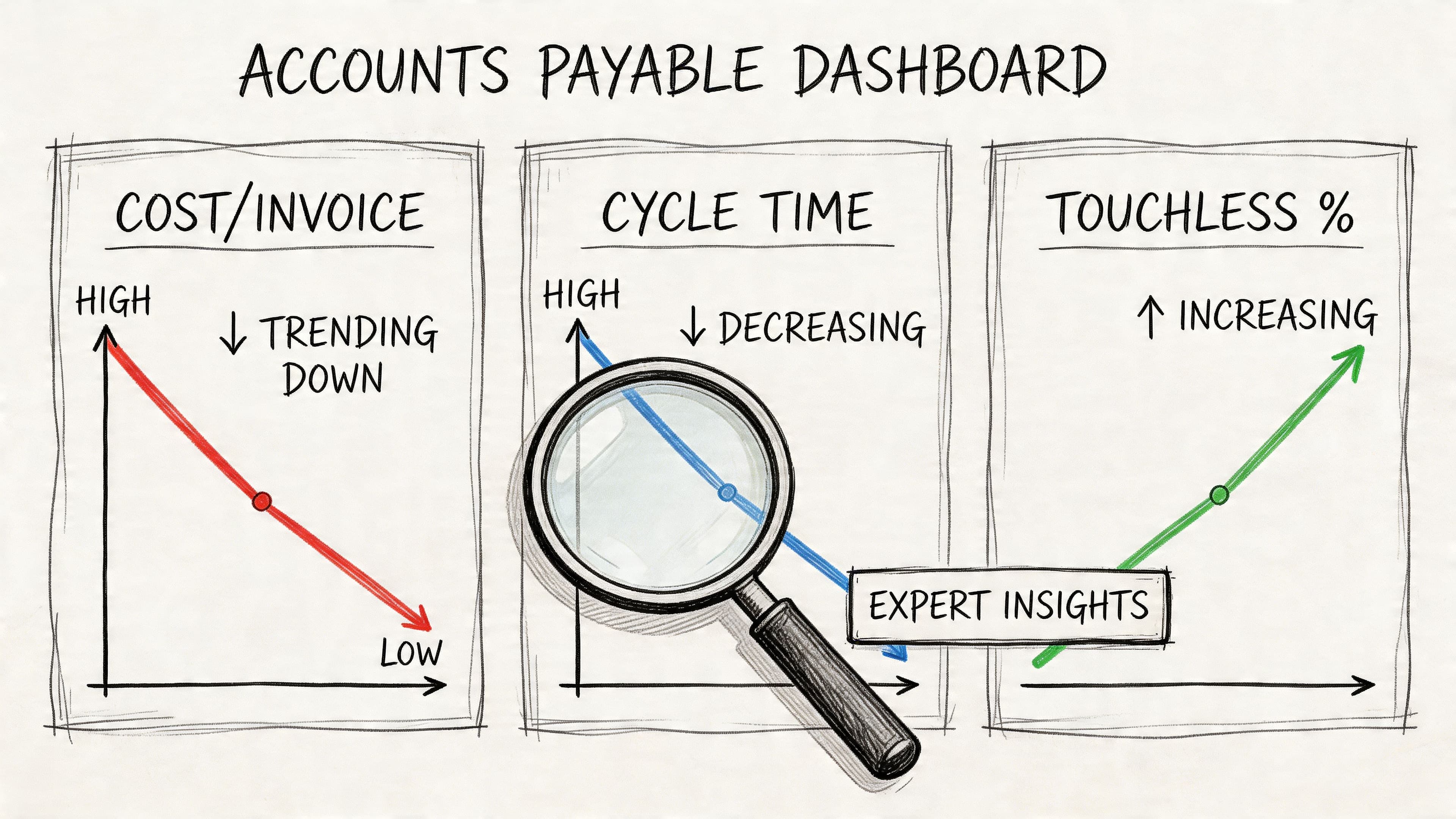
Track a short list. Review it monthly.
| KPI | What it tells you |
|---|---|
| Cost per invoice | Whether the process is becoming more efficient |
| Invoice cycle time | How fast invoices move from receipt to approval and posting |
| Touchless processing rate | How many invoices move through without manual intervention |
| Exception rate | How often invoices require human cleanup |
| Approval turnaround time | Whether managers are bottlenecks |
| Time spent on ERP mismatches | Whether integration is improving or still leaking work |
Don't overload the dashboard. If a metric doesn't drive a workflow decision, drop it.
The controls that protect you
Automation without controls is just faster risk.
Your AP workflow should enforce:
- Segregation of duties so no one person can create, approve, and pay the same invoice
- Vendor master controls so new vendors are reviewed before use
- Approval thresholds based on invoice value, vendor risk, and spend type
- Audit trails for coding changes, approvals, and payment release
- Exception review for unusual amounts, duplicate bills, and new banking instructions
Good AP automation doesn't remove human judgment. It moves human judgment to the exceptions that matter.
When DIY is fine and when it isn't
A do-it-yourself rollout is usually fine if your business is simple. One entity. One accounting system. Straightforward approvals. Low invoice complexity. Minimal department or project allocation.
Bring in outside help when any of these are true:
- You run multiple entities or locations
- You need clean department, class, location, or client coding
- Your finance team already struggles to close on time
- You rely on Stripe, Shopify, or other operational systems that feed reporting
- You need investor-ready or audit-ready financials
- Your internal team doesn't have bandwidth to own implementation
An outsourced controller or implementation partner can define workflow, clean the accounting structure, test sync logic, train approvers, and monitor exceptions after go-live. If you're evaluating that path, this overview of outsourced controller services is a useful starting point.
My recommendation
Don't wait for AP pain to become a finance emergency. If your team is still forwarding invoices, manually entering bills, and fixing coding errors at month-end, the process is already too expensive.
Start with a process map. Pick one owner. Run demos with real invoices. Pilot one department or entity. Validate the sync before full rollout. Then measure the process every month like it matters, because it does.
If you want help designing and implementing an AP workflow that fits QuickBooks, Xero, NetSuite, Stripe, or Shopify, talk to Jumpstart Partners. They provide outsourced finance support for growing businesses, including AP automation setup, workflow design, ERP integration, and ongoing controller oversight.