Financial Operations
Revenue Per Employee Benchmarks and How to Raise Yours
Calculate revenue per employee with MRR and ARR normalization, compare SaaS benchmarks, and use four proven levers to raise yours. Worked examples included.
ByJumpstart Partners, CPA, QuickBooks ProAdvisor
··20 min readRevenue per employee equals total revenue divided by full-time equivalent (FTE) headcount. If you run a $500K-$20M SaaS company, digital agency, or professional services firm, this number tells you whether your hiring drives growth or drains cash. Track it as a trend over months or quarters and you see exactly how much output each person generates.

Table of Contents
- Why Revenue per Employee Shapes Growth Decisions
- Calculating Revenue per Employee Step by Step
- Industry and SaaS Benchmarks to Measure Against
- What Drives the Ratio and Where It Misleads
- Tactical Levers That Raise Revenue per Employee
- Tracking Companion KPIs on a Dashboard You Can Trust
- Test Growth Quality with Companion KPIs
- Related KPIs That Explain Your Revenue per Employee
- Build a Single Page for Monthly Decisions
- Close the Books Before Trusting the Dashboard
- Counting Part-Time Staff and Contractors
- Should I Use Revenue or ARR?
- How Often Should I Review It?
- What Is a Reasonable Target?
Why Revenue per Employee Shapes Growth Decisions
You face one of two problems right now. Either you hired ahead of revenue and cash pressure is biting, or you waited too long and your team is stretched thin. Both mistakes show up in the same number.
Think of each employee as a machine on a factory line. Revenue per employee shows how much each machine produces. Once you run that math, you see whether your team turns people into sales efficiently or loses ground.
A rising ratio means your team gets more done per person. A falling ratio means costs run ahead of sales, or work piles up faster than people handle it.
Reading the Number Over Time
According to Axis Intelligence analysis of Fortune 500 data, calculated revenue per employee climbed from about $606,452 in 2024 to $641,935 in 2025. That's an increase of roughly 5.9%. The 2024 figure came from $18.8 trillion in revenue spread across 31.0 million employees. Discover more insights about Fortune 500 revenue trends.
The same math works just as well at $1 million in revenue. Watch the direction more than the level. A ratio that climbs 5% a year sounds modest, but it compounds into a very different business within three years.
Know What to Count Before You Start
Most bad numbers come from bad inputs, not bad math. Before you divide anything, get clear on the three pieces below.
Quick Answer: The Three Inputs Behind Revenue per Employee
| Input | What to Count | Common Mistake |
|---|---|---|
| Total revenue | Recognized revenue for the period, including recurring and one-time fees | Mixing in one-time implementation fees that inflate the result |
| Full-time employees | Active staff on payroll, counted as 1.0 each | Using month-end headcount and ignoring mid-period hires and departures |
| Contractors | Hours worked, converted to FTE using 40 hours per week | Leaving them out entirely because they do not appear in headcount |
Get these three right and the formula takes care of itself. You calculate your own number, compare it to the right peers, and set a realistic target for the next four quarters.
Calculating Revenue per Employee Step by Step
The formula takes about five seconds to write down. Getting the inputs right is where the real work happens.
Take a company with $2.4 million in ARR, 18 full-time employees, and 3 part-time contractors who each work half-time. It's a common mix for a growing SaaS team or agency.
The infographic below walks through the six-stage calculation using this same $2.4 million example.
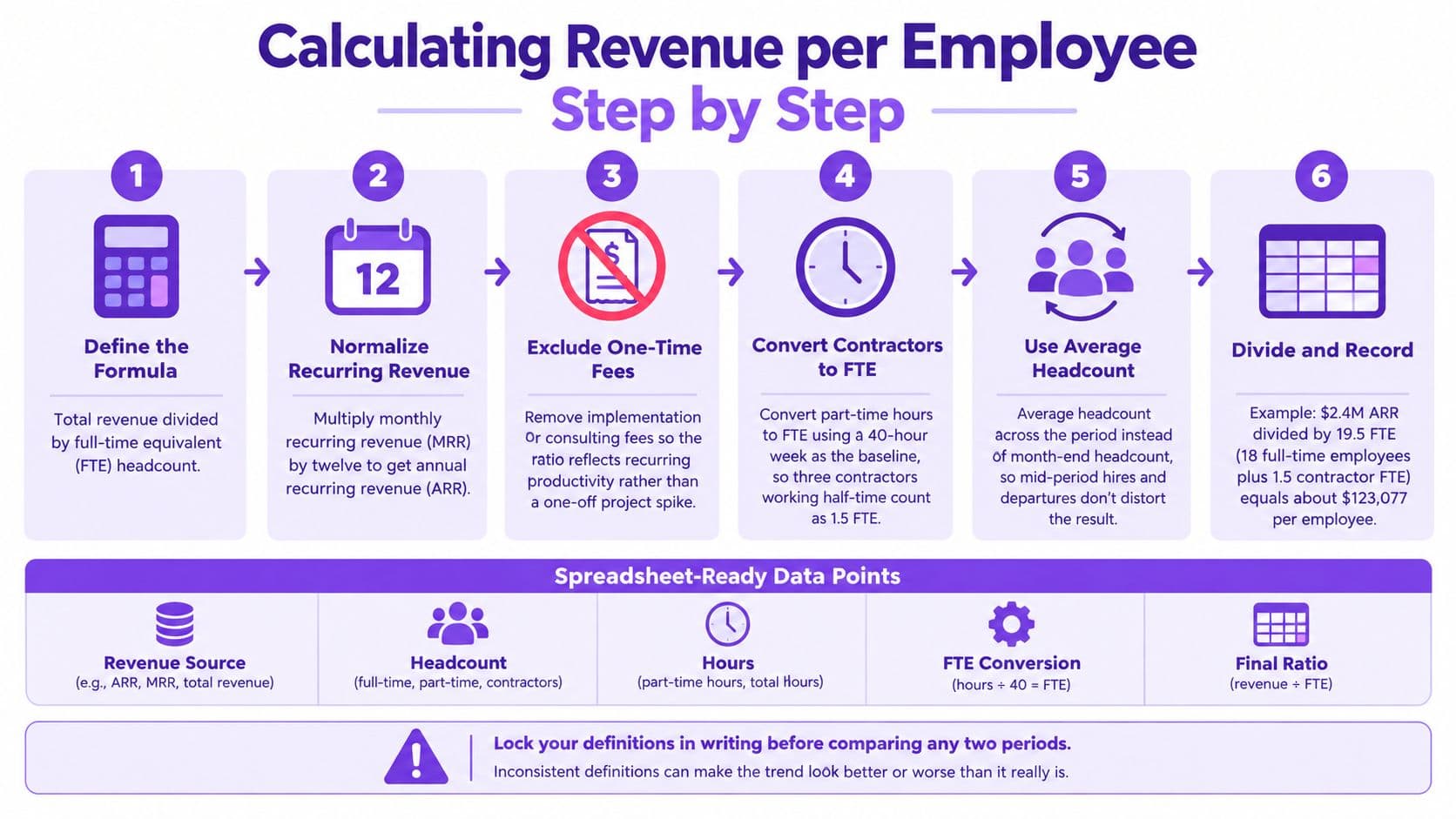
You create most errors before you run the division. Clean your inputs first.
Start With the Core Formula
Revenue per employee is total revenue divided by full-time equivalent (FTE) headcount. The part people often miss is the denominator. It isn't a count of names on the org chart. It's the FTE total, which converts part-time work into full-time equivalents.
Normalize MRR Into ARR
If your revenue comes in as monthly figures, multiply your monthly recurring revenue (MRR) by twelve. That gets you to annual recurring revenue (ARR), which matches the rest of the ratio.
Next, pull out one-time implementation and consulting fees. A big setup project makes one quarter look like a productivity spike when your team just finished a one-off job. Report those fees separately so the ratio tracks recurring productivity.
Contractors count too, just not as whole people. Divide each contractor's weekly hours by 40. Three contractors working 20 hours each add up to 1.5 FTE.
Mid-period hires and departures need extra care. A month-end headcount snapshot misses anyone who worked only part of the period, and that skews the result. Use the average headcount across the period instead.
Build Your Spreadsheet Template
Set up a sheet with five columns: Revenue Source, Headcount, Hours, FTE Conversion, and Final Ratio. Then work through them in order:
- Revenue Source: Enter monthly recurring revenue for each month, then multiply the total by 12.
- Headcount: Record full-time employees and average their monthly counts.
- Hours: Enter each contractor's average weekly hours.
- FTE Conversion: Divide weekly hours by 40, then add the result to full-time headcount.
- Final Ratio: Divide annual recurring revenue by total FTE. For the example, $2,400,000 divided by 19.5 equals about $123,077 per FTE.
Lock Definitions Before You Compare
Lock your definitions in writing before you compare any two periods. If Q2 counts contractors and Q3 doesn't, the trend line will tell a story that isn't true.
Before you divide anything, take a look at our guide on calculating total revenue correctly. The numerator deserves the same care as the denominator.
Once your inputs are clean, the ratio stops being a rough guess and becomes a trend line you trust. That's when it starts earning its place in hiring conversations. Run the calculation every month so drift shows up early, before it eats into your annual budget.
Industry and SaaS Benchmarks to Measure Against

A number on its own doesn't tell you much. Put it next to other numbers, though, and it starts to mean something. Benchmarks give your ratio that context, but they work best as reference points rather than pass-or-fail grades.
Where the Private SaaS Baseline Sits
According to SaaS Capital's 2025 survey of more than 1,000 private SaaS firms, median revenue per full-time employee hit $129,724. That's up from about $125,000 the year before. Read the full findings on private SaaS revenue per employee.
Treat that figure as your anchor, not your verdict.
Think of it like a weight chart at the doctor's office. It tells you where most people land, but it doesn't tell you whether you're healthy. Your stage, your margins, and your delivery model all matter just as much.
“If revenue per employee falls for two straight quarters while headcount climbs, you hired ahead of revenue. Pause hiring and fix pricing or utilization first.” — Jumpstart Partners Advisory Team
Why Early-Stage Companies Sit Lower
Early-stage companies carry fixed costs for product, security, finance, and leadership long before revenue catches up. Those costs don't shrink just because you're billing less. They stay largely the same whether you bring in $300,000 or $3 million.
Consider a company growing from $3 million to $30 million in recurring revenue. Its headcount climbs from 30 to 150, and output per person looks like this:
- $3 million in recurring revenue with 30 employees: $100,000 per employee
- $30 million in recurring revenue with 150 employees: $200,000 per employee
That jump comes from overhead getting absorbed. Each new dollar of revenue spreads the same product and finance costs across a bigger base, so the ratio climbs over time. Early on, it feels like you run in place, even when you grow fast.
Agencies and Professional Services Firms Run Differently
Agencies and consultancies post lower ratios than software companies. Billable labor makes up a bigger share of the model, so most of the team works on client projects just to cover their own salaries.
That means a number that looks weak for a SaaS company is perfectly healthy for an agency. Judge your figure against firms that sell time, not software.
Choosing the Right Peer Group
Before you compare yourself to anyone, narrow the field. Three filters do most of the work:
- Revenue scale: Stay within roughly 2x of your annual revenue.
- Gross margin: Compare businesses with similar delivery costs.
- Stage: Match your growth phase and funding model.
The table below pulls these ideas together so you find the peer group closest to your own business.
Revenue per Employee Benchmarks by Company Stage and Model
Each row below points to a different peer group. Use the driver column to understand why the gap exists before you decide whether it's a problem to fix.
| Business Type or Stage | Typical Revenue per Employee | Primary Driver of the Gap | Best Use of This Benchmark |
|---|---|---|---|
| Private SaaS median (2025) | $129,724 | Established, broadly funded software firms with settled cost structures | Your general anchor for a mature software business |
| Early-stage SaaS at $1M–$3M ARR (2026) | $109,644 | Fixed costs for product, security, and finance still outpacing revenue | Tracking whether your ratio is rising as you scale |
| Public SaaS median (Q2 2024) | About $356,000 | Scale, pricing power, and automated operations | Setting a long-term target, not a near-term goal |
| Agencies and professional services | Typically lower than software peers | Billable labor makes up most of the delivery model | Comparing against firms that sell time, not software |
Benchmarks like these start your own conversation about the numbers. They never replace your internal trend line, which tells you more than any outside comparison.
Your own trend matters most. A ratio that rises quarter after quarter, even from a low starting point, tells a healthier story than a high number that's been flat for two years. Use the peer data to decide where you head next, then track your progress against your own history.
Once you've picked your peer group, you start looking at what's driving your number and which levers are worth pulling.
Read also: how SaaS financial metrics connect to your ratio.
What Drives the Ratio and Where It Misleads
Five operational drivers move this number: pricing power, retention, sales productivity, gross margin, and hiring timing. Each one pushes the ratio in its own way, so the same result hides very different stories.
Think of it like a dinner party. Add more guests without adding cooks, and the kitchen looks efficient right up until the food runs out.
Tracing a Trend Example
Consider a company that grows ARR from $2 million to $3 million while full-time employees rise from 20 to 25.
Revenue per employee climbs from $100,000 to $120,000, a 20% improvement. On the surface, that looks like a clean win. The jump, though, comes from two very different places, and only one of them is good news.
Diagnosing Pricing Versus Delayed Hiring
Pricing and hiring timing both lift the ratio, but they leave different fingerprints. Compare revenue per customer against headcount growth in each function.
Say your customer count rose from 200 to 210, while revenue per customer jumped from $10,000 to $14,286. That points to pricing power, not hiring. You didn't add much work. You simply got paid more for the same kind of work.
Now flip the picture. If customers grew 50% while support headcount stayed flat, the ratio rose because your team absorbed more work. That isn't a pricing win. It's strain dressed up as a good-looking number.
Why a Higher Ratio Can Mislead
A higher ratio does not always mean a healthier business. It signals a team too thin to serve customers well.
You often hear this objection: “Our ratio is low because we invest for growth.” Investment explains a low ratio only when you tie each hire to future revenue and set a payoff date. Without that link, low productivity is not investment — it is overspending.
A rising ratio also hides underinvestment in customer support or product development. Headcount holds steady while the backlog quietly grows, and the number looks strong right up until churn shows up.
The metric also doesn't travel across industries unadjusted. Agencies sell billable time, so a ratio that looks weak for software is perfectly healthy for them.
Scale and automation drive the gap. According to High Alpha's 2024 SaaS Benchmarks Report, public SaaS companies reached a median of about $356,000 in ARR per employee in Q2 2024, up 15% from $309,000 a year earlier. Companies with strong brand recognition and automated finance processes reach higher ratios. Sales close faster, and reporting needs fewer hands.
Discover more insights about public SaaS benchmarks
Read also: SaaS unit economics metrics that actually matter.
Warning Signs to Watch
- Rising ratio, falling retention: Revenue per head climbs as customers leave.
- Shrinking support coverage: Tickets per agent keep rising and response times slip.
- Growing contractor use: Hours climb while headcount stays flat, hiding labor cost.
Tactical Levers That Raise Revenue per Employee

Once you know where your ratio stands, pull the levers below. Each one includes a worked calculation you rerun on your own numbers.
Start With Pricing
Pricing is the fastest lever, and it's the only one that adds revenue without adding a single person. Take the $2.4 million ARR company from earlier. A 15% price increase adds $360,000, which lifts ARR to $2.76 million.
Divide that by 19.5 FTEs and the ratio climbs to $141,538, with no new hires.
Churn takes some of that back. Say 2% of revenue walks out the door. You keep $2,704,800, or about $138,708 per FTE. Even after losing customers, a modest price rise still comes out ahead.
A price increase doesn't need to be perfect. It just needs to earn more than the churn it causes.
Cutting Sales Ramp Time
New reps are expensive capacity that sits idle while they ramp up. It's a bit like a delivery truck that gets loaded and then waits in the lot for weeks before it leaves. Cut ramp time from five months to three and you get back two months of full-capacity selling per rep.
Assume a rep carries a $600,000 annual quota, or $50,000 a month. The math looks like this:
- Monthly quota: $50,000
- Extra months of selling gained: 2
- Added bookings per new rep in year one: $100,000
Hire two reps a year and that's $200,000 of added output, all from shortening a process you never timed.
If you want to see how this kind of capacity gets measured in practice, our guide on tracking time and profitability for agency resource utilization walks through the mechanics.
A climbing revenue per employee number feels good. It doesn't prove you're actually making money.
Before you sign off on that next hire, check what sits underneath it. Are acquisition costs holding steady? Is delivery eating the margin? Is operating profit keeping up?
Tracking Companion KPIs on a Dashboard You Can Trust
Test Growth Quality with Companion KPIs
Take the same $2.4 million company with 19.5 FTEs. For this example, assume recognized revenue equals ARR.
That shortcut only works here for illustration. Gross profit and EBIT have to come from recognized revenue, not an annualized run rate.
Think of it this way. Revenue per employee tells you how much each seat produces. It doesn't tell you what you keep.
Related KPIs That Explain Your Revenue per Employee
These three companion checks fill in that gap. They show whether growth is efficient, or just busy.
| KPI | Formula | Worked Example | Warning Sign |
|---|---|---|---|
| LTV:CAC | Customer lifetime value ÷ customer acquisition cost | $18,000 ÷ $6,000 = 3.0x | Acquisition spending consumes too much customer value |
| Gross Profit per FTE | Revenue × gross margin ÷ average FTEs | $2,400,000 × 78% ÷ 19.5 = $96,000 | Delivery costs erode productivity gains |
| EBIT per Employee | EBIT ÷ average FTEs | $240,000 ÷ 19.5 = $12,308 | Operating overhead absorbs gross profit |
LTV:CAC tests your acquisition math. Gross profit per FTE shows output after delivery cost. EBIT per employee reveals what is left for operations.
One caution from the field. Keep your LTV definition steady, especially whether it is based on gross profit. Change the formula mid-year and you manufacture an improvement that never happened.
Revenue per employee measures output. Companion KPIs test how much of that output becomes economic value.
Build a Single Page for Monthly Decisions
A good dashboard answers one question fast: Is revenue growing faster than the capacity required to deliver it?
Skip the wall of charts. Show the monthly number in context so you act on it.
Include these elements:
- Monthly revenue per employee, using recognized monthly revenue and average monthly FTEs.
- A rolling three-month trend, calculated the same way every period.
- Headcount by function, split between sales, delivery, engineering, support, and administration.
- A prior-quarter warning flag, comparing the current roll to last quarter on the same basis.
For example, monthly revenue of $200,000 ÷ 19.5 FTEs gives you $10,256 per FTE. Compare that to other months, not to the annual $123,077 figure.
Put the three companion KPIs right next to the trend. Assign an owner to each one and add a one-line note when anything moves materially. For layout ideas, read our guide to financial dashboards and CEO metrics.
Red flags deserve investigation, not automatic hiring freezes. A dip tied to a planned engineering push is very different from falling revenue with flat staffing.
Close the Books Before Trusting the Dashboard
If the books are not closed, the ratio is a guess. Missing invoices, unreconciled payroll, and mistimed revenue shift both profit and the trend line.
Label any preliminary view clearly. Then lock a final version each month.
Use this proposed close calendar:
- Business day one: Complete bank feeds and collect missing transaction documentation.
- Business days two and three: Reconcile accounts, payroll, and revenue recognition under ASC 606.
- Business day four: Reconcile MRR movements against subscription records, explaining differences from recognized revenue.
- Business day five: Review adjustments, approve the close, and refresh the dashboard.
An outsourced controller runs that calendar for you. That takes manual reconciliations and follow-ups off your plate. Connect QuickBooks, Xero, NetSuite, Stripe, and Gusto through supported integrations so routine data flows without manual exports.
Jumpstart Partners reports an average five-day close, more than $47K in errors detected per client, and 40% cash flow improvement. Treat these as reported service results, not guaranteed outcomes for your business.
Your checklist:
- This week: Calculate your current ratio from closed financials.
- Next: Identify your three largest headcount-to-revenue gaps.
- Then: Contact Jumpstart Partners to book a consultation and review your dashboard, close schedule, and reporting ownership before making your next hiring decision.
Counting Part-Time Staff and Contractors
This is where the math goes sideways. Headcount isn't just bodies — it's hours worked.
Think in FTEs, not names on payroll:
- Part-timer working 20 hours per week = 0.5 FTE
- Contractor = average weekly hours divided by 40
- Three contractors at 20 hours each = 1.5 FTE
Joined or left mid-month? Use average headcount for the period. That small adjustment keeps one hire from skewing the whole ratio.
Should I Use Revenue or ARR?
For SaaS, use ARR when you want a clean read on recurring productivity. Park one-time implementation fees off to the side.
Here's what that looks like in practice. Say you have $2.4 million ARR, plus $600,000 in implementation fees, with 19.5 FTEs:
- Total revenue math: $153,846 per FTE
- ARR-only math: $123,077 per FTE
The first number feels better, but it includes project work that won't repeat. Use $123,077 for the operating view and disclose the total separately.
How Often Should I Review It?
Run it monthly right after close. Then step back and review the trend quarterly with leadership.
Flag any 5% change from the prior quarter and pin down the cause:
- Did pricing change?
- Did retention slip?
- Did you hire ahead of revenue?
Use the dashboard blueprint for a three-month rolling view and headcount by function. It makes the dip or bump much easier to explain.
What Is a Reasonable Target?
If you're between $500,000 and $5 million in revenue, a solid range is $110,000 to $150,000 in revenue per employee. Model and stage matter a lot here.
Software companies push toward the top end. Agencies land lower because delivery is labor-heavy by nature. Pick your target from the benchmark table, then aim to lift it 10% over four quarters without starving support or product.
Refresh your denominator this month, pick one lever to pull, and give it an owner. And if you want a clean close and dashboard before you approve that next hire, Jumpstart Partners will put the reporting in place. Start with a consultation to lock your FTE conversion, target, and monthly dashboard plan.