Financial Operations
Accounts Payable Aging: A Complete Guide for 2026
Master accounts payable aging with worked examples, industry benchmarks, and a step-by-step report walkthrough for SaaS, agencies, and e-commerce.
ByJumpstart Partners, CPA, QuickBooks ProAdvisor
··18 min readYou know the moment. It's mid-close, a vendor is asking about an invoice you thought was already handled, your controller says the AP balance doesn't match the aging report, and Friday's cash forecast is sitting on your desk with no clean answer. That's when accounts payable aging stops being a routine report and starts exposing whether your books are under control.
For founders and finance leaders, the problem isn't that you owe money. The problem is that your payables list often lies by omission. It hides stale invoices, splits balances across duplicate vendors, and makes it impossible to know what's current versus what's drifting toward delinquency. If you want a useful benchmark for your vendor-payment profile, evaluating trade payables metrics is a helpful complement to the aging report, but it only works when the report itself is reconciled and trustworthy.
That's why this topic matters for three groups at once. Finance leaders need a control that stands up during audit and fundraising. Founders running lean teams need a simple way to keep cash from leaking through unpaid or misclassified liabilities. Operations and procurement leads need a clear picture of which vendors are at risk before relationships turn tense.
If you want to improve the working-capital side of the equation too, this pairs naturally with working capital planning. But the first job is simpler, and harder: make sure the aging report matches the general ledger before you use it for anything else.
Table of Contents
- Why Accounts Payable Aging Matters Before You Even Open the Report
- Accounts Payable Aging Defined Through a Real Worked Example
- How to Read an Accounts Payable Aging Report Step by Step
- Industry-Specific Aging Examples for SaaS, Agencies, and E-Commerce
- Red Flags in Your Aging Report and How to Fix Them
- Automating Accounts Payable Aging in QuickBooks, Xero, and NetSuite
- Your 30-60-90 Day AP Aging Plan and What to Do Next
Why Accounts Payable Aging Matters Before You Even Open the Report
The first sign something is off is usually not in the ledger. It's a vendor email, a Slack message from operations, or a surprise from your controller during close. Someone thought an invoice was settled, the AP report says otherwise, and now you're trying to explain why the balance sheet, the forecast, and the vendor conversation all disagree.
Accounts payable aging exists to stop that mess. The report groups unpaid invoices into standard time buckets, then reconciles those buckets back to the AP balance in the general ledger. That's why it matters as a control first and a payment list second, because the question is not just who you owe, but whether the liability stack in your books is complete and accurate.
What it solves for different teams
Finance leaders use aging to backstop month-end close, audit prep, and fundraising diligence. Founders use it to keep a small team from running blind on cash. Operations teams use it to protect vendor trust, because suppliers remember late payment patterns even when the internal team has moved on.
Practical rule: if the aging total does not match the AP control account at the same cutoff date, don't use it for cash decisions.
That's the difference between a report and a control. A report can tell you what appears open. A control tells you whether your accounting system is telling the truth. Modern finance guides consistently frame aging as a bucketed summary that must reconcile to the AP balance before close, and that logic is what makes it foundational rather than optional as described by GEP and in standard aging workflows.
Why founders should care now
When you're under-resourced, the failure mode is usually the same. One invoice gets paid, the open item stays live, and the aging report keeps carrying a balance that should have been cleared. Or a duplicate vendor record splits a supplier into two rows, and the total looks smaller than the actual obligation. Either way, the month-end numbers drift, and the drift shows up later as a cash surprise.
A clean aging process also supports vendor negotiations. If you know what's current, what's stale, and what's overdue, you can prioritize the liabilities that matter without guessing. That's the point of a mature AP function, not just paying bills, but protecting close quality, cash visibility, and negotiation power.
Accounts Payable Aging Defined Through a Real Worked Example
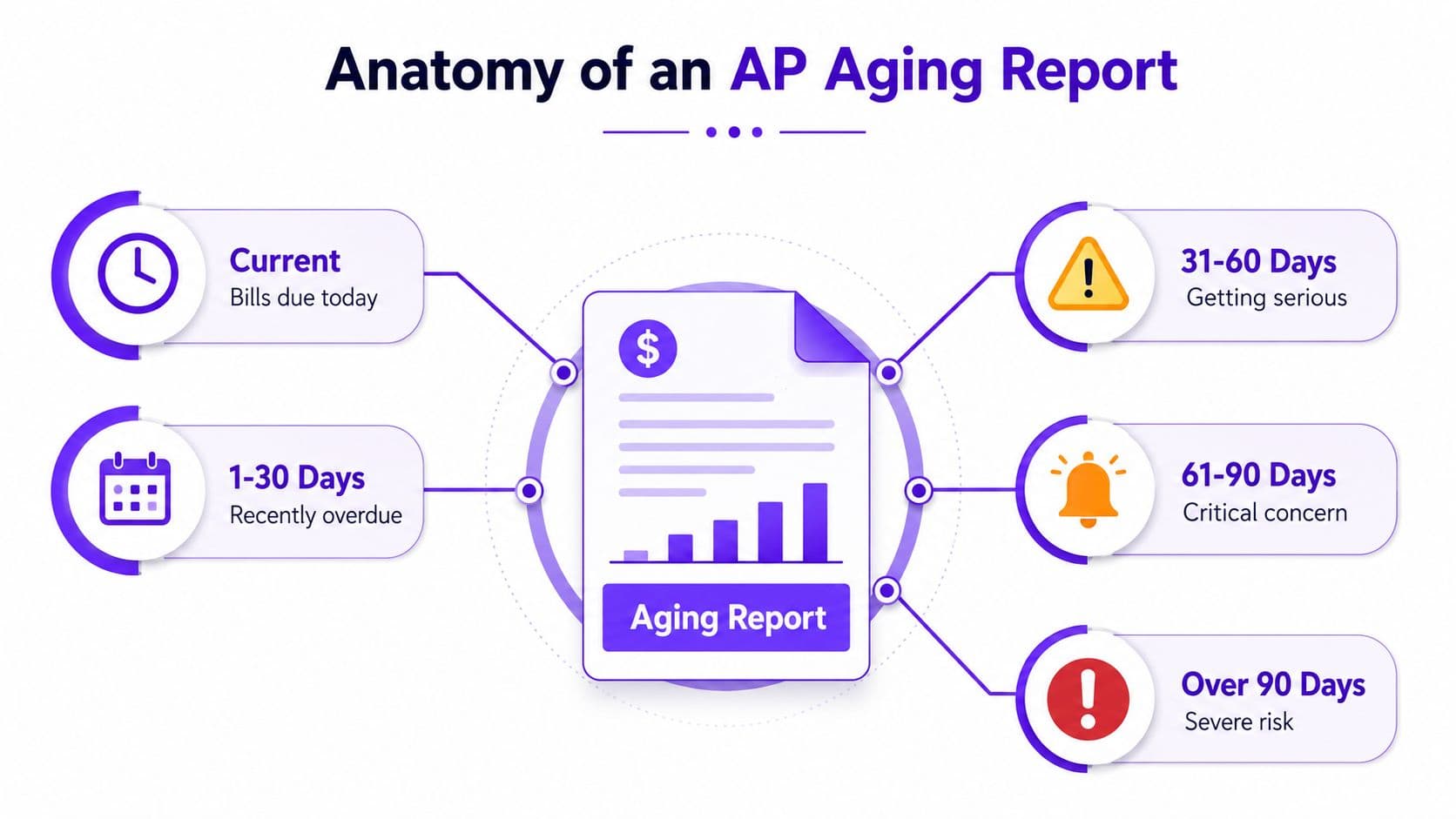
At its simplest, accounts payable aging is a report that sorts unpaid vendor invoices by how long they've been outstanding. The standard buckets are current, 1–30 days, 31–60 days, 61–90 days, and over 90 days past due as outlined in common AP aging structures. The cutoff date matters. An invoice due on the 15th of last month can be current at month-end, then move into the next bucket the day after, depending on the report date.
Here's a plain worked example. Suppose one vendor has these open items:
- Cloud vendor, $4,200 in current
- Contractor invoice, $1,800 in 31–60
- Software subscription, $950 in 61–90
- Office lease true-up, $2,400 in over 90
That gives you $9,350 in total open payables. The report doesn't just tell you the total, it shows where the liability sits on the aging curve. That matters because a $9,350 balance that is mostly current is a very different problem from a $9,350 balance with a large chunk stuck in over-90 territory.
What the report is really telling you
The purpose of the report is simple. It sorts the AP control account by overdue age so you can see how much of the liability stack is healthy and how much is slipping into collections risk. It's the working-capital view of bills you owe, and it's the inverse of receivables, where the focus is on what customers owe you.
A reliable report always ties back to the general ledger AP account on the same date. That's not a technical footnote. It's the difference between a dashboard you can trust and a list that only looks right until someone compares it to the balance sheet.
Plain truth: if the bucket totals don't reconcile to the AP control account, the report is not ready for planning.
The workflow is consistent across systems. Collect invoices and credit memos, group them by vendor, sort them by due date, then total them by bucket and vendor as described in standard AP aging workflows and common preparation steps. That structure is why the report works as a control and not just a payment reminder.
How to Read an Accounts Payable Aging Report Step by Step
A well-built aging report reads like a map of your liabilities. The left side lists vendors, the top row shows the five aging buckets, and the total line tells you what you owe in aggregate. If the report is laid out properly, you can scan it in under a minute and see which suppliers are current, which ones are slipping, and which balances need attention before close.
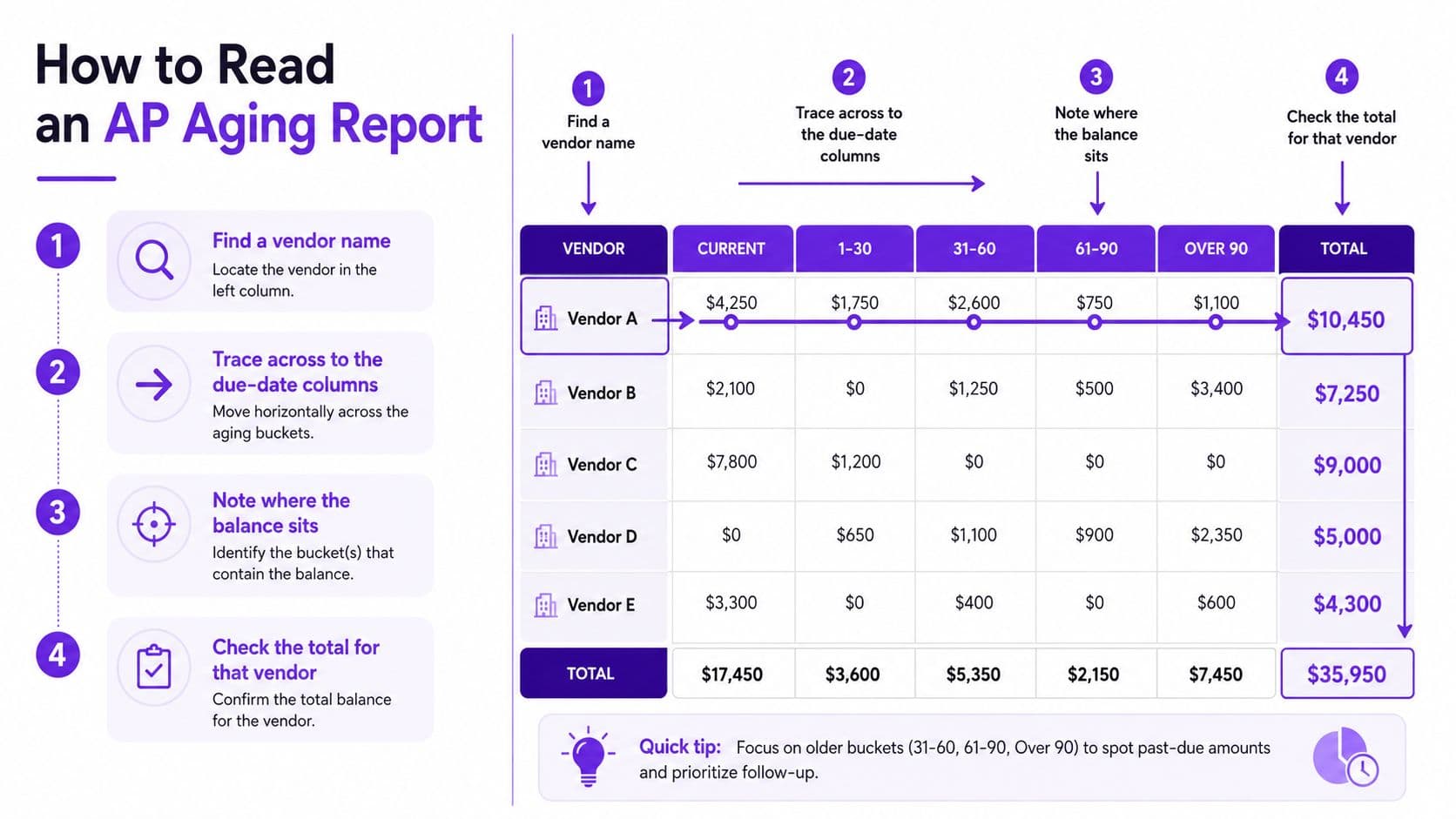
Read the vendor row first
Start with one vendor and move across the row. If Vendor A has mostly current balances, that supplier is probably being managed cleanly. If Vendor B shows scattered balances across 31–60, 61–90, and over 90, the issue is no longer just payment timing. It's likely a process break, a dispute, or a missing reconciliation step.
Here's a simple table layout you should expect to see.
| Vendor | Current | 1–30 | 31–60 | 61–90 | Over 90 | Total |
|---|---|---|---|---|---|---|
| Vendor A | 4,200 | 0 | 0 | 0 | 0 | 4,200 |
| Vendor B | 0 | 0 | 1,800 | 0 | 0 | 1,800 |
| Vendor C | 0 | 0 | 0 | 950 | 0 | 950 |
| Vendor D | 0 | 0 | 0 | 0 | 2,400 | 2,400 |
The key question is whether the total column makes sense against the ledger and whether the mix is skewing older. If a meaningful share of balances sits beyond 60 days, that's a warning sign that your AP process is decaying or your vendor management is slipping.
Reconcile before you trust anything
Every report needs two checks. First, the report date has to match the general ledger date. Second, the grand total of all buckets has to equal the AP control account on the balance sheet. If either one is off, you do not have a reliable forecast input.
The most common reasons totals break are predictable. A bill lands after cutoff. A paid invoice stays open in the aging. A credit memo never gets applied. Or the same supplier exists in duplicate vendor records, which splits one liability across two rows and creates a false sense of control.
Why the layout matters downstream
This same layout supports three jobs at once. It helps you decide who gets paid this week, it gives you the numbers you need to defend cash usage to a board or investor, and it gives auditors a clean aged trail during testing. If you want that operating rhythm to stick, tie it to three-way match discipline so invoices, receipts, and payments all land in the same control framework.
Industry-Specific Aging Examples for SaaS, Agencies, and E-Commerce
The same aging report looks different depending on your business model. That's where a lot of founders get tripped up. They copy a generic AP process from another company and then wonder why the report isn't telling them anything useful.
SaaS companies need a clean view of recurring vendors
In SaaS, the aging report usually clusters around subscription vendors, infrastructure providers, and usage-based platforms. The day-to-day list often includes tools like HubSpot, Datadog, and AWS, with most balances staying current and the issue showing up when an AWS true-up lands in an older bucket. The important lens is not just overdue dollars, it's how payables behave alongside recurring revenue and cash planning.
For that reason, SaaS teams should look at the report through the lens of working capital discipline. The right question is whether the AP rhythm is stable enough to support predictable month-end close and cash allocation. If your accounting motion is immature, SaaS accounting discipline matters just as much as the report itself.
Agencies need contractor discipline, not just payment timing
Digital agencies usually have a different pattern. The report is dominated by contractors, subcontractors, and project-related invoices, so one stale 1099-NEC item in 31–60 can become a real year-end problem if it never gets categorized correctly. In this model, AP aging is not only about cash. It's also about keeping contractor liabilities clean enough for tax reporting and job-cost visibility.
That's why agencies should treat aged contractor balances as a control issue. If a subcontractor invoice is sitting in the wrong bucket, the liability is not just late, it's misstated. That creates friction in both the close and the tax file.
E-commerce needs freight and 3PL timing discipline
E-commerce brands usually see aging dominated by freight, 3PL, and inventory-related invoices that arrive in arrears. That means a 90-day lookback is more important than in a purely software business, because the invoice cycle often trails the actual operational activity. The over-90 bucket should be cleared monthly, or you start creating reconciliation gaps between AP, inventory, and COGS.
Here's a simple comparison.
| Business Model | Top Aging Concern | Primary KPI | Target Range |
|---|---|---|---|
| SaaS | Recurring vendor true-ups | DPO | Stable and intentional |
| Agencies | Contractor and subcontractor liabilities | % of AP over 60 days | Low and reviewed weekly |
| E-Commerce | Freight and 3PL timing gaps | AP-to-cash ratio | Tight enough to protect inventory planning |
The point is not to force every company into the same shape. The point is to use the report in a way that matches the operating reality of your model. If you don't, the report becomes a list of bills instead of a management tool.
Red Flags in Your Aging Report and How to Fix Them
Aging reports fail in the same ways over and over. The good news is that the problems are visible if you know what to look for. The bad news is that teams often treat them as normal until the close breaks or a vendor escalates.
The first red flag is simple. If the vendor totals don't reconcile to the general ledger, the report is not trustworthy. Assign the controller or senior bookkeeper to compare the cutoff date, trace the variance line by line, and clear the difference before the report is used in forecasting. The green light is a zero-difference tie-out.
The second red flag is concentration in older buckets. If too much of the report sits beyond 60 days, the process is no longer controlled. The AP owner should pull those balances, review each one with the vendor file, and decide whether the issue is timing, dispute, or missing documentation. Clean aging means the older buckets shrink, not linger.
The third red flag is duplicate invoice appearance. This usually means the same bill has been entered twice or split across multiple vendor records. The fix is a vendor-master cleanup, not another payment run. The green light is one supplier, one balance, one aging row.
Practical rule: every invoice should tie to one vendor and one status, not a trail of half-updated entries.
The fourth and fifth problems are credits that never close out and tiny recurring balances that never get swept. Those usually sit in the background until month-end, then they keep the AP account from matching reality. The AP owner should clear credits against open invoices and sweep immaterial leftovers on a set schedule, with the controller reviewing exceptions.
The sixth red flag is date drift. If the aging cutoff changes from month to month, the report stops being comparable. The fix is operational, not technical, use one reporting date policy and lock it. The seventh is uncategorized contractor balances, which should be routed through the same AP review and 1099 workflow before the year-end scramble starts.
If you want a clean report, it should feel boring. Every invoice ties to a vendor, every bucket reconciles, and the Friday forecast uses the same numbers the auditor will pull in March. That is what control looks like.
Automating Accounts Payable Aging in QuickBooks, Xero, and NetSuite
Manual aging in spreadsheets breaks as soon as your bill volume grows or your team starts working across multiple systems. Automation does not fix bad accounting, but it does remove the repetitive cleanup that causes the report to drift. The right setup is the one that produces an aging report you can reconcile to the general ledger on the same day every month without a manual rescue mission.
Pick the tool that matches your stage
QuickBooks Online gives smaller teams a straightforward AP aging report pulled from the vendor center, filtered by date, and tied to the Accounts Payable account. Many teams pair it with Bill.com or Ramp for bill capture and approval routing, which reduces the number of invoices that enter the system late or incomplete. Xero gives you the aged payables summary plus purchase order matching, and teams often add Hubdoc or Xero Pay to tighten receipt-to-approval flow. NetSuite is the right fit when you need multi-entity reporting, because saved searches can compute aging by subsidiary, class, or location.
| Platform | Built-in Aging | Best Automation Add-On | Best Fit |
|---|---|---|---|
| QuickBooks Online | Yes | Bill.com or Ramp | Smaller teams that need simple controls |
| Xero | Yes | Hubdoc or Xero Pay | Founder-led teams with lighter process complexity |
| NetSuite | Yes, via saved search | Native workflow and controls | Multi-entity or mid-market finance teams |
If you want a structured implementation path, this invoice management automation roadmap is a practical reference point for building the workflow around the report instead of around email threads.
Use the report as a workflow, not a file
The mistake many teams make is treating automation like formatting. They automate report generation but leave vendor cleanup, approval routing, and cutoff discipline unchanged. That just gives you a faster version of the same mess.
A cleaner setup does three things. It keeps vendor data standardized, it routes bills through approval before they hit AP, and it preserves a consistent cutoff date. If you're deciding whether to outsource part of this work, Jumpstart Partners can handle AP setup and controller support as one option among others, especially when the close is getting held up by manual cleanup.
For the founder, the decision should come down to one question. Which system gets you to a reconciled aging report fastest, with the fewest manual adjustments, every single month? If the answer isn't obvious, the platform is not the problem. The process is.
Your 30-60-90 Day AP Aging Plan and What to Do Next
Aging control gets real when you put it on a calendar. If you try to “improve AP” without deadlines, the same exceptions will be sitting there next month. A simple 30-60-90 day plan forces the work into the close cadence where it belongs.
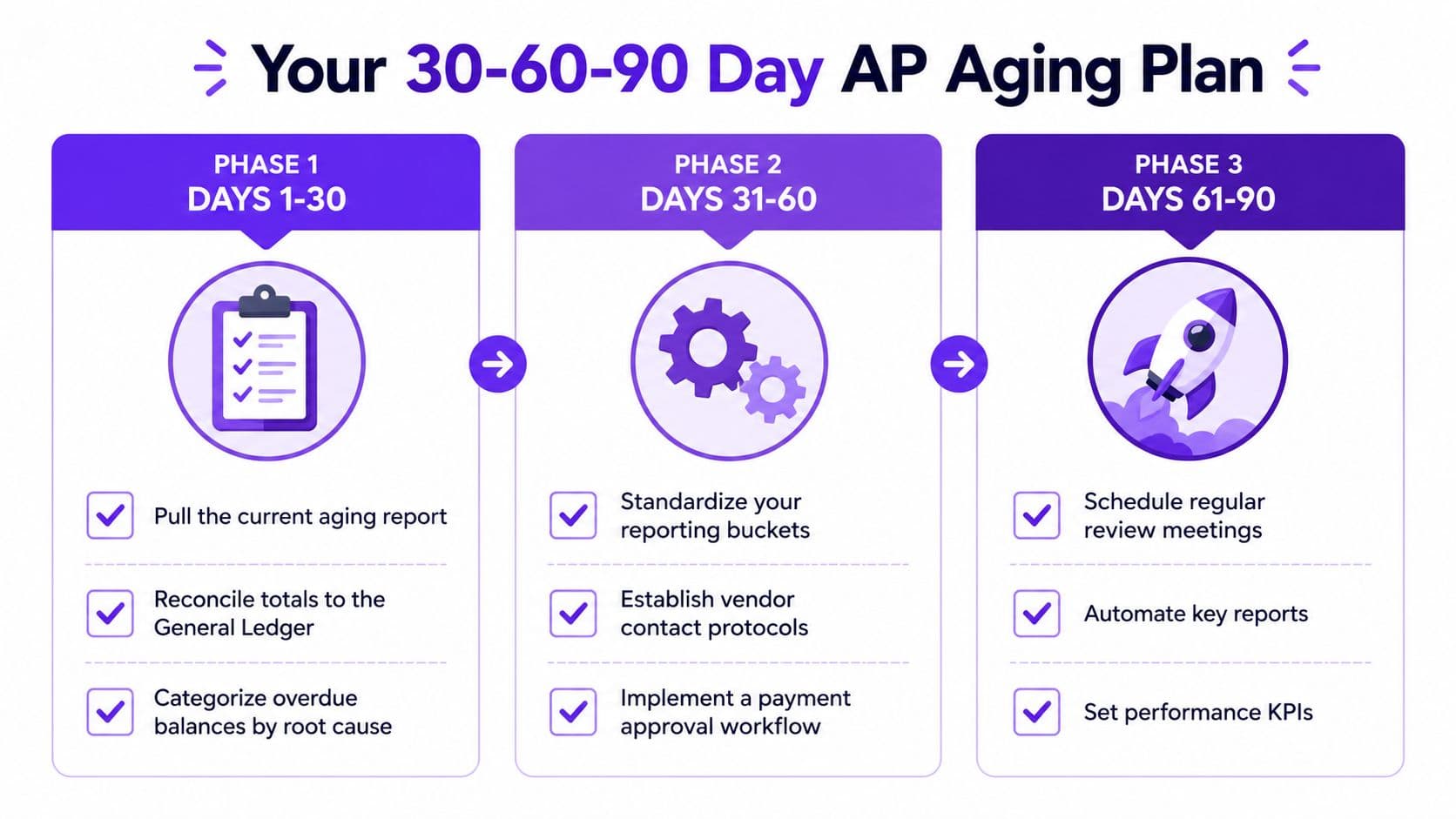
Days 1 to 30
Pull the current aging report, tie it to the general ledger, and tag every overdue balance by root cause. If you can't explain a balance in one sentence, it stays in exception status. A clean starting point is the one that distinguishes timing issues from true process problems.
Days 31 to 60
Lock the bucket policy and train one owner to review aging weekly. Decide whether QuickBooks, Xero, or NetSuite should be the source of truth, then add the bill workflow layer that keeps invoices from landing late. If you want a model for building the rest of the process around invoice intake and approvals, this AP setup project example shows the kind of operational structure that keeps aging usable.
Days 61 to 90
Move from reactive cleanup to prevention. Set a threshold so the over-60-days bucket stays under control, automate vendor statement reconciliation, and prepare an audit-ready aging package that ties every balance back to the AP control account. If your team wants a broader implementation framework, Jumpstart Partners' AP setup work is one place to start.
A practical checklist for this week:
- Pull the latest aging report and freeze the cutoff date.
- Reconcile the total to the AP control account.
- Review every over-60 balance and assign an owner.
- Check for duplicate vendors in the master file.
- Match credits to open invoices so they don't linger.
- Sweep immaterial old balances that should have been cleared.
- Verify contractor coding for 1099 treatment.
- Confirm invoice dates are not sitting post-cutoff.
- Look for unpaid items that were already settled.
- Review vendor statements against the aging report.
- Check whether the forecast uses the same cutoff as the close.
- Document the exceptions so next month's review is faster.
If you need outside help, use an outsourced controller or AP automation partner to run the cadence before the close starts slipping again. For founders who want a tighter month-end process, Jumpstart Partners provides outsourced controller and bookkeeping support that includes AP cleanup, close discipline, and cash visibility for growing companies.