Financial Operations
Accounts Payable Automation NetSuite: A Practical Guide
A practical guide to accounts payable automation NetSuite founders and finance leaders use to cut cycle time, reduce errors, and tighten controls.
ByJumpstart Partners, CPA, QuickBooks ProAdvisor
··17 min readMost companies don't have a NetSuite AP problem. They have a stack-design problem. In 2025, NetSuite highlighted that only 9% of accounts payable departments were fully automated, while 54% were partially automated, and roughly two-thirds of finance professionals expected AP to be fully automated by 2025, as reported in AP automation statistics from Quadient. The message is clear: buying an ERP doesn't finish the job. You still have to decide where invoice capture, matching, approvals, payments, and controls should live.
For a SaaS company, digital agency, or professional services firm generating $1M to $5M ARR in revenue, that decision affects close quality, cash visibility, audit readiness, and the amount of controller time trapped in invoice administration. The right approach to NetSuite accounts payable automation combines native functionality with a carefully selected SuiteApp or external payment layer. The wrong approach automates data entry while leaving exceptions and fraud controls manual.
Table of Contents
- The Hidden Cost of Manual AP in NetSuite
- The Performance Gap Automation Must Close
- How the NetSuite AP Workflow Actually Runs
- Configuring Approval Routing and Exception Handling
- Choosing Your AP Stack in NetSuite
- Governance, Fraud Risk, and Vendor Master Controls
- Measuring Success and Your Next Steps
The Hidden Cost of Manual AP in NetSuite
Manual AP creates a measurable operating cost even when NetSuite is already licensed. Staff time, delayed approvals, incomplete documentation, duplicate payments, and outdated cash information all consume finance capacity.
A manual invoice cycle commonly takes 12 to 18 days in growing finance teams. Across several hundred invoices each month, the workload can require roughly 1.0 to 1.5 full-time equivalent employees, based on the operating assumptions used for this guide. Controller and staff accountant hours go to downloading attachments, entering bills, chasing approvals, checking purchase orders, and answering vendors instead of managing the close, forecasting cash, and negotiating terms.
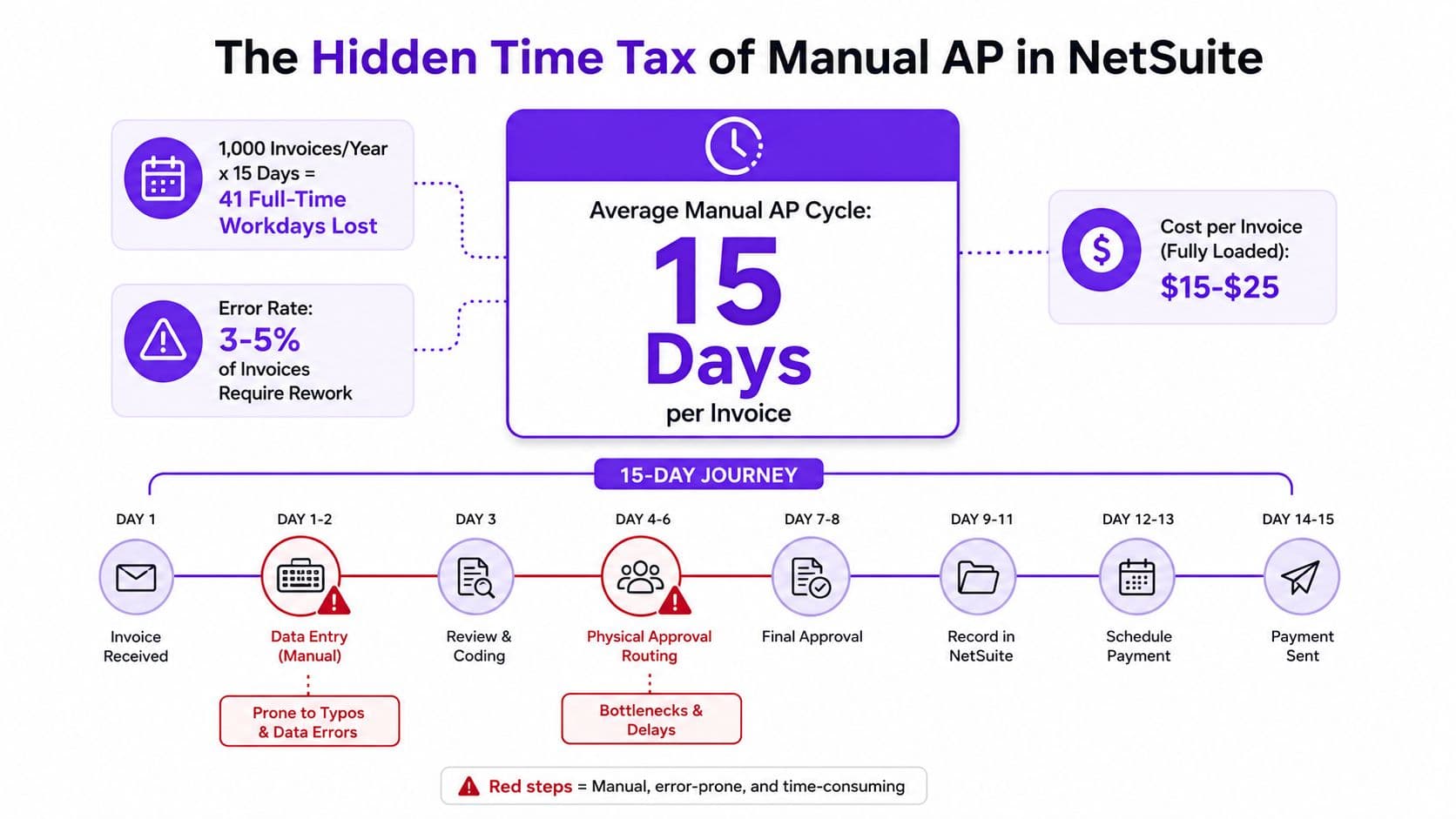
Operational leakage is harder to see
Manual processes also create costs that rarely appear in an AP report:
- Duplicate payments: Invoices can pass through twice when invoice numbers, dates, or file formats vary.
- Missed discounts: Early-payment discounts disappear when an invoice remains in an inbox awaiting approval.
- Late penalties: A delayed approval can turn an ordinary vendor bill into a fee or a strained supplier relationship.
- Audit remediation: Missing invoice attachments, approval evidence, and exception notes create cleanup work during diligence or audit preparation.
NetSuite provides vendor bill records, accounting dimensions, attachments, approval workflows, and payment records. Those features establish a sound ledger foundation. They do not remove the work before a bill reaches the ledger. Someone still must capture the invoice, validate its fields, reconcile it to a purchase order and receipt, and route it to the correct approver.
Controller's rule: If an invoice still arrives by email and a person must key every field, the process is digitized paperwork, not automation.
Evaluate the benefits of accounts payable automation as an operating model rather than a software checkbox. Native NetSuite can handle part of the workflow. OCR, advanced matching, supplier onboarding, and payment execution may belong in a SuiteApp or external payment layer. The right stack depends on where native NetSuite provides sufficient control and where manual handoffs create operational risk. That boundary should be defined before selecting a tool, not discovered after implementation.
The Performance Gap Automation Must Close
AP automation should close a measurable operating gap, not decorate NetSuite with another dashboard. Independent AP benchmarking places top-performing invoice processing at about $2.78 per invoice and 3.1 days, compared with roughly $10.89 per invoice and 10.9 days for typical teams, according to AP automation ROI benchmarks.
At 6,000 invoices annually, the difference is clear:
- Typical processing cost: 6,000 × $10.89 = $65,340
- Best-in-class processing cost: 6,000 × $2.78 = $16,680
- Difference: $48,660 annually
That calculation excludes faster approvals, better payment timing, fewer vendor inquiries, and less close-period cleanup. For a business with several million dollars in revenue, nearly $50,000 in processing capacity is material. It can support a finance hire, strengthen forecasting discipline, or reduce outside cleanup work.
What creates the gap
| Cost Line | Typical ($) | Best-in-Class ($) | Annual Gap at 6K Invoices |
|---|---|---|---|
| Invoice processing cost | 10.89 | 2.78 | 48,660 |
The per-invoice difference usually comes from five controllable areas:
- Receipt and capture: Invoices need a structured intake queue, with header and line data extracted instead of manually keyed.
- Coding accuracy: Vendor history, purchase orders, departments, classes, and locations should generate coding suggestions.
- Approval latency: Bills should route under defined rules instead of waiting for someone to forward an email.
- Exception handling: Every mismatch needs an owner, status, reason, and resolution path.
- Payment scheduling: Approved bills should enter a controlled payment run without another spreadsheet handoff.
Treat each area as a stack-design decision. Native NetSuite may provide adequate workflow and accounting control. A SuiteApp may handle capture, matching, or supplier intake more effectively. An external payment layer may be the better boundary for execution and payment controls. Choose that boundary before selecting software, because each manual handoff adds operational risk.
A focused rollout can close meaningful gaps in 60 to 90 days, rather than becoming an 18-month transformation project, if the team starts with real invoices, defined ownership, and measurable exception rules.
Benchmark results also report about 49.2% touchless processing with a 9% exception rate. Test the business case against touchless rate, exception rate, and cycle time, not invoice volume alone. Those measures show whether the chosen NetSuite stack is reducing work or moving it between systems.
How the NetSuite AP Workflow Actually Runs
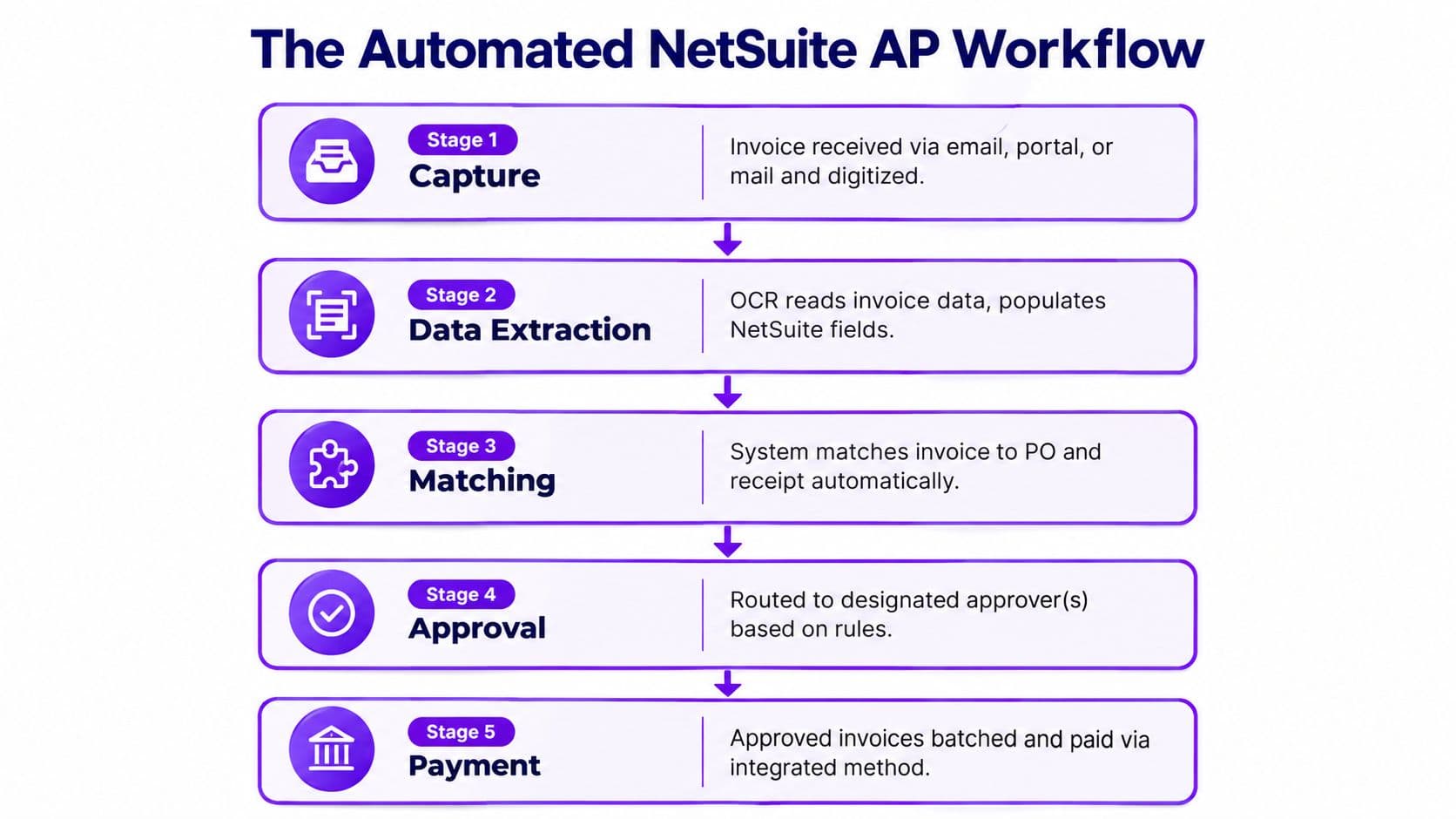
A reliable NetSuite AP process has five stages. Each stage has a different automation requirement, and confusing them is how companies end up paying for a capture tool that leaves the rest of AP manual.
Stage one capture
A vendor sends a PDF by email, uploads an invoice through a portal, or sends paper documentation that must be digitized. OCR or an AP SuiteApp extracts the vendor, invoice number, dates, totals, tax fields, line items, and purchase order reference, then creates a draft vendor bill.
NetSuite can store invoice images and support invoice capture, but dedicated tools such as Bill.com, AvidXchange, and ZoneCapture generally provide the specialized intake experience companies need for varied invoice formats. If AP still downloads attachments and enters the header fields manually, the workflow hasn't solved its first bottleneck.
Stage two coding and matching
The system proposes GL accounts, classes, departments, and locations using vendor history or purchase order lines. It then attempts two-way or three-way matching against the purchase order and item receipt.
NetSuite handles the accounting structure and matching logic reasonably well when purchasing and receiving teams maintain clean records. A strong implementation adds AI-OCR capture, automated GL coding, line-level three-way matching, and subsidiary-level queue handling, as described in NetSuite AP automation benchmarks. Stopping at invoice capture leaves manual coding and reconciliation in place.
Stage three exception handling
A mismatch shouldn't disappear into a shared inbox. It should enter a queue with a reason, owner, due date, and resolution action. NetSuite's default vendor bill approval logic treats quantity, cost, and missing-PO discrepancies as exceptions, while bills without detected discrepancies can move forward, as explained in NetSuite invoice approval workflow guidance.
Stage four approval routing
NetSuite routes bills to the correct approver using predefined rules based on invoice amount, vendor, or other criteria, as documented in NetSuite's AP automation workflow. Stronger configurations add subsidiary, legal entity, department, and GL class, with delegation for absences.
Stage five payment execution
The approved bill enters a scheduled payment run. Depending on your design, payment executes through NetSuite, ACH, checks, virtual cards, or an integrated payment SuiteApp, and remittance information goes to the vendor.
Before selecting a tool, review this practical resource on how to automate invoice management, particularly if your current workflow separates invoice review from payment status. The accounting record, payment record, and bank reconciliation should remain connected.
Configuring Approval Routing and Exception Handling
Approval routing should reflect financial authority, vendor risk, accounting treatment, and entity structure. Amount thresholds are only the floor. A bill's value alone doesn't tell you whether it's a routine recurring subscription, a new vendor, a capital purchase, or an intercompany expense.
Build routing across four dimensions
Start with amount, then add the conditions that change risk:
| Routing Dimension | NetSuite Field or Feature | Typical Threshold or Rule |
|---|---|---|
| Invoice amount | Approval limits or workflow conditions | Escalate as the amount increases |
| Vendor | Vendor record and vendor status | New or high-risk vendors require additional review |
| GL class | Expense account, class, department, or category | Capital and sensitive expense categories receive elevated approval |
| Subsidiary | Subsidiary and supervisor hierarchy | Route to the legal entity's authorized approver |
NetSuite can route by supervisor on subsidiary, transaction role, or approval limit. Configure a delegated approver for absences, but don't allow delegation to bypass authority. The substitute should inherit a defined approval scope, not receive unrestricted payment power.
Make exceptions deliberate
Enable native matching on purchase orders and decide how each item or vendor handles receiving. The Receive Goods/Services and Bill in Advance settings determine whether NetSuite expects a receipt before billing or permits an invoice before receipt.
Set quantity and cost variance tolerances based on the nature of the spend. For inventory, use strict controls. For recurring services, permit only the variance the business can explain. Every override should require a reason code or comment, and overrides above your chosen threshold should route to a controller-level approver.
The payment process must also respect holds. A bill with a missing receiving report, unresolved mismatch, missing remittance email, or vendor-status issue should not enter the payment release queue.
A clean approval chain doesn't mean every bill gets more approvals. It means every bill gets the right approval, and exceptions stop in a visible queue.
Test every path in a sandbox before production. Create bills that match, bills with quantity variances, bills with cost variances, non-PO bills, new-vendor bills, intercompany bills, and bills assigned to an absent approver. For teams refining receipt controls, three-way matching in AP provides useful implementation context.
Choosing Your AP Stack in NetSuite
Stop treating AP automation as one product. Your stack has four layers: capture, match and approve, pay, and reconcile. Native NetSuite is the system of record, but it doesn't necessarily provide the best user experience or control depth at every layer.
Compare the layers before you compare vendors
| Stack Layer | Native NetSuite | SuiteApp, Tipalti, Stampli, Bill.com | Standalone Platform, Ramp, Airbase |
|---|---|---|---|
| Invoice capture | Basic capture and uploads | Specialized OCR and intake workflows | Strong intake, often tied to broader spend control |
| Coding and matching | GL coding, PO validation, matching | Advanced extraction, coding suggestions, and matching | Depends on integration depth and configuration |
| Approvals | SuiteFlow and transaction rules | Dedicated approval interface and collaboration | Strong approval UX, often with cards and expenses |
| Payments | Checks and configured payment processes | ACH, international, virtual-card, or managed payment options | Payment controls often central to the platform |
| Fraud controls | Workflow and saved-search foundation | Duplicate detection and vendor controls vary by product | Often broader spend and card controls |
| Reconciliation | NetSuite ledger and bank processes | Requires reliable write-back | Requires disciplined synchronization to NetSuite |
Native NetSuite is a sensible choice when invoice volume is moderate, vendors use consistent formats, purchasing discipline is strong, and your team can maintain the workflow. It becomes a weak choice when AP spends its day on data entry, approvals happen outside the system, or payment status doesn't reliably return to the vendor bill.
A SuiteApp such as Tipalti, Stampli, Bill.com, or AvidXchange is the usual next layer. It can improve capture, collaboration, supplier onboarding, payment execution, or international support without replacing NetSuite as the ledger. A standalone platform such as Ramp, Airbase, or Brex makes more sense when virtual cards, employee spend, and travel expenses are as important as invoice processing.
Evaluate every option against five tests:
- Capture accuracy: Test it against your actual invoices, not a vendor demo.
- Approval experience: Confirm that approvers can review, comment, and act from a practical interface.
- Payment coverage: Verify supported methods in every country where you operate.
- Fraud controls: Check duplicate detection, vendor-change alerts, and audit logs.
- Total cost: Measure subscription, implementation, payment, and reconciliation costs against spend.
Your CRM and finance systems also need clean handoffs. If customer and vendor conversations live in Gmail, a tool such as Tooling Studio's CRM for Gmail can help keep operational context accessible without turning email into the approval system.
For broader system selection, use this guide to choosing accounting software for a growing business. For most companies in this revenue range, native NetSuite plus one well-integrated SuiteApp is the practical ceiling. Add a third tool only when payment complexity, international operations, or a broader spend-management requirement justifies the extra reconciliation surface.
Governance, Fraud Risk, and Vendor Master Controls
AP automation does not create control. It executes the control design you configure, including weak design. A poorly governed workflow can approve a duplicate invoice, process a fictitious vendor, or release payment after bank details change. NetSuite may process more transactions before anyone detects the problem, so risk management must start with the vendor master and payment rules.
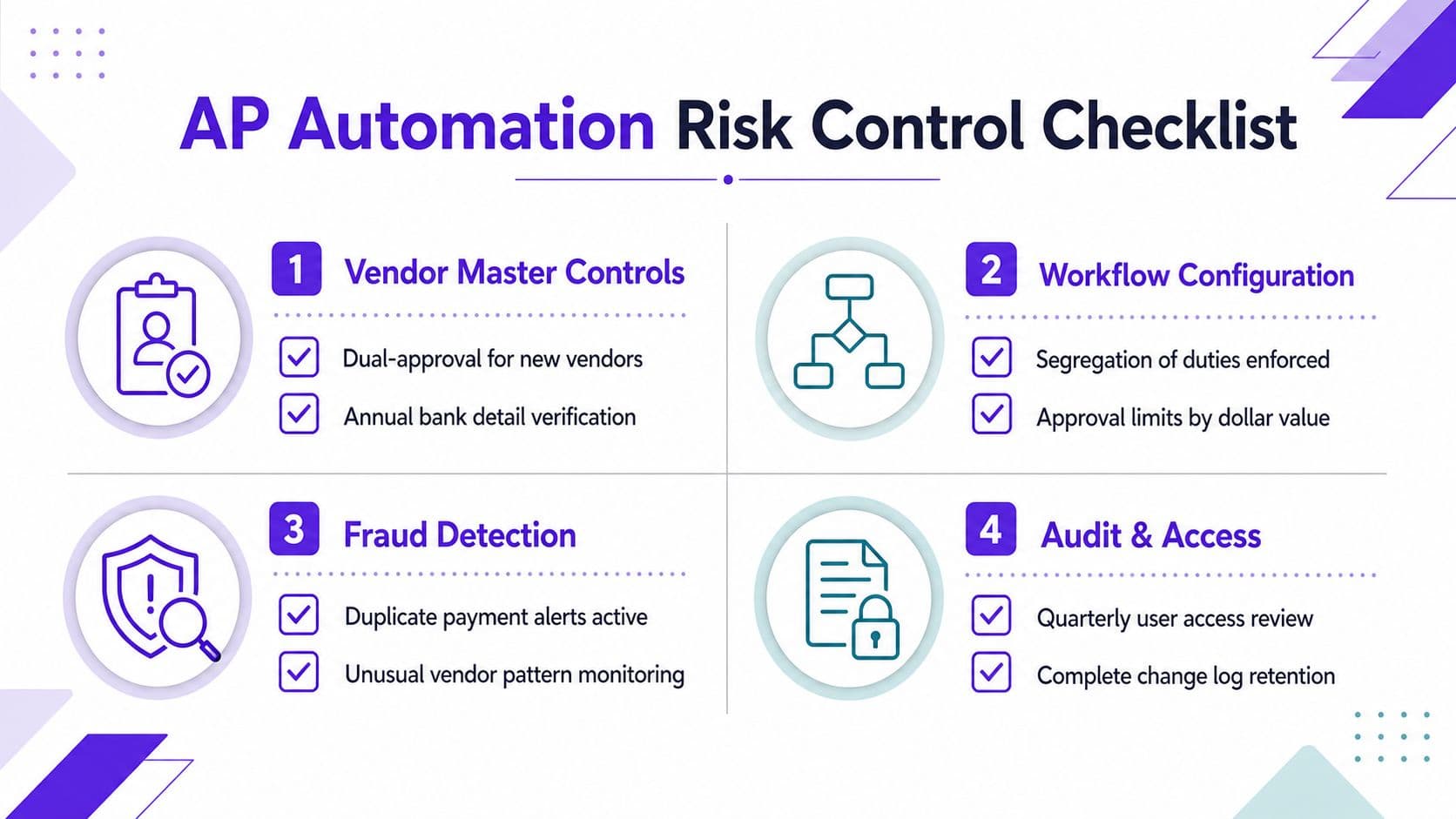
Treat the vendor master as production infrastructure
At a growing company, vendor creation and bank-detail changes deserve the same discipline as production access. A spoofed supplier can pass through ordinary invoice approval when AP verifies only the document, not the underlying supplier.
Set these controls before go-live:
- New-vendor approval: Require dual approval before a vendor becomes payable.
- Bank verification: Confirm the bank account before the first payment.
- Change verification: Use an out-of-band callback or document check for every bank-detail change.
- Duplicate detection: Compare vendor, invoice number, amount, and date, using a tolerance below $50 for this rollout.
- Payment holds: Block release until vendor verification and exception review are complete.
Segregate vendor creation, bill entry, approval, and payment release wherever staffing permits. If one employee must handle multiple steps, require compensating controller review through a dashboard and retain evidence of that review. The approval record should show who reviewed the change, what evidence they examined, and when they approved it.
Make controls visible
A policy hidden in a handbook will not protect the ledger. Create saved searches and dashboards for new vendors, changed bank details, duplicate candidates, inactive vendors, unusual payment activity, and bills released through overrides. Assign an owner for each queue, with a defined review cadence.
Run a quarterly vendor-master scrub. Remove duplicates, confirm legal names, review inactive vendors, and challenge stale banking records. A controller should review vendors inactive for 12 months, following this guide's operating control design.
Use a structured invoice verification guide to define the evidence AP must review before approval. Convert those requirements into NetSuite workflow conditions, mandatory fields, and exception queues rather than relying on memory.
Risk principle: Ask which fraud opportunity the workflow eliminates before payment.
A formal internal controls assessment should test access, approval authority, vendor changes, duplicate detection, payment release, and audit-log retention. The goal is targeted control, not bureaucracy: routine bills should move quickly, while unusual bills should stop and demand documented review.
Measuring Success and Your Next Steps
NetSuite accounts payable automation succeeds only when the stack improves control and throughput together. Track process quality with touchless invoice rate, exception rate, and cycle time, not invoice volume alone. These measures show whether native NetSuite workflows, a SuiteApp, or an external payment layer is closing the operating gap.
A worked example clarifies the comparison. A finance team handling $12 million in spend might move from a 4% touchless rate and a 13-day invoice cycle to a 62% touchless rate and a 4.2-day cycle within 90 days of go-live. Treat these figures as the guide's operating scenario, not a promised result. Use identical definitions before and after implementation.
Use definitions that survive review
| KPI | Definition | Manual Baseline | Post-Automation Target | NetSuite Source |
|---|---|---|---|---|
| Touchless invoice rate | Invoices approved without manual intervention after capture | 4% | 62% | Vendor bill workflow, SuiteApp dashboard |
| Exception rate | Invoices requiring human resolution for mismatch or missing data | Establish at baseline | Reduce while preserving control | Matching and exception queue |
| Invoice cycle time | Days from invoice receipt to approval | 13 days | 4.2 days | Invoice date, receipt timestamp, approval history |
| First-pass match rate | Matched invoices on first review ÷ total invoices reviewed | Calculate from baseline | Improve after data cleanup | PO, receipt, and bill records |
Calculate first-pass matching as follows:
First-pass match rate = invoices matched without correction ÷ total invoices reviewed × 100
If 780 invoices match without correction out of 1,000 reviewed, the rate is 78%. Keep the numerator and denominator consistent. Excluding difficult invoices only makes the dashboard misleading.
An external benchmark cited earlier reports about 49.2% touchless processing and a 9% exception rate among best-in-class organizations. Use that comparison as context, not as a target copied into your plan. Set targets from invoice mix, PO discipline, subsidiary structure, vendor behavior, and the control limits of your selected stack.
A practical 30-60-90 day rollout
First 30 days, diagnose. Export vendor bills, invoice timestamps, approval history, payment records, open exceptions, vendor-master changes, and bank data. Classify invoices by PO status, vendor, subsidiary, GL category, payment method, and exception reason.
Days 31 to 60, configure and test. Choose the stack layer that addresses the largest bottleneck. Native NetSuite should own records, approvals, and reporting when those controls are sufficient. Use a SuiteApp for capture or matching when native capability leaves manual work. Add an external payment layer only when payment execution, banking, or reconciliation requires stronger operational handling. Configure approval limits, delegated authority, holds, payment execution, and NetSuite write-back. Test real invoice types and exceptions in a sandbox.
Days 61 to 90, launch and measure. Start with a controlled vendor group. Monitor the three core KPIs, review each exception category, and adjust workflow rules based on evidence. Confirm that payment status, remittance, and reconciliation records return to NetSuite correctly.
Before kickoff, gather the vendor master, subsidiary list, bank and payment-method requirements, approval matrix, purchase-order policy, invoice samples, exception reports, and user-role listing. That evidence determines where native NetSuite ends and whether a SuiteApp or external payment layer is justified.
Jumpstart Partners offers a managed NetSuite AP automation diagnostic and implementation covering platform selection, workflow configuration, approval design, invoice capture, synchronization, and team training. Visit Jumpstart Partners to assess invoice volume, controls, and stack design before committing to another AP tool.