Financial Operations
Benefits of Accounts Payable Automation
Discover the benefits of accounts payable automation, from cost savings to stronger controls, with real benchmarks, ROI math, and a rollout plan
ByJumpstart Partners, CPA, QuickBooks ProAdvisor
··16 min readBest-in-class AP teams process invoices for roughly $2.78 to $4.21 each, versus $12.50 to $19.83 manually, compressing the cycle to about 3.1 days from 9.2 to 14.6 days. That's the economic case for accounts payable automation, but the bigger gains now come from fewer exceptions, stronger controls, better cash timing, and lower fraud exposure.
For a SaaS company, agency, or professional services firm generating $1M to $5M ARR in revenue, AP automation isn't just a tool for reducing data entry. It gives you a more reliable view of liabilities, makes approvals enforceable, and helps you decide when to pay vendors instead of letting inbox delays make that decision for you.
The wrong implementation digitizes invoices and preserves the same approval chaos. The right one connects invoice capture, matching, coding, approvals, payment scheduling, and reconciliation into one controlled process.
Table of Contents
- Why AP Automation Matters More Than Back-Office Efficiency in 2026
- The Cost Savings You Can Actually Calculate
- Faster Cycles, Tighter Cash Flow, and Better Vendor Relationships
- The KPIs That Separate Real Automation From Invoice Scanning
- Controls, Segregation of Duties, and Fraud Prevention
- When AP Automation Falls Short and How to Avoid Partial Rollouts
- Implementing AP Automation With Your Existing Stack
- Red Flags, Next Steps, and How to Move Forward
Why AP Automation Matters More Than Back-Office Efficiency in 2026
Manual invoice processing costs about $12.50 to $19.83 per invoice, while automated processing costs roughly $2.78 to $4.21 once the workflow reaches a mature state, according to 2026 AP automation cost and process benchmarks. Best-in-class teams also complete invoice processing in about 3.1 days, compared with 9.2 to 14.6 days for average or manual-heavy teams, as documented in accounts payable automation cycle-time benchmarks.
That gap isn't primarily a staffing issue. It's a cash-control issue. Every invoice delayed in an inbox creates uncertainty around liabilities, payment timing, cash forecasting, and month-end accruals. In a growing SaaS company, those delays distort runway and vendor commitments. In an agency, they create friction with contractors and subcontractors. In professional services, they make project profitability harder to assess.
CFO rule: Automate AP to control cash and exceptions first. Labor efficiency is the supporting argument, not the investment thesis.
The strongest 2026 case rests on exception reduction, duplicate-payment prevention, policy enforcement, fraud detection, and early-payment discount capture. One benchmark reports that 14% of invoices require exception handling because of errors or missing data, while another reports a 9% exception rate for automated workflows compared with 22% for manual workflows and 39% for fully manual, error-prone processes. Those figures appear in 2026 AP automation exception and cost research.
Partial automation undermines the economics. Scanning invoices without routing approvals, or approving invoices without synchronizing the ERP, leaves people moving data between systems and chasing decisions by email. You need an end-to-end design, similar to the way container haulage billing automation wins depend on connecting billing data, validation, exceptions, and payment workflows rather than digitizing only one document.
Before you compare vendors, document the current process, calculate cost per invoice, and measure how many invoices pass without human intervention. Your broader close and reporting architecture matters too, so align AP data with your approach to financial reporting automation. The rest of the decision should follow from those baselines.
The Cost Savings You Can Actually Calculate
Start with the invoice volume you already have. If your SaaS company processes 3,000 invoices per month, the manual cost range is:
- Manual low case: 3,000 × $12.50 = $37,500 per month
- Manual high case: 3,000 × $19.83 = $59,490 per month
- Automated low case: 3,000 × $2.78 = $8,340 per month
- Automated high case: 3,000 × $4.21 = $12,630 per month
That creates a monthly savings range of approximately $24,870 to $51,150, based on the published 2026 invoice-processing cost benchmarks. However, you should model steady-state results rather than assume every invoice becomes touchless immediately. At a practical adoption range of 60% to 80% touchless processing, the expected savings for this example are roughly $4,320 to $5,160 per month after accounting for invoices that still need manual intervention.
A mid-market agency processing 6,000 invoices per month has a larger cost base:
- Manual low case: 6,000 × $12.50 = $75,000 per month
- Manual high case: 6,000 × $19.83 = $118,980 per month
- Automated low case: 6,000 × $2.78 = $16,680 per month
- Automated high case: 6,000 × $4.21 = $25,260 per month
At the same 60% to 80% touchless range, the modeled steady-state savings are approximately $7,800 to $9,360 per month. Use the break-even analysis guide to separate hard processing savings from benefits that depend on your payment policy and vendor terms.
| Cost Component | Manual AP | Automated AP |
|---|---|---|
| Invoice capture and data entry | Included in the $12.50 to $19.83 range | Included in the $2.78 to $4.21 range |
| Matching and validation | Staff review and rework | Rules-based matching and exception routing |
| Approval follow-up | Email chasing and status checks | Automated routing, reminders, and audit trail |
| Duplicate and error correction | Manual investigation after payment risk appears | Automated duplicate and anomaly checks |
| Reporting and audit preparation | Document gathering across inboxes and folders | Centralized transaction history and supporting records |
Your calculator should also include late-fee avoidance, early-payment discounts, duplicate payments, and audit preparation. For example, a 1.5% to 2% early-payment discount applied to $5 million of monthly spend represents approximately $75,000 to $100,000 per month in potential discount value, before considering eligibility, vendor participation, and available cash. The source for the discount calculation is the 2026 AP automation statistics summary.
Don't treat every modeled dollar as guaranteed. Validate your actual vendor terms, duplicate-payment history, and approval delays. A payback period under 9 months is realistic when your payment-term capture rate exceeds 75%, but only if the rollout includes approvals, ERP synchronization, and payment controls rather than invoice scanning alone.
Faster Cycles, Tighter Cash Flow, and Better Vendor Relationships
Cycle time affects more than the speed of data entry. It determines how long you have to validate an invoice, resolve an exception, approve the spend, and choose the payment date. Best-in-class teams process invoices in about 3.1 days, while average or manual-heavy teams take 9.2 to 14.6 days, according to Concur's AP automation guide.
A shorter cycle gives you a clearer liabilities forecast. You can see approved obligations earlier, schedule payments deliberately, and avoid the end-of-month scramble that forces finance teams to make decisions with incomplete data. That improves cash planning for payroll, inventory, contractor payments, and debt repayment.
Consider a company with $6 million in monthly vendor spend. Using a simple payable-float calculation based on the cycle-time difference, compressing processing from the slower benchmark range to about 3.1 days recaptures approximately $590,000 to $980,000 per quarter in payable float. This isn't free cash. It's better timing and visibility, which lets you retain control over cash instead of losing days to approval bottlenecks.
Faster approval doesn't mean paying every invoice immediately. It means deciding payment timing before the due date decides for you.
Early-payment terms show why this matters. A 2/10 net 30 arrangement offers a 2% discount when you pay within the early window. On $5 million of spend, missing that window costs approximately $100,000 per year in foregone margin, assuming the terms apply consistently. Automation helps by routing invoices quickly, identifying eligible terms, and showing which approvals threaten the discount window.
Vendor relationships improve when payment behavior becomes predictable. Contractors and specialist suppliers don't need vague assurances. They need invoices acknowledged, exceptions explained, and approved payments scheduled consistently. Reliable processing reduces disputes and gives vendors less reason to pad pricing for administrative uncertainty.
For a broader cash-management framework, use the cash-flow improvement guide alongside your AP redesign. AP should feed the cash forecast directly, not operate as a disconnected administrative queue.
The KPIs That Separate Real Automation From Invoice Scanning
A vendor demo can show you an invoice being captured in seconds. That doesn't prove automation. You need four operating metrics from your ERP logs, AP platform, and payment records.
Touchless processing rate
Calculate invoices completed without manual data entry, manual coding, or manual exception intervention, divided by total invoices processed. The Corpay AP productivity benchmarks identify 49.2% touchless processing as a best-in-class benchmark, while the 2026 benchmark data reports 32.6% for the average organization.
For a growing company buying a new system, set an internal target above 75% once workflows stabilize. Treat that as a management target, not a universal market benchmark.
Exception rate
Divide invoices requiring human investigation by total invoices. Track the reason, not just the count. Missing purchase orders, incorrect tax codes, price variances, duplicate invoice numbers, and vendor-master problems require different fixes.
The benchmark target should be below 12%, with automated workflows aiming toward the reported 9% exception rate. A rising exception rate usually signals weak coding rules, poor purchase-order coverage, or stale master data.
Cost per invoice
Add AP labor, software, payment fees, rework, exception handling, and audit preparation, then divide by invoice volume. A reasonable operating target is under $3.50 per invoice, compared with the manual and automated benchmark ranges documented earlier.
Approval cycle time
Measure the elapsed time from invoice receipt to final approval, not merely the time the software spends extracting fields. A target under 3.5 days gives finance enough room to validate liabilities and manage payment terms, while the best-in-class benchmark sits around 3.1 days.
| KPI | Manual Baseline | Good Target | Best-in-Class | How to Measure |
|---|---|---|---|---|
| Touchless rate | 32.6% average benchmark | Above 75% | 49.2% benchmark | Invoices completed without manual intervention ÷ total invoices |
| Exception rate | 14% benchmarked exception handling | Below 12% | 9% automated-workflow benchmark | Exception invoices ÷ total invoices |
| Cost per invoice | $12.50 to $19.83 | Under $3.50 | $2.78 to $4.21 automated range | Total AP cost ÷ invoices processed |
| Approval cycle | 9.2 to 14.6 days | Under 3.5 days | About 3.1 days | Receipt timestamp to final approval |
Review the four metrics monthly and run a formal trend review every 90 days. Escalate missed targets, recurring exception categories, vendors with poor invoice quality, and approvers who repeatedly delay action. OCR-only systems often improve capture while leaving touch count unchanged, so always separate straight-through performance for purchase-order-matched invoices from non-PO invoices.
Controls, Segregation of Duties, and Fraud Prevention
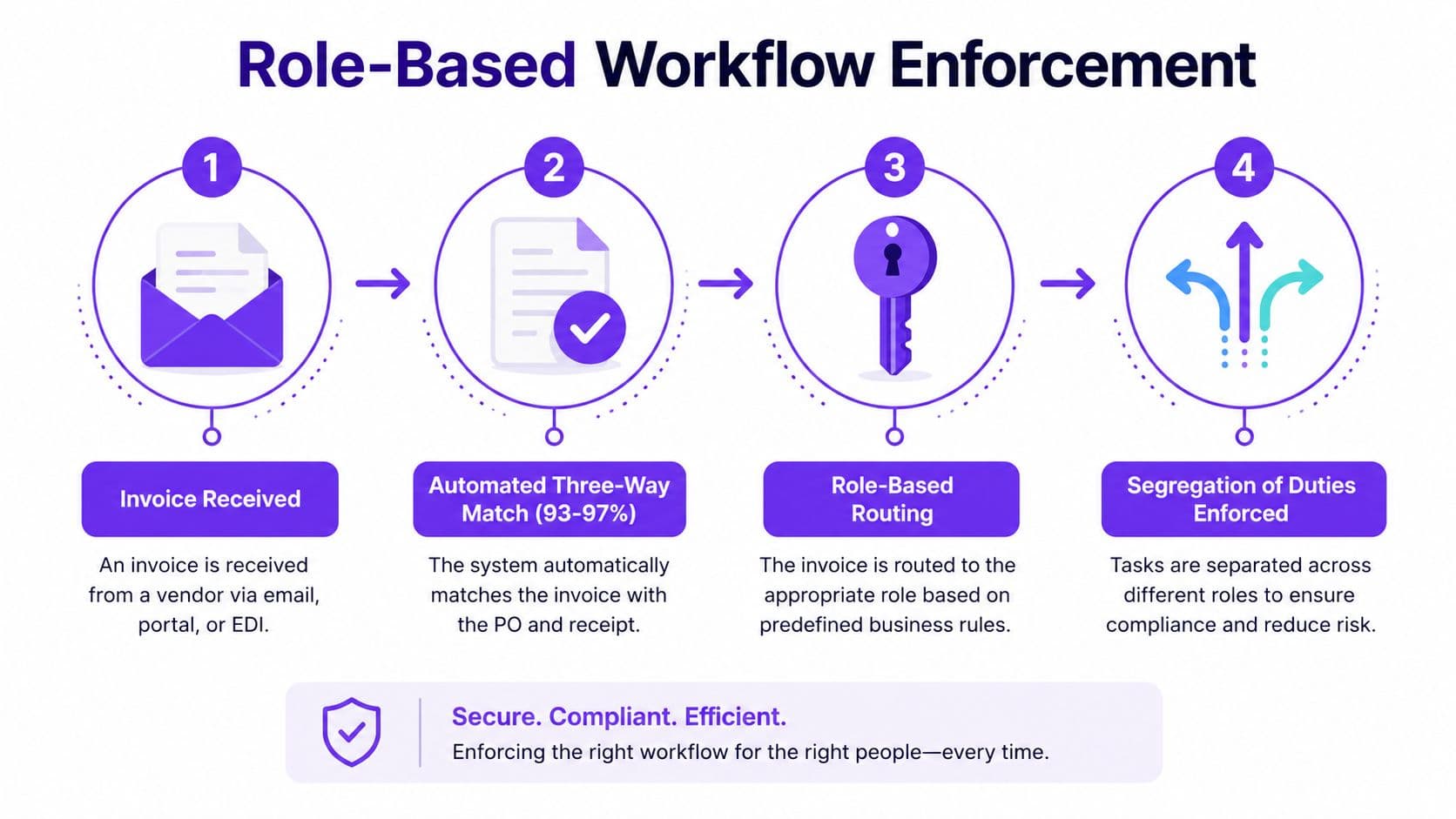
AP automation strengthens controls when you configure it to enforce them. It shouldn't merely record what users did after the fact. A role-based workflow can keep vendor creation, invoice approval, and payment release with separate users while preserving timestamps and supporting documents.
Automated three-way matching compares the invoice with the purchase order and goods receipt before approval. Reported benchmark performance shows this control catches 93% to 97% of duplicate and erroneous invoices, compared with roughly 60% in manual review, as summarized in AP automation research on controls and exception reduction.
Configure alerts for patterns that deserve investigation:
- Vendor-master changes: Flag bank-detail or address changes made shortly before payment.
- New-payee invoices: Route round-dollar invoices from newly created vendors for separate review.
- Split invoices: Detect transactions divided to remain below dual-control thresholds.
- Duplicate attributes: Compare vendor, invoice number, amount, date, and purchase order references.
An audit trail also makes evidence collection more practical. If every capture, edit, approval, match, and payment release carries a timestamp, your team can retrieve support from the workflow instead of reconstructing decisions from email threads. Use a documented segregation-of-duties framework to define access before configuration begins.
Automation doesn't eliminate insider collusion or an approver intentionally authorizing a bad invoice. Keep independent review for sensitive vendors, payment-detail changes, and unusual spend. Technology reduces exposure, but governance still determines whether controls work.
When AP Automation Falls Short and How to Avoid Partial Rollouts
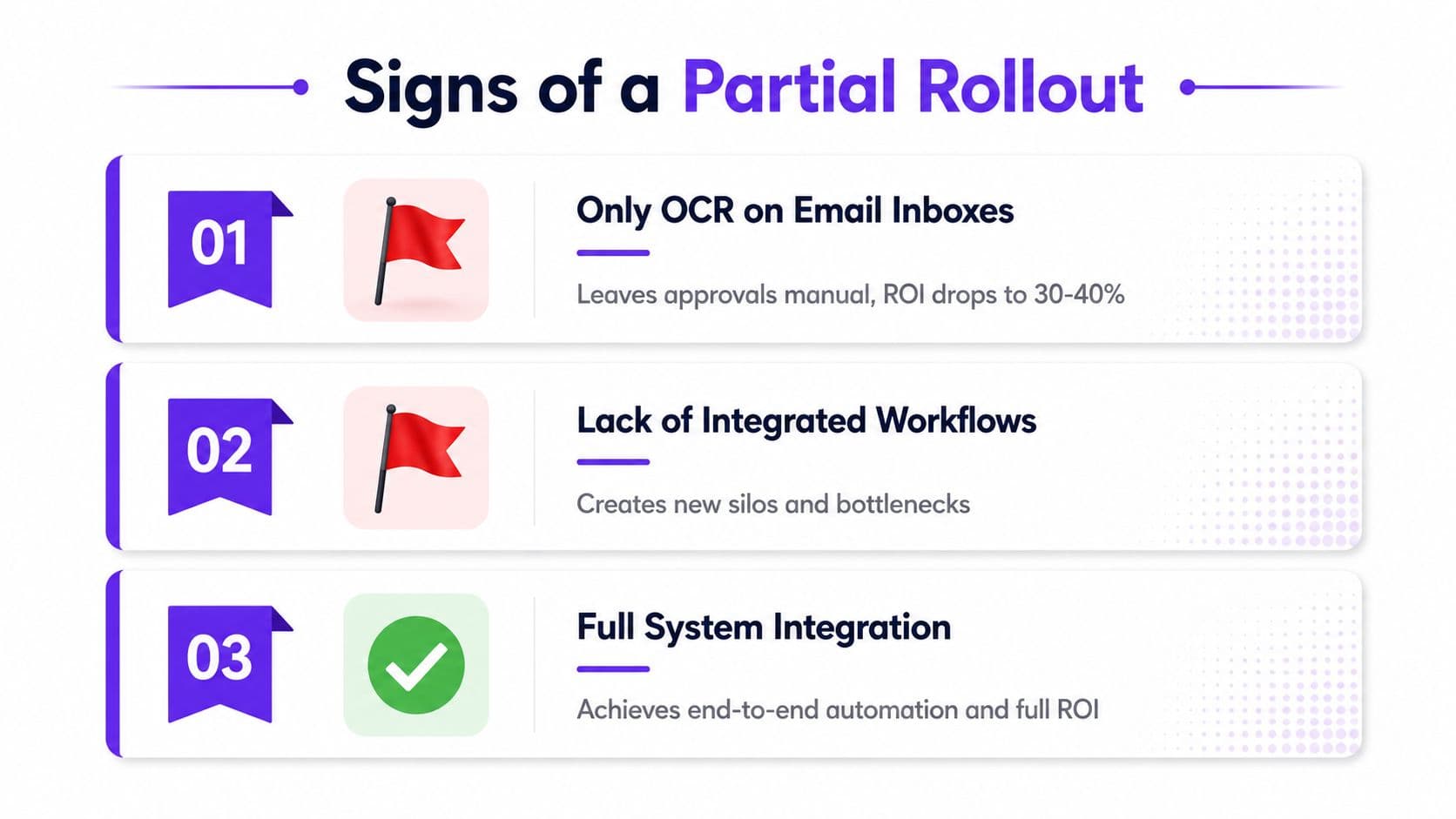
OCR on an email inbox isn't AP automation. It extracts fields, but it doesn't create reliable approvals, enforce coding rules, match invoices to commitments, or post clean transactions to your accounting system.
Partial deployments that automate intake while leaving approvals in email often deliver only 30% to 40% of projected savings, with touchless rates stuck below 35%, according to the supplied 2026 implementation coverage. Treat those figures as a warning about process design, not as a vendor comparison.
The standardization gate
Before selecting software, formalize the rules it will execute:
- Clean the vendor master: Remove duplicates, inactive suppliers, and inconsistent payment details.
- Map the chart of accounts: Establish approved GL accounts, departments, classes, and locations.
- Validate tax registrations: Confirm legal names, tax identifiers, and applicable tax treatment.
- Define coding rules: Document recurring vendor, category, department, and project mappings.
- Set approval matrices: Assign approvers by amount, department, entity, and spend type.
- Calibrate thresholds: Decide when invoices need one approver, dual approval, or finance review.
- Assess purchase-order coverage: Identify which spend requires a PO and how non-PO invoices are handled.
- Define exception ownership: Give each exception category a named resolver and response standard.
- Document payment policy: Set payment methods, discount rules, release controls, and bank-change verification.
- Assign process ownership: Name one accountable finance leader for performance and adoption.
Skipping this gate creates rework. A configuration that should take six weeks can stretch to six months when teams discover unresolved master-data and approval problems during implementation. Standardization is the most important part of the rollout because the software can only automate rules you've defined.
Implementing AP Automation With Your Existing Stack
You don't need to replace QuickBooks Online, Xero, NetSuite, or Stripe to improve AP. You need clear ownership of the data moving between each system.
Use four controlled phases
- Readiness assessment: Review the chart of accounts, vendor master, approval paths, tax codes, purchase-order process, and payment methods. Finance owns policy decisions. IT or an implementation partner owns technical connectivity.
- Two-week pilot: Start with the highest-volume vendor or the cleanest recurring invoice stream. Test capture, coding, matching, routing, payment terms, and ERP posting.
- Thirty-day parallel run: Reconcile automated journal postings against the existing general ledger process. Compare invoice counts, amounts, exceptions, approval timestamps, and payment status.
- Full cutover: Retire duplicate manual steps, publish approval matrices, train approvers, and review KPI performance after launch.
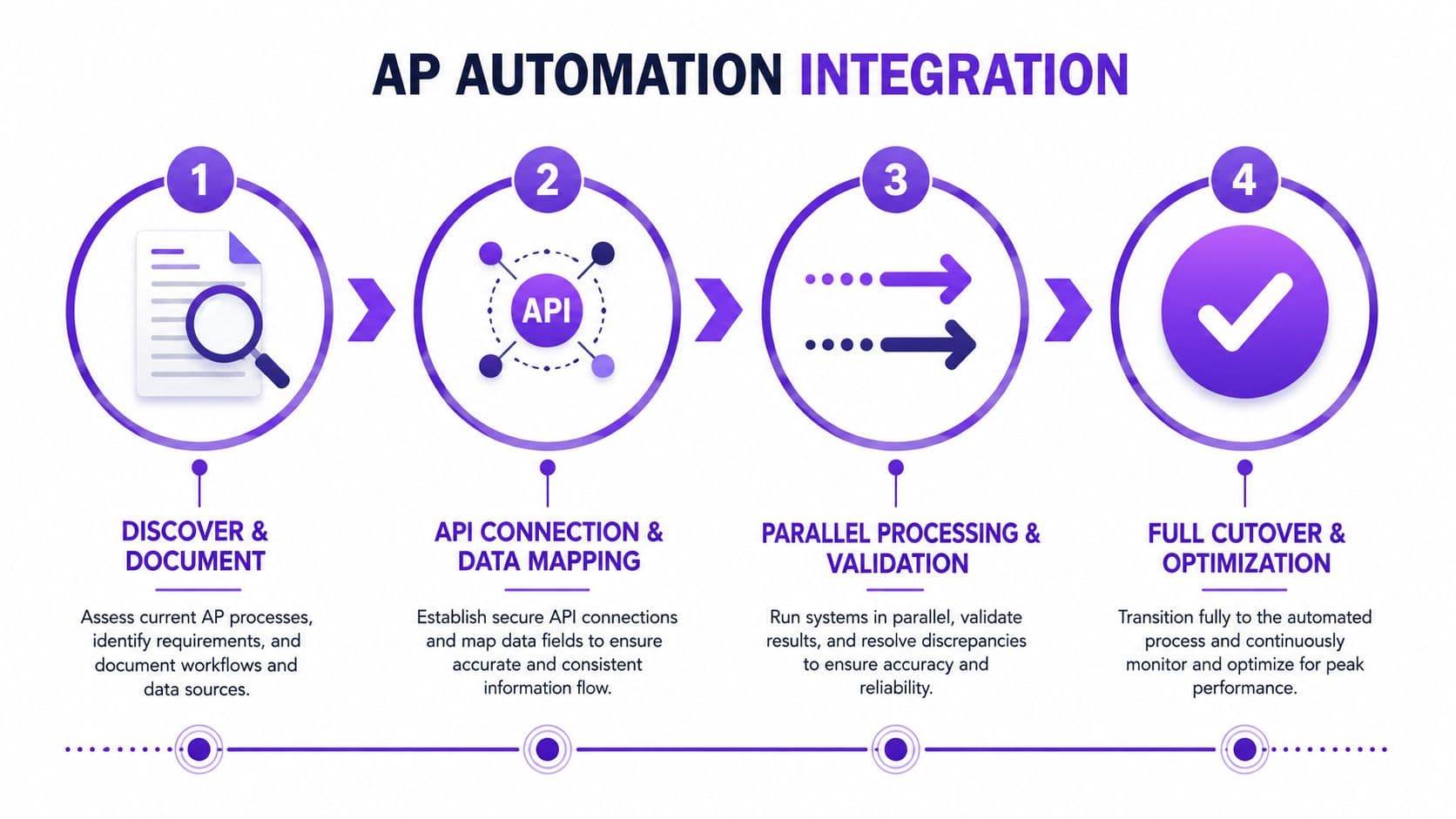
A typical invoice workflow starts with email capture and OCR extraction. The system validates the vendor and tax fields, performs a three-way match against the purchase order and goods receipt, routes the invoice through Slack or email notifications based on approval thresholds, and pushes the approved journal into the ERP.
Integration details matter. Stale vendor records can create duplicate master entries. Tax-code mappings between Bill.com and NetSuite can produce posting errors. Stripe payouts require separate reconciliation logic from card transactions because the payout represents a settlement, not an individual expense invoice.
| Decision | Finance must define | Technology must confirm |
|---|---|---|
| Coding | GL, department, project, and tax treatment | Field mapping and validation |
| Approval | Thresholds, owners, substitutes, and escalation | Workflow routing and notifications |
| Matching | PO, receipt, invoice, and tolerance rules | Data availability through API or integration |
| Payment | Method, timing, discount, and release controls | Bank and payment connectivity |
| Reconciliation | Required journal and settlement detail | Reliable posting and error handling |
Before signing a contract, confirm who owns vendor cleanup, workflow design, API mapping, testing, training, and post-launch measurement. A structured AP automation software evaluation should score those responsibilities alongside product features.
Red Flags, Next Steps, and How to Move Forward
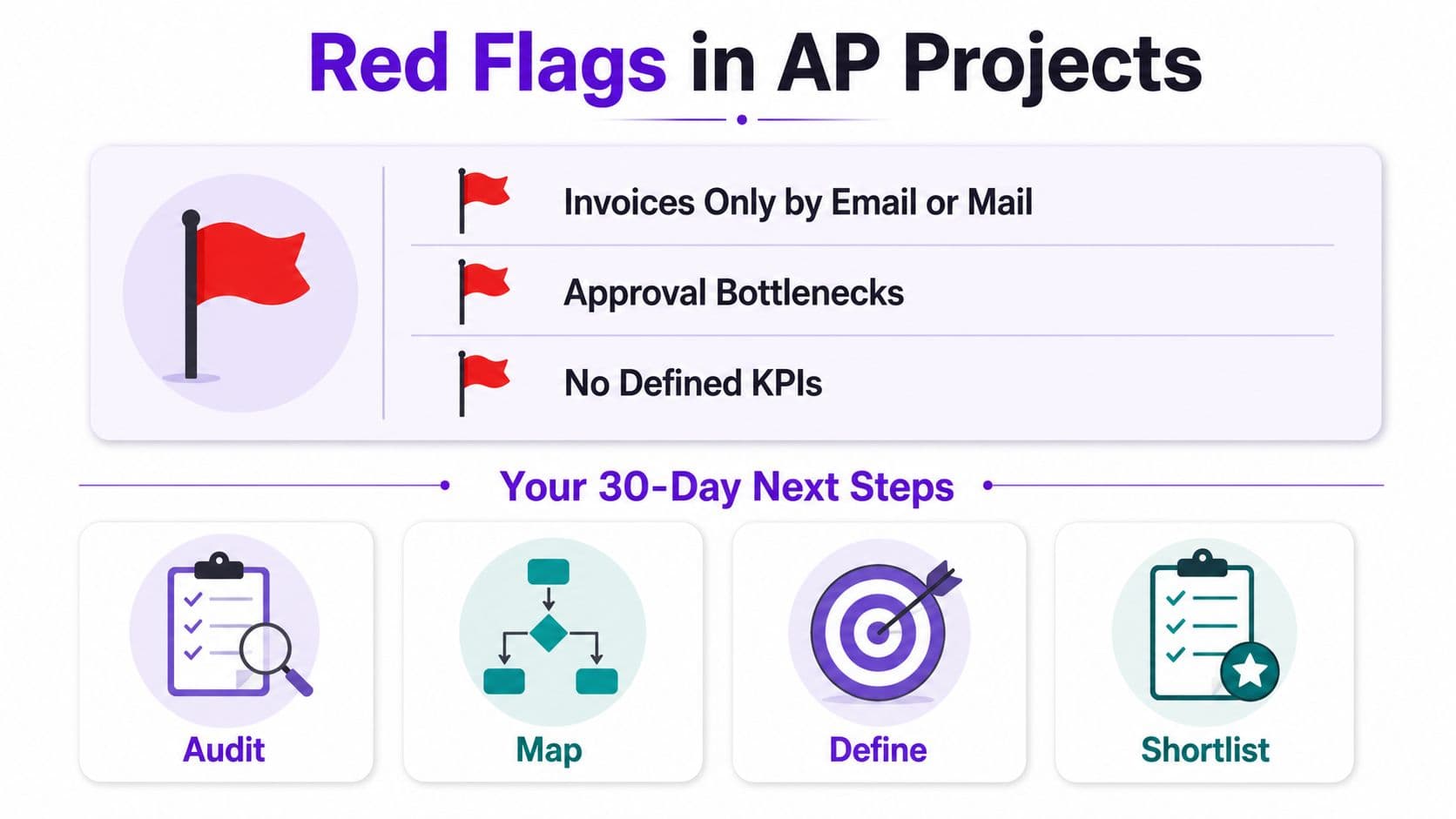
Your project is at risk if invoices still arrive only by paper or unstructured email. The same applies when no one owns GL coding, approvers refuse to use the workflow, vendors are paid exclusively by wire without remittance data, or the company can't name a single AP process owner.
Each warning points to a specific failure mode:
- Invoices only by email or mail: Intake remains fragmented, so invoices get lost or entered twice.
- No standardized GL coding: Automated suggestions remain unreliable. A chart of accounts with 14 uncategorized expense buckets can block consistent coding.
- Approval bottlenecks: The system routes work, but executives still delay decisions outside the platform.
- Wire-only payment behavior: Payment confirmation and remittance visibility stay disconnected from the invoice record.
- No accountable owner: Nobody has authority to change policies, measure adoption, or resolve recurring exceptions.
Your 30-day action plan
Days 1 through 7: Establish the baseline. Measure touchless rate, exception rate, cost per invoice, approval cycle, duplicate-payment history, and invoices by vendor.
Days 8 through 14: Clean the vendor list, remove inactive records, standardize payment details, and identify suppliers with recurring invoice-quality issues.
Days 15 through 21: Redesign approval thresholds, document coding rules, define PO and non-PO treatment, and assign exception ownership.
Days 22 through 30: Shortlist two to three vendors using a weighted scorecard. Test each against your real invoices, ERP integration, approval matrix, payment policy, reporting needs, and control requirements.
Don't start with a generic software demo. Start with a working-capital diagnostic that shows where your current process loses money, time, and control. Jumpstart Partners offers AP automation implementation, vendor selection, workflow design, system integration, team training, and payment-system setup for growing SaaS, agency, and professional services businesses.
Jumpstart Partners can assess your current AP workflow, clean the underlying data, and connect approval and payment processes to systems such as QuickBooks, Xero, NetSuite, and Stripe. Visit Jumpstart Partners to request a working-capital diagnostic and turn your invoice data into a practical automation roadmap.