Financial Operations
AP Automation QuickBooks: The Founder's Playbook
AP automation QuickBooks guide for offices and agencies. Cut manual work by 48%, prevent fraud, and build bill workflows your CFO can audit.
ByJumpstart Partners, CPA, QuickBooks ProAdvisor
··15 min readIntuit reported that integrated AP automation reduced manual entry by 48% among U.S. QuickBooks customers using automated bill-recording tools, compared with customers that didn't use them, based on activity from November 2022 through March 2023 (QuickBooks documentation). That sounds like a productivity statistic. For a growing company, it's really a control warning.
Once your business passes $500,000 in revenue, the central AP question isn't whether someone can type bills faster. It's whether one person can create a vendor, change its bank details, enter an invoice, approve it, and release payment without independent review. AP automation in QuickBooks should separate those powers first, then reduce manual work.
Table of Contents
- Why AP Automation QuickBooks Is a Control Problem, Not Just a Speed Problem
- The Five-Step QuickBooks AP Workflow That Holds Up Under Audit
- Designing Approval Thresholds Without Bottlenecking Cash Flow
- Three-Way Matching and Where QuickBooks Hands Off to Other Tools
- Fraud Controls for QuickBooks AP: Designing for the 79% Exposure
- QuickBooks Integration Limits That Decide Your Chart of Accounts
- AP Automation QuickBooks Benchmarks and Your Next Step
Why AP Automation QuickBooks Is a Control Problem, Not Just a Speed Problem
QuickBooks Online users managed approximately $2 trillion in invoices, $790 billion in bills, and $125 billion in payment volume during fiscal year 2022 (Roland Berger's QuickBooks AP case study). That makes QuickBooks more than a bookkeeping ledger. It functions as a major transaction-processing environment where invoice capture, bill recording, approvals, reconciliation, and payment workflows can connect.
The scale changes how you should assess risk. A spreadsheet approval process that feels manageable at an early-stage company becomes dangerous when vendor count, contractors, software subscriptions, and client-related expenses grow. Faster entry helps, but faster uncontrolled payment creates a more efficient fraud path.
Controller's rule: Never automate payment authority before you separate vendor setup, bill approval, and payment release.
The 48% manual-entry reduction is useful because it shows the workload benefit of integrated automation. It isn't an accuracy guarantee, and it doesn't prove that an automated bill is safe to pay. Your team still needs to review extracted fields, investigate exceptions, and preserve a clear audit trail.
A practical segregation-of-duties design gives different people different powers. An operations employee can prepare a bill, a finance lead can review coding and approve it, and an authorized payment user can release funds. Review the details in your QuickBooks segregation-of-duties framework before changing permissions.
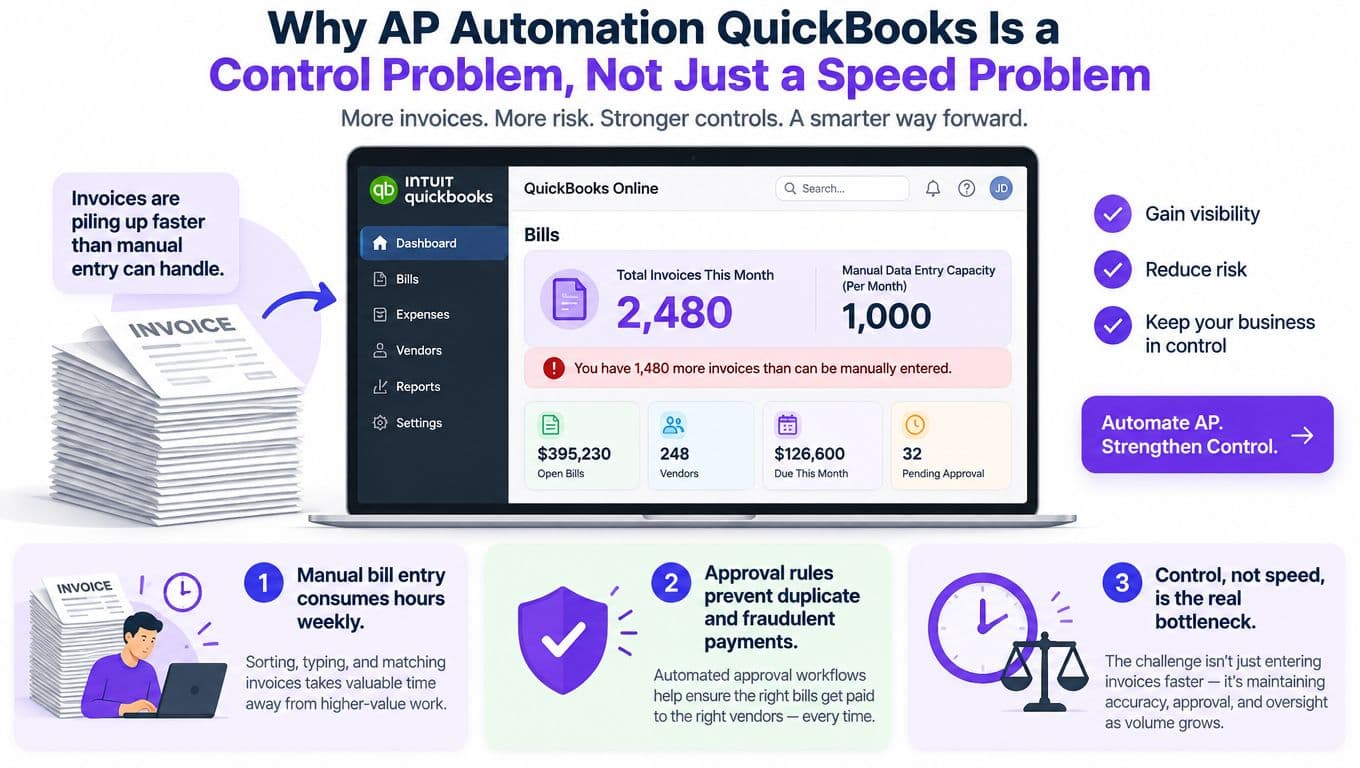
The reason to implement AP automation at this stage is simple: preserve human judgment where it matters while removing repetitive re-keying. If your system only makes bill entry faster, you've automated the least important part of the control problem.
The Five-Step QuickBooks AP Workflow That Holds Up Under Audit
A reliable QuickBooks AP workflow starts before anyone opens the Bills page. Route every PDF, image, and emailed invoice into one controlled intake channel. Do not leave invoices scattered across founder inboxes, employee folders, and vendor portals. That single change gives reviewers one queue, preserves source documents, and makes missing bills easier to identify.
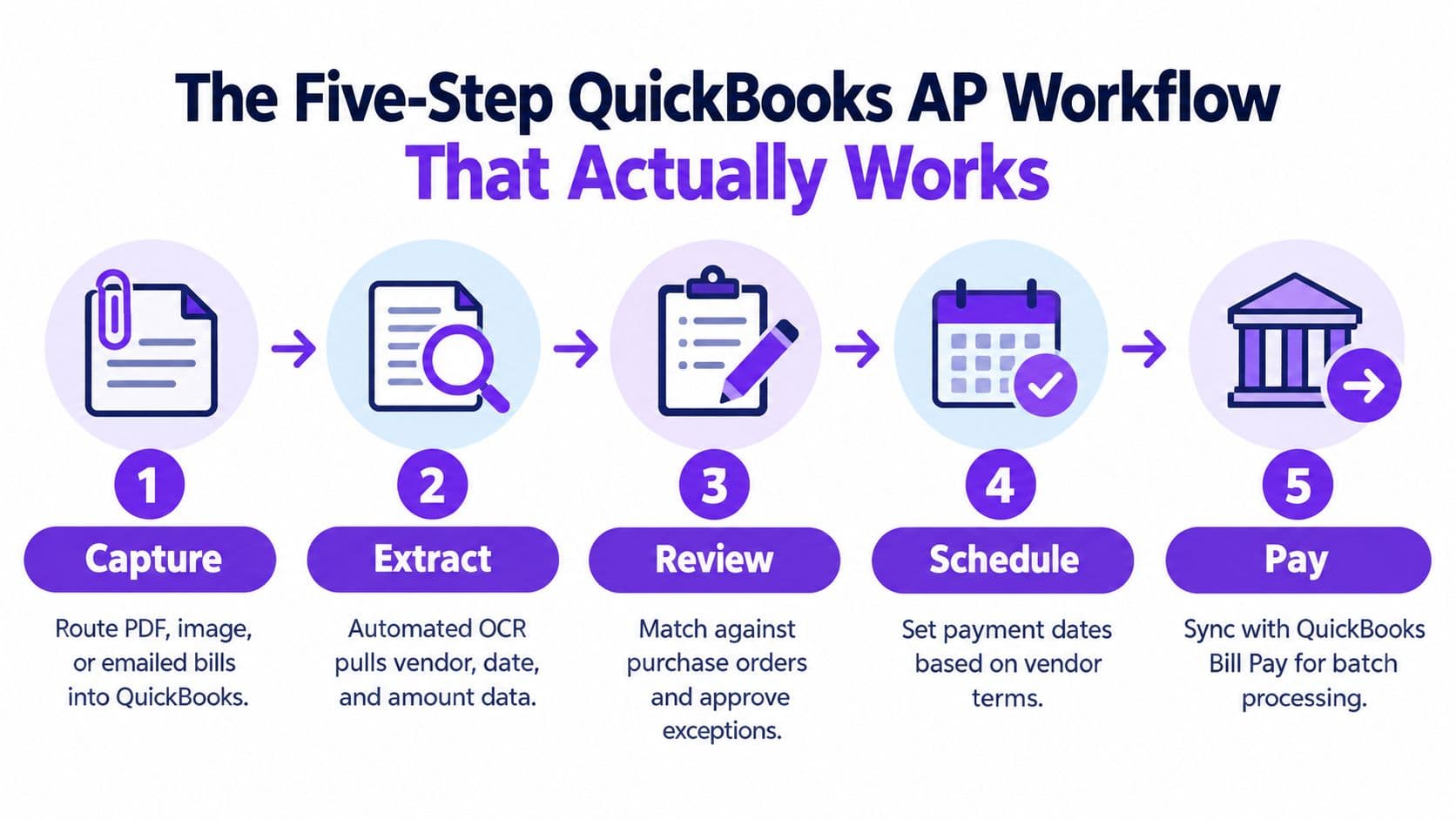
Build the process in five controlled moves
-
Capture: Centralize the source document and retain the original attachment. Every bill needs a traceable starting point before accounting work begins.
-
Extract: Let QuickBooks populate vendor, invoice number, amount, date, line-item, and coding fields into a draft bill. Treat that draft as proposed accounting data, not an authoritative record.
-
Review: Compare the draft with the source invoice before saving it. Check vendor identity, amount, tax, coding, classes or locations, and duplicate invoice numbers.
-
Approve: Route the bill according to amount, vendor, location, or combined conditions. The approver must be independent of bill preparation.
-
Pay: Release payment only after approval. Keep the invoice, approval history, payment status, and QuickBooks audit trail together.
For a SaaS company processing 220 bills per month, the workflow should assign human attention deliberately. Capture and extraction reduce repetitive entry, while reviewers concentrate on coding, duplicate checks, vendor details, and exceptions. The workload benefit depends on invoice quality and the number of bills that require correction. The operating procedures in this invoice processing automation guide can help translate each step into assigned responsibilities and documented controls.
| Step | Action in QuickBooks | Most Common Failure |
|---|---|---|
| Capture | Route PDF, image, or email invoices to one intake channel | Bills remain in personal inboxes or get submitted twice |
| Extract | Create a draft with vendor, amount, date, line-item, and coding fields | OCR misreads tax, quantities, or account coding |
| Review | Compare the draft with the original document | Staff trust the draft without source-document review |
| Approve | Apply amount, vendor, location, or combined approval rules | The preparer also approves the bill |
| Pay | Release approved bills and retain the audit trail | Payment permissions are not separated from vendor maintenance |
During the first month, sample 25 to 50 invoices and reconcile extracted fields against the source document, vendor master, and general ledger. Track duplicate invoices, inactive or duplicated vendors, incorrect project dimensions, and approval routes that send exceptions back to the preparer. Record the cause of each failure and assign an owner for correction.
Do not scale the workflow until those failure points are visible. A process that produces clean drafts but permits one employee to prepare, approve, and pay still leaves the core control weakness intact.
Designing Approval Thresholds Without Bottlenecking Cash Flow
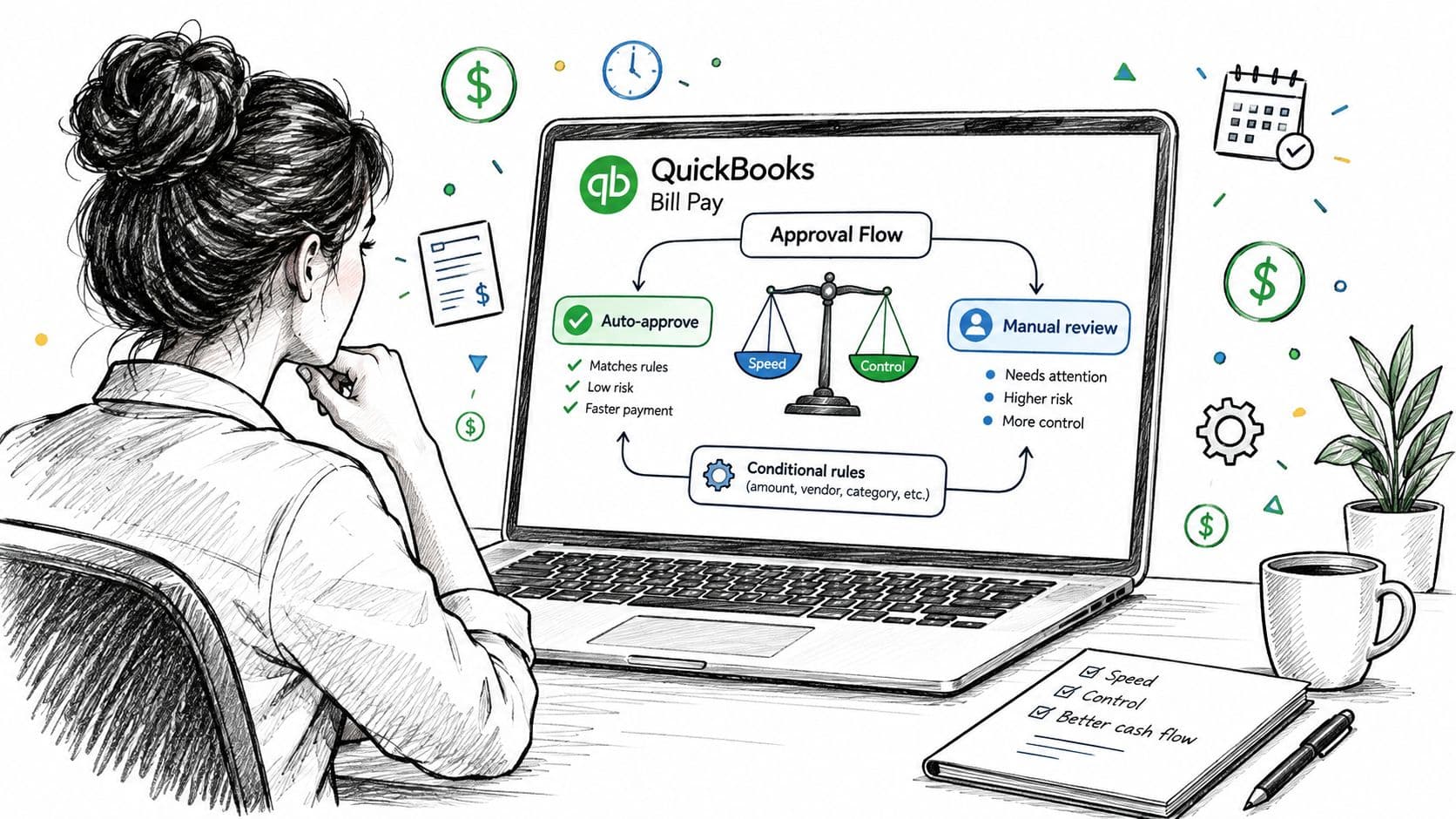
Approval thresholds should control fraud exposure while keeping ordinary purchases moving. QuickBooks Bill Pay Elite supports conditional workflows based on invoice amount, vendor, location, or combinations of those fields, with up to five sequential approval layers (QuickBooks approval workflow documentation). Use those fields to route risk, not to send every low-value renewal to the CEO.
A practical matrix for a growing digital agency looks like this:
| Invoice condition | Required approval path | Control purpose |
|---|---|---|
| Below $1,000 | Department manager | Keeps routine operating spend moving |
| $1,000 to $10,000 | Department manager, then finance lead | Adds financial review to material spend |
| Above $10,000 | Finance lead, CEO, and board-designated approver | Requires senior authorization for high-value commitments |
| First-time vendor | Finance lead plus independent vendor verification | Prevents unauthorized supplier creation |
| Changed remittance details | Finance lead and separate payment reviewer | Stops bank-detail fraud from flowing into payment |
Recalibrate the matrix whenever a single month sends more than ten invoices to the CEO or average invoice value changes by more than 25%. A professional services firm with many small subcontractor invoices needs different routing from a SaaS company with fewer, larger infrastructure bills. Review the exception volume, then move routine approvals downward and retain senior review for unusual vendors, bank changes, and high-value commitments.
Separate the four permissions
Bill entry alone does not create segregation of duties. Assign these permissions separately:
- Bill creation: The preparer enters or reviews the draft.
- Bill editing: An authorized finance user corrects coding or documentation.
- Bill approval: An independent approver confirms the business purpose and amount.
- Payment release: A separate authorized user releases cash after approval.
QuickBooks documentation indicates that custom roles for bill approval and payment-release workflows require QuickBooks Online Advanced. Businesses on lower tiers may need a documented review, bank-level approval controls, or a separate AP platform to maintain the separation.
For a $4 million digital agency, the founder should not retain all four permissions for convenience. The operations manager can prepare bills, the controller can edit and approve within assigned limits, and the CEO can approve invoices above the senior threshold. Keep payment release separate from vendor maintenance.
Prevent approval dead ends
Only administrators can serve as approvers in the documented Bill Pay Elite workflow, and invoices not reviewed after 30 days are automatically denied. That creates a cash-flow risk when vendors require payment within 15 days. A bill can expire before anyone acts.
Monitor pending approvals daily, send reminders, and name backup approvers. Review the matrix quarterly. Document who has access, why access exists, and when it was last tested. Run a test invoice through every route, including amounts just below and just above each threshold.
Include these timing effects in your QuickBooks cash flow forecast process. Approval automation pays off when it produces predictable authorization and timely payment, rather than hiding pending bills until a vendor complains.
Three-Way Matching and Where QuickBooks Hands Off to Other Tools
QuickBooks approval automation is not the same as purchase-order matching. Independent product documentation reports that QuickBooks Online doesn't automatically perform two-way or three-way matching among an invoice, purchase order, and receiving record. Its workflows can trigger approval, notifications, reminders, sending, or record updates, but matching remains manual (QuickBooks workflow documentation).
A three-way match asks whether the supplier, quantity, price, and total agree across the purchase order, invoice, and receiving record. If the purchase order authorizes 100 hours at $48 per hour, but the invoice shows 110 hours, the $480 variance requires investigation before payment.
The labor cost becomes visible in a services business processing 150 invoices per month. At 8 minutes per comparison, the team spends 20 hours per month on manual matching. At an assumed fully loaded finance cost of $45 per hour, that equals $900 per month, or $10,800 annually, before duplicate payments or overbilling.
| Situation | QuickBooks approval workflow | Additional control required |
|---|---|---|
| Routine recurring bill with no purchase order | Routes for authorization | Confirm vendor, amount, coding, and duplicate status |
| Invoice tied to a purchase order | Routes for authorization | Compare purchase order, invoice, and receiving evidence |
| Quantity or price variance | Flags through review policy | Assign an owner to investigate and document resolution |
| High-volume procurement | Controls approval | Add a matching layer when manual review consumes material time |
Define which vendors require purchase orders, what variance is tolerable, and who resolves exceptions. Use QuickBooks for approval and accounting records, then add a third-party matching layer when the control value exceeds the integration and subscription cost. Your three-way match procedures should specify the evidence required before payment.
Fraud Controls for QuickBooks AP: Designing for the 79% Exposure
The 2025 AFP Payments Fraud and Control Survey reported that 79% of organizations experienced attempted or actual payments fraud in 2024 (AFP coverage of the survey). That exposure makes payment authority the first AP automation decision. QuickBooks can speed processing, but automation also moves fraudulent bills through faster when one person can create a vendor, approve an invoice, and release payment.
Invoice capture addresses data entry, not fraud. Separate vendor onboarding, bank-account changes, approval limits, and payment release. For companies approaching or exceeding $500K in revenue, this separation should be designed into the workflow rather than added after a loss.
Use a vendor-bank-change procedure
Require these controls before a first payment or any change to remittance details:
- Independent callback: Call a known vendor phone number from the existing vendor record, never the number in the change request.
- Dual confirmation: Have two authorized employees confirm the change through separate channels.
- Documented evidence: Attach the verification note and supporting correspondence to the vendor record.
- Restricted access: Separate vendor maintenance from bill approval and payment release.
- Exception review: Require finance-lead approval for first-time vendors, changed banking details, unusual invoices, and bills without expected purchasing support.
Review the weekly new-vendor report for names, addresses, bank changes, and similarities to existing suppliers. Catching a fake vendor before its first payment turns automation into a control rather than a faster typing process. For suspected losses, forensic accounting for fraud losses covers investigation and evidence preservation.
Set red-flag monitoring
Review duplicate invoice numbers and unusual bank-detail changes during every payment cycle. Review weekend payments and bills posted to closed periods at least weekly. Escalate immediately when a transaction lacks a documented business explanation.
Your internal controls assessment should test whether one login can create a vendor, edit banking information, enter a bill, approve it, and release payment. If one person can complete that chain, the workflow remains exposed regardless of how polished the QuickBooks interface looks.
QuickBooks Integration Limits That Decide Your Chart of Accounts
Integration architecture determines whether AP automation produces reliable accounting data or a queue of partial syncs. Documented QuickBooks Online API limitations include no general JOIN or GROUP BY support, a 1,000-record query-pagination ceiling, restrictions around filtering and entity updates, and rate-limited API requests. QuickBooks Online Plus also limits accounts to 250 and the combined number of classes and locations to 40 (documented QuickBooks API limitations).
Those limits affect your chart of accounts before they affect your software choice. An agency that uses classes for every client, location, and department can exhaust its available structure. A multi-entity SaaS business that forces product, geography, and cost-center reporting into one dimension creates a reporting system that becomes harder to maintain as entities multiply.
Make the chart carry only durable accounting meaning
Use the chart of accounts for stable financial categories. Use classes, locations, projects, or a controlled staging layer for operational detail only when that dimension supports a clear reporting decision. Don't add another automation connector to compensate for a dimension design that no longer fits.
The same logic applies to commerce businesses. If inventory data feeds accounting, separate AP decisions from broader inventory turnover basics. Inventory, purchasing, and vendor bills need consistent ownership, or your general ledger will reflect timing differences that nobody can explain.
A practical integration-readiness checklist includes:
- Field ownership: Decide whether QuickBooks, the AP tool, or the source system owns vendor, account, class, location, project, and payment status.
- Sync failure handling: Send failed and partial records to an exception queue. Never assume a successful API response means every field posted correctly.
- Pagination control: Reconcile records beyond the documented query ceiling instead of processing only the first page.
- Dimension cleanup: Archive duplicate or inactive categories and document mapping rules before adding new classes or locations.
- Reconciliation: Compare the AP subledger, QuickBooks bills, payments, and bank activity at every close.
Run a measurable parallel process
Before automation, capture invoices per month, minutes per invoice, exception rate, duplicate-payment incidents, days from receipt to approval, and payment-on-time rate. These metrics give you a baseline for workload, control quality, and cash timing.
Run a 30-day parallel process. Automate intake and draft creation, but retain existing approval and bank-reconciliation controls until exception rates stabilize. Don't let the first clean-looking batch convince you that the process is ready for full payment release.
Use the first 100 to 200 processed invoices to calculate field-level accuracy and exception rates. For each field, compare the extracted value with the source document and record whether it required correction. Tighten vendor-specific rules, approval thresholds, and coding controls before increasing volume.
AP Automation QuickBooks Benchmarks and Your Next Step
A 2024 accounts-payable benchmark reports average invoice-processing cost of $2.36 per invoice, compared with $1.07 for top performers. It also reports average cycle time of 2.6 days versus 1.1 days, automation of 68% versus 92%, exception rates of 18% versus 6%, and touchless processing of 44% versus 81% (American Prime Research benchmark).
For a company processing 300 invoices per month, moving from the reported average processing cost to the top-performer figure reduces cost by $1.29 per invoice. That equals $387 per month, or $4,644 annually, on processing cost alone. Moving from 68% to 92% automated processing also shifts 72 additional invoices per month out of manual handling.
Those figures aren't a promise that every company will reach top-performer performance. They show what to measure: cost per invoice, approval cycle time, automation rate, exception rate, touchless processing, duplicate incidents, and payment timeliness. The right business case depends on finance-team time, fraud exposure, and month-end delay, not invoice count alone.
Start by mapping permissions and vendor controls, then baseline the process and run the 30-day parallel test. If your team needs help selecting the workflow, configuring QuickBooks synchronization, documenting approval rules, and reconciling the resulting bills, Jumpstart Partners provides outsourced controller support and AP automation implementation for growing companies.
Jumpstart Partners can design your QuickBooks AP workflow, separate vendor, approval, and payment permissions, and build the reconciliation controls around it. Visit Jumpstart Partners to discuss AP automation or a 13-week cash flow sprint for your business.