Financial Operations
Invoice Processing Automation: A Founder's Roadmap
Implement invoice processing automation in growing businesses. Step-by-step roadmap with KPIs, ROI, exception handling, and vendor selection checklist.
ByJumpstart Partners, CPA, QuickBooks ProAdvisor
··18 min readOnly 32.6% of invoices are processed without human intervention on average, while best-in-class teams reach 49.2%, according to invoice processing automation benchmarks. That gap changes the question founders should ask. The problem usually isn't whether your team can capture invoice data. It's what happens after capture, when missing purchase orders, incomplete receipts, approval delays, duplicate invoices, and weak vendor records push work into manual queues.
For SaaS companies, agencies, and professional services firms generating $500K to $20M, invoice processing automation should be treated as a finance-control project first and an OCR project second. A better extraction engine won't fix an approval chain that lives in email or a vendor master file that nobody governs. You need a workflow that captures invoices, validates them, routes exceptions, preserves evidence, and releases payments safely.
Table of Contents
- The Hidden Costs of Manual Invoice Processing
- How an Automated Invoice Processing Workflow Works
- Choosing How Automation Connects to Your Tech Stack
- Building Audit Trails and SOC 2 Ready Controls
- Exception Handling That Stops Eating Your Time
- A 90 Day Implementation Roadmap for Growing Teams
- Vendor Selection Checklist and ROI Math That Holds Up
The Hidden Costs of Manual Invoice Processing
Manual AP is a controls problem before it is a data-entry problem. Salaries allocated to AP work, software, third-party services, rework, and penalty payments all belong in the calculation. Divide that total by every document processed, including exceptions, rejected invoices, and duplicates, using this cost-per-invoice methodology. A clean invoice capture process still produces poor economics if approvals, matching, and vendor records send too much work into review.
The benchmark gap is substantial. A widely cited AP benchmark places average team cycle time at 17.4 days, compared with 3.1 days for top-quartile teams. It also connects automation with processing costs moving from roughly $10 to $15 per invoice to under $3 in stronger environments. Faster movement comes from fewer touches, follow-ups, and broken handoffs, not from a faster OCR engine alone. See the AP cycle-time and invoice-cost benchmark.
| Cost Driver | Manual AP | Automated AP |
|---|---|---|
| Invoice intake | Shared inboxes, downloads, forwarding, and manual filing | Centralized capture from approved channels |
| Data entry | Re-keying vendor, amount, date, and line-item data | Extraction followed by field validation |
| Matching | Manual comparison of invoices, POs, and receipts | Rule-based matching with exception routing |
| Approval | Email chasing and spreadsheet tracking | Role-based routing with recorded decisions |
| Payment preparation | Manual payment batches and reconciliation | Controlled payment-file generation and posting |
| Audit evidence | Scattered messages and files | Structured documents, timestamps, identities, and change logs |
The highest-cost failure point is the exception queue. A benchmark reports that 14% of invoices still require exception handling because of errors or missing data. Mid-market surveys also report that 89% of respondents use only partial automation and 48% report little to no cost savings from AP tools. Those figures show why intake automation alone often leaves AP costs largely unchanged. The better accounts payable automation data on exception management supports measuring what happens after capture.
Practical rule: Measure the percentage of invoices that reach payment without a human touch. Document-level OCR accuracy matters, but it is not the outcome your controller owns.
Duplicate invoices add another leakage point. AP error rates are commonly benchmarked at 1% to 4% of invoices, or 10 to 40 errors per 1,000 invoices, across GL coding, PO matching, vendor data, tax or VAT, duplicates, and approvals. The AP error-rate benchmark reinforces the need to report error categories separately rather than one blended accuracy figure.
For SaaS and agency teams, the first business case should fund exception resolution, approval discipline, master-data governance, and payment controls. Use accounts payable automation benefits for growing teams as a planning reference, then improve capture only where field-level testing shows a problem.
Weak segregation of duties turns convenience into risk. If one person can create a vendor, change bank details, approve an invoice, and release payment, automation can accelerate an unauthorized payment as efficiently as a legitimate one. Configure controls before chasing marginal OCR gains.
How an Automated Invoice Processing Workflow Works
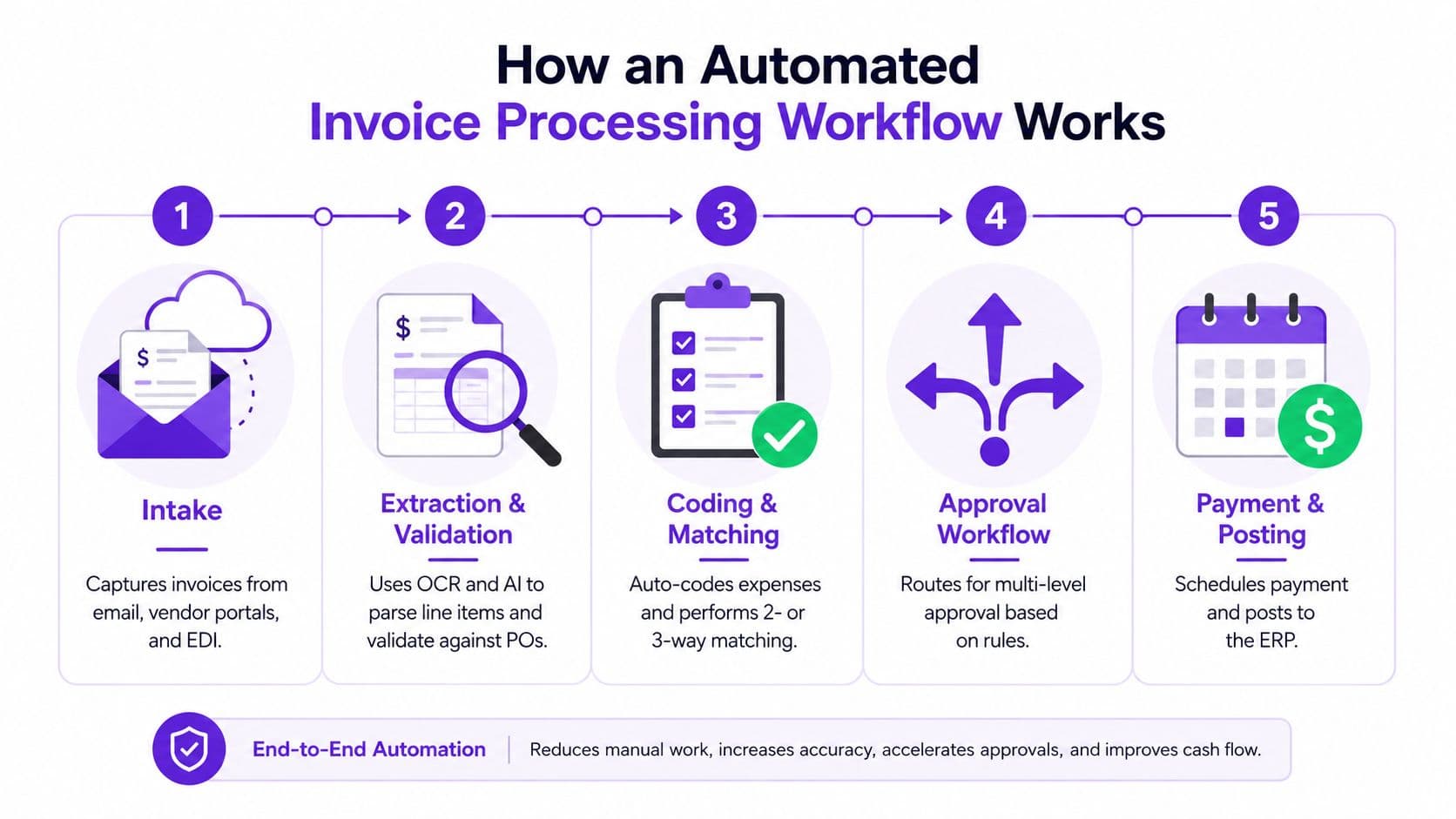
An automated workflow is a controls system with five connected stages. Capture matters, but the larger savings come from routing exceptions, enforcing approvals, maintaining master data, and recording each decision in the ERP or accounting system.
Intake and extraction
Intake starts with a controlled invoice address, vendor portal, EDI feed, or approved upload channel. Consolidate entry points without forcing every supplier into one format. The platform should create a unique record, retain the original document, and block duplicate submissions before they reach the queue.
Extraction and validation identify the vendor, invoice number, dates, total, tax, purchase order, and line items. Test field-level accuracy rather than accepting a document-level OCR claim. The invoice OCR accuracy reference supports testing individual fields across clean digital and scanned samples.
Validation should also check vendor status, bank details, tax treatment, currency, duplicate invoice numbers, and required purchase-order data. Those checks stop bad records before matching and approval consume staff time.
Matching, coding, and approval
For PO-backed purchases, the system performs a two-way or three-way match. A three-way match compares the invoice with the purchase order and receipt, then routes differences above your tolerance to an exception queue. Non-PO invoices can receive suggested GL accounts and cost centers from vendor history, while unusual charges and first-time vendors require review.
Approval routing should follow department, vendor, project, entity, and amount rules. A recurring software invoice can move without manual handling when it matches its PO and budget owner. A new vendor, an invoice above the approval threshold, or a receipt mismatch should go to a named approver, with reminders through email, Slack, Teams, or mobile notifications.
Use this guide to automating accounts payable to map the operating model before selecting tools. Teams handling grant, fund, or program-specific spending can also use a resource to manage nonprofit bills when translating approval rules into bill-management procedures.
Payment and posting
After approval, the platform posts the invoice to QuickBooks, Xero, NetSuite, Sage Intacct, or another ERP, then prepares ACH, wire, virtual-card, or check payments. Payment-file generation can run automatically, but payment release must remain subject to role separation and approval authority.
The workflow succeeds only when the ERP connection and approval notification layer support the controls. Re-keying data into the ERP leaves a manual failure point. Alerts that lack an action, owner, or deadline leave invoices stalled.
Choosing How Automation Connects to Your Tech Stack
Your integration model determines where the accounting record lives, how much reconciliation your team performs, and how easily an auditor can trace a payment back to its source. Choose the system of record before choosing a platform.
| Dimension | Direct ERP Connector | Middleware / iPaaS | Standalone AP Platform |
|---|---|---|---|
| Best fit | One ERP and a straightforward process | Multiple entities or systems | Procurement-heavy or high-churn vendor environments |
| Implementation profile | Usually the simplest path | Requires mapping and orchestration | Requires disciplined synchronization |
| Control retention | Audit trail stays close to the ERP | Adds a reconciliation layer | Depends on sync quality and export controls |
| Scalability | Strong with one ERP | Strong across disparate systems | Strong when purchasing workflows are central |
| Main risk | Limited flexibility outside the ERP | Data mapping and duplicate records | System-of-record ambiguity |
For a single-ERP SaaS company under $5M ARR, default to the native AP module unless it fails a defined control or workflow requirement. Native integration reduces duplicate maintenance and keeps vendor, GL, PO, invoice, and payment status in one environment.
Choose middleware such as Workato, Tray, or Merge.dev when multiple entities, post-acquisition systems, or separate operating tools must exchange data. Middleware earns its place when that complexity already exists. A simple QuickBooks or NetSuite setup rarely needs another integration layer.
Standalone platforms such as Tipalti, Ramp, or Bill.com fit businesses where procurement, payment methods, vendor onboarding, and spend policy shape the operating model. Agencies and e-commerce businesses with high vendor churn should assess this option carefully. Define which platform owns vendor data, which one owns the payable ledger, and how changes move between them.
Your selection should also account for exception handling. A platform that captures invoices accurately still loses value when sync failures, unmatched records, and approval changes create manual queues. Test how each option handles duplicate invoices, missing purchase orders, coding changes, and failed exports before signing.
Use this guide to choosing accounting software for a growing business to test the decision against your broader finance stack. Compare reconciliation time, failed syncs, manual exports, and audit preparation alongside licensing and implementation costs. The cheapest connector can produce the most expensive operating model.
Building Audit Trails and SOC 2 Ready Controls
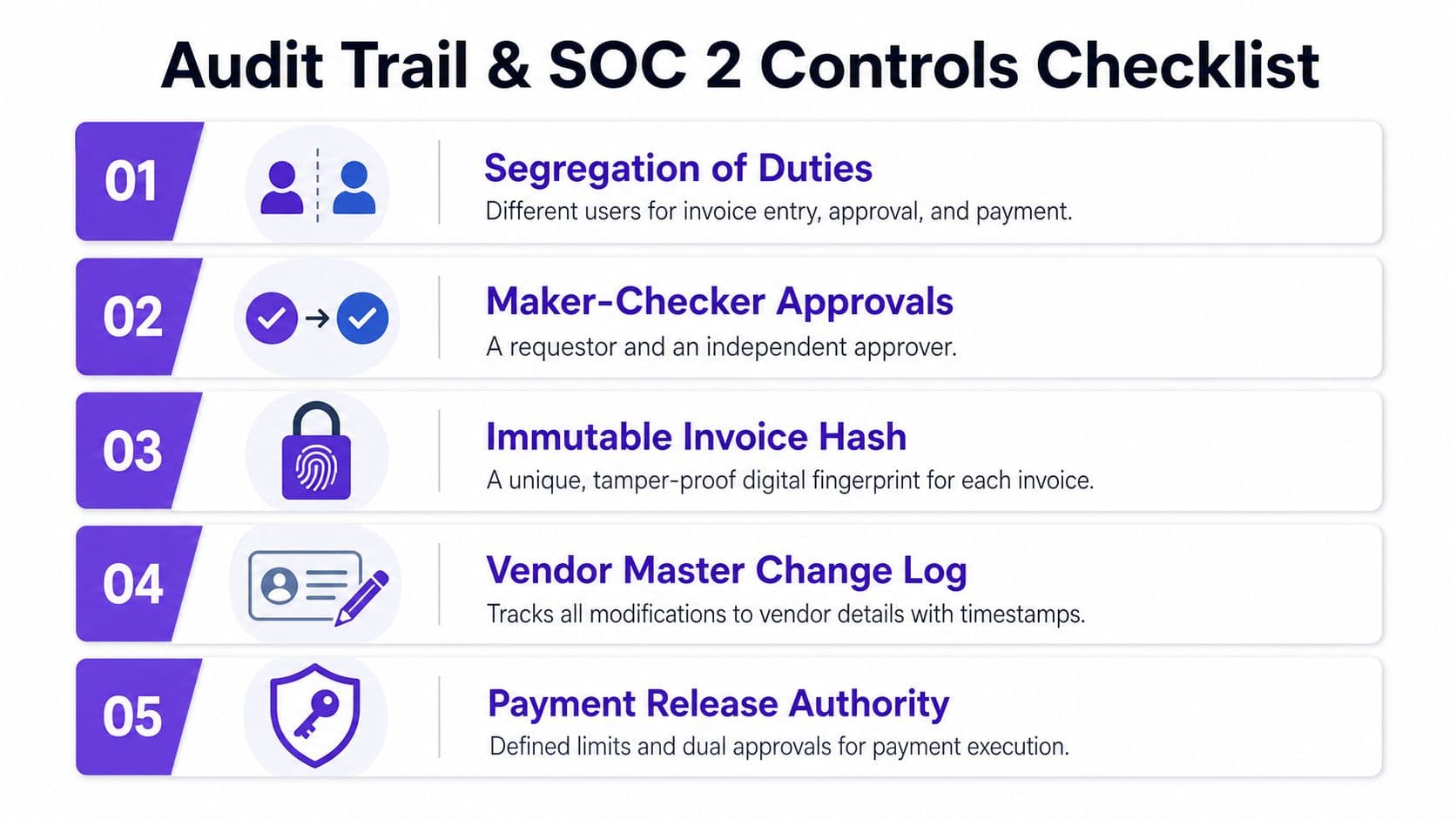
Strong controls require deliberate configuration. Encode segregation of duties, maker-checker approval, vendor-master protection, and role-based access, then enforce each rule in the workflow. Your controller should be able to show who submitted an invoice, changed vendor data, approved the charge, released the payment, and which original document supports the transaction.
Configure the control points
Start with segregation of duties. Assign separate people to invoice entry, approval, and payment release. Add maker-checker approval so the person who creates or codes a transaction cannot be its sole authorizer. For higher-value payments, set dual approval above a defined dollar limit that matches your risk tolerance and board policy.
Protect the vendor master as carefully as the invoice queue. New vendors should enter an onboarding workflow with tax ID validation, documented ownership, and independent verification of payment instructions. Every bank-detail change needs a timestamped change log, the identity of the person who made it, and a separate review before the next payment.
Retain the original PDF beside extracted structured data, such as JSON, so reviewers can compare the source document with posted fields. Preserve approval timestamps, approver identity, comments, relevant IP information, payment-release evidence, and the invoice's immutable hash where your system supports it.
Use a controller-ready checklist
| Control | Operational Action | Evidence to Retain |
|---|---|---|
| Segregation of duties | Assign separate roles for entry, approval, and release | Role matrix and access review |
| Maker-checker approval | Require an independent approver | Approval event and timestamp |
| Vendor master protection | Review every bank-detail change | Change log and verification record |
| Invoice integrity | Preserve source document and immutable hash | PDF, extracted data, and hash |
| Payment authority | Apply defined limits and dual approval | Release record and payment batch |
| Audit access | Provide read-only auditor access | Access grant and review history |
Email-only approvals leave a control gap because messages can be forwarded, deleted, or separated from the invoice. An approver who can also release payment creates another weakness. If the system cannot connect each approval to the exact invoice version that was paid, correct that control before expanding automation.
Use this audit trail guide to turn these requirements into a repeatable evidence process. Finance teams connecting accounting, project management, and payment tools can also evaluate services to automate finance workflows with Wisely as part of the broader control design.
Exception Handling That Stops Eating Your Time
Exception handling is where AP automation either earns its keep or becomes an expensive inbox. Mature implementations report 75% to 86% of invoice processing automated without manual touchpoints, while automated three-way matching reaches about 85% to 92% straight-through processing in environments with clean PO discipline and integrated ERPs. Best-in-class teams report exception rates around 9%, compared with approximately 22% for average teams, according to invoice-matching automation benchmarks.
Build separate queues for separate causes. A single “needs review” queue hides urgency and sends every problem to the same person.
| Exception Type | Trigger Condition | Routed To | Target SLA |
|---|---|---|---|
| PO mismatch | Invoice price, quantity, or vendor differs from PO | Procurement owner and budget owner | Resolve before payment batch |
| Missing receipt | PO exists, but goods or service receipt is absent | Receiving owner or service owner | Resolve during the current close |
| Duplicate detection | Invoice hash, vendor, invoice number, or amount matches an existing record | AP analyst | Block posting pending confirmation |
| Vendor master issue | New vendor, missing tax document, or changed bank data | Vendor onboarding owner | Complete before payment release |
Consider a $4,200 SaaS renewal with no PO. Route it to the budget owner, show the prior-period vendor record, and offer a suggested PO or contract reference. Don't send the invoice through a long email chain with no owner and no due date.
For a suspected duplicate, block posting when the invoice hash, vendor, and amount match a recent record. Notify an AP analyst with both documents attached so the reviewer can confirm whether the second record is a legitimate installment or a duplicate submission.
A new vendor without a W-9 should enter vendor onboarding, not the payment queue. Require tax ID validation and independent bank-detail verification before the invoice becomes eligible for release.
Score exceptions by payment urgency, dollar value, fraud risk, and close impact. Review an aging report weekly, and escalate to the controller when an exception threatens the close, exceeds your approval authority, involves a bank-detail change, or remains unresolved beyond its assigned SLA. The AP automation best-practices guide provides a useful framework for formalizing these queues.
A 90 Day Implementation Roadmap for Growing Teams
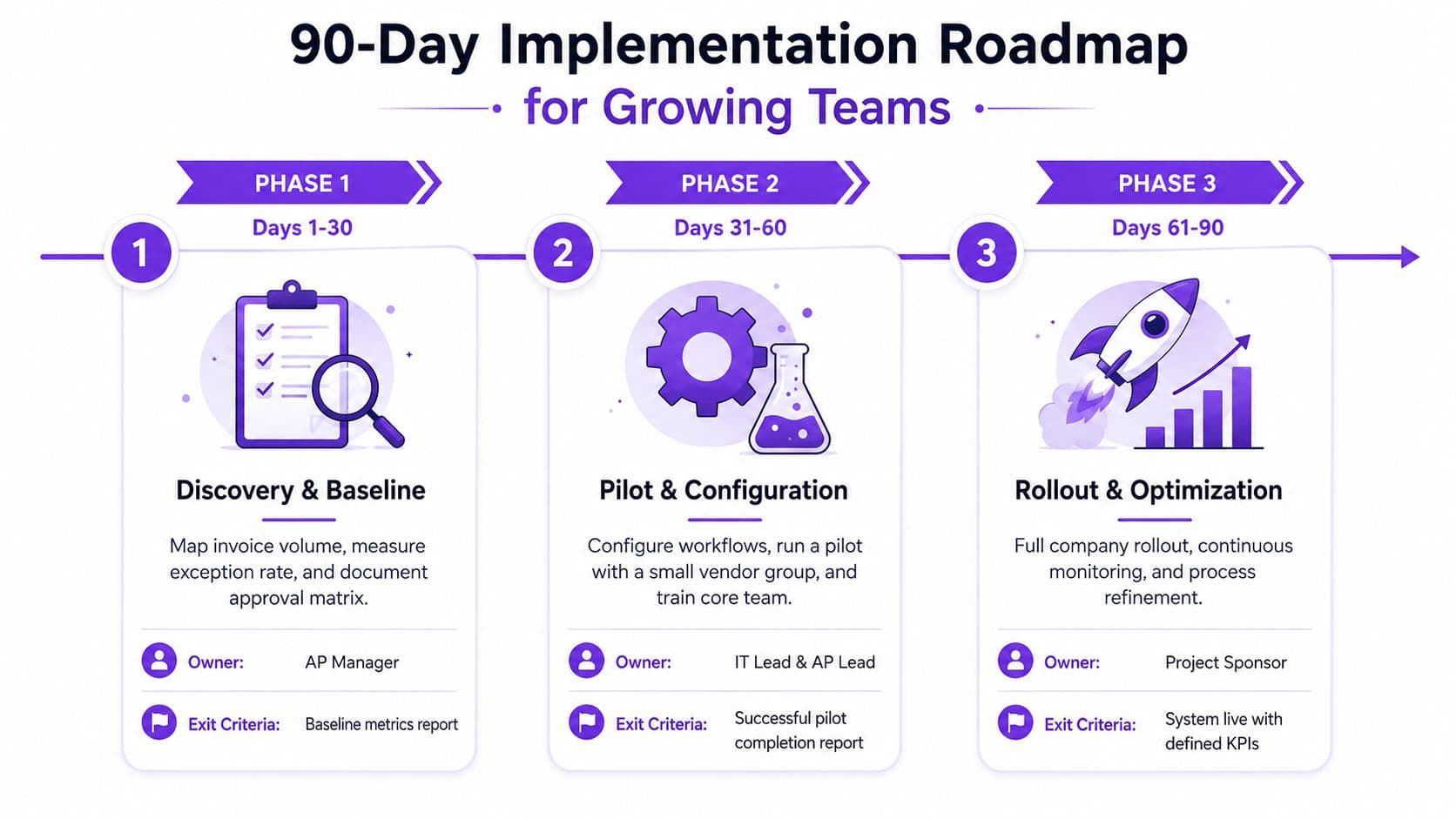
A controlled rollout beats a company-wide launch built on untested assumptions. Assign one owner per milestone, define an exit gate, and make the team prove that the workflow works before adding more entities or invoice types.
Days 1 to 30
The controller owns the baseline. The AP lead maps invoice volume, intake channels, current exception categories, approval paths, and time spent on rework. IT and security document ERP connections, user roles, payment permissions, and evidence requirements. Procurement reviews vendor records and PO discipline.
Shortlist three vendors only after documenting the current process. Your exit criterion is a baseline report that includes invoice volume, field-level extraction accuracy, exception rate, cycle time, cost per invoice, and duplicate-payment controls.
Days 31 to 60
The AP lead and IT lead run one end-to-end pilot. Use one entity, one invoice type, or a small vendor group. Validate three-way matching on a 200-invoice sample, score GL coding accuracy, test approval notifications, and reconcile posted records to the ERP.
The pilot must meet two gates before rollout. GL coding accuracy must stay above 95%, and the exception rate must remain below 15%. If either condition fails, fix vendor data, coding rules, tolerances, or routing. Don't advance because the launch date is convenient.
Days 61 to 90
The project sponsor owns scale. Expand to remaining entities, enable automated approval routing, cut over vendor payments, and train finance, budget owners, procurement, and security administrators. Keep a 30-day hypercare window with daily queue reviews at first, then move to a regular KPI cadence once the process stabilizes.
| Milestone | Primary Owner | Exit Criterion |
|---|---|---|
| Discovery and baseline | Controller and AP lead | Baseline metrics report |
| Pilot and configuration | IT lead and AP lead | Successful pilot report |
| Rollout and optimization | Project sponsor | System live with defined KPIs |
Before go-live, require UAT sign-off, a cutover plan, payment fallback procedures, role review, vendor communication, and documented support ownership. A workflow that works in a demo but fails during the first close isn't ready.
Vendor Selection Checklist and ROI Math That Holds Up
Choose three vendors and force all three through the same exception-heavy evaluation. More demos create noise. Score the work your team needs, with exception handling weighted above extraction polish. Many teams already capture invoices adequately. The larger loss comes from invoices stranded in manual queues, so the platform must improve approvals, master data, matching, and recovery paths.
| Criterion | Weight |
|---|---|
| ERP integration depth | 25% |
| Exception handling and approval configurability | 20% |
| SOC 2 and audit-trail strength | 15% |
| Total cost, including per-invoice fees | 15% |
| Implementation timeline references | 15% |
| Customer support responsiveness | 10% |
Require a live workflow demonstration. The invoice should move from intake through extraction, matching, approval, posting, and payment-status synchronization. Give the vendor five failure cases: a missing PO, a duplicate, a changed bank account, an absent approver, and a failed ERP sync. Ask who receives each exception, what evidence is retained, and how the item returns to the workflow. A clean PDF demo evaluates the least important part of AP automation.
| Criterion | Vendor A | Vendor B | Vendor C |
|---|---|---|---|
| Integration model | Direct ERP connector | Middleware / iPaaS | Standalone AP platform |
| Exception configuration | Basic rules | Advanced cross-system routing | Advanced AP queues |
| Audit trail | ERP-centered | Split across systems | Platform-centered with export |
| Total cost of ownership | Lower when bundled | Includes integration overhead | Includes platform and payment fees |
| Best fit | Single-ERP SaaS | Multi-entity or post-acquisition | Procurement-heavy or high-churn vendors |
Worked ROI calculation
Use a fully loaded model, not the vendor's license quote. For a business processing 500 vendor invoices monthly at $4.50 per invoice, current AP labor costs are:
- 500 invoices × $4.50 = $2,250 monthly
- $2,250 × 12 months = $27,000 annually
Assume automation reduces internal processing cost to $1.20 per invoice and adds a $1.50 platform fee per invoice:
- 500 invoices × ($1.20 + $1.50) = $1,350 monthly
- $1,350 × 12 months = $16,200 annually
- $27,000 minus $16,200 = $10,800 annual savings
These figures describe the stated scenario, not a universal result. They exclude one-time implementation costs of $15,000 to $25,000. Simple payback is therefore:
- At $15,000 implementation cost, $15,000 ÷ $10,800 × 12 = 16.7 months
- At $25,000 implementation cost, $25,000 ÷ $10,800 × 12 = 27.8 months
This model does not support an 18 to 22 month payback at the stated volume and cost structure. Show every assumption plainly. At more than 1,000 monthly invoices, the same plan can compress payback below 12 months if fixed implementation costs and operating assumptions remain controlled. Below 200 monthly invoices, processing labor alone rarely supports automation, and outsourced bookkeeping may be the more rational choice.
Use the fully loaded cost-per-invoice benchmark to structure the model. Count exception work, rejected invoices, duplicates, rework, software, third-party services, and payment penalties. Compare your current fully loaded result with the specified automated benchmark of $1.50 to $2.50 per invoice. If the gap exceeds $3 per invoice and monthly volume clears 400, begin vendor evaluation this quarter.
Warning signs and operating KPIs
Invoice processing automation deserves investment when several of these conditions appear:
- Cycle time: Invoice processing takes more than 12 days.
- Duplicate payments: The duplicate-payment rate exceeds 0.5%.
- Exception aging: The exception queue is older than 14 days.
- Controller capacity: The controller spends more than 30% of working time on AP tasks.
- Audit evidence: Auditors find missing approver evidence.
Assign one owner, one target, and one review cadence to every KPI:
| KPI | Owner | Target | Review Cadence |
|---|---|---|---|
| Invoice cycle time | AP lead | Set from baseline and improve toward top-quartile performance | Weekly |
| Straight-through processing rate | Automation owner | Increase without weakening controls | Weekly |
| Exception resolution time | Controller | Reduce aging by category | Weekly |
| Cost per invoice processed | Finance operations | Track fully loaded cost | Monthly |
| Duplicate payment rate | Controller | Drive toward zero confirmed duplicates | Monthly |
Pull the last 90 days of AP data. Calculate fully loaded cost per invoice, isolate exception volume and rework, and compare the result with the automated benchmark. If the volume and gap tests pass, put three vendors through the same failure scenarios. Select the platform that strengthens control and resolves exceptions, not the one with the prettiest extraction score.
Jumpstart Partners offers AP and payment-system setup for growing SaaS, agency, and professional services teams, including platform selection, workflow configuration, approval design, invoice capture, and synchronization with QuickBooks, Xero, and NetSuite. Visit Jumpstart Partners to discuss current AP data, exception queues, ERP integration, and implementation planning.