Financial Operations
Accounts Payable Automation QuickBooks: A Founder's Guide
Set up accounts payable automation QuickBooks with confidence. Setup steps, workflow design, ROI math, and the controls investors actually want to see.
ByJumpstart Partners, CPA, QuickBooks ProAdvisor
··18 min readAutomating bill entry doesn't mean you've controlled spending. Ramp's explanation of QuickBooks AP automation reports a 57% reduction in manual bill-entry work among QuickBooks customers using automation tools, while identifying gaps in native three-way matching, line-level price validation, and anomaly detection. You can eliminate typing and still pay an incorrect invoice.
For founders and finance leaders running $500K–$20M businesses, the right question isn't which app connects to QuickBooks. It's whether your workflow proves what you owe, who approved it, and why cash should leave your bank account. Treat accounts payable automation for QuickBooks as control design, then buy software to execute that design.
Table of Contents
- Why Manual AP Is Quietly Costing You More Than You Think
- The 30-Day Baseline That Predicts Whether AP Automation Will Pay Off
- Designing the QuickBooks Spine Before You Buy Any AP Tool
- Choosing AP Automation Add-Ons by What They Actually Control
- The ROI Math and Migration Costs Nobody Quotes You
- Red Flags Investors and Auditors Look For in QuickBooks AP
- Your 30-60-90 Day Plan and When to Bring in a Partner
Why Manual AP Is Quietly Costing You More Than You Think
Your bookkeeper's invoice-entry time isn't your full AP cost. You also pay people to locate supporting documents, chase approvals, resolve vendor questions, correct coding, and explain discrepancies during close. A cheap-looking manual workflow becomes expensive when finance repeatedly handles the same obligation.
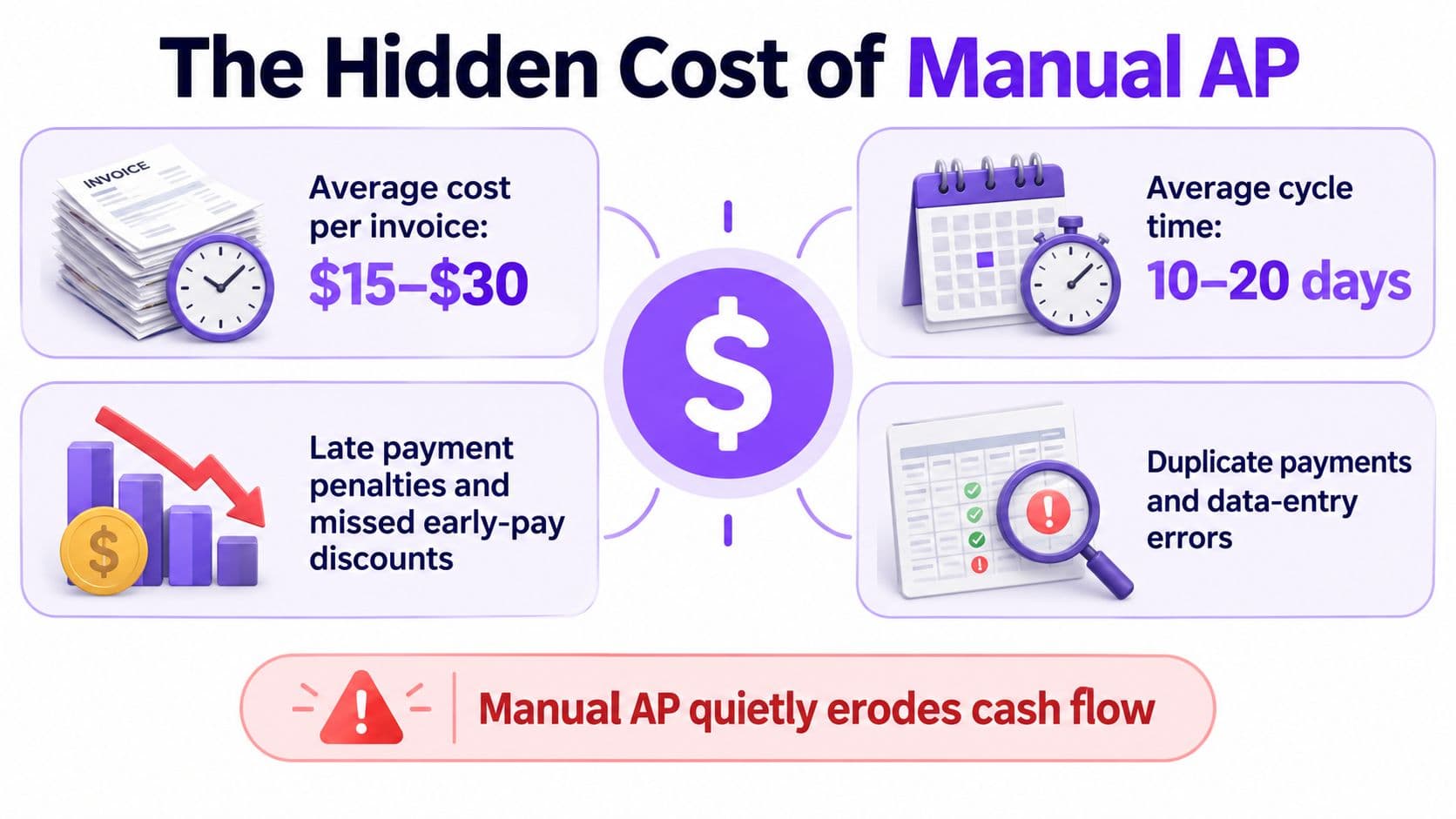
Orb's invoice-processing benchmark summary reports $9.40 per invoice across average operations, $2.78 for best-in-class teams, and $12.88–$19.83 in manual or lagging environments; processing times span 17.4 days for paper-heavy workflows, 9.2 days across the broader industry, and 3.1 days for best-in-class organizations. These are directional benchmarks, not a price quote for your company.
Compare the whole workflow
| Operating condition | Where your team spends effort | What you should change |
|---|---|---|
| Paper-heavy intake | Finding invoices and re-entering details | Centralize capture |
| Scattered approvals | Chasing managers through email | Assign owners and escalation rules |
| Inconsistent coding | Repairing expense and project classifications | Define coding rules before synchronization |
| Unclear payment status | Answering vendors and checking bank activity | Establish a reconciled payment record |
The infographic highlights the cost categories you should investigate. Use the sourced benchmarks above, rather than the graphic's illustrative ranges, for financial planning.
Faster approval isn't faster payment
A shorter processing cycle gives you an accurate payable balance sooner. It doesn't require you to release cash sooner. Your controller should approve valid obligations promptly, then schedule payment according to terms, liquidity, and any economically worthwhile discount.
For a SaaS company, that means visibility into recurring software and contractor obligations before forecasting cash. For an agency, it means knowing which subcontractor costs belong to which client engagement before reporting project profitability.
Duplicate and unauthorized payments create a different problem: they represent cash leakage, not administrative inefficiency. Don't bury them inside a generic productivity estimate. Track losses, recoveries, and remediation effort separately.
Practical rule: Automate the movement of information. Keep the decision to release cash tied to evidence and authority.
When you map the process, examine handoffs outside accounting too. The Everglow Prosperity automation overview is a useful companion for thinking about cross-functional automation, rather than treating invoice capture as an isolated bookkeeping task.
My recommendation: evaluate automation when bill handling regularly consumes finance capacity or interrupts the founder. But fix ownership before buying an add-on. Otherwise, you'll pay software fees while your team continues chasing the same missing decisions.
The 30-Day Baseline That Predicts Whether AP Automation Will Pay Off
Don't accept a vendor's savings calculator as your business case. Build a 30-day baseline covering volume, handling time, approval delays, exceptions, payment reliability, and processing cost, following the implementation approach described in Stampli's AP automation ROI guide, which also cites 6,082 versus 23,333 invoices per FTE annually, manual versus optimized automated processes, and invoice error rates of 2% versus 0.8%.
Those figures describe operating outcomes, not guaranteed software performance. Your baseline must reveal what your people do.
Baseline Metrics That Predict AP Automation ROI
| Metric | Where to Find It | Manual Benchmark | Automated Benchmark |
|---|---|---|---|
| Invoice volume | QuickBooks bill activity, checked against intake records | Your received-invoice count | Same scope and definition |
| Minutes per invoice | Time log covering entry, review, and follow-up | Your current handling time | Pilot handling time, including exceptions |
| Exception rate | Approval log and unresolved AP queue | Share requiring intervention | Track separately from capture accuracy |
| Duplicate or error rate | Corrections, credits, payment investigations | Your confirmed incidents | Confirmed incidents after rollout |
| Approval cycle time | Receipt and approval timestamps | Current elapsed time | Pilot elapsed time |
| On-time payment rate | Due dates compared with payment records | Current payment reliability | Post-pilot payment reliability |
QuickBooks gives you recorded bills, balances, and transaction activity. It won't reveal every invoice waiting in someone's inbox. Compare the ledger with your intake channel so your denominator includes received invoices, not just successfully posted ones.
Use an accounts payable aging review to distinguish overdue obligations from invoices still awaiting investigation. Record why each unresolved item remains open.
Turn effort into a budget
Take a hypothetical planning example, not a customer result: 600 invoices per month × 14 minutes per invoice = 8,400 minutes, or 140 hours. That total includes handling effort only if your time log includes vendor emails, approval chasing, recoding, and payment-status checks.
Multiply those hours by your actual fully loaded labor cost. Then subtract the labor that remains after implementation, software charges, payment fees, and reconciliation effort. The remainder is your operating benefit, not the entire existing labor bill.
- Log interruptions: Record vendor inquiries and manager follow-ups against the invoice that caused them.
- Classify exceptions: Separate missing documentation, incorrect coding, disputed charges, and integration failures.
- Record ownership: Every unresolved invoice needs a named decision-maker, not a shared inbox alone.
A clerical bottleneck shows up as repetitive handling of otherwise valid invoices. A control gap shows up as missing authority, unsupported spend, or uncertain payment status. Software can address the former directly; the latter requires management decisions.
Give vendors this baseline and require a pilot report using the same definitions. Don't let “accuracy” mean only correctly extracted text.
Designing the QuickBooks Spine Before You Buy Any AP Tool
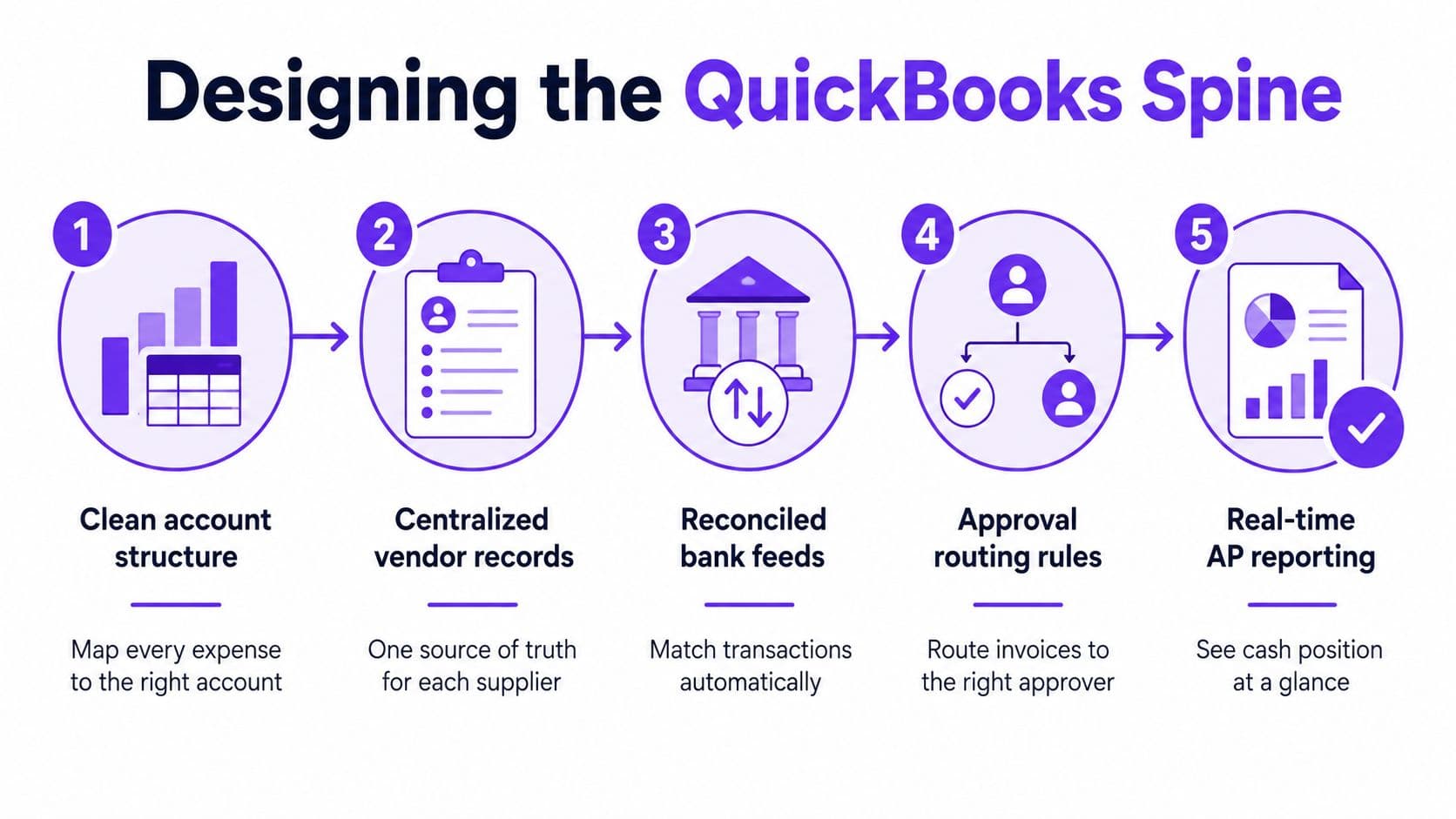
QuickBooks should remain your system of record. Your AP application should extend the ledger, not establish a competing version of vendors, bills, or payment status.
Start with your chart of accounts. Remove ambiguous coding choices, define expense-account ownership, and decide how you'll use classes, locations, and projects. For an agency, project attribution deserves explicit rules; for SaaS, recurring subscriptions and contractor expenses need consistent treatment.
The workflow diagram shows the foundation to establish before connecting another application.
Establish ownership at every handoff
Amazon Business's AP process guidance supports a control-centered implementation: normalize vendor records, define approval matrices, apply duplicate screening, preserve event history, and reconcile representative test transactions before production release. Use that approach to assign responsibilities explicitly.
| Handoff | Required decision | Accountable owner |
|---|---|---|
| Capture | Is the invoice complete and associated with the correct vendor? | AP operator |
| Coding | Which entity, account, department, or project owns the cost? | Finance reviewer |
| Approval | Was the obligation authorized and supported? | Budget owner |
| Payment | Should approved cash leave now, through the verified destination? | Authorized payer |
| Reconciliation | Do the bill, payment, and ledger agree? | Independent reconciler |
Normalize legal names, unique vendor identifiers, remit-to details, and tax information where applicable. Don't let automatic vendor creation multiply records for the same supplier. As a related resource on the onboarding stage, review vendor onboarding with FIS payables; your objective is a verified supplier record before payment setup.
Use bills for ordinary vendor obligations rather than relying on miscellaneous journal entries to represent invoice activity. Reserve journals for documented accounting adjustments approved by the controller. Your reporting should retain a clear connection between the supplier obligation and its settlement.
Make approval independent of payment
Separate vendor maintenance, bill entry, approval, payment release, and bank reconciliation. Require dual approval for high-value payment runs, with thresholds based on your cash exposure and authority policy.
The founder shouldn't approve everything. The founder should approve the policy, assign accountable delegates, and review exceptions that exceed those delegates' authority.
Test the workflow in a sandbox or duplicated company file using ordinary invoices alongside credit memos, partial payments, voids, currency transactions, and month-end cutoffs. Check whether attachments survive, coding remains intact, and rejected bills stay blocked.
Don't launch because the connection succeeds. Launch when the resulting ledger and payment records reconcile, and your team can explain each exception without improvising.
Choosing AP Automation Add-Ons by What They Actually Control
A feature checklist isn't a control assessment. “Approvals,” “sync,” and “duplicate detection” are labels until a vendor demonstrates their behavior with your invoices.
QuickBooks native is enough when your tested plan supports your approval policy, your spend is straightforward, and documented human review covers the matching gaps identified earlier. Buy an add-on when you need a specific control that your current configuration can't enforce.
AP Automation Tools Compared by Control Point
The matrix below is a demo scorecard, not an unsupported product ranking. Each cell identifies what you should require the vendor to prove.
| Tool | Capture & OCR | Approval Routing | Payment Rails | QuickBooks Sync | Best Fit |
|---|---|---|---|---|---|
| Bill.com | Test extraction and duplicate blocking | Demonstrate authority thresholds and overrides | Verify methods, fees, and release controls | Trace bills, credits, and payment status | Consider for an AP-centered workflow |
| Ramp | Test coding and invoice evidence | Demonstrate department and amount rules | Verify permissions and payment destinations | Test attachments and status changes | Consider when reviewing AP alongside wider spend |
| Brex | Test your invoice formats | Show separate approver and payer permissions | Verify supported destinations and costs | Prove account and project mapping | Evaluate where an existing spend relationship matters |
| Stampli | Test line capture and exception handling | Demonstrate review history and escalation | Establish who authorizes release | Trace corrections back to the ledger | Consider when invoice review is the main bottleneck |
| Melio | Verify capture scope in the quoted plan | Test approval restrictions | Demonstrate settlement and cancellation behavior | Check payment-to-bill matching | Evaluate for a narrowly defined payment need |
| AvidXchange | Test supplier-document variation | Demonstrate policy enforcement | Verify vendor coverage and controls | Test your exact QuickBooks environment | Consider for a more involved payables implementation |
| QuickBooks Advanced native features | Test available capture functionality | Demonstrate your actual approval chain | Verify the associated payment configuration | Inspect the resulting ledger directly | Start here when requirements remain simple |
These are starting hypotheses for evaluation, not claims that a named product satisfies every requirement. Demand written confirmation of plan coverage and a live test.
Score evidence, not sales language
Mark each requirement pass, conditional, or fail. A conditional result must identify the manual workaround, its owner, and its cost. Give payment security and accounting integrity veto power over an attractive interface.
Your three-way matching requirements should reflect the obligation. An agency can require contract terms and deliverable acceptance; a goods-based business needs purchasing and receiving evidence. Ask vendors to demonstrate discrepancies, not just clean invoices.
For a straightforward SaaS workflow, avoid buying procurement complexity you won't use. For a project-heavy agency, prioritize attribution and approval ownership. For an e-commerce business paying suppliers across currencies, scrutinize receiving evidence, currency treatment, and settlement visibility.
“I assumed I would have to choose between speed and control. What I found is that you can have both. A well-designed system takes friction out, for the finance function and for everyone else.”
Justin Webster, CFO, Denver Broncos, quoted in Ramp's QuickBooks AP automation article linked above.
Use the invoice automation ROI benchmarks from Cyndra as a companion resource when building evaluation questions. Base your purchase decision on demonstrated controls and your measured economics, not a generalized savings promise.
The ROI Math and Migration Costs Nobody Quotes You
A low subscription price does not make an AP system inexpensive. The costly setup is one that leaves your controller repairing transactions after every sync. Measure the full operating cost, not just the software fee.
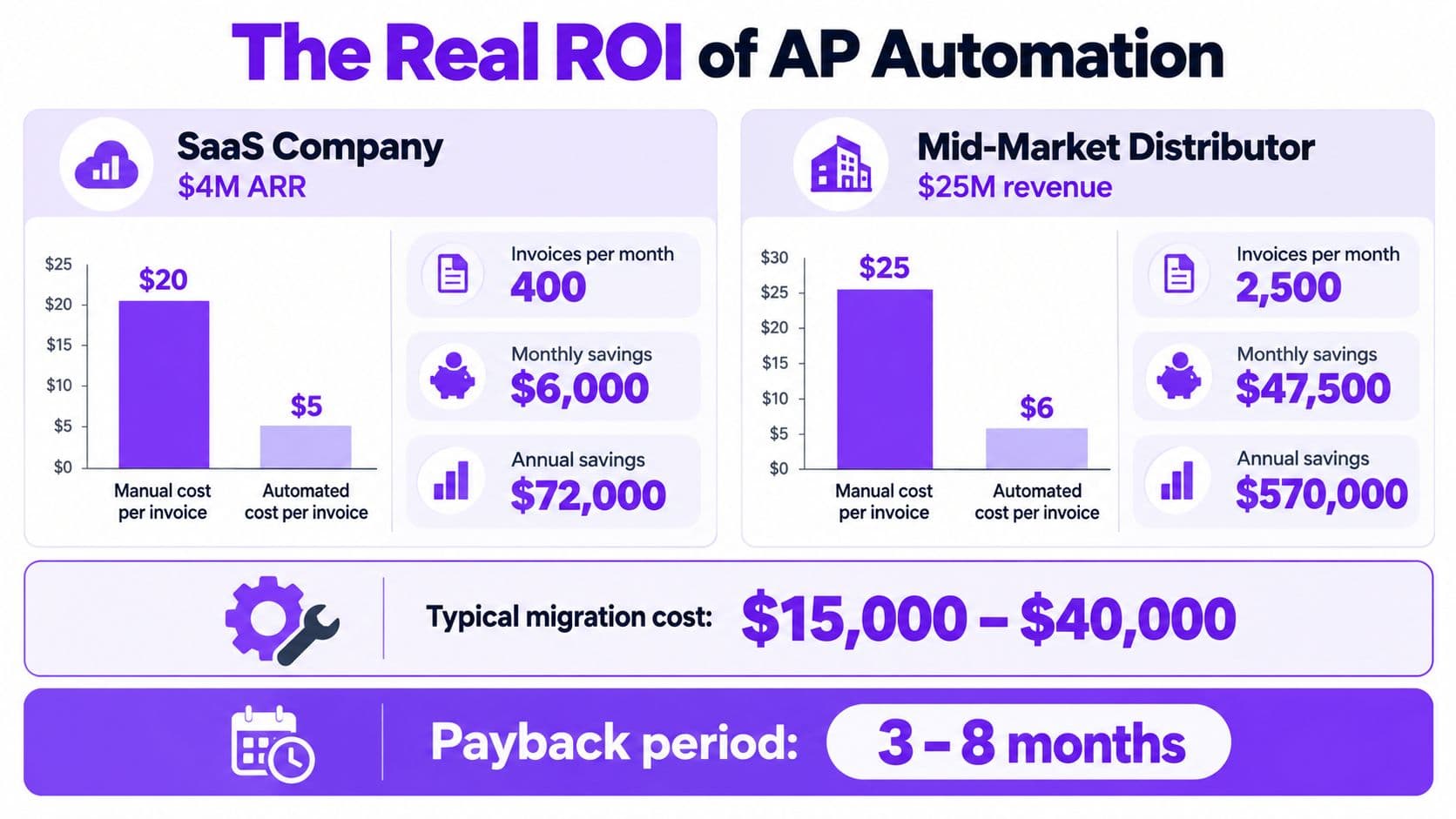
Use the infographic to identify cost categories, not as evidence for its dollar amounts or payback claims. Build your investment case from your own implementation quote and the published cost benchmarks established earlier.
Calculate gross opportunity before claiming net savings
Using the Orb benchmarks cited earlier, the average-to-best-in-class processing-cost difference is $9.40 − $2.78 = $6.62 per invoice. These planning profiles are hypothetical examples, not documented customer outcomes.
| Planning profile | Worked calculation using the earlier benchmarks | Gross annual processing-cost opportunity |
|---|---|---|
| SaaS business with $4M ARR and 400 monthly invoices | 400 × 12 × $6.62 | $31,776 |
| Digital agency with $12M revenue and 1,000 monthly invoices | 1,000 × 12 × $6.62 | $79,440 |
Those figures are calculated opportunities, not guaranteed cash savings. If you keep the same team, the gain may be capacity for forecasting, collections, or financial review. Count payroll savings only when you avoid or remove an actual cost.
The QuickBooks accounts payable overview reports that 52% of AP teams spend more than 10 hours weekly processing invoices, while 60% still manually key invoices. These figures describe teams broadly. Do not treat them as a forecast of any one employee's workload.
Budget for the transition
| Cost category | What your quote should include |
|---|---|
| Design and cleanup | Account mapping, vendor deduplication, approval-policy documentation |
| Historical transactions | Treatment of open bills, credits, and payments in flight |
| Implementation | Configuration, testing, training, and cutover support |
| Recurring platform costs | Subscription, users, transaction charges, and payment fees |
| Retained labor | Exception resolution, vendor changes, reconciliation, and supervision |
Subtract recurring costs and retained labor from gross savings. Then divide implementation cost by the resulting monthly net benefit to estimate payback. Exclude duplicate-payment prevention and discounts unless your baseline supports those benefits.
Use this AP automation benefits assessment to check the model against operating outcomes. Keep the decision anchored in documented costs and pilot results, not a vendor's savings promise.
The accompanying video offers another way to review the topic. Your approval decision should still rest on the documented model and pilot results.
Stress-test the model with costly exceptions and a demanding adoption period. If the investment only works when nobody intervenes, the business case is too fragile.
Red Flags Investors and Auditors Look For in QuickBooks AP
Prepare your AP records so an independent reviewer can reconstruct the transaction without relying on the founder's memory. A clean payable balance isn't enough if nobody can establish the supporting evidence or payment authority.
The warning signs below are practical review priorities, not a claim that every auditor follows the same checklist. They expose places where your approval spine needs repair.
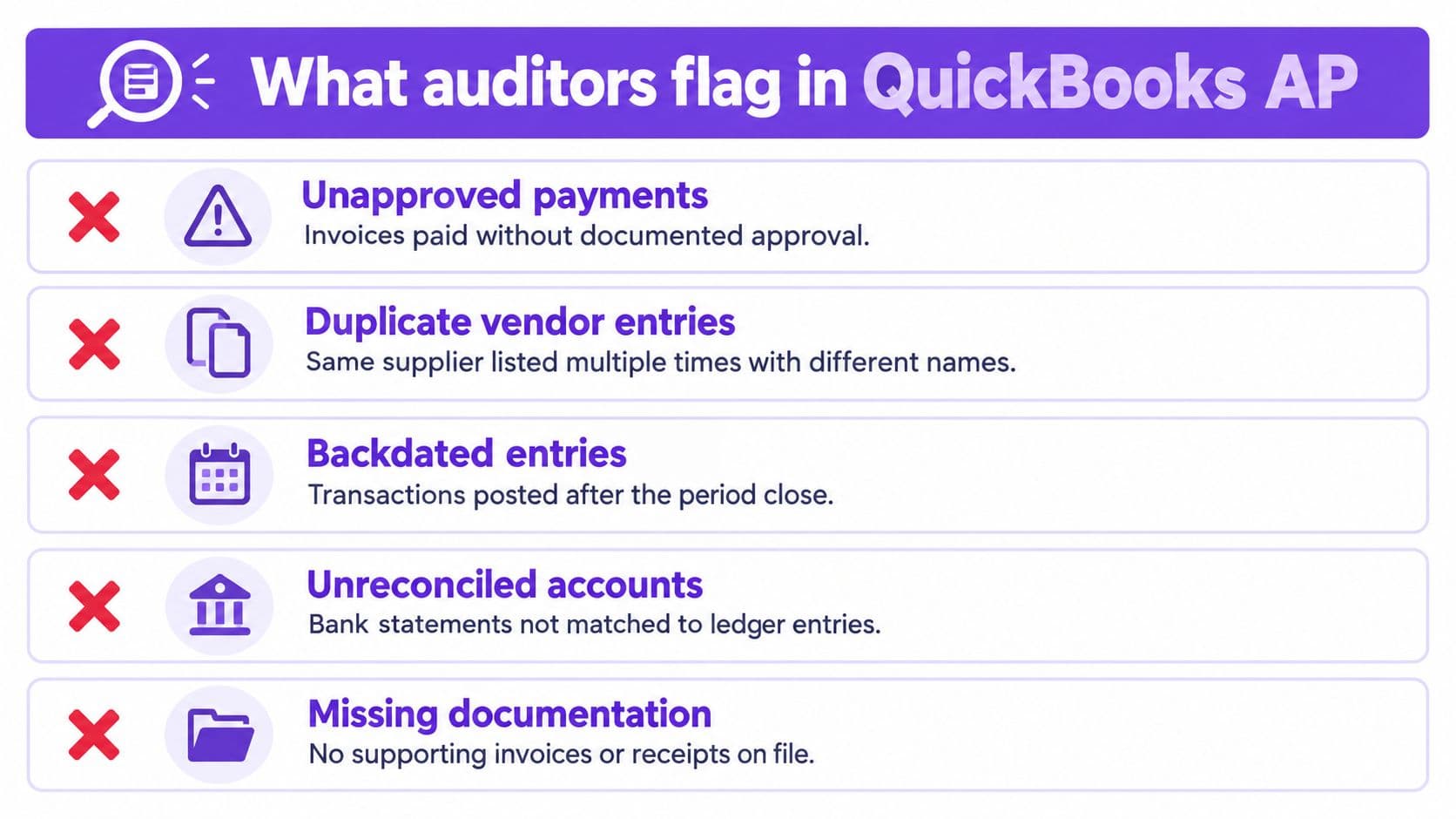
Pair every warning sign with a control
| Red flag | Required response |
|---|---|
| Vendor entries lack reliable identifiers | Assign controlled identifiers and investigate overlapping supplier records |
| Approval exists only in an email thread | Preserve approval identity, timestamp, evidence, and subsequent changes in the transaction history |
| Material spend lacks purchasing or acceptance evidence | Hold release until the responsible owner documents the obligation |
| Bank details changed without independent verification | Verify through a previously trusted contact channel and retain the record |
| Voids and reissues have no explanation | Require a documented reason and review the original payment's disposition |
| One person controls the entire transaction | Redesign access and introduce independent review |
An email can support a decision, but it shouldn't be the only place where your finance team can find that decision. The record must show which version of the invoice received approval and whether somebody changed it afterward.
Use segregation of duties to prevent a single person from creating a supplier, approving its invoice, releasing payment, and reconciling the bank. Where your team is small, assign an independent compensating review rather than pretending headcount constraints eliminate the risk.
A synced bill proves that systems exchanged data. It doesn't prove that management authorized the obligation.
Assemble a defensible review package
Your close package should connect the AP aging to the general ledger and explain reconciling items. Include sampled invoices with supporting documents, approval records, payment evidence, and logged vendor-detail changes.
- Explain adjustments: Document cutoffs, credits, voids, and reissues rather than leaving reviewers to infer their purpose.
- Retain evidence: Keep attachments and event histories accessible after staff changes or software migrations.
- Resolve differences: Assign an owner and resolution status to every unexplained balance.
Don't automate a broken control because diligence is approaching. Tighten the evidence trail first. Software can enforce a policy only after management defines it.
Your 30-60-90 Day Plan and When to Bring in a Partner
Run the rollout as a controlled finance project, not an application installation. Name an accountable owner, define release criteria, and give that person authority to stop the rollout when reconciliations fail.
Sequence the work around proof
| Period | Work to complete | Gate before advancing |
|---|---|---|
| Days 1–30 | Establish the baseline, clean vendor records, draft approval policy, and select a test environment | Finance approves the current-state map and target controls |
| Days 31–60 | Pilot one vendor class, reconcile every synced bill, and tune exception routing | Pilot transactions reconcile and users follow the policy |
| Days 61–90 | Expand volume and compare cycle time, exceptions, duplicates, and payment reliability with baseline | Controller signs off on operating performance and remaining issues |
Keep the pilot narrow enough to diagnose failures. Expanding an unreliable process only increases the number of transactions your team must repair.
Bring in an outsourced controller or bookkeeping partner when nobody internally owns both accounting design and implementation. That's particularly relevant when QuickBooks cleanup, historical bill treatment, or cash forecasting must happen before automation can work.
Buy accountability alongside capability
Ask prospective partners who will approve mappings, test payment scenarios, review exceptions, and sign off on reconciliations. Request the actual security documentation and service commitments rather than relying on phrases such as “audit-ready.”
A cash-flow planning project can be more urgent than another AP feature if you don't know which approved obligations you can fund. Likewise, account cleanup can yield more value than a complex approval engine posting into inconsistent books.
Your next action is concrete: export open payables, start the handling-time log, and write down who currently authorizes each stage. Use those records to scope the pilot and any external support. Don't buy software until you can name the control gap it must close.
Jumpstart Partners offers outsourced controller and bookkeeping support, QuickBooks cleanup, and AP automation implementation for growing SaaS companies, agencies, and professional services firms. Visit Jumpstart Partners to discuss a scoped project covering your approval workflow, QuickBooks synchronization, and reconciliation controls, and bring your AP aging and baseline records to the consultation.