Financial Operations
How to Create Invoices in QuickBooks: A Founder's Guide
Learn how to create invoices in QuickBooks beyond the basics. A founder's guide to customizing, automating, and managing AR for faster cash flow and compliance.
ByJumpstart Partners, CPA, QuickBooks ProAdvisor
··19 min readInvoicing isn't an admin chore. It's a cash collection system, a revenue reporting input, and a control point for every month-end close.
For growing businesses, the gap between a basic invoice and a disciplined AR process is expensive. Businesses that offer 3+ payment options collect payments 23-28% faster according to QuickBooks invoicing guidance. That difference changes your working capital, your forecast accuracy, and how much time your team spends chasing money instead of operating the business.
If you're trying to learn how to create invoices in QuickBooks, don't stop at the clicks. Build the process so invoices go out correctly, get paid without friction, and hold up under investor diligence, audit review, and internal reporting.
Your Invoicing Process Is Costing You More Than You Think
Most founders don't notice invoicing problems until cash gets tight.
The first symptom is usually delayed collections. The second is uglier. Finance starts working off bad data. Sales thinks a customer is current when AR shows an open balance. Your forecast assumes money is coming in this month, but the invoice went out late, had the wrong terms, or got rejected by the customer's AP team.
For businesses in the $500K-$20M range, that isn't a back-office nuisance. It affects hiring plans, vendor payments, and whether you're making decisions from actual receivables or wishful thinking. If cash is consistently later than expected, your forecast is wrong even if your revenue target looks fine on paper. That's why strong invoicing belongs inside a broader cash flow improvement plan, not a one-off bookkeeping task.
What poor invoicing actually breaks
| Business area | What goes wrong | Business impact |
|---|---|---|
| Cash flow | Invoices go out late or with payment friction | Collections slow down |
| Forecasting | Due dates and terms aren't entered consistently | Cash receipts become hard to predict |
| Revenue reporting | Service dates or line items are vague | Revenue recognition gets messy |
| Audit readiness | Support for invoices is inconsistent | Month-end reviews take longer |
| Executive time | Founders chase payments manually | Leadership gets pulled into collections |
Practical rule: If your invoice process depends on one person remembering what to type each time, you don't have a process. You have a recurring risk.
A lot of teams assume invoicing problems are small because each individual error looks small. A missing PO number. A vague line item. A payment recorded against the wrong customer. Those issues stack up fast. By the time you feel the pain, the problem isn't invoice creation. It's AR management, collections discipline, and trust in your books.
The Core Workflow for Creating an Invoice in QuickBooks
QuickBooks Online uses a standardized 7-step workflow that lets businesses create professional invoices in minutes, consolidating customer selection, line items, dates, terms, and customization in one interface, as outlined in this QuickBooks invoice setup guide.
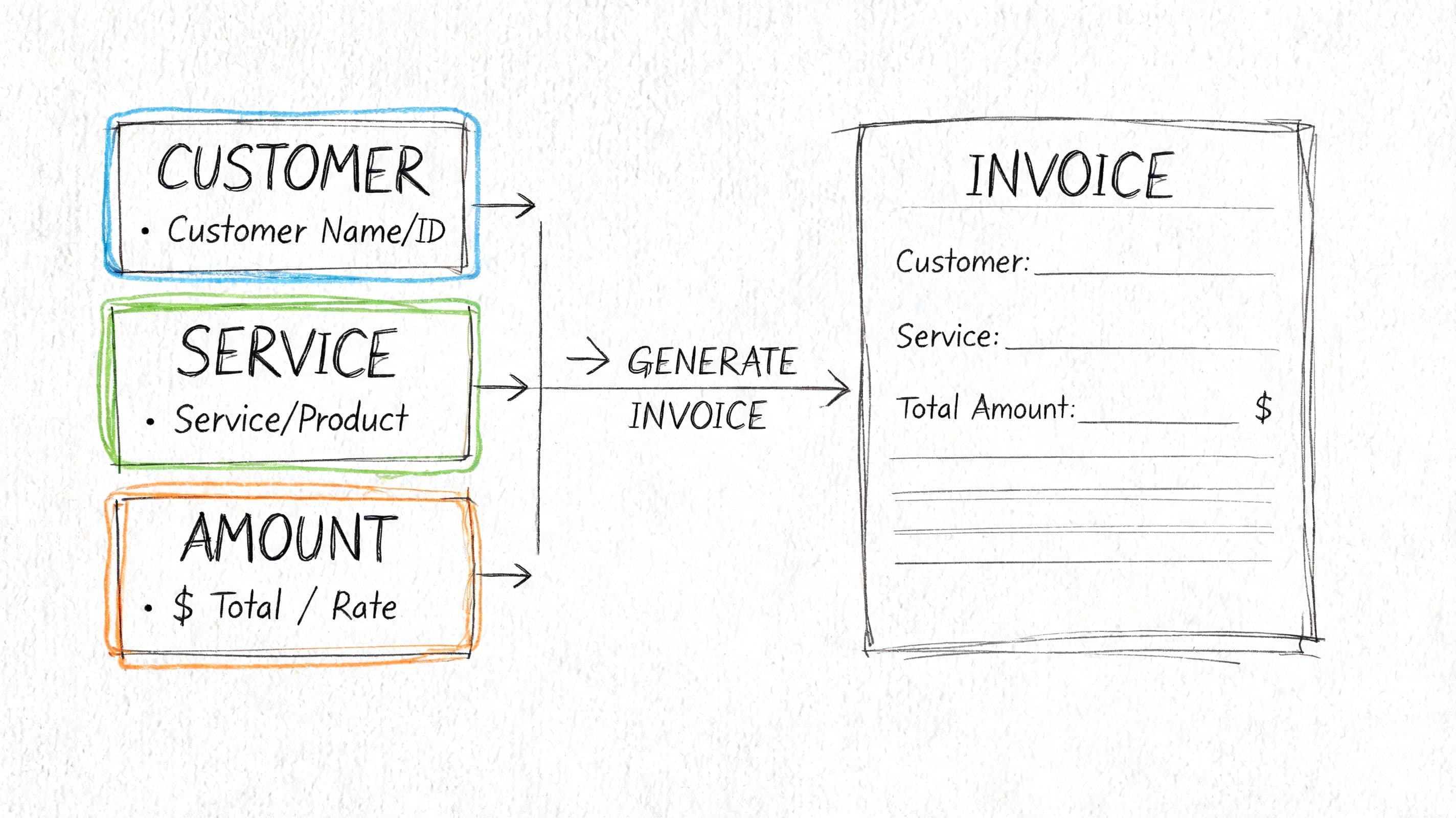
If you're serious about how to create invoices in QuickBooks the right way, treat each field as a financial data point, not just a blank to fill in.
Start with the right record
In QuickBooks Online, you begin with + Create, then choose Invoice. After that, select the customer from your database or create a new customer record.
This sounds simple, but it drives reporting quality. If your team creates duplicate customer records, AR aging becomes unreliable. If billing contacts live in someone's email instead of the customer profile, invoice delivery becomes inconsistent.
Before you send the first invoice, align your customer naming convention with the way you report revenue and receivables. That matters as much as your chart of accounts structure, because clean subledger data makes the general ledger easier to trust.
Get dates and terms right the first time
QuickBooks requires an invoice date and a due date. It also uses Net terminology in the Terms field to show how many days until payment is due.
Founders often blur operational and accounting dates. The invoice date is not a guess. It should line up with your billing policy. The due date shouldn't be whatever feels standard. It should match the customer contract. If your agreement says Net 15 and your invoice says Net 30, your collections process is weakened before the invoice is even sent.
Use this quick check:
- Invoice date should reflect your billing policy and support clean reporting.
- Due date should match contractual terms.
- Terms field should be consistent across similar customers.
- Service description should identify what was delivered, not just "monthly services."
Clean invoice data protects both cash flow and revenue recognition. Bad invoice data creates rework in AR and confusion in the close.
Build line items that support reporting
QuickBooks lets you add products or services from your catalog or create new items, then adjust quantities and rates. That's where profitability tracking starts.
If every invoice line says "services rendered," you lose visibility by client, service line, or project type. Founders then ask why gross margin is unclear. The answer is often in the invoice item setup, not just in the P&L.
A simple operating standard works well:
- Use product and service items consistently.
- Write descriptions that match the scope delivered.
- Separate billable phases or deliverables on distinct lines.
- Review rates before sending, especially for manually edited invoices.
If your team wants a useful outside explainer on standard invoice mechanics, this guide from Smart Receipts can help you Streamline your invoicing process without overcomplicating the basics.
Customize only what improves clarity
QuickBooks lets you change fonts, colors, logos, headers, footers, and terms and conditions. It remembers those choices for future invoices.
That memory is useful if you set the template well once. It becomes a problem if your first template is messy. Keep the design clean, but focus on clarity first. The customer's AP team doesn't pay faster because your invoice looks stylish. They pay faster when the invoice is easy to validate.
Customizing Your Invoice Template for Faster Payments
Most invoice template changes are cosmetic. A few materially affect whether you get paid on time.
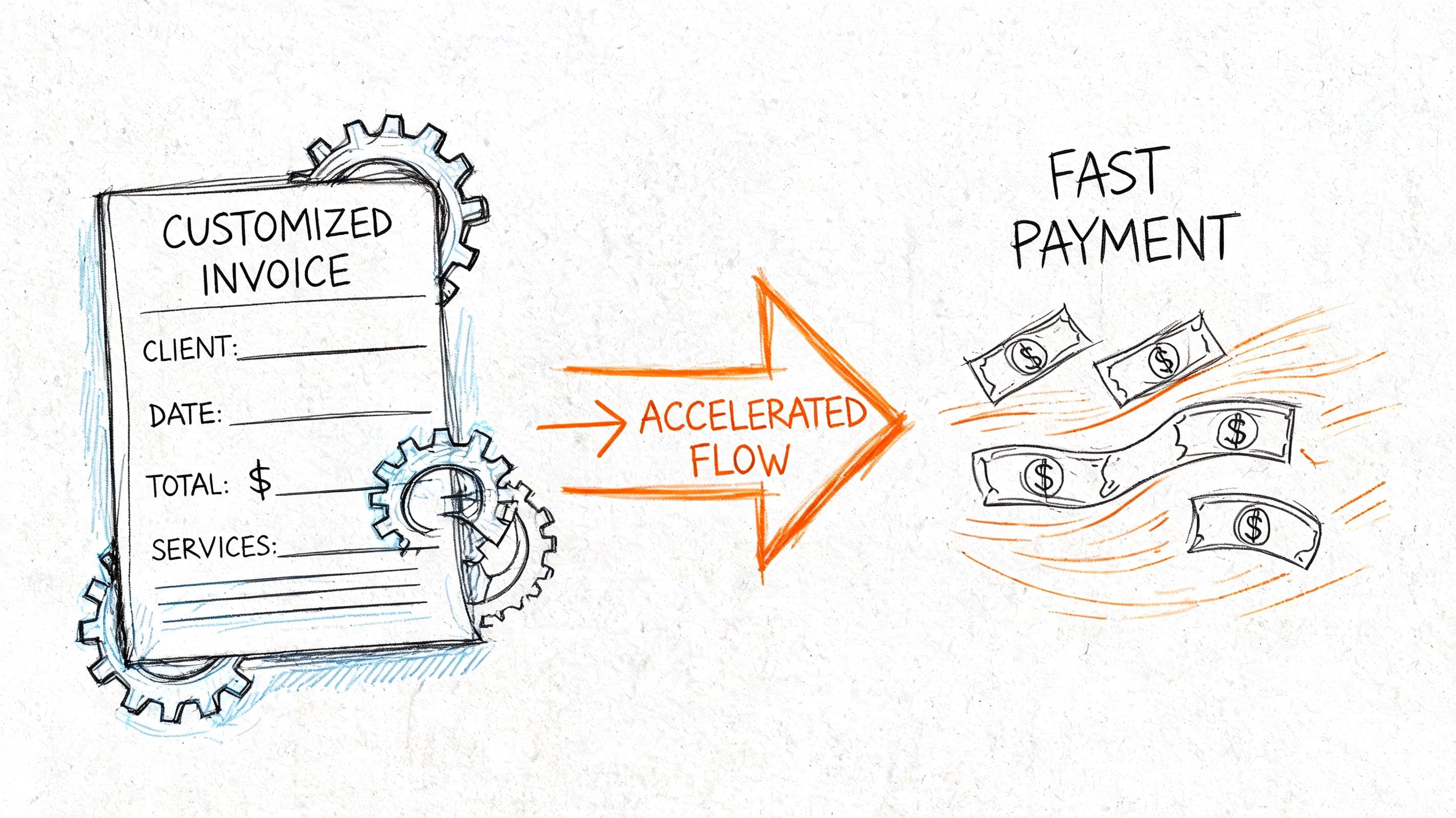
QuickBooks lets you customize invoice appearance by changing fonts, colors, logos, headers, footers, and terms. Use that flexibility to remove friction from payment approval. Don't use it to create a prettier version of a confusing invoice.
What belongs on a high-performance invoice
A good invoice answers the AP team's questions before they ask them.
| Template element | Why it matters | Common failure |
|---|---|---|
| Customer legal name | Prevents routing confusion | Nicknames or shortened names |
| Clear service description | Supports approval and dispute resolution | Vague monthly billing text |
| PO number field | Helps customers match invoice to procurement records | Missing PO causes rejection |
| Due date and terms | Sets expectations clearly | Terms buried in notes |
| Payment instructions | Reduces back-and-forth | Customer doesn't know how to pay |
| Contact for billing questions | Resolves holds quickly | Invoice goes unanswered in a shared inbox |
"The invoice should make approval easy. If AP has to email you to understand what they're paying for, you've already slowed collection."
That's the standard I use with founders. If your customer has to interpret the invoice, your process is weak.
Customize for the customer's workflow
The right template depends on who pays you.
A SaaS invoice usually needs subscription period clarity. An agency invoice often needs campaign, milestone, or retainer detail. A professional services invoice may need consultant names, hours, or workstream descriptions. The design isn't the point. The approval path is.
QuickBooks is strongest when you standardize one template per billing pattern, not one template for every customer edge case. That's also where teams start to automate invoice sending more reliably, because the email workflow works better when the underlying invoice is already consistent.
Here's a short walkthrough if you want to see the mechanics in action:
What doesn't work
Founders often assume invoice disputes come from pricing disagreements. In practice, many disputes start with formatting and missing context.
Watch for these template mistakes:
- Overloaded footers with legal text that hides basic payment instructions.
- Generic line items that don't map to contract language.
- Missing remittance details when the customer pays outside embedded payment links.
- Inconsistent branding and sender names that make invoices look unofficial.
A strong template reduces friction. It doesn't replace collections discipline, but it stops avoidable delays before they start.
Automating AR with Recurring Invoices and Payment Options
For a company billing $120,000 per month, collecting 14 days sooner can bring roughly $56,000 forward. That is enough to cover a payroll cycle, reduce draws on a line of credit, or avoid delaying vendor payments. For businesses between $500K and $20M, invoice automation is a cash flow control, not an admin convenience.
Recurring billing is usually the first AR process that breaks under growth. A SaaS company with monthly subscriptions, an agency with fixed retainers, and an e-commerce business with wholesale reorders all create the same pressure point. Someone on the team is rebuilding invoices that should have been standardized months ago.
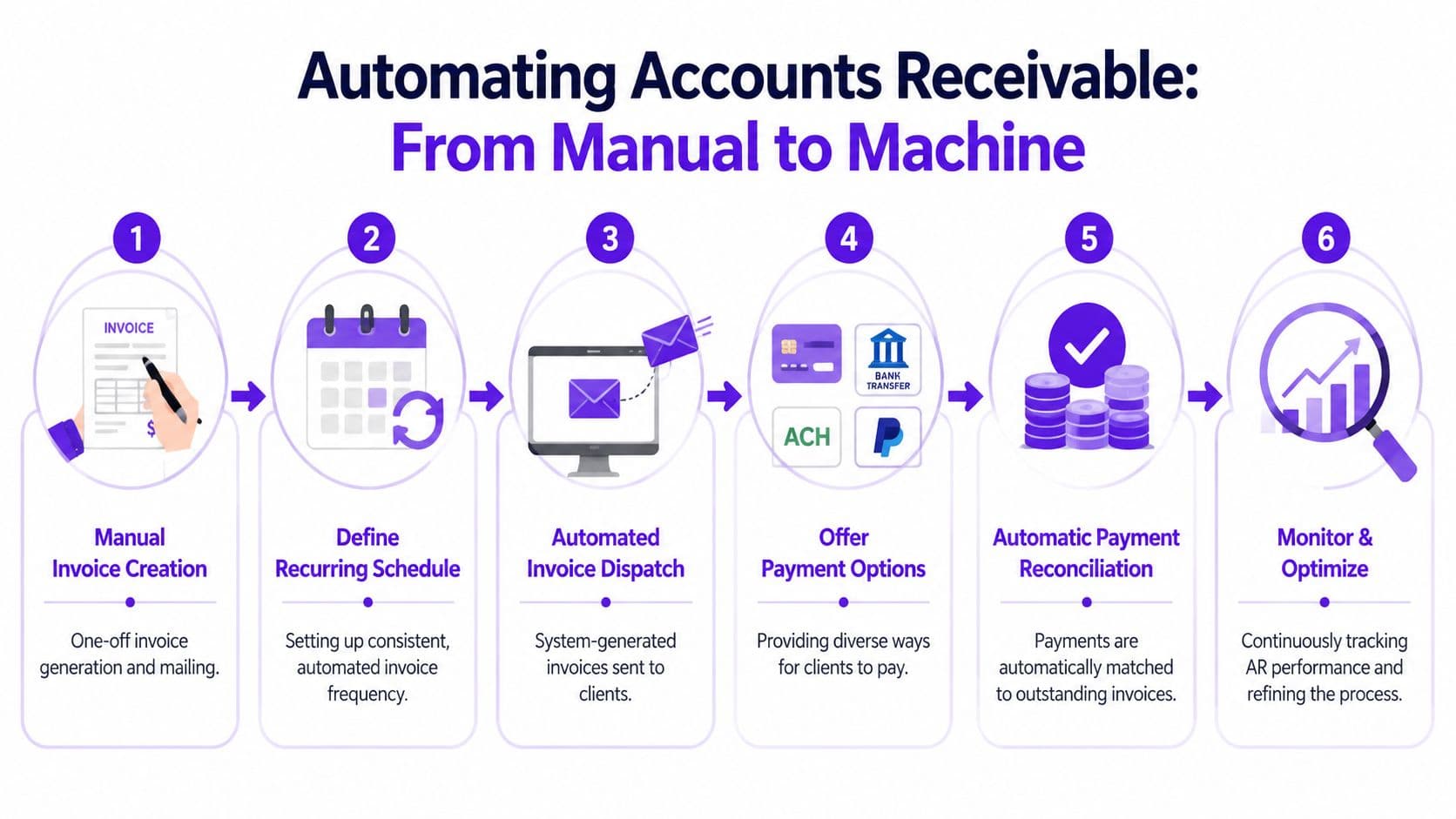
QuickBooks can automate a large part of that work through recurring invoices, reminders, and online payment methods. Used well, that setup supports disciplined accounts receivable management and gives finance a cleaner audit trail for what was billed, when it was sent, and how it was collected.
Where automation matters
The strongest QuickBooks setup removes friction at the exact point a customer is ready to pay. If the invoice arrives on time, includes the right service period, and offers card, ACH, or wallet payment options, cash comes in faster. If any one of those pieces is missing, your DSO stretches.
QuickBooks Online supports payment methods such as card payments through QuickBooks Payments, ACH transfers, and PayPal. Earlier QuickBooks guidance notes that businesses offering more than one payment path tend to collect faster than teams relying on checks or a single bank transfer option. In practice, I see the same pattern. The easier you make payment, the less often an approved invoice sits in someone else's AP queue for another week.
That matters even more for founders managing uneven cash cycles. A two-week improvement in collections can change whether you fund growth from operating cash or from short-term debt.
A worked cash flow example
Assume your business invoices $120,000 per month on Net 30 terms.
If customers pay in 42 days, your cash conversion on receivables is slow enough to create recurring pressure. If better invoice timing, reminders, and payment options bring that down to 28 days, you get cash 14 days earlier.
A practical estimate looks like this:
- Monthly invoicing = $120,000
- Days accelerated = 14
- Daily invoicing value approximation = $120,000 / 30 = $4,000
- Cash received earlier = 14 × $4,000 = $56,000
That does not increase revenue. It improves timing.
For SaaS, that can fund customer support and hosting costs tied to active subscriptions. For agencies, it reduces the gap between payroll and client collections. For e-commerce operators with wholesale invoices, it can cover inventory deposits without squeezing the rest of the business.
Set up recurring invoices with controls
Recurring invoices work well for subscriptions, retainers, maintenance agreements, and any fixed-fee engagement with stable terms. They also create risk if the underlying invoice is wrong, because automation repeats the same mistake every cycle.
Use this setup sequence:
- Build the source invoice correctly. Confirm customer name, billing contact, item mapping, tax treatment, terms, and service dates.
- Set the recurrence rule. Monthly is common, but billing should follow the contract, not team habit.
- Choose the right automation type. Some invoices should auto-send. Others should save as drafts for review first, especially if usage, headcount, or pass-through costs can change.
- Enable online payment methods. Give customers a direct path to pay from the invoice.
- Turn on reminders. A consistent reminder cadence cuts down on manual follow-up.
- Review the first one or two billing cycles. Catch template errors before they multiply.
That review step matters. I would not auto-send a SaaS invoice if revenue recognition depends on the service period being stated correctly. I would not auto-send an agency invoice if out-of-scope fees or media spend need account manager approval first.
Payment configuration changes customer behavior
Finance teams often enable online payments and stop there. Collections do not improve much if the customer still has to guess what to do next.
Spell out the payment method in the invoice email. Keep the due date visible. Include remittance details for customers who still pay outside the link. If the customer pays by ACH, card, or PayPal depending on invoice size or internal policy, let them choose from the options you support.
Reminder language should be standardized too. A useful starting point is this invoice reminder template to get paid faster, which helps teams avoid inconsistent follow-up emails that create confusion or unnecessary escalation.
One practical option is to have an outside finance team configure the workflow and test edge cases before volume increases. Jumpstart Partners handles QuickBooks workflow design and cleanup for growing businesses that need recurring billing, reconciliations, and tighter AR controls.
The mistakes that create bigger accounting problems
Automation failures are rarely caused by the software itself. They usually come from weak process design.
Common examples:
- Wrong product or service mapping creates revenue classification problems at month-end.
- Missing service periods create headaches for deferred revenue and audit support, especially in SaaS.
- Auto-sending invoices that still need approval leads to credits, reissues, and damaged client trust.
- No exception owner means disputes and short-pays sit unresolved while the invoice ages.
- No reminder schedule turns collections into a manual, personality-driven task.
The right outcome is a repeatable AR process that sends accurate invoices on time, gives customers a clear way to pay, and supports clean month-end close data. That is how QuickBooks invoicing starts serving finance, not just operations.
Advanced Invoicing Workflows for Complex Business Models
A small invoicing mistake in a simple business is an annoyance. In a $500K to $20M company, it can distort revenue timing, delay collections, and force cleanup work at month-end.
QuickBooks can handle more than one billing pattern, but the workflow has to match how the business earns revenue. Founders often keep one generic invoice process long after the model has become more complex. That usually shows up later as slower cash collection, weak audit support, or invoices that no longer reflect the contract.
Invoicing strategy by business model
| Business Model | Primary Invoicing Challenge | Recommended QuickBooks Workflow |
|---|---|---|
| SaaS | Aligning invoice timing and service periods with subscription delivery | Standardized recurring invoices with precise service period descriptions |
| Digital agency | Billing retainers, projects, and milestones without losing scope clarity | Convert estimates to invoices and use progress invoicing for phased work |
| E-commerce | Handling high invoice volume and imported order data | Bulk import invoice data from spreadsheets after customer and item setup |
| Professional services | Tracking billable deliverables clearly by client and engagement | Direct invoice creation with disciplined line-item structure and terms |
One metric tells you whether the workflow is doing its job. Accounts receivable turnover shows how quickly invoices convert into cash. If turnover is slipping, the issue is often process design, not just collections effort.
SaaS and recurring service businesses
For SaaS companies, the invoice often supports both billing and revenue accounting.
A line item that says "monthly subscription" is usually too vague for a clean close. A stronger invoice shows the service period, plan name, billing frequency, and any one-time implementation or usage-based charges separately. That gives finance a direct trail from contract to invoice to revenue schedule. It also reduces customer questions because the invoice explains what was billed and for what period.
This matters more once annual prepaids, mid-cycle upgrades, and credits enter the picture. If a customer prepays $24,000 for a 12-month term, finance needs the invoice structured in a way that supports deferred revenue treatment instead of forcing manual reconstruction later.
Agencies and milestone billing
Agencies usually outgrow flat monthly invoices once work includes deposits, production phases, media pass-throughs, or change orders.
Estimate conversion and progress invoicing are useful here because they reduce rekeying and keep billing tied to approved scope. If the statement of work says 30% upfront, 40% at design approval, and 30% at launch, the QuickBooks workflow should follow that structure closely. Rebuilding those terms manually on each invoice creates avoidable errors, especially when account managers and finance are working from different versions of the agreement.
Use milestone labels the client will recognize. "Phase 2" means little if the contract calls it "Creative Development and Revision Round 1." Matching invoice language to the signed scope cuts disputes and shortens approval time inside the client's AP department.
E-commerce and high-volume businesses
E-commerce companies face a different problem. The risk is less about one incorrect invoice and more about scaling bad data across hundreds or thousands of transactions.
Bulk import can save time, but only after customer records, item mapping, sales tax treatment, and SKU logic are clean. If imported rows point to the wrong product or income account, the business gets speed at the cost of reporting accuracy. I have seen teams save two hours on invoice entry and lose two days cleaning up revenue by product line.
High-volume businesses need a review layer before posting batches. Set rules for import files, test a small sample first, and reconcile imported invoices to the source order report every time. That is the difference between automation that supports growth and automation that creates month-end noise.
Professional services and mixed-model billing
Professional services firms often bill across retainers, fixed-fee projects, and hourly overages at the same time. QuickBooks can support that mix, but only if line items clearly separate recurring fees from variable work.
That separation affects more than presentation. It helps finance identify earned versus unbilled revenue, spot scope creep earlier, and explain margin by engagement type. If a client pays a $6,000 monthly retainer and then adds $2,500 of out-of-scope work, the invoice should show those as distinct charges with clear dates and descriptions. Combining them into one generic line makes approvals harder and reporting weaker.
The rule across all four models is simple. Build the invoice around how the business earns revenue, how the customer approves spend, and how finance will support the close. QuickBooks is flexible enough to do that, but only if the workflow is designed with cash flow and accounting in mind from the start.
Fixing Common QuickBooks Invoicing Errors Before They Hurt Your Books
Most invoicing errors don't stay inside AR. They spill into revenue reporting, tax review, and the close.
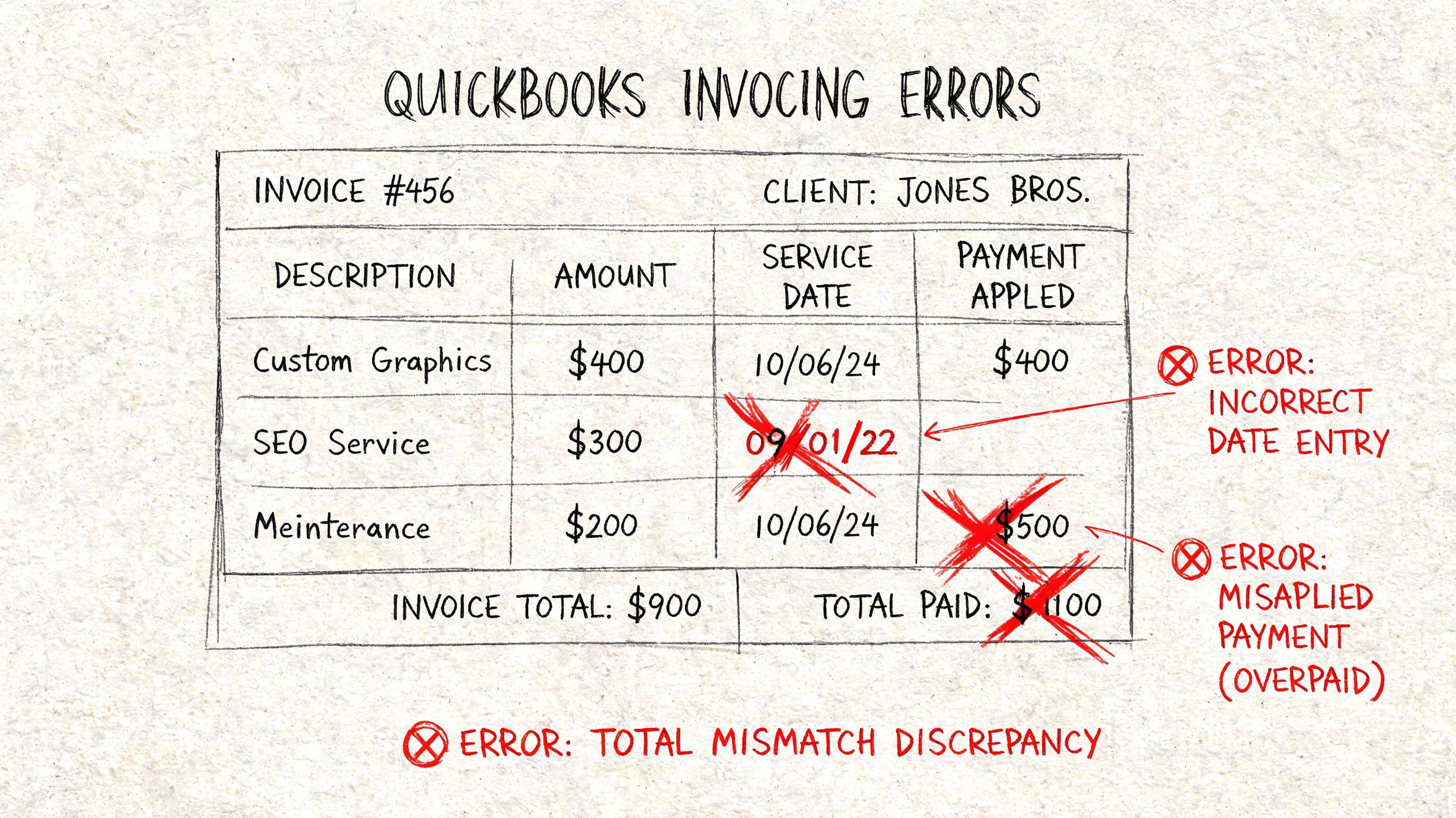
If your team thinks invoice mistakes are easy to fix later, that's usually a sign the books haven't been tested under pressure yet. A cleanup after a fundraising request or tax deadline is much more painful than preventing the issue up front. When the file is already messy, a focused QuickBooks cleanup service is often faster than trying to patch errors one by one during close.
Red flags to address immediately
| Symptom | Likely cause | What to do |
|---|---|---|
| Customer says they paid, but invoice is still open | Payment applied to wrong invoice or customer | Recheck payment application and customer record |
| AR aging looks inflated | Duplicate invoices or unapplied credits | Review open items by customer and clear duplicates |
| Revenue doesn't match delivery timing | Wrong invoice date or vague service period | Correct dates and improve line descriptions |
| Customer AP rejects invoice | Missing PO, missing entity name, unclear support | Update template and resend correctly |
| Sales tax looks inconsistent | Incorrect item or tax setup | Review item mapping and tax configuration |
Three habits that create expensive messes
The first is using the wrong date because it was convenient. Teams backdate or postdate invoices to force a reporting result. That creates problems in both AR and revenue reporting.
The second is misapplied cash. One payment posted to the wrong invoice can make one customer look delinquent and another look overpaid. Then your collections team follows up with the wrong account.
The third is weak item discipline. If your service items aren't standardized, every invoice becomes custom accounting. That slows the close and creates inconsistent reporting by service line, client, or project type.
If a customer balance looks wrong, don't send a statement first. Reconstruct the invoice, payment, and credit trail before you contact them.
What good control looks like
You don't need a heavyweight ERP to control this. You need a repeatable review before invoices go out and a second review when payments come in.
Use a short checklist:
- Confirm customer record before invoicing new entities or billing contacts.
- Match dates to contract and delivery before sending.
- Review line items against your product or service catalog instead of free-typing everything.
- Apply cash deliberately and investigate exceptions the same week.
- Reconcile open AR monthly before close, not during audit prep.
Good invoicing hygiene keeps small errors from becoming financial reporting issues.
Turn Your Invoicing Process into a Strategic Asset
QuickBooks can handle basic invoicing easily. The primary advantage comes when you use it to create a disciplined, scalable AR process.
That means invoices are standardized, dates and terms are clean, templates reduce payment friction, recurring billing is automated, and payment options are configured to accelerate cash collection. It also means your invoice data supports revenue reporting instead of creating clean-up work every month.
If your current process depends on memory, manual follow-up, or one person who "knows how it works," it's time to fix it. Founders need invoicing that supports cash flow, accurate forecasts, and investor-ready books.
If you want help turning QuickBooks invoicing into a clean, audit-ready AR workflow, Jumpstart Partners can support the setup, cleanup, and controller oversight needed to make the process reliable.