Financial Operations
Invoice to Pay Process: Steps, Roles and Controls
Build an invoice to pay process with clear owners, approval thresholds, controls and KPIs. A step-by-step guide for growing SaaS and service firms.
ByJumpstart Partners, CPA, QuickBooks ProAdvisor
··18 min readBuying AP automation isn't the first fix for a slow invoice to pay process. Fix who approves what, how long they have, and what happens when they don't act. Otherwise, you'll pay for software that sends reminders to the same overloaded founder while supplier invoices keep aging.
For a growing SaaS company, agency, or professional services firm, the objective isn't faster payment alone. It's knowing what you owe, approving legitimate obligations promptly, and releasing cash on contracted terms without weakening controls.
Table of Contents
- Where Your Invoice to Pay Process Leaks Cash
- Map Every Stage From Supplier Setup to Payment
- Who Approves What and How Fast
- How to Automate Without Losing Payment Control
- Exceptions, Fraud Checks and Red Flags
- Security Controls for SOC 2 and Bank-Level Standards
- KPIs That Show Whether Your Process Works
- Map Your Invoice to Pay Process Before You Change It
Where Your Invoice to Pay Process Leaks Cash
Cash leaks while invoices sit in approval queues, long before anyone debates the fee to process them. An approval with no owner, no hold reason, and no date is not a control. It is working capital you cannot see.
Use a 400-invoice month as the planning case. Read the ranges below as typical benchmarks, not as a forecast of what software will save.
Invoice processing benchmarks: average and best-in-class
| Metric | Average | Best-in-class |
|---|---|---|
| Cost per invoice | $9.84 | 79% lower than average |
| Processing time | 8.2 days | 79% faster than average |
| Invoice exception rate | 18.4% | 47% lower than average |
| Touchless processing | 38.3% in the 2024 benchmark | Not stated |
| Total processing time | 11.6 days in the 2024 benchmark | Not stated |
Ardent Partners and Medius cover different populations and measures. Do not blend those rows into one target. Processing time is not the day cash leaves the bank.
At 8.2 days, 400 invoices a month is about 110 bills in flight (400 × 8.2 / 30). That pile is the cash question. Invoices in it wait on a missing purchase order, a service confirmation, or a dispute, and the finance lead still has to forecast payments. Pay them blind and you release cash you have not reviewed. Hold them with no resolution date and suppliers age while the close gets harder to explain. Set the rule now: nothing hits a payment run without a named approver, a hold reason, and a date, and the person who changes vendor bank details does not release the payment.
IFOL's 2025 global AP research found that 66% of surveyed AP teams still manually entered invoice data into their ERP or finance system. Manual entry is where approvals stall, because the same clerk who keys the bill is usually the one chasing the approver. An earlier APEC policy study also identified manual invoice processing as a major constraint on digital transaction workflows.
Controller's test: If you can't identify an invoice's current owner, hold reason, and expected resolution date, you don't have reliable payment visibility.
Keep three figures separate. Processing expense is what it costs to touch the invoice. Unresolved obligations are bills you may owe and cannot defend. Cash available to spend is what remains after you refuse to schedule payment on an invoice that fails that test. They are not interchangeable.
Map Every Stage From Supplier Setup to Payment
The invoice to pay process technically starts when an invoice arrives. Operationally, you need controls earlier, when someone creates a supplier or commits to spending money. A skipped purchasing control returns later as an invoice exception.
For SaaS and services businesses, receipt confirmation often means evidence of completed work rather than a warehouse delivery. Use an accepted project milestone, approved contractor timesheet, or confirmation that the subscription period and purchased seats match the agreement.
Give every stage an owner and evidence
Invoice to pay stages, owners and proof of completion
| Stage | Owner | Proof the stage is done |
|---|---|---|
| Supplier onboarding and master-data validation | AP lead | Verified vendor record with tax ID and bank details |
| Purchase requisition and PO approval | Budget owner | Approved PO before spend is committed |
| Invoice receipt and capture | AP clerk or system | Invoice in one queue with data captured |
| Deterministic field validation | System rules | Required fields and tax details checked |
| Three-way match (PO, receipt, invoice) | System | Lines agree within tolerance thresholds |
| Exception routing | AP lead | Held invoice with a cause code and owner |
| Delegated approval | Approver | Approval recorded in an audit trail |
| Payment scheduling | Finance lead | Payment date set against contracted terms |
| Bank-file execution | Controller | Payment file released under dual control |
| ERP posting and reconciliation | Controller | Ledger entry matches bank record |
Record the liability in the appropriate accounting period, even if payment remains blocked. The final reconciliation step confirms that the payment cleared and the ledger reflects it correctly; it isn't permission to leave unpaid obligations out of your books.
Keep payment authorization separate from invoice approval. Approving the underlying expense establishes that the company owes it. Authorizing a cash disbursement confirms that the specific payment should leave the bank.
Define tolerances before the system matches invoices
Ardent Partners' AP benchmarks report average invoice-processing cost of $9.84, processing time of 8.2 days, and an exception rate of 18.4%, with best-in-class teams processing invoices 79% faster, at 79% lower cost, and with exception rates 47% lower than other organizations.
Your first improvement should be fewer preventable exceptions, not indiscriminate automatic approval. Define acceptable differences for quantity, unit price, tax, freight, currency, and payment terms.
For example, suppose your policy allows a 2% unit-price variance on an $8,000 invoice, with quantities unchanged:
$8,000 × 2% = $160 permitted variance.
An invoice exceeding that allowance is held, not force-posted. A price tolerance mustn't excuse an incorrect tax treatment or currency.
- Separate conflicting duties. The requester must not approve their own invoice or release its payment.
- Verify sensitive changes independently. Someone outside the change request must validate new supplier bank details through a trusted contact.
- Assign people, not departments. In a hypothetical 12-person SaaS team, employees can hold several roles, but conflicting actions still require separate people.
Before changing software, put a named person against every row.
Who Approves What and How Fast
Approval architecture is a working-capital decision. If every contractor invoice and software renewal lands with the founder, payment timing follows one inbox, not supplier terms.
The State of ePayables report published by SAP identifies invoice and payment approval time as the top challenge for 49% of AP executives. Faster capture will not clear a queue one person cannot finish.
Say a founder receives 30 invoices weekly but clears only 12. The queue grows by 18 invoices every week, or 72 after four weeks, assuming no other approvals. Price that stall against your own bands. At the $5,000 PO line, those 18 invoices are $90,000 waiting on one person for a week. The same miss for four weeks is 72 × $5,000 = $360,000 already billed and not released. That cash sits in the approval design until someone with authority signs.
Use thresholds that reflect risk
The grid below is a proposed starting policy, not an industry benchmark or legal requirement. Adjust the amounts to your spend profile and assign actual names to each role.
Approval thresholds, service levels and escalation
| Invoice type | Approver | Service level | Escalate after |
|---|---|---|---|
| Recurring PO invoice under $5,000 | Department budget owner | 2 business days | Backup approver after 1 day |
| PO invoice from $5,000 to $25,000 | Budget owner and finance lead | 3 business days | Controller after 2 days |
| Non-PO invoice, any amount | Finance lead and controller | 3 business days | CFO after 2 days |
| Vendor bank-detail change | Controller, verified by callback | 1 business day | CFO the same day |
| Invoice over $25,000 | CFO and a second approver | 5 business days | CEO after 3 days |
Where categories overlap, apply the stricter requirements. A bank-change review does not replace the invoice's financial approval. An escalation deadline does not authorize bypassing a hold.
Stephen Carter makes the underlying governance point in his published invoice-to-pay guidance:
“When there's no standardized workflow, different departments follow rogue procedures, which can cause a lot of confusion and increase the likelihood of errors.”
Delegate authority without sharing credentials
Founders stay the default approver because they once knew every purchase. Department heads inherit that habit as the company grows. Replace informal authority with documented segregation of duties, spending limits, and backup approvers.
Delegation must name who takes over, when authority starts and ends, and which transactions stay excluded. An absent approver's login is not a shared team credential.
Measure queue aging separately from data-entry speed. Write the thresholds, deadlines, and escalation paths down before the next billing cycle.
How to Automate Without Losing Payment Control
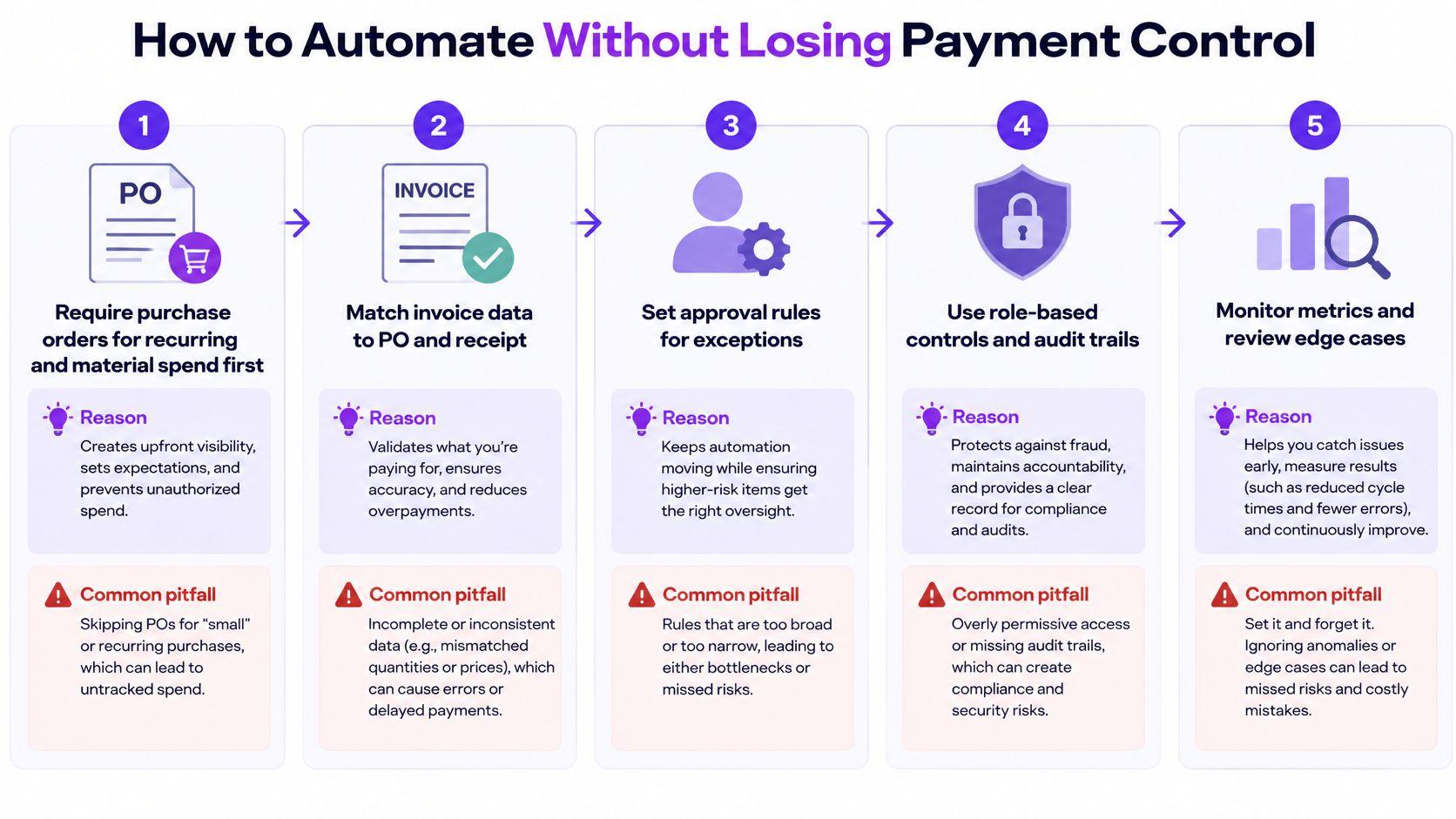
Automate a controlled process, not an unstructured inbox. Use this sequence to establish what the system can handle independently and what requires a person.
-
Require purchase orders for recurring and material spend first. An approved PO gives the system an authorized commitment to match. The pitfall is allowing teams to skip purchasing approval because the supplier needs an immediate answer.
-
Map suppliers to approved vendor IDs and open POs. Normalize supplier identities before importing invoices. Duplicate vendor records split spend history and make duplicate detection less reliable.
-
Treat OCR as capture, not accounting approval. Validate extracted fields against supplier records, PO lines, receipt evidence, tax rules, and duplicate fingerprints. High OCR confidence doesn't prove that a charge is legitimate.
-
Route exceptions by cause to a named owner. Pricing disputes belong with the budget owner; receipt issues belong with the person accepting delivery. Don't replace ownership with a shared mailbox or email approvals that disappear outside the audit trail.
-
Gate payment release. Require approved status, an appropriate payment date, verified bank details, and applicable fraud or sanctions checks. Never permit unrestricted supplier-bank edits.
Use the visual sequence to review the controls around automation:
Judge automation by invoice type
The objection that POs slow everyone down confuses purchasing effort with payment effort. For a contractor engagement or software renewal, capture the authorization while scope, price, and ownership are clear, rather than reconstructing them after billing.
The 2024 Medius benchmark summary reports 38.3% average touchless processing, 11.6 days average total processing time, and 1.4 days total processing time for PO invoices in its process detail. Applied illustratively to 400 monthly invoices, 38.3% means approximately 153 touchless invoices and 247 requiring human intervention.
Split your results between PO and non-PO invoices. A hypothetical blended touchless rate of 60% can conceal excellent PO matching alongside poorly controlled non-PO spending.
For cross-border workflows, Zaro's guide to automating accounts payable for exporters provides a useful adjacent implementation perspective. Your acceptance test remains straightforward: fewer unresolved holds without more payment errors.
Exceptions, Fraud Checks and Red Flags
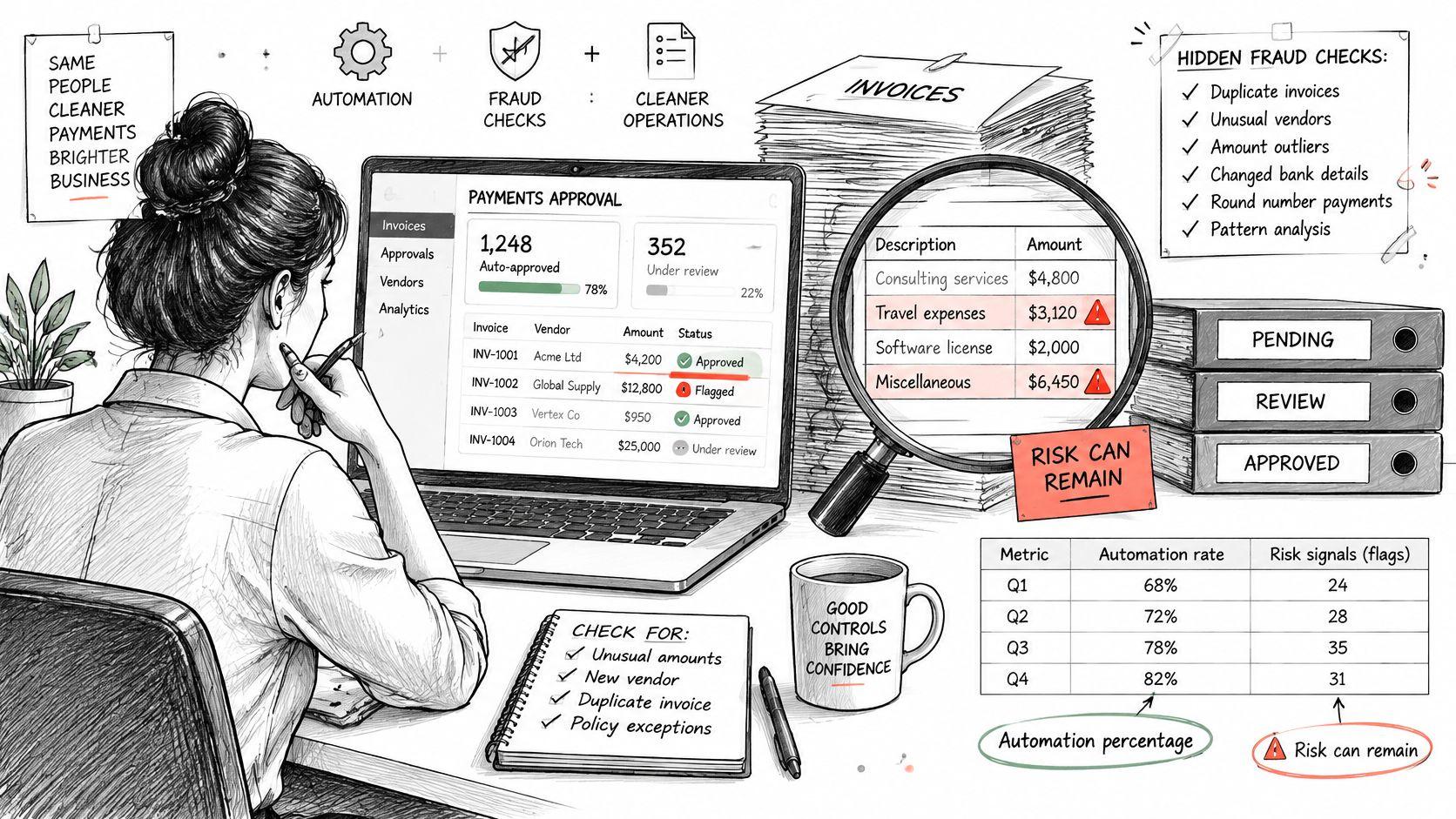
A high automation percentage isn't proof of safe payments. The 2025 Vertex global e-invoicing report found that 87% of surveyed organizations use e-invoicing systems, yet 60% of organizations selling in multiple mandated countries automate only about 60% of their e-invoicing processes.
Review fraud indicators alongside payment status, not after release:
Exception causes, owners and hold-or-release actions
| Exception | Typical cause | Owner | Action |
|---|---|---|---|
| Missing PO | Unplanned spend | Requester | Hold; obtain retroactive PO approval before payment |
| Late goods receipt | Receiving delay | Receiving owner | Hold until receipt is confirmed; alert after 5 business days under the proposed policy |
| Invalid tax data | Wrong tax ID or rate | AP lead | Hold; request a corrected invoice |
| Non-standard mandated format | Supplier format mismatch | AP lead | Hold; capture manually and retain evidence; confirm legal format requirements before release |
| Changed bank account | Possible supplier compromise or fraud | Controller | Hold payment; verify by callback to a known contact |
| Duplicate invoice | Resubmission or duplicate sending | AP clerk | Reject confirmed duplicate; compare fingerprint with prior record |
Retroactive approval documents an exception, not an acceptable purchasing habit. Manual capture also doesn't cure a legally invalid format. Use three-way matching where appropriate, but remember that a perfect match doesn't authenticate a changed bank account.
Warning signs that require review
- Urgency around bank changes, especially email-only requests.
- Threshold avoidance, such as invoices just below approval limits.
- Missing independence, including requester self-approval.
- Record inconsistencies, including changed amounts against reused invoice numbers.
- Control bypasses, including new vendors without POs or payment files edited after approval.
For example, hold a $12,400 invoice from a familiar supplier if its bank account changes. Call the number already in the vendor record, retain confirmation, and obtain independent release authorization.
Never release a payment to a changed bank account until someone outside the request has verified it.
MCA Pay's discussion of protecting merchant trust across MCA collections offers an adjacent perspective on fraud controls, not a substitute for supplier verification.
Keep payment-review training alongside your written exception policy:
Security Controls for SOC 2 and Bank-Level Standards
“Bank-level security” isn't a sufficient purchasing specification. Translate it into controls you can inspect, test, and assign to an owner. SOC 2 assurance also doesn't replace your own payment procedures.
Check access, evidence, and platform risk
- Access controls. Require single sign-on and multi-factor authentication for sensitive finance access. Use access control policies to restrict vendor creation, bank-detail edits, approvals, and payment release according to each person's duties.
- Audit evidence. Log who changed supplier records, approved invoices, modified payment instructions, and released payments. Retain logs and supporting documents according to applicable tax, contractual, and audit requirements.
- Platform assurance. Request the provider's current SOC 2 Type II report. Examine the systems covered, audit period, exceptions, and customer responsibilities, along with encryption, backup, and recovery controls.
- Bank authorization. Require independent payment authorization and bank-side limits. Use positive pay for checks where supported, and appropriate bank verification or filtering controls for electronic payments.
Positive pay isn't a universal mechanism for proving that every electronic payment file matches its approved version. Your payment platform and bank must support the relevant controls for the payment method.
Test the workflow before buying
In a hypothetical small SaaS team, the controller prepares a payment batch and the CFO authorizes release. Neither person can alter an approved batch without triggering a fresh review.
Test a changed bank account, an absent approver, and a rejected bank file during implementation. Confirm that the system preserves the evidence and prevents unauthorized release.
Buying rule: Write the required controls into your AP policy before evaluating software demonstrations.
KPIs That Show Whether Your Process Works
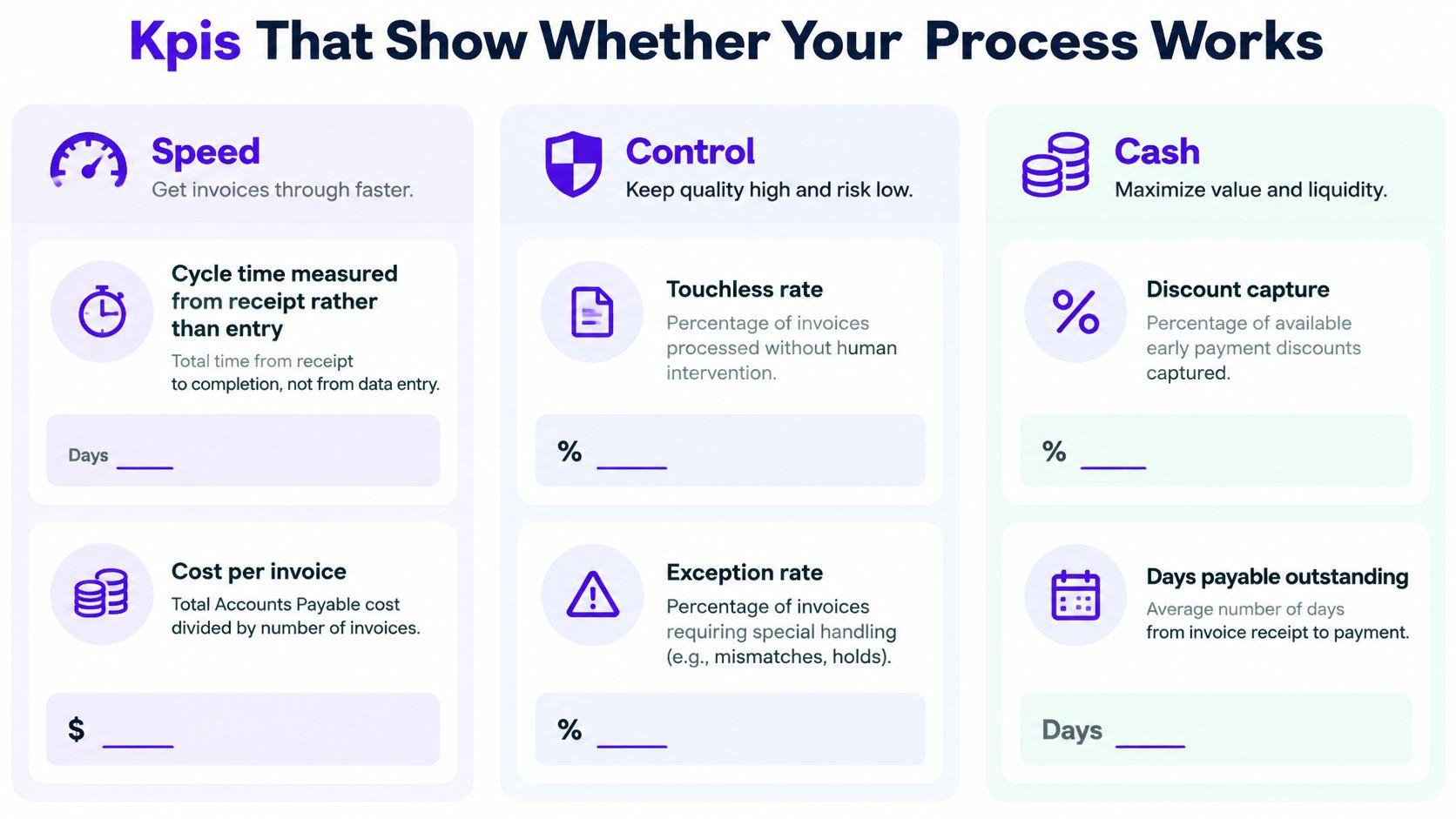
Measure whether your team resolves legitimate obligations predictably, not merely how quickly software extracts invoice fields. Establish a baseline before changing workflows, then give every metric a named owner and an explicit target.
Group the dashboard by speed, control, and cash so the CEO can distinguish operational delays from payment-policy decisions.
| Group | KPI | What to measure | Suggested owner |
|---|---|---|---|
| Speed | Cycle time | Receipt to payment-ready status, with receipt-to-payment tracked separately | AP lead |
| Speed | Cost per invoice | AP processing costs divided by invoices processed | Controller |
| Control | Touchless rate | Invoices completed without manual intervention, split by PO and non-PO | AP lead |
| Control | First-pass match rate | Eligible invoices matching without correction | Procurement or finance lead |
| Control | Exceptions and aging | Share blocked, days blocked, cause, and value | Exception owner |
| Control | Duplicate-payment attempts | Confirmed duplicates stopped before release | Controller |
| Cash | On-time payment rate | Payments made within contracted terms | Finance lead |
| Cash | Discount capture | Eligible early-payment discounts actually taken | Finance lead |
| Cash | Out-of-terms payments | Share paid earlier or later than agreed without authorization | Controller |
Use this grouping to keep the dashboard readable:
Price the queue without calling it savings
Suppose 40 invoices, averaging $3,000 each, wait 12 days for approval:
40 × $3,000 = $120,000 in unresolved payment obligations.
Reducing the hold to 4 days makes those invoices payment-ready 8 days sooner. You haven't created $120,000 of new cash. You've removed uncertainty around when that cash needs to leave.
If all invoices remain in the queue for the full illustrated period, unresolved value-days fall from $1,440,000 to $480,000, a reduction of $960,000 value-days. That's a measure of approval exposure, not interest expense or realized savings.
Use accounts payable aging alongside exception aging to distinguish overdue obligations from invoices blocked before their due dates. Faster approval should improve scheduling, not automatically trigger earlier payment.
Keep the operating review short
A practical proposed cadence is a one-page monthly dashboard reviewed by the controller and CEO in 30 minutes. Discuss the oldest holds, payments outside terms, and the owner responsible for the next corrective action.
Start with cycle time from receipt, exception aging, and on-time payment rate. Add complexity only when someone will act on it.
Map Your Invoice to Pay Process Before You Change It
Don't start with a software shortlist. Start with a written workflow that shows where invoices enter, who acts, what evidence they need, and where payment stops.
Your first review should produce decisions, not a prettier diagram. If nobody owns contractor acceptance or software-renewal approval, name the owner before configuring the workflow.
Take these actions this week
- Establish the operating baseline. Pull monthly invoice volume, processing cost, and exception rate. Separate recurring software, contractors, project suppliers, and other meaningful invoice types.
- List the actual approvers. Record who approves each type today, including informal founder approvals and absence coverage. Compare actual practice with the authority people believe they have.
- Find the largest unresolved cash queue. Group held invoice value by cause and owner. Fix the largest actionable bottleneck rather than whichever complaint arrived most recently.
Keep the evidence with the map: sample invoices, approval histories, exception reasons, and payment records. That gives your finance lead something concrete to test after a change.
Get a written map before committing to ongoing help
Our Finance Ops Diagnostic costs a fixed $3,500 and is delivered in five business days, starting with a 30-minute kickoff that you book. It reviews your current stack and handoffs, spreadsheet dependencies, unclear owners, review gaps, and monthly routine, then delivers a written workflow map and recommended cleanup path before either side commits to a retainer.
For intake, share your ARR band, billing model, current finance setup, and where the process feels messy. Tell us whether you need help this month, this quarter, or before your next board update.
Use a practical decision rule: book the diagnostic if ownership is unclear or approval exceptions leave cash obligations unresolved for more than two weeks. If neither applies, complete the baseline, approver list, and exception review first.
Jumpstart Partners offers controller-led finance support and fixed-fee AP setup projects to help you establish clear owners, approval rules, and payment controls. Visit Jumpstart Partners to start with a Finance Ops Diagnostic and get a written workflow map before committing to ongoing support.