Financial Operations
Month End Close Calendar: How to Build a 5-Day Schedule
Build a month end close calendar with a day-by-day 5-day schedule, owners, benchmarks and review controls for SaaS and growing companies.
ByJumpstart Partners, CPA, QuickBooks ProAdvisor
··16 min readYou're preparing for a board update, but your bookkeeper is still waiting on payroll, your billing report doesn't match the ledger, and nobody can tell you whether the profit figure includes all contractor costs. You don't need another checklist. You need a month end close calendar that tells each person what to deliver, when it's due, and what evidence makes it complete.
For a SaaS company, agency, or professional services firm, closing quickly only helps if you can use the numbers. An unfinished revenue schedule or missing accrual makes a polished reporting package unreliable. Build your schedule around available capacity and accounting dependencies, then shorten it without removing review.
Table of Contents
- Set a Close Target That Fits Your Company Size
- Day-by-Day Close Calendar You Can Copy
- Owners and Handoffs That Stop Close Delays
- Reconciliations That Eat Most of Your Close Time
- Revenue Recognition Steps for a SaaS Close
- Review Controls and Red Flags Before You Sign Off
- Put the Calendar in Place This Week
Set a Close Target That Fits Your Company Size
Close benchmarks by source
| Source | Measure | Figure | How to Read It |
|---|---|---|---|
| APQC General Accounting Open Standards survey, about 2,300 organizations | Median monthly close | 6.4 calendar days | Historical median, largely reflecting larger organizations |
| APQC survey | Top 25% | 4.8 days or fewer | Faster than five calendar days, not a default for a small team |
| APQC survey | Bottom 25% | 10 days or more | Investigate waiting time as well as accounting workload |
| Vena survey of 600+ US finance professionals | Average close | 6.2 business days | Reported alongside 78% correcting or restating numbers after close within the prior year |
| 2023 finance-community survey | Average close | 8 days, unchanged from the prior year | 82% attributed inefficiency primarily to manual processing |
| Ventana Research, 2023 | Share closing within six business days | 58% | Six business days was common, not universal |
| Ventana Research, 2023 automation comparison | Close within six business days, extensive versus little or no automation | 88% versus 40% | Strong association, not proof that software alone fixes delays |
| 2025 finance-team survey summarized by indinero | Six or more business days versus one to three business days | 50% versus 18% | Half took at least six business days |
Define capacity before promising speed
If you run a $500K–$20M business, don't copy a larger organization's target without checking staffing, transaction volume, and entity complexity. Separate close-critical work, such as payroll accruals and revenue schedules, from optional reporting, such as a new customer-segmentation dashboard. Your deadline must accommodate the former; the latter can follow.
A five-day target requires enough preparation and review capacity on the actual working dates. Compare assigned workload with availability, including payroll deadlines and leave. If your bookkeeper can prepare schedules but nobody can approve estimates, the constraint is controller capacity, not effort. Clarify the difference between a bookkeeper and a controller before assigning accountability.
Define the clock
Before Day 1, state whether you measure from month-end or the initial trial-balance run, and whether you count business or calendar days. Stop the clock at approved statements, not the first draft. APQC's benchmark uses elapsed calendar time from trial-balance execution through completed consolidated statements, so don't compare it directly with a month-end-to-sign-off business-day target.
Target-setting rule: Start with the duration you've achieved for three consecutive months. Remove one day at a time by eliminating a specific bottleneck, not by skipping an accrual or review.
Day-by-Day Close Calendar You Can Copy
Five-day month end close schedule
| Day | Core Tasks | Owner | Output |
|---|---|---|---|
| Day 0 | Lock intake rules, confirm subledger completeness, issue the close timetable | Controller | Signed close timetable |
| Days 1–2 | Bank, card, cash, AR, AP, payroll, and inventory reconciliations with tie-outs | Staff accountants and reviewer | Reconciled accounts with aging of open items |
| Days 2–3 | Recurring entries, accruals, prepaids, depreciation, payroll allocations, intercompany eliminations | Staff accountants | Posted journal entries with support |
| Days 2–3, SaaS | Billing-to-ledger check, deferred revenue rollforward, ASC 606 schedules | Revenue accountant | Revenue schedule that ties to the ledger |
| Day 4 | Trial balance, variance thresholds, unusual journal entries, balance-sheet certifications | Controller | Reviewed trial balance |
| Day 5 | Income statement, balance sheet, cash-flow statement, KPI package, commentary, approval | Controller or CFO | Approved financial package and post-close adjustment log |
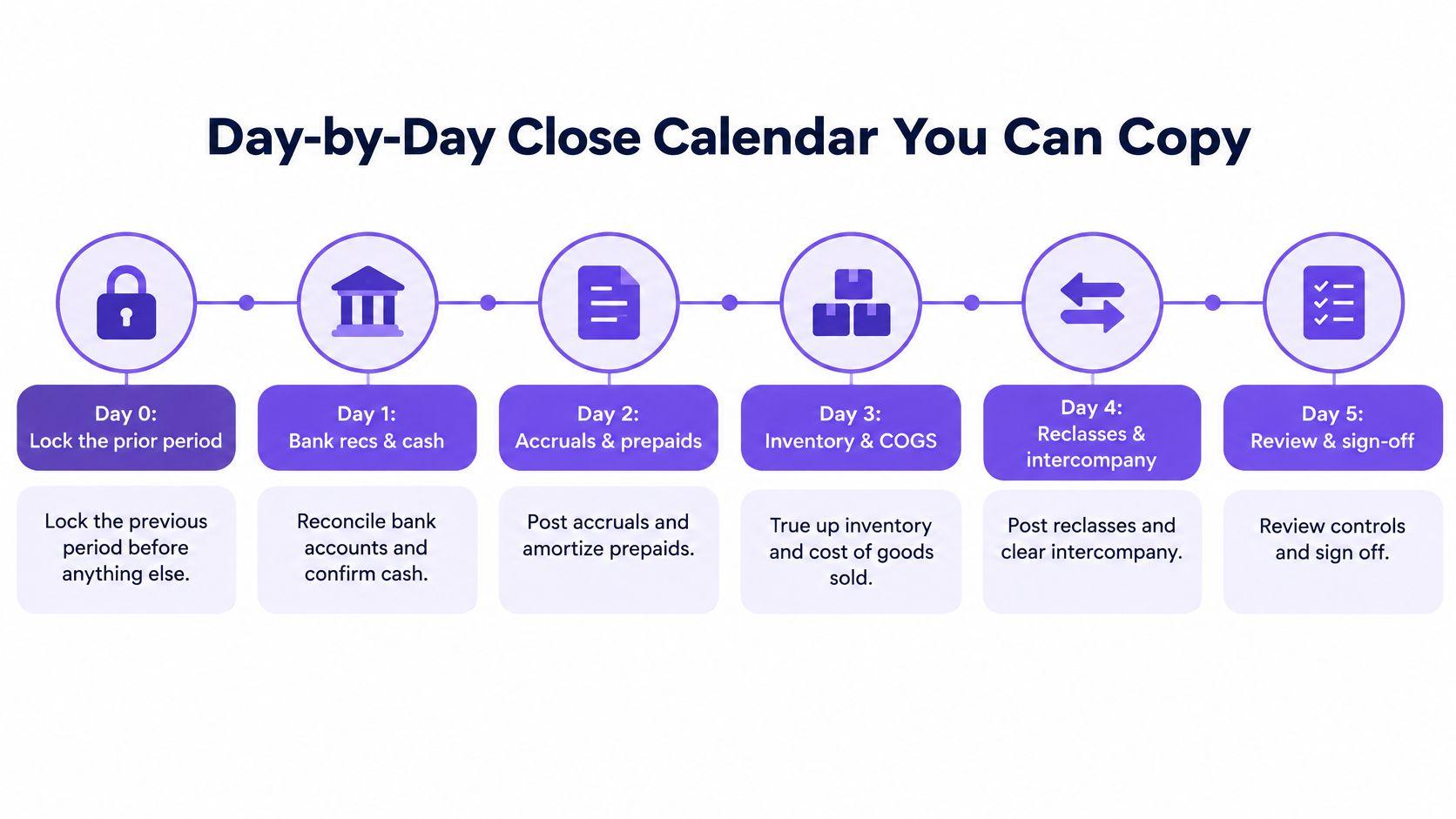
Use this timeline to visualize the sequence, then retain the detailed acceptance criteria in your tracker.
Stabilize inputs before reviewing outputs
Day 0 establishes cutoff rules, rather than blocking legitimate close adjustments. Confirm which period receives late vendor bills, employee expenses, credits, and payroll costs. Check that supporting systems, such as accounts payable and billing, contain the expected activity, and distribute the timetable to everyone supplying files.
Days 1–2 establish reliable balances. Each reconciliation needs an ending-balance tie-out, supporting detail, preparer sign-off, reviewer sign-off, and an aged list of unresolved differences. For an agency, include contractor liabilities and customer receivables; include inventory only when your business carries it.
Days 2–3 complete the accounting adjustments. Update prepaid expenses and fixed assets, calculate earned-but-unpaid wages, allocate payroll, and reconcile intercompany activity before posting eliminations. Your SaaS revenue owner should validate contract changes and deferred revenue in parallel, not after the reporting package is drafted.
Preserve time for corrections
Day 4 is the investigation window. Refresh the trial balance, compare results with prior periods and expectations, and investigate movements above your documented dollar and percentage thresholds. Require support for unusual journals and certify balance-sheet accounts against their schedules.
This emphasis on supported entries addresses a concrete bottleneck: 48% of surveyed finance professionals cited journal-entry management as a primary inefficiency, according to the SAPinsider financial-close report. Don't let an uploaded journal count as finished before its support and approval are attached.
Day 5 releases the approved operating picture. Produce the statements, KPI package, and commentary only after corrections flow through every affected report. Your post-close adjustment policy should identify who approves changes, when the period can reopen, and how recipients receive revised statements.
Copy the table into your shared tracker. Give every row a clock time, named person, dependency, and evidence location, not just a day number.
Owners and Handoffs That Stop Close Delays
A close slows down at the seams between people, not inside the ledger. In a 2017 report, the Journal of Accountancy summarized surveys in which 71% described their close as "tribal knowledge," while 54% identified coordination with other departments as an obstacle. Fix the documentation first.
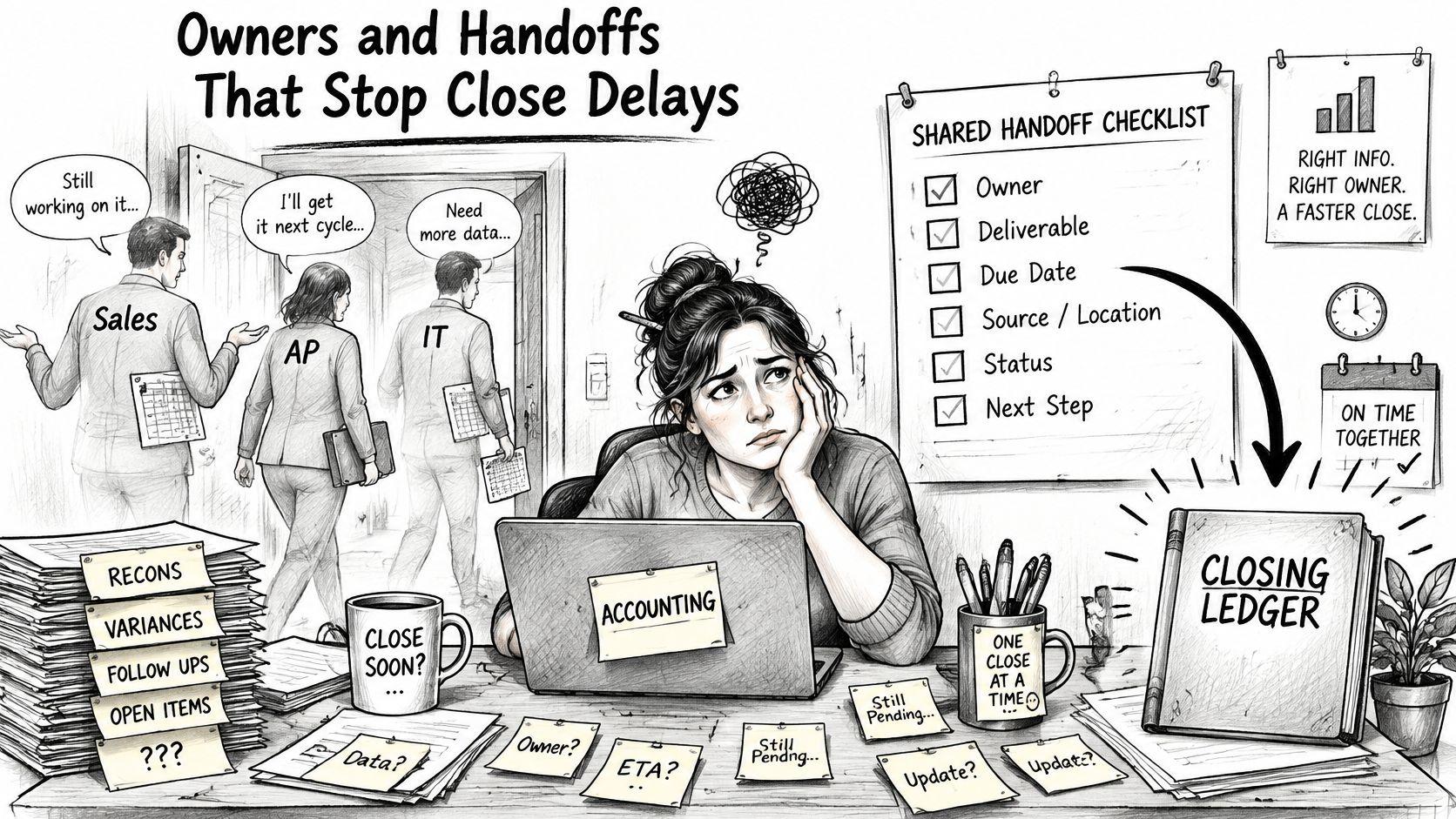
"Tribal knowledge" captures the risk: your close shouldn't depend on knowing whom to call.
Build an owner register
Give each reconciliation, accrual, and review a named preparer, reviewer, backup, and due time. Then name the people outside accounting who supply payroll, billing, sales operations, and payment-processor data. A finance owner can't resolve a missing file when its upstream owner is anonymous.
Treat each handoff as a defined transfer, not an email. A practical map for a SaaS close has four. Ops hands the controller a billing bridge that ties invoices, usage, credits, and cash into one reviewed file. Product hands the controller inference and hosting costs matched to the same plan groupings, so margin review produces a view with variance notes. Payroll sends its register. The controller hands the founder a reporting release that packages P&L, cash, runway, ARR movement, and commentary into one approved operating view. One sequence per month, four explicit handoffs, an output someone can review.
At Jumpstart Partners, close, reporting, review points, and owner responsibilities are made explicit before the monthly cadence starts. The Finance Workflow Map covers the current stack, where it breaks, missing owners, and the monthly routine, and the close sequence assigns named owners to reconciliations, accruals, review, and sign-off, producing an evidence-backed close checklist.
Document what triggers each handoff too. Your invoice-to-pay process should state when approved bills reach accounting, and customer operations should route order edits and cancellations to billing on a fixed schedule. If your business runs a storefront, operational references like how Mayra handles order edits can help you map that upstream input.
Use the video alongside your register when discussing the workflow with your team.
Roll out the register
- Inventory recurring work. Pull tasks from your last three closes, including corrections that never reached the checklist.
- Assign accountability. Name an owner and backup for each task, with an independent reviewer where required.
- Set handoff times. Start dependent work only after its required input is marked complete. Escalate late inputs to the controller at a fixed hour.
- Record misses. After the first close, log each missed deadline and its cause.
If you must call someone to discover a task's status, your register isn't complete enough. And if your close target assumes handoffs you haven't built yet, slow the target down until the register exists: a five-day close with unfinished accruals is worse than a seven-day close that was fully reviewed.
Reconciliations That Eat Most of Your Close Time
Cash reconciliation breaks schedules because reconcile cash doesn't describe the actual work. It's also the most spreadsheet-dependent part of a typical close, and it expands to fill whatever time you budget unless you define the evidence each account needs upfront.
Your preparer may need to connect bank activity with Stripe, Shopify, Square, payroll funding, refunds, chargebacks, and marketplace settlements. Each source settles on a different clock. A bank deposit alone doesn't prove gross sales or processor fees; it only confirms that cash arrived.
Cash reconciliation matrix
| Account | Authoritative source | Owner | Cutoff | Expected file | Tolerance | Escalation |
|---|---|---|---|---|---|---|
| Operating bank | Bank statement, not processor payout | Staff accountant | Day 2 morning | Statement or bank feed | Unidentified difference must be $0 | Controller the same day |
| Stripe settlements | Stripe payout report for gross, fees, refunds, and chargebacks | Staff accountant | Day 1, when payout file arrives | Payout report | Book fees in full; documented timing differences may remain | Controller by noon on Day 2 |
| Shopify, Square, or marketplace | Processor settlement report | Staff accountant | Day 2 | Settlement file | Itemize fees, refunds, and chargebacks | Controller the same day |
| Payroll cash | Payroll register | Payroll data owner | Day 1 file receipt | Register and funding confirmation | $0 unexplained difference | Controller the same day |
Separate timing from missing money
Say your Stripe report shows a hypothetical $10,000 gross settlement, with $290 in fees, and the bank receives the money two days later. Your expected deposit is $10,000 − $290 = $9,710.
Record the fees separately and hold the net amount in processor clearing until the bank deposit arrives. Then clear the deposit against that balance. At month-end, document the outstanding settlement with its payout identifier and expected receipt date rather than forcing a match or expensing the difference.
That trade-off sits at the center of the matrix. I'd rather sign a Day 5 close where every open item carries a documented reason than a Day 3 close with an unexplained plug. Speed only counts once the evidence does.
Apply the same evidence standard across your balance-sheet reconciliations. Automated matching can propose matches; a person still needs to review exceptions, duplicate feeds, and incorrect mappings.
Control point: A documented timing difference is acceptable. An unexplained plug isn't.
Schedule a post-close exception sweep for late settlements and processor adjustments. Track unresolved exceptions and reviewer approval as your close status; locking the books doesn't clear either one.
Revenue Recognition Steps for a SaaS Close
Your SaaS close needs a revenue schedule, not just an invoice total. The ASC 606 disclosure filed with the SEC describes the five-step model: identify the customer contract, identify performance obligations, determine the transaction price, allocate that price to the obligations, and recognize revenue when or as each obligation is satisfied.
Say a customer pays $12,000 upfront on January 1 for a 12-month subscription. Assume it's one stand-ready service obligation delivered evenly throughout the term. Your monthly revenue is $12,000 ÷ 12 = $1,000, not the cash collected.
| Period | Revenue recognized | Deferred revenue remaining |
|---|---|---|
| January | $1,000 | $12,000 − $1,000 = $11,000 |
| February | $1,000 | $11,000 − $1,000 = $10,000 |
Recording the full payment as January revenue overstates that month by $12,000 − $1,000 = $11,000. You would present an inflated growth story, followed by understated revenue in later months despite continuing to serve the customer.
Turn the calculation into recurring work
- Reconcile billings to the ledger. Match invoices, credits, and billing adjustments to the accounting records. Investigate missing or duplicate transactions before calculating recognized revenue.
- Roll deferred revenue forward. Start with the opening liability, add amounts billed or collected for future service as appropriate, subtract earned revenue, and explain other adjustments.
- Review contract changes. Check new agreements, upgrades, cancellations, concessions, and modifications for changes to service periods or promised deliverables.
- Assess onboarding and implementation. Determine whether these services are separate performance obligations. Don't recognize an upfront fee immediately just because the invoice labels it separately.
- Approve manual revenue journals. Attach the contract assessment and calculation before releasing the financial package.
Your ASC 606 revenue-recognition workflow should connect each contract assessment to its schedule and ledger entry. Keep contract terms, recognition dates, and modification decisions available to the reviewer, rather than buried in a salesperson's email.
Matching invoices to Stripe isn't the completion test. You're finished when billed amounts map to the promised services and the resulting revenue schedule agrees with the general ledger.
Review Controls and Red Flags Before You Sign Off
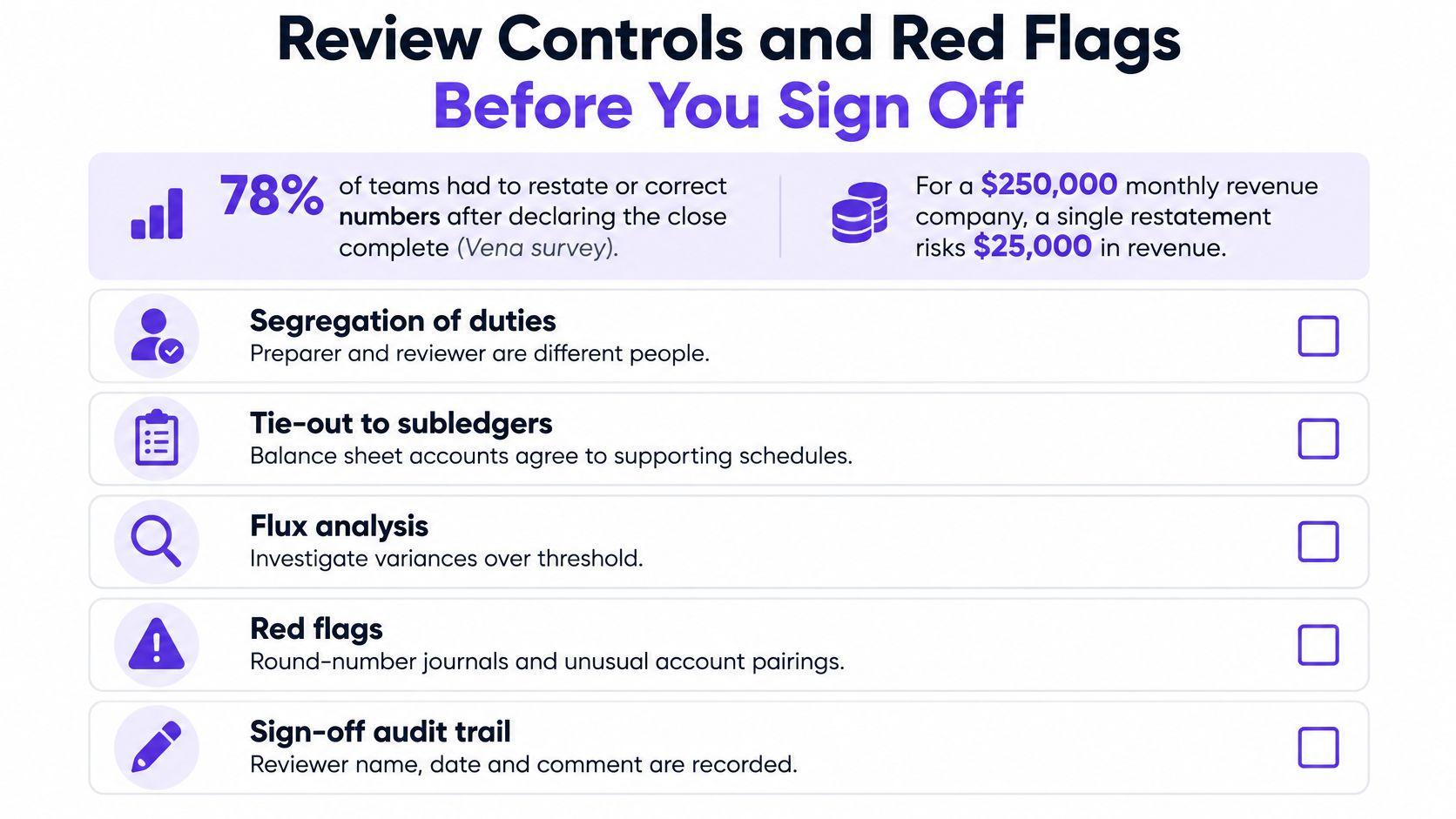
A post-close correction changes the numbers your team has already used. For a hypothetical business reporting $250,000 in monthly revenue, a 3% correction is $250,000 × 3% = $7,500; a 5% correction is $250,000 × 5% = $12,500. Those changes deserve review before you send a lender report or investor update.
The objection that review slows the close confuses necessary control with repetitive checking. Use risk-based review: standardize recurring low-risk items, but demand evidence and approval for revenue, accruals, payroll, debt, and unusual transactions.
Make approval an explicit gate
The preparer finishes the schedules first. An independent reviewer investigates unusual variances, and the controller approves release only after open items have a documented treatment. Your segregation-of-duties design should keep preparation and approval separate, including when you use outsourced support.
Use this checklist to support the gate. Dollar exposure must come from the specific error being assessed, not a blanket assumption.
Red Flags That Block Release
- Unreconciled bank accounts. You can't substantiate the reported cash balance.
- Negative deferred revenue. Investigate schedule logic, missing billings, and classification.
- Unexplained suspense balances. Assign a resolution, not another month of automatic carryforward.
- Unsupported manual journals. Require the calculation, business reason, and approval.
- Unexplained margin swings. Check revenue timing, contractor costs, payroll allocations, and hosting expenses.
- Incomplete cutoffs. Don't release final reports before payroll, billing, and accrual inputs are complete or appropriately estimated.
Keep a compact scorecard beside the calendar: close cycle time, reconciliations completed by deadline, number and value of post-close adjustments, and share of entries or reconciliations requiring rework. A shorter close with more corrections isn't an improvement.
Put the Calendar in Place This Week
Before the next close, complete these actions in order:
- Build the tracker before Friday. Paste in the schedule and give every deliverable a clock time.
- Complete the owner register. Name preparers, reviewers, backups, and the payroll, billing, and processor contacts supplying files.
- Write your measurement rule. For example: the close starts with the initial trial-balance run and ends with controller-approved statements, counted in business days. Use your consistently achieved duration as the starting target.
- Run a dry close on the last business day. Test file access, dependencies, and assignments. Log unavailable inputs and missed times with reasons.
- Agree on release blockers. Have the controller approve which unresolved items prevent sign-off.
If you can't staff preparation and independent review, our Finance Ops Diagnostic runs for five business days. It includes a current-stack and handoff review, spreadsheet dependency map, unclear-owner and review-gap inventory, recommended cleanup path, and monthly routine recommendation. You receive a written workflow map before either side commits to a retainer.
Our approach also draws on Steven's previous role as controller on a public B2B SaaS finance team that delivered a clean monthly close on time every month for two years running.
Jumpstart Partners offers controller-led close ownership, management reporting, and workflow cleanup so your calendar produces reviewed numbers, not just completed boxes. Visit Jumpstart Partners to discuss your current close bottlenecks and whether the Finance Ops Diagnostic fits your next reporting deadline.