Financial Operations
Accounts Payable Management: A Practical Playbook
Accounts payable management playbook for growing businesses. Cut invoice costs, automate workflows, prevent duplicate payments, and protect cash flow
ByJumpstart Partners, CPA, QuickBooks ProAdvisor
··16 min readThe average buyer processes an invoice in 10.9 days at $10.89 per invoice, while top-performing accounts payable teams do it in 3.1 days at $2.78, with 49.2% touchless processing and a 9% exception rate, according to Corpay's 2025 AP productivity benchmark. That gap isn't a software problem first. It's a control-design problem.
For founders and finance leaders at $500K to $20M businesses, accounts payable management determines how reliably cash leaves the company, how quickly liabilities reach the ledger, and how much time your controller loses chasing missing receipts, approvals, and vendor details. Buying another tool before fixing those bottlenecks only digitizes confusion.
This playbook starts with diagnosis. You'll identify the four highest-error points, assign ownership, select technology based on volume and audit exposure, and build a dashboard that tells you whether AP is improving. The objective isn't “maximum automation.” It's controlled, visible, timely payment execution.
Table of Contents
- The Cost of Broken Accounts Payable
- Designing the Four-Stage AP Workflow
- Choosing the Right AP Tech Stack
- Three-Way Matching and Exception Handling
- Red Flags and Common Control Failures
- AP KPIs and What Good Actually Looks Like
- When to Outsource AP and Your Next Steps
The Cost of Broken Accounts Payable
68% of respondents manually key invoices into ERP or accounting software, fewer than 32% have an automated process, and a manual invoice costs about $15 on average, according to Global AP research. Those figures make AP a control and capacity issue, not a bookkeeping footnote.
Manual AP creates work at every handoff: capture, coding, approval, matching, reconciliation, and payment. Consider a business processing 12,000 invoices per year. At $15 each, manual handling costs:
12,000 × $15 = $180,000 per year
If capture and matching reduce the cost to $2.78 per invoice, using the top-performer benchmark reported by Corpay, the same workload costs:
12,000 × $2.78 = $33,360 per year
That produces a modeled difference of $146,640 annually. The benchmark is a target, not a promise. It still shows why finance leaders should examine AP as an operating-cost and control issue before purchasing another tool.
| Cost Driver | Manual AP | Automated AP |
|---|---|---|
| Invoice cost | About $15 per invoice | $2.78 for top-performing teams |
| Annual cost at 12,000 invoices | $180,000 | $33,360 at the benchmark rate |
| Processing cycle | Often slower and dependent on inboxes and spreadsheets | 3.1 days for top performers |
| Manual intervention | Frequent data entry and approval chasing | 49.2% touchless processing for top performers |
The cash and control drags
Invoice cost is only the visible layer. A discount labeled 2/10 net 30 offers a 2% discount for payment within 10 days. Missing it means paying the full invoice later, with a commonly calculated annualized opportunity cost of 36%. The actual impact depends on vendor terms and cash availability, but approval delays convert available savings into avoidable expense.
Duplicate and erroneous payments create another leak. Top performers classify about 0.8% of annual disbursements this way, while bottom performers exceed 2.0%, according to APQC benchmarking. Prevention belongs before payment release, not in a recovery spreadsheet after funds have left.
AP also affects the close. Missing receipts, unclear coding, and invoices trapped in personal inboxes force controllers to estimate liabilities, post late accruals, and reconcile after the period should be closed. Payment documentation must also identify the correct party. If the terminology is unclear, this explanation of the difference between payor and payee provides a useful reference.
Controller's rule: Treat every invoice as both a liability record and a payment-control event.
Document the current process and quantify the benefits of AP automation. Then fix the four highest-error steps first: vendor setup, invoice capture, match resolution, and payment release. Control design and clear ownership should precede a broad technology rollout.
Designing the Four-Stage AP Workflow
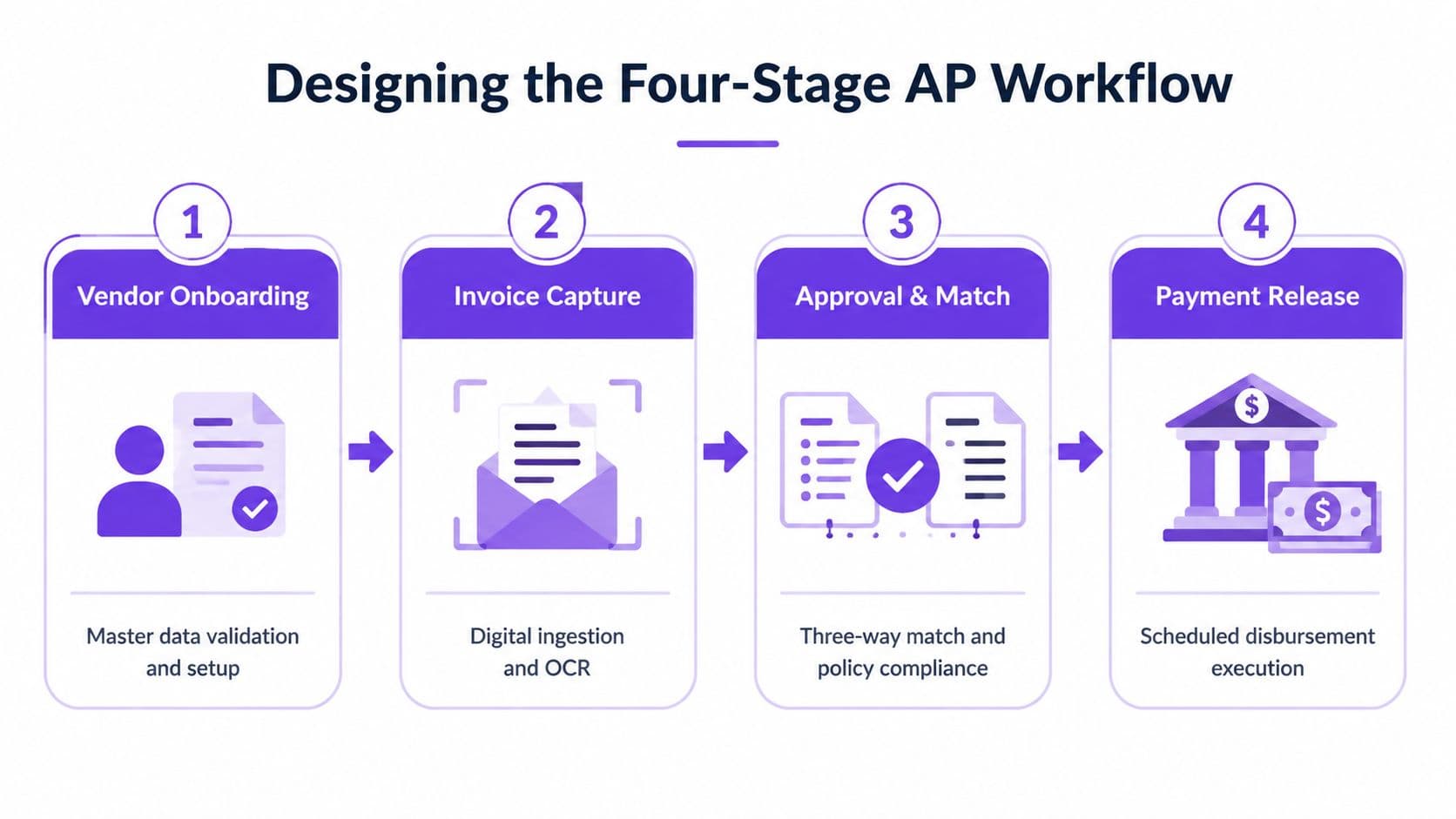
A reliable workflow gives every invoice a route, every decision a name, and every payment a documented authorization. If your org chart can't answer who owns the next step, your process has a gap.
Stage one vendor onboarding
The AP clerk owns the vendor record in the ERP or AP platform. Before activation, collect the W-9, legal name, tax identification details, banking information, certificate of insurance where relevant, and 1099 tracking status. The controller reviews the setup, validates bank changes through a separate channel, and blocks payment until required documentation is complete.
Keep the vendor master as the system of record. Don't let a Slack message, email thread, or spreadsheet become an unofficial supplier database.
Stage two invoice capture
Route every invoice through one controlled intake point, such as a shared AP inbox, supplier portal, or EDI connection. The AP clerk checks that the invoice contains the vendor name, invoice number, date, amount, tax treatment, purchase order reference, and payment terms. Capture software can extract fields, but the clerk owns exceptions and confirms that the document belongs to the correct vendor record.
A centralized intake also prevents the same invoice from entering through email, a portal, and a department upload without a duplicate check.
Stage three approval and match
The controller owns the approval matrix. Separate the person requesting goods or services from the person approving the invoice, and require two approvers for invoices above your defined risk threshold. The invoice record should hold the approval history, coding, purchase order, receipt, and exception comments.
Use three-way matching when the purchase order, goods receipt, and invoice exist. For non-PO spend, require documented business-owner approval and evidence that the service was delivered.
Stage four payment release
The CFO or delegated treasury owner releases the payment batch. The AP clerk prepares the run, the controller reviews the batch and supporting exceptions, and the CFO authorizes release. Configure positive pay with your bank where available, require dual authorization above a defined dollar limit, and prohibit the person who created or changed vendor banking details from releasing that vendor's payment.
For a practical implementation map, use this accounts payable process improvement guide to assign each control to a person and system.
Choosing the Right AP Tech Stack
The right stack follows your invoice volume, entity complexity, currency requirements, and audit exposure. Revenue helps frame the decision, but it shouldn't dictate the purchase by itself. A $3M agency with heavy project billing may need stronger controls than a larger company with simple recurring vendors.
| Stack Archetype | Best Revenue Range | Monthly Invoice Volume | Audit Readiness | ERP Fit |
|---|---|---|---|---|
| QuickBooks-native bill pay and rules | Under $5M | Under 500 | Light audit needs | QuickBooks Online |
| Xero or NetSuite native AP plus capture tool | $5M to $50M | Growing or multi-entity volume | Moderate to strong | Xero or NetSuite |
| Dedicated bill-pay platform layered on ERP | Above $5M, especially complex groups | Above 1,000 | High, multi-entity, or audit-heavy | QuickBooks, Xero, NetSuite, and other ERPs |
Three practical archetypes
QuickBooks-native bill pay and rules works when your business has a straightforward entity structure, limited currencies, and a small approval population. Use vendor rules, standardized coding, scheduled payment runs, and an approval workflow that preserves an audit trail. Don't choose this route if your team already spends its week reconciling disconnected spreadsheets.
Xero or NetSuite with a native AP module plus a capture tool such as BILL or Tipalti fits businesses that need stronger routing, multi-entity reporting, or multi-currency support. NetSuite gives you a deeper system of record, while Xero can suit a growing company that hasn't outgrown its accounting model. The bolt-on capture layer should feed approved data into the ERP rather than create a parallel ledger.
Dedicated platforms such as Bill.com, Ramp, Airbase, or AvidXchange make sense when invoice volume, entities, approvals, and audit requirements justify a separate payment-control layer. Keep the ERP as the accounting source of truth, and use the platform for intake, routing, payment execution, and evidence.
Buying rule: The correct stack is determined by invoice volume and audit need, not by which vendor delivered the most impressive demo.
Before selecting software, document your current intake channels, exception categories, approval thresholds, and payment permissions. A structured AP automation software evaluation should test those workflows with real invoices, not just a feature checklist.
Three-Way Matching and Exception Handling
Three-way matching verifies the purchase order, goods receipt note, and vendor invoice before payment is released. Automated matching needs invoice capture, ERP access to purchase order and receipt data, and a matching engine that compares line items within configured tolerances, as explained in Corpay's three-way matching guide.
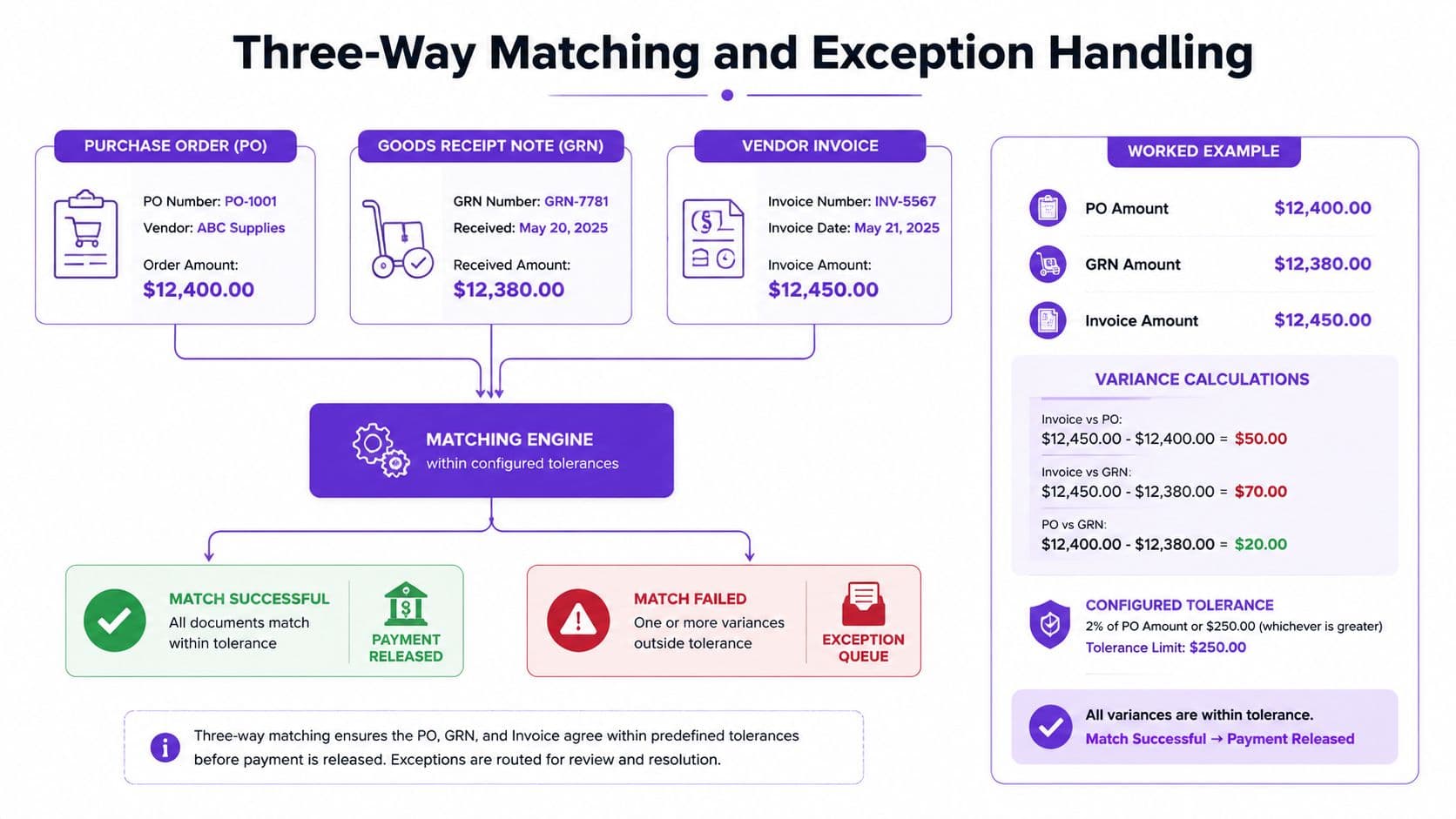
Consider a purchase order for $12,400, representing 200 units at $62 each. With a 2% price tolerance, the acceptable unit-price range is:
$62 × 2% = $1.24
The system can accept unit prices from $60.76 to $63.24, assuming the quantity and other fields also pass. With a 1% quantity tolerance, the acceptable quantity variance is:
200 × 1% = 2 units
An invoice for 201 units at $62 falls within the quantity tolerance. An invoice for 205 units exceeds it and should enter the exception queue. A unit price of $64 also exceeds the price tolerance and should route to the procurement owner or named approver.
Triage exceptions by cause
| Exception Type | First Check | Triage Rule |
|---|---|---|
| Quantity mismatch | Compare invoice quantity with GRN | Auto-accept within tolerance. Hold and request a vendor credit when the invoice exceeds received quantity. |
| Price mismatch | Compare invoice price with PO price | Escalate to procurement when the approved commercial terms changed. |
| Missing receipt | Confirm delivery with the requestor | Hold payment until the business owner confirms receipt. |
| Tax variance | Review jurisdiction, exemption, and coding | Block payment until tax treatment is corrected or approved. |
The AP owner should resolve exceptions within 48 hours to protect vendor terms and early-payment opportunities. If exceptions exceed 10% of monthly invoice volume, the upstream process is broken. Fix purchasing discipline, receiving procedures, or supplier data instead of blaming AP for cleaning up decisions made elsewhere.
Use a three-way match implementation approach that records the reason, owner, and resolution for every exception.
The worked visual above shows how a PO, GRN, and invoice converge in a matching engine. For a concise operational explanation, review the following walkthrough.
Red Flags and Common Control Failures
A control failure can turn a small process gap into direct cash leakage. Growing businesses usually lose control when daily behavior bypasses policy: shared inboxes, editable vendor spreadsheets, and one person who can create, approve, and release payments.
Duplicate and erroneous disbursements should be tested against internal records, not accepted as normal leakage. Compare results with APQC benchmarking reported by CFO to frame the risk for finance leadership.
| Failure Mode | Typical Annual Cost | Diagnostic Test |
|---|---|---|
| Duplicate payments | Recoverable spend varies with invoice volume and payment value | Group payments by invoice number, vendor, and amount |
| Ghost or duplicate vendors | Exposure depends on unauthorized or redundant records | Scrub vendor master records by bank account and tax ID |
| Missing purchase orders | Uncontrolled spend and extra exception handling | Review PO coverage and investigate purchases outside policy |
| Weak approval matrix | Unauthorized or poorly documented disbursements | Check whether one approver handles all payment decisions |
| Late accruals | Close delays and incomplete liabilities | Compare late AP journal entries with total AP activity |
| Payment-redirect scams | Direct loss if changed banking details are fraudulent | Test whether every bank-change request receives independent verification |
Six tests your controller should run
-
Duplicate report: Search invoice numbers, amounts, dates, and vendor names together. Exact invoice-number matching misses altered formatting and resubmitted bills.
-
Vendor master scrub: Find vendors sharing a bank account, tax ID, address, or similar name. Inactivate unused records and require controlled reactivation.
-
PO coverage review: Pull invoices without purchase orders and classify each reason. Repeated exceptions show where departments bypass purchasing controls.
-
Approval segregation test: Select a payment sample and confirm that the requestor, approver, vendor editor, and payment releaser are different people.
-
Close review: Examine manual AP journal entries and late invoices. Repeated late accruals indicate weak invoice intake or delayed department confirmation, not merely a month-end staffing problem.
-
Bank-change verification: Treat emailed banking-change requests as untrusted until the vendor confirms them through a known contact method. Pair system controls with employee training for fraud prevention.
Run these tests on a recurring schedule and assign an owner to every finding. A control that exists only on paper will not protect cash.
Control principle: A payment is safe only when the vendor, obligation, approval, receipt, and bank details pass independent checks.
AP KPIs and What Good Actually Looks Like
A useful dashboard exposes bottlenecks instead of decorating the monthly finance pack. Track five measures: days payable outstanding, invoice exception rate, cost per invoice, straight-through processing rate, and on-time payment rate.
For DPO, use:
Accounts payable balance ÷ cost of goods sold × 30
If AP is $180,000 and cost of goods sold is $120,000:
$180,000 ÷ $120,000 × 30 = 45 days
That result falls within a practical target band of 35 to 50 days for a business in the $500K to $20M revenue range. Do not stretch DPO by paying suppliers late. Set payment timing deliberately, follow agreed terms, and preserve cash visibility.
Exception rate uses:
Invoices requiring intervention ÷ total invoices processed
If 80 of 1,000 invoices enter the exception queue:
80 ÷ 1,000 = 8%
Set an operating target of under 8%, then verify that exceptions are resolved rather than hidden or suppressed.
| KPI | Formula | Target Band |
|---|---|---|
| Days payable outstanding | AP balance ÷ COGS × 30 | 35 to 50 days |
| Invoice exception rate | Exceptions ÷ invoices processed | Under 8% |
| Cost per invoice | Fully loaded AP labor and software ÷ invoice count | $2 to $4 automated target, with manual baseline of $12 to $15, Concur |
| Straight-through processing | Invoices paid without human touch ÷ invoices processed | Above 70% once three-way matching is live |
| On-time payment rate | Invoices paid within agreed terms ÷ invoices due | Maintain a consistently high rate |
The $2 to $4 automated target is a management benchmark. Concur's invoice-processing analysis reports a reduction from $6.30 to $1.45 per invoice when organizations move from no automation and inconsistent processes to end-to-end automation and consistent processes. Hyland's ROI discussion cites an average invoice cost of $9.40 and a best-in-class cost of $2.78.
Review the dashboard monthly. If one KPI misses its band for two consecutive months, investigate the workflow, policy, or system configuration before blaming the AP clerk. The point is diagnosis: fix the highest-error step before buying another tool.
When to Outsource AP and Your Next Steps
In-house AP starts to strain when invoice volume, vendor follow-up, and reconciliation consume controller capacity. A business clearing roughly $5M in revenue or 500 invoices per month should compare the cost of internal execution with a managed model, especially when duplicate-payment risk and missed payment terms are already visible.
An in-house AP clerk typically costs $55,000 to $70,000 fully loaded, before software and audit-recovery costs. An outsourced controller model typically runs $1,500 to $4,000 per month, according to the operating assumptions in this playbook. Those figures aren't interchangeable without reviewing scope, but they give you a defensible starting point for a make-or-buy analysis.
| Dimension | In-House AP Clerk | Outsourced Controller |
|---|---|---|
| Core labor | $55,000 to $70,000 fully loaded | $1,500 to $4,000 monthly |
| Vendor master | Maintained internally | Owned and reviewed as part of the control process |
| Approval matrix | Often depends on controller oversight | Designed, documented, and monitored |
| Payment release | Internal payment runs | Controlled release with documented authorization |
| Matching | Depends on internal tools and capacity | Capture and three-way matching included in the managed model |
| Month-end AP accruals | Internal close responsibility | Included in controller-backed close support |
| Treasury and vendor relationships | Remain with your team | Remain with your team, while the workflow is managed |
Outsourcing isn't an excuse to surrender financial authority. Keep treasury decisions, supplier relationships, and final payment authorization inside your company. The outsourced controller should own the vendor master process, approval matrix administration, payment preparation and control evidence, and month-end AP accruals.
A managed accounts payable outsourcing model works best when the provider integrates with your accounting system and documents every handoff.
Your three-step implementation path
-
Benchmark this week: Calculate current DPO, exception rate, cost per invoice, and on-time payment rate from your ledger and payment history.
-
Request a 30-day diagnostic: Have a provider test vendor duplicates, approval segregation, unmatched invoices, missing receipts, and payment-release permissions.
-
Move capture and matching within 90 days: Keep treasury and vendor relationships in-house, but centralize invoice intake, configure approval routing, and enforce matching before payment.
Jumpstart Partners provides outsourced controller and bookkeeping services for growing SaaS companies, agencies, professional services firms, and other businesses in the $500K to $20M revenue range, including vendor selection, AP workflow design, system integration, and team training. Visit Jumpstart Partners to discuss a controlled AP diagnostic and a practical implementation plan for your finance team.