Financial Operations
How to Fix QuickBooks Errors Without Corrupting Your Books
Learn how to fix QuickBooks errors safely, from triage and program repair to reconciliation fixes and knowing when to call a CPA.
ByJumpstart Partners, CPA, QuickBooks ProAdvisor
··14 min readRe-entering a missing transaction or forcing a reconciliation to zero isn't a safe starting point for fixing QuickBooks. Those shortcuts can duplicate cash, distort receivables, and leave you presenting unreliable numbers to investors or lenders. Diagnose the failure before you change the ledger.
For founders and finance leaders at growing SaaS companies, agencies, and professional services firms, knowing how to fix QuickBooks errors means separating software problems from accounting problems. A successful repair restores access and leaves your financial reports supported by evidence.
Table of Contents
- Match Your QuickBooks Error to the Right Fix
- How to Triage an Error Before You Change Any Data
- How to Repair QuickBooks Desktop Program and Print Errors
- Fixing Bank Feed and Reconciliation Discrepancies
- How to Repair a Damaged Company File Safely
- Decide Whether to Hand Off the Cleanup
Match Your QuickBooks Error to the Right Fix
Guessing gets expensive when the same symptom has different causes. A payment missing from a report can indicate damaged data, an incorrect report filter, or a posting problem. Recreating it before checking the original record adds another transaction without resolving the underlying question.
Start by identifying what failed: the application, document output, bank connection, company file, or accounting record. Then choose the appropriate diagnostic tool.
Common QuickBooks errors, likely category and first check
| Symptom | Likely Category | First Check | Full Fix In |
|---|---|---|---|
| Program will not launch or install fails with error 1603 | Program or installation fault | Quick Fix my Program, then Install Diagnostic Tool | How to Repair QuickBooks Desktop Program and Print Errors |
| Print or PDF output fails for one or all printers | Output subsystem | Print and PDF Repair Tool | How to Repair QuickBooks Desktop Program and Print Errors |
| Bank feed download fails with Error 350 | Bank connection | Reconnect the account, then test in a test company for Desktop troubleshooting | Fixing Bank Feed and Reconciliation Discrepancies |
| Beginning balance does not match the statement | Changed historical transaction | Reconciliation Discrepancy report | Fixing Bank Feed and Reconciliation Discrepancies |
| Unrecoverable error or a payment missing from reports | Company file damage | Backup, then Verify Data | How to Repair a Damaged Company File Safely |
| Payroll totals differ from Form 941 | Payroll filing mismatch | Compare payroll register with actual payments and the quarterly filing | Decide Whether to Hand Off the Cleanup |
These are diagnostic categories, not final conclusions. An incorrect beginning balance also warrants checking account setup and statement selection. A missing payment warrants checking report dates before assuming corruption.
Keep your ledger-level checks separate from the software tests. A trial balance helps you review account balances, but equal debits and credits don't establish that transactions were recorded correctly. A duplicate payment can still produce balanced books.
Practical rule: Identify the failure category first. Change transactions only when you can explain what's wrong, what evidence supports the correction, and which reports it affects.
How to Triage an Error Before You Change Any Data
Re-entering transactions first destroys useful diagnostic context. Opening-balance edits are particularly risky because they can make the current reconciliation balance while leaving a historical transaction wrong.
Intuit's reconciliation guidance directs users to verify the statement's ending balance and date, inspect manually entered transactions, and account for payments that the bank combines into a deposit. Treat those checks as evidence gathering, not permission to adjust away an unexplained difference.
Use this visual as a reminder to investigate before modifying company data.
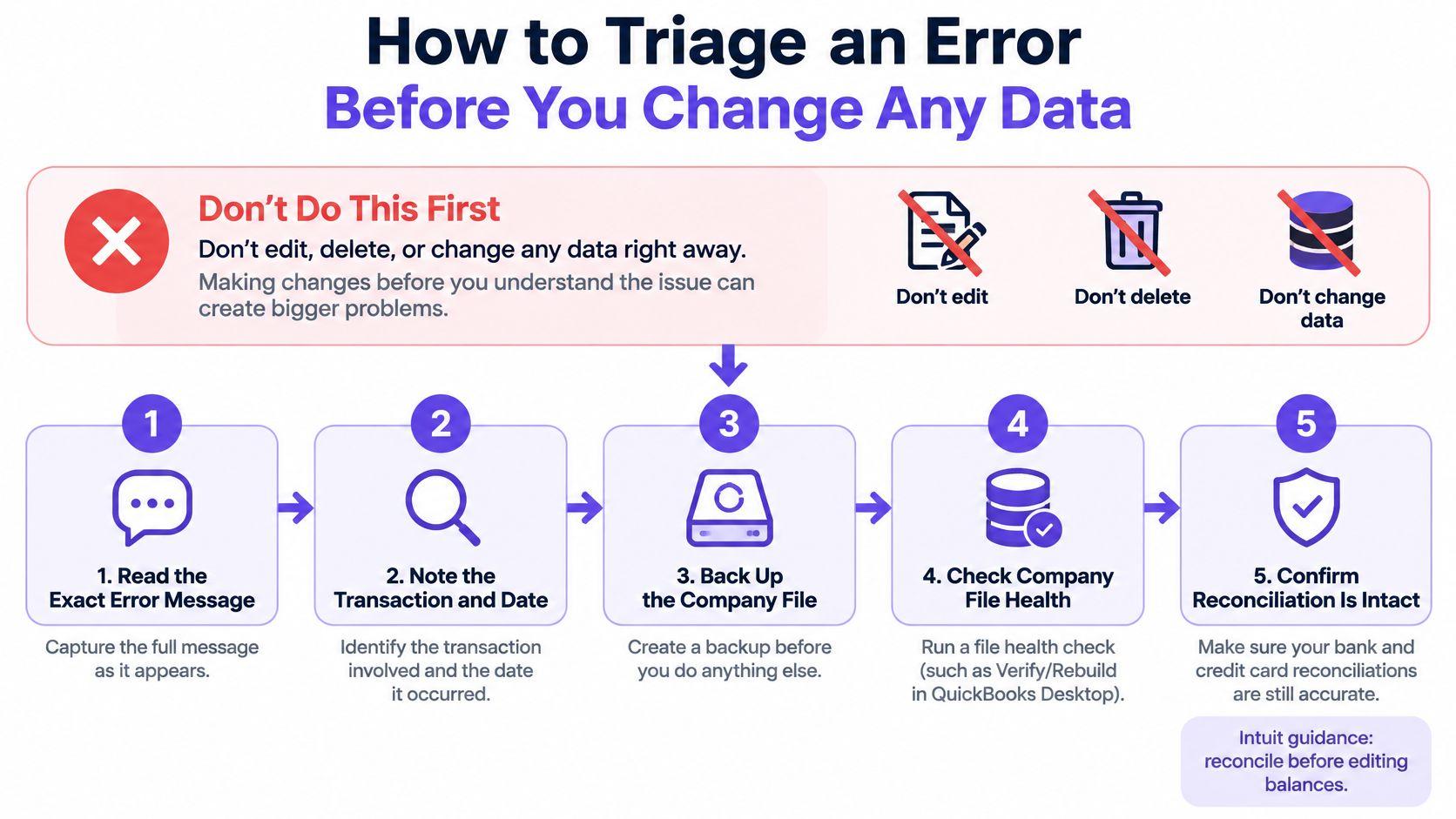
Preserve evidence and locate the first affected period
- Create a dated backup and confirm it opens. For QuickBooks Desktop, verify the backup through a separate restore without overwriting your production file. For Online, preserve available exports, reconciliation reports, and audit-log evidence, and confirm your backup arrangements.
- Record the exact failure. Capture the error text, code, QuickBooks release, company-file location, and, for Desktop, Windows version. Note whether a sample file reproduces the problem.
- Classify the issue. Separate program faults, bank-feed faults, suspected company-file damage, and ledger discrepancies. Don't run unrelated repairs because they're available.
- Find the earliest affected reconciliation. Compare completed reconciliation reports with statements. Work backward until you find the last supported balance.
- Inspect the audit trail. Compare modified, deleted, and imported transactions with independent records. Distinguish a deposit awaiting bank clearance from a payment removed after reconciliation.
- Stop at unauthorized historical changes. Send unexplained closed-period edits to the controller or CPA before mass deletion, opening-balance changes, or replacement entries.
Include spreadsheets and integrations in that review. For a SaaS business, inspect payment-processor settlement schedules and revenue imports. For an agency, inspect payroll allocations, contractor-payment imports, and manually maintained project billing trackers.
A zero difference isn't proof
A reconciliation establishes agreement only when the underlying transactions are valid. If someone changes the opening balance to absorb a deleted payment, the screen can show no difference while the expense and cash history remain wrong.
Use a documented prior-period adjustment process when the correction affects financial statements already issued. Your controller or CPA should decide whether to restore the original transaction, record an adjustment, or reopen the affected period.
Finish triage with a short written handoff containing the failure category, earliest affected period, evidence list, proposed fix, and named owner. Add the reports that depend on the affected balance so the reviewer knows what needs rechecking.
How to Repair QuickBooks Desktop Program and Print Errors
Repair before reinstalling. Reinstalling the application doesn't establish whether the fault belongs to Windows, QuickBooks, or a particular company file.
Keep the repair sequence visible while you work.
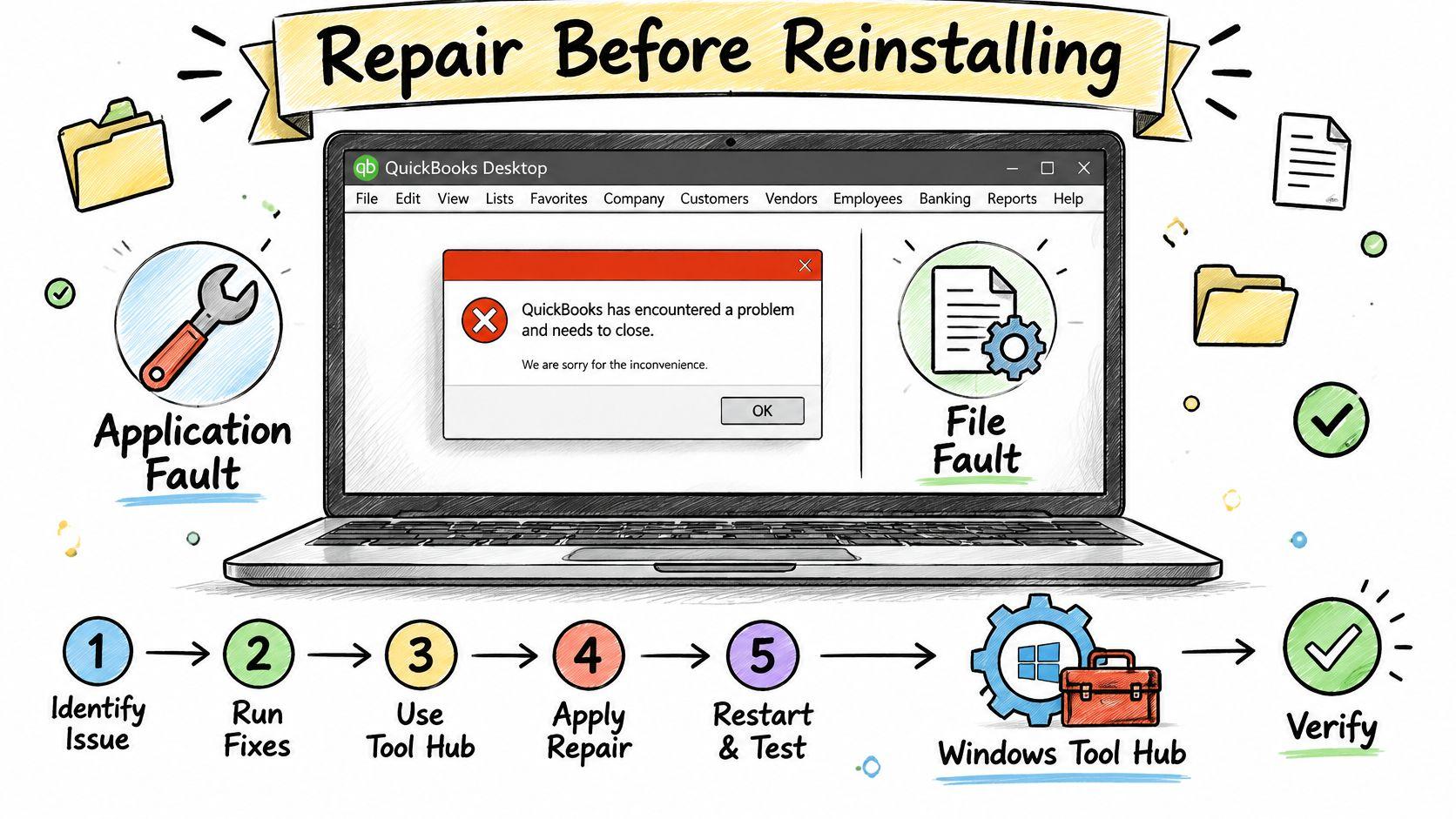
Follow the Windows repair sequence
- Close QuickBooks completely. Create or verify a current company-file backup before repair work.
- Install the latest QuickBooks Tool Hub.
- Open Program Problems → Quick Fix my Program, then reopen QuickBooks and test the company file.
- If the failure persists, run Installation Issues → QuickBooks Install Diagnostic Tool. Intuit's Windows repair documentation says the diagnostic can take up to 20 minutes and repairs Windows components QuickBooks requires.
- Restart Windows and retest. Record whether the original action now works, not merely whether QuickBooks opens.
Choose the next tool according to the result:
- Application won't launch: Continue with Program Problems and installation diagnostics.
- Application opens, but a company file fails: Use Company File Issues → Quick Fix my File or File Doctor.
- Sample file works: Investigate the production file rather than repeatedly repairing the application.
Avoid running repairs with QuickBooks processes still open, skipping the reboot, or manually changing .NET Framework or MSXML before automated repair. Leave component-level changes to experienced IT support.
This video provides an additional troubleshooting reference.
Isolate printing and PDF failures
For document-output problems, close QuickBooks and run Program Problems → QuickBooks Print & PDF Repair Tool. Intuit's print and PDF troubleshooting documentation describes an approximately one-minute repair; retry printing, emailing, or saving the PDF afterward.
If a particular printer fails, check the Windows default printer, driver status, and permissions. If every printer and company file fails, investigate the Windows or QuickBooks output components rather than changing invoices.
A technical repair is complete only after the original action works and the accounting reports still agree with the preserved records.
Use internal operational benchmarks, not an assumed industry success rate: log first-pass resolution, downtime, recurrence during the following week, and whether reports and reconciliations remain intact. The cited documentation doesn't establish a published repair-success percentage.
Fixing Bank Feed and Reconciliation Discrepancies
A failed download and an incorrect ledger balance require different responses. Restore the connection before deciding whether any transactions need correction.
For QuickBooks Online, Error 350 indicates an expired or failed secure bank connection, so reconnect the account and download again. Intuit's bank-feed reset guidance also describes the Desktop reset workflow: update the Financial Institutions Directory, back up, deactivate the affected account's Bank Feeds, create a replacement bank-type account, merge it with the existing account, and reconnect Bank Feeds.
Don't merge accounts casually. Confirm the account identity and preserve the original file before following that workflow. A connection repair shouldn't become an improvised chart-of-accounts cleanup.
For Desktop diagnosis, test the same bank connection in a test company. Successful downloads there point toward a production-file problem; failure in both places calls for contacting the financial institution.
Investigate the beginning balance
Causes of a beginning-balance discrepancy
| Cause | Where to Check | Correction |
|---|---|---|
| Account set up with no balance or the wrong balance | Opening balance entry for the account | Establish the supported opening balance and obtain approval before changing closed history |
| Cleared or reconciled transaction voided, deleted or modified | Entered and Last Modified fields in Reconciliation Discrepancy | Restore or correct the transaction |
| Data damage to the company file | Verify Data error report | Back up, then use Rebuild Data when indicated |
| Wrong account or period selected | Account and statement date in the reconciliation | Reselect the account or period and reconcile again |
Using the amounts in Intuit's beginning-balance guidance, deleting a $4,500 vendor payment from a previously reconciled $125,000 balance produces $125,000 + $4,500 = $129,500, a $4,500 difference from the supported balance. The higher balance is the symptom; the deleted payment is the item to investigate.
Open Reports → Banking → Reconciliation Discrepancy, select the account, and inspect the transaction date alongside Entered/Last Modified. Restore or correct the transaction only after checking the statement and source document. If approved remediation requires reopening the reconciliation, use Undo Last Reconciliation under accounting supervision and document the impact.
Don't confuse changed history with legitimate clearance timing. For help distinguishing deposits recorded in the ledger from deposits already credited by the bank, Reliance Property Accounts' reconciliation guide helps explain deposits in transit.
Once the cause is resolved, follow a consistent QuickBooks Online bank reconciliation process. Preserve the corrected reconciliation and the explanation for your controller, tax preparer, or auditor.
How to Repair a Damaged Company File Safely
Verify Data diagnoses integrity problems. Rebuild Data repairs qualifying problems. Running them in that order gives you a record of what failed and whether the repair addressed it.
Suspect file damage when records behave inconsistently, not just because a report looks unfamiliar. Check report dates, filters, and account selection before treating a missing transaction as corruption.
Run Verify Data before Rebuild Data
Intuit's guidance on unrecoverable reconciliation errors supports a backup-first approach and distinguishes file problems from update, computer, and program-code issues.
- Create a dated company-file backup. Retain the untouched version separately from the working file.
- Switch from multi-user mode to single-user mode so other users aren't posting during the repair.
- Run Verify Data and record the findings.
- If damage is identified, run Rebuild Data and retain the repair messages.
- Close and reopen QuickBooks.
- Run Verify Data again. Confirm that the reported integrity issue has cleared before returning to normal work.
Don't treat a completed rebuild as accounting sign-off. Compare the repaired file with preserved reports, bank statements, and customer balances. Have the person responsible for the close approve any remaining differences.
Why recreating a payment is the wrong first move
Consider the missing-payment scenario described in the same Intuit guidance: a $2,300 customer payment appears in the bank register but not in the receivables report. Entering it again risks adding $2,300 to cash and reducing accounts receivable by another $2,300, even though no additional money arrived.
The correct response is to establish whether the original payment exists, whether the report includes it, and whether the file passes integrity checks. Only then should you decide whether a transaction-level correction is necessary.
Stop condition: If Verify Data still reports damage after the repair, preserve the current file and error report. Don't keep adding transactions to compensate for inconsistent reports.
Bypassing integrity verification during an Accountant's Changes import isn't a repair. An import that proceeds successfully doesn't establish that the underlying file is healthy.
If the utilities don't resolve the unrecoverable error, escalate to QuickBooks support or file-recovery options with the backup, error report, release information, and reproduction steps. Use a documented accounting cleanup process to validate the repaired balances before closing the period.
Decide Whether to Hand Off the Cleanup
Hand off the work when the repair crosses from software troubleshooting into historical reporting, payroll compliance, or uncertain data recovery. The decision isn't whether you're comfortable clicking through QuickBooks. It's whether you can establish the full effect of the change.
Red Flags That Require Review
- Payroll disagreement: The payroll register doesn't match actual payments, or quarterly payroll totals don't agree with Form 941.
- Unexplained historical change: A previously reconciled balance changed without a documented reason.
- Duplicate imports: The same transaction appears again after a feed refresh or integration import.
- Recurring failure: The error returns during the week after repair.
- Closed-period exposure: The proposed fix affects periods used for lender reporting, tax filings, or investor materials.
- System-component editing: The next step requires manually changing .NET Framework or MSXML components.
Use this checklist before authorizing further changes.
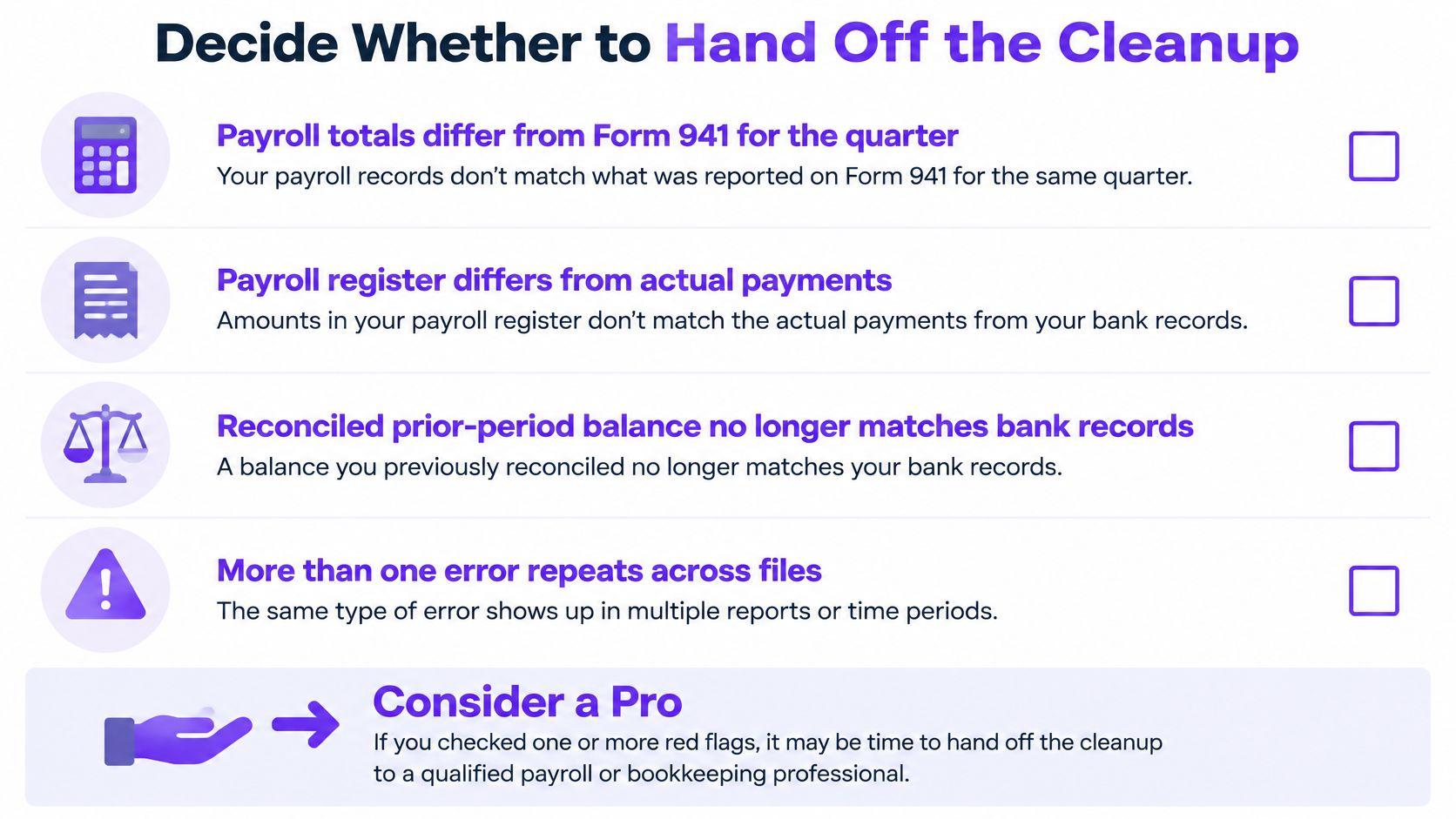
Payroll needs more than a software update
Intuit's payroll guidance recommends comparing the payroll register with actual payments and checking quarterly wages and taxes against Form 941, including income tax, Social Security, and Medicare.
Classify the failure before correcting it: calculation, posting, funding, liability payment, or filing. Each stage has a different authoritative record. A bank withdrawal establishes funding, but it doesn't establish that employee wages or tax liabilities were reported correctly.
Updating QuickBooks won't automatically correct a payroll provider's filing, employee W-2 records, or an external liability ledger. If the provider filed correctly and only the ledger posting is wrong, changing the paycheck creates another disagreement.
Have the payroll owner and CPA determine whether the remedy requires a corrected payroll run, amended filing, or approved ledger adjustment. Pay particular attention to year-end cutoffs, off-cycle payroll, contractor classification, and multi-state records.
Make the handoff useful
If none of the warning signs applies, assign an owner to repeat triage during the monthly close and review reconciliation discrepancies. If a warning sign applies, send the controller or CPA the backup, error codes, earliest mismatched period, relevant statements, and dependent reports.
Include what you've already attempted. That prevents the next reviewer from repeating an unsuccessful repair or assuming that an edited balance is original.
At Jumpstart Partners, we hold the QuickBooks ProAdvisor credential, and our engagements are CPA-led. We work with your existing founder, operations, CPA, or bookkeeper setup rather than forcing a full reset on day one.
Our approach to QuickBooks bookkeeping services keeps responsibility explicit: who investigates the discrepancy, who approves the correction, and who signs off on the resulting reports. This week, preserve the affected records and assign that decision to a named person before anyone edits the ledger again.
Jumpstart Partners offers controller-led help to diagnose QuickBooks discrepancies and scope the cleanup around your existing finance team. Visit Jumpstart Partners to use the free diagnostic, which asks three questions to name the likely failure point and explain why, with no email required for the first result.