Financial Operations
Journal Entry Automation: Boost Business Growth
Automate journal entries to streamline accounting & boost efficiency. Discover how journal entry automation can transform your growing business finances in
ByJumpstart Partners, CPA, QuickBooks ProAdvisor
··17 min readManual journal entries are still one of the biggest hidden drags on the close. A 2025 benchmarking summary says manual entries typically carry a 1% to 5% error rate, while AI journal entry automation brings that down to 0.2% to 0.8%, and it cuts the fully loaded processing cost from $14.20 per entry to $3.80 (benchmarking summary). If you're still chasing accruals, fixing mis-postings, and reconciling entries by hand, you're not running a finance function, you're paying people to clean up the same mess every month.
The problem is bigger than data entry. Manual journal work can consume 50% or more of total close time (industry automation guide), which means your team spends the month-end window doing repetitive repair work instead of giving you answers on hiring, spend, and cash. That's why journal entry automation matters, not as a software trend, but as a control and decision-making problem.
Table of Contents
- The Hidden Cost of Manual Journal Entry
- What Journal Entry Automation Actually Does
- Which Entries to Automate First and Which to Keep Manual
- Platform Integrations, Controls, and ASC 606 Considerations
- A Phased Implementation Sequence You Can Run in 90 Days
- ROI, KPIs, and a Worked Example for a $5M ARR SaaS Company
- Red Flags and Common Pitfalls That Break Automation
- When to Outsource and Your Next 30 Days
The Hidden Cost of Manual Journal Entry
Manual journal entry does not just burn labor hours. It slows close, increases rework, and turns every month-end into a cleanup exercise for entries that should have been correct upstream. If your team still types journals by hand, you are paying for error risk, audit friction, and delayed management reporting every single cycle.
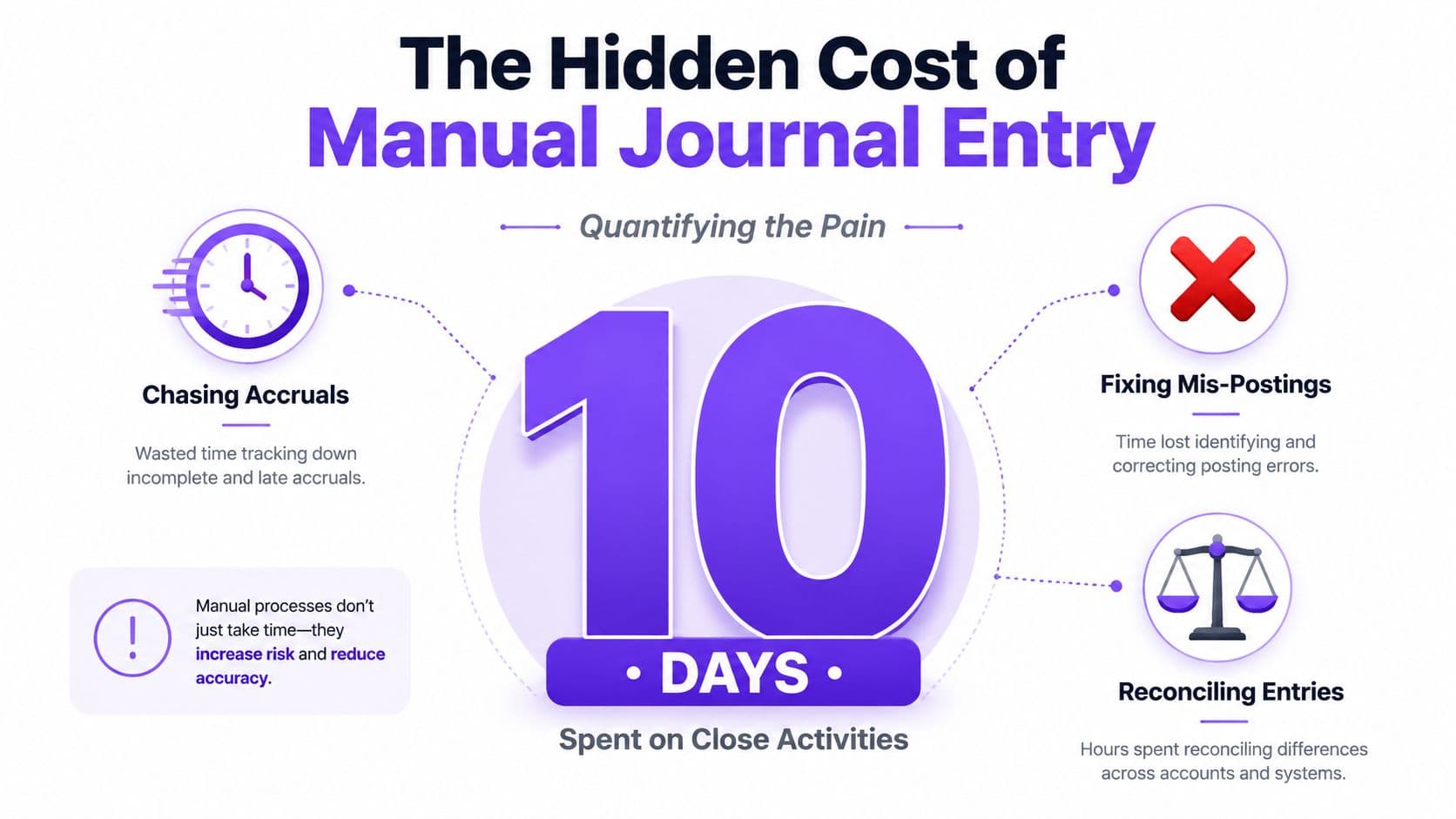
What the numbers mean
A manual entry that costs $14.20 to process versus $3.80 for AI-assisted processing is a structural cost difference, not a minor workflow tweak (benchmarking summary). The direct savings matter, but the operating change matters more. You get fewer rework loops, fewer late fixes, and fewer meetings spent asking why an entry does not tie.
Practical rule: if a journal type appears every month with the same source systems and the same controls, it should not be typed in by hand.
The close-speed effect is just as direct. Companies using AI journal entry automation close their books 2.9 days faster on average, moving from a median 8.4-day close to 5.5 days (benchmarking summary). For founders, that means decisions happen earlier. For finance leaders, it means less uncertainty before board reporting and fewer days spent answering questions with stale numbers.
The control issue matters even more than the speed gain. A weak evidence chain creates audit pain, and a faster process only helps you make mistakes sooner. Start with the basics of an audit trail, because if the support is thin, the posting speed is irrelevant.
Manual posting also obscures the core bottleneck. A close that appears to be routine accounting work is often a stack of low-value tasks, repeated approvals, and mismatch cleanup that should have been addressed upstream. That is why automation pays off when it removes the need to touch every entry, not just when it expedites the final click into the ledger.
For teams that need a practical example of how this shows up at the operational layer, discover OrderOut POS integration and compare it to your current journal workflow.
If you want to fix manual close pain, stop measuring effort by how many journals were created. Measure it by how many entries forced a human to investigate, correct, or explain them after the fact. That is where the hidden cost lives.
What Journal Entry Automation Actually Does
Many think journal entry automation means a recurring template that posts on a schedule. That's a small piece of the picture. Real automation is a pipeline that prepares the entry, proves it, and then posts it only after the controls pass.
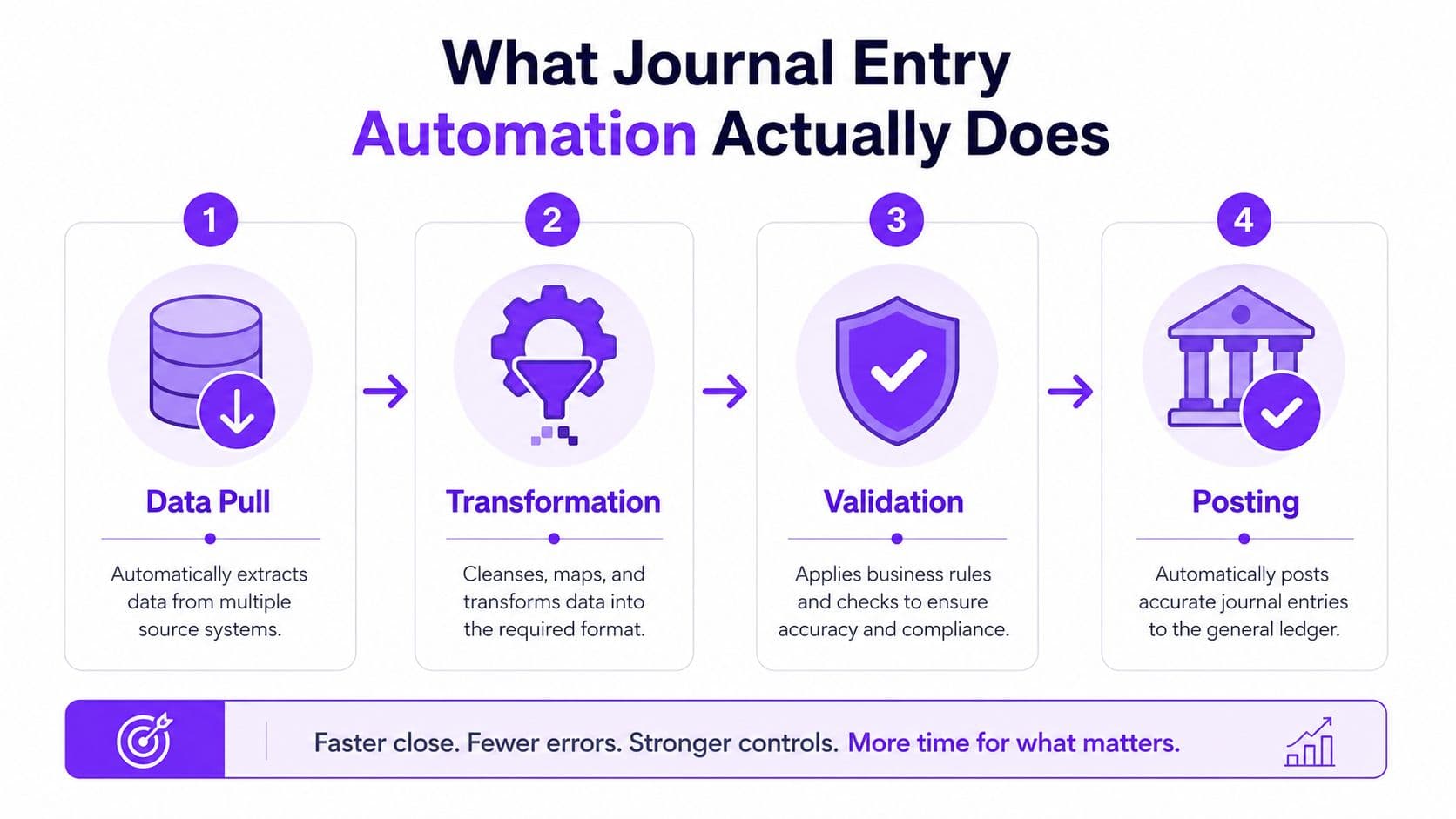
The four stages that matter
First, the system pulls source data from platforms like Stripe, QuickBooks, payroll tools, or billing systems. Then it applies accounting transformations and calculations, so the entry reflects the right period, classification, and amounts. After that, it builds the supporting workpaper, validates cutoff and threshold rules, and only then routes the entry for approval and posting.
That's why automation is not a faster typist. It's more like a junior accountant who gathers the documents, drafts the entry, attaches the support, and waits for sign-off.
The distinction matters because the biggest savings live in the preparation layer, not the final click into the general ledger. That's the point many overviews miss. A tool that only posts faster gives you a little relief. A tool that creates, validates, and documents the entry changes how the close runs.
A practical resource for this kind of workflow thinking is discover OrderOut POS integration, especially if your data starts in operational systems before it reaches finance. For a broader process view, see financial reporting automation.
What good automation looks like
Good automation links systems cleanly, uses templates and preset rules, and can also use AI to auto-post entries when the data is stable enough to trust (NetSuite). The output should be traceable, with a clear path from source totals to the journal ID in the ERP. If that path is missing, you've built convenience without control.
If the system can't explain where an entry came from, don't let it post.
That's the standard. Anything less creates cleanup work later.
Which Entries to Automate First and Which to Keep Manual
Not every entry deserves the same treatment. If you try to automate everything at once, you'll create reconciliation debt and spend more time untangling exceptions than you saved on posting. The right move is to start with the categories that are repetitive, stable, and easy to prove.
Journal Entry Categories Ranked by Automation Readiness
| Entry Category | Automation Fit | Control Risk | Recommended Phase |
|---|---|---|---|
| Recurring entries | High | Low | First wave |
| Accruals | High | Medium | Second wave |
| Allocations | Medium | Medium | After recurring and accruals |
| Intercompany | Lower | Higher | Later wave |
| Period-end adjustments | Mixed | Higher | Keep semi-manual unless rules are stable |
Recurring entries are the obvious starting point. Rent, subscriptions, depreciation, amortization, and similar items usually have stable inputs and clear logic, which makes them the lowest-risk automation target (implementation guidance). Accruals come next because the drivers are predictable even when the judgment call is still important.
Complex intercompany entries sit near the bottom because they rely on matching logic across entities and are far more sensitive to exceptions (implementation sequence guidance). If you're a SaaS or agency business with multi-entity activity, don't start there just because it looks advanced. Start where the rules are boring.
A practical decision rule
Use this simple filter. If an entry has stable source data, repeatable calculations, and clear approval logic, automate it. If it depends on judgment, tie-outs across multiple entities, or shifting interpretations of policy, keep a human in the loop.
Control rule: automate repeatable preparation, not unresolved accounting judgment.
That's also where the internal process matters. Journal automation only works when traceability, approvals, and documentation stay intact, especially for items that need a manual review path (reconciliation automation guidance). If you can't define the exception path before rollout, you're not ready to automate that category.
The most common mistake is treating all manual journals as equally automatable. They're not. Pick the first wave carefully, or you'll spend your gains on cleanup.
Platform Integrations, Controls, and ASC 606 Considerations
Automation fails fast when the plumbing is weak. If your finance stack cannot move clean data from source system to GL, your team ends up rekeying entries and the automation label becomes expensive theater. The right stack matters, but the control design matters more.
What has to connect
Journal workflows need dependable connections to the systems that create the numbers, including QuickBooks, Xero, NetSuite, Stripe, Shopify, Square, Gusto, and BambooHR. APIs should be the default path because they are cleaner, easier to monitor, and less brittle than workarounds. Use RPA only where an API does not exist, and keep it confined to the smallest possible step so you are not automating a pile of fragile clicks (implementation guidance).
If your finance stack runs through cloud infrastructure, a Google Cloud partner comparison is a useful way to judge whether the vendor can support integration, permissioning, and long-term support. Pick the stack that your team can operate and audit, not the one with the slickest demo.
Controls that can't be skipped
Segregation of duties still applies after automation. One person can configure the rules, another should approve the posting path, and nobody should be able to both build and automatically post the same journal set. Keep documentation in one place, and make every automated entry trace back from source totals to the GL posting through a clear audit trail (control guidance; Alteryx workflow design).
That control trail is the difference between a tidy close and a painful audit sample. If the source-to-GL link is weak, reviewers will spend time reconstructing what the system did, and your team will spend more time explaining than closing.
For SaaS companies, ASC 606 adds a separate layer of discipline. Subscription revenue, usage-based billing, and contract modifications need rules that reflect the policy, not a shortcut that happens to post quickly. Use ASC 606 revenue recognition as the reference point before you automate any revenue journal logic. If the recognition logic is loose, automation just repeats the mistake at scale.
What to review before you automate
- Source system coverage: Confirm the entry starts from a trusted system, not from a spreadsheet that someone copied by hand.
- Approval routing: Approval has to happen before posting, not after the journal is already in the ledger.
- Audit evidence: Attach the support to the journal itself so reviewers do not have to hunt through shared folders.
- Exception handling: Define which items auto-post and which ones stop for manual review, with clear thresholds for both.
That exception path deserves more attention than it often receives. The hard part is not pushing 85 to 95 percent of journals through faster. The hard part is handling the 5 to 15 percent that should not auto-post without creating control gaps or audit noise. If you get that part right, the automation is defensible. If you get it wrong, the rollout becomes a cleanup exercise.
For teams deciding whether to host finance workflows in a partner-managed environment, the Google Cloud partner comparison also helps separate platform capability from implementation promises. That matters because control design only works when the underlying systems can support it.
A Phased Implementation Sequence You Can Run in 90 Days
You do not need a giant transformation program to get value out of journal entry automation. You need a tight rollout that starts with low-risk entries, proves control, and adds complexity only after the first wave works. Anything else turns into a cleanup project disguised as innovation.
A simple 90-day calendar
Days 1 to 14: map your current close, count entries by category, and identify the recurring templates that already behave predictably. You find the first automation candidates not by guesswork but by volume and repeatability. The output should be a shortlist of entries that can be prepared from source systems without heavy judgment.
Days 15 to 42: build the rules, connect the systems, and set the approval routing for that first wave. Keep the scope small. If the logic can't be explained to another controller in one page, it's too broad for phase one.
Days 43 to 70: go live with recurring entries, then add accruals once the first batch is stable. The cleanup risk drops if you've preserved source-to-GL traceability and built an exception path.
Days 71 to 90: layer in AI-driven validation and anomaly detection after the deterministic rules are working. That sequencing matters because AI should police the process, not define it.
For close process sequencing more broadly, the financial close automation playbook is the right companion read.
How to know each phase is working
Don't judge progress by how many demos you've seen. Judge it by whether the system is posting the right entries, routing the right exceptions, and cutting the time your team spends on recurring cleanup. A successful phase one makes the next phase easier, not messier.
The best implementations start with the boring stuff, prove the controls, then expand. That's how you get speed without creating reconciliation debt.
ROI, KPIs, and a Worked Example for a $5M ARR SaaS Company
If you cannot measure the rollout, you are guessing. Track entries auto-posted, close days, error rate, exception review time, and labor hours saved. Everything else is noise.
What to track
A strong rollout should show how many entries are prepared automatically, how many still need manual review, how quickly exceptions are cleared, and whether the close is getting shorter. That is the scorecard. If the auto-post rate rises but exception review time explodes, you have built speed on top of chaos.
For a SaaS company, I want finance watching the close calendar and the exception queue at the same time. Automation only pays when it shortens the close without weakening control evidence, and the benchmarking data cited earlier makes that tradeoff plain.
A worked example
Take a fictional $5M ARR SaaS company processing about 400 manual entries per month. At $14.20 per entry, that is about $5,680 per month in entry-processing cost, or roughly $68,160 per year. If automation cuts that cost by 73%, the direct annual savings are about $49,747.
That is the starting point, not the finish line. The payback calculation has to include software fees, implementation effort, and any outsourced controller support you need during rollout. If the finance team spends weeks configuring rules, mapping source data, and testing exception paths, that labor belongs in the model. Ignore it and the business case looks cleaner than it is.
The close-speed gain still matters. Moving from 8.4 days to 5.5 days means the finance team gets answers sooner, and leadership stops waiting nearly three days for the same reporting package. That matters when you are making hiring calls, deferring spend, or timing a fundraising conversation.
Finance leader rule: if automation does not reduce both rework and close lag, it is not paying for itself.
How to think about the investment
Compare savings against the full cost of tools, implementation, and any outsourced controller support. If your current process depends on people manually keying repetitive journals, the payback usually comes from labor avoided, not from a feature list. For a growing SaaS team, that is the main reason to fund the project.
The case gets stronger when automation turns recurring labor into governed workflow with clear exception handling. That is where you get ROI and cleaner reporting at the same time.
Red Flags and Common Pitfalls That Break Automation
Automation failure is usually obvious before it becomes expensive, if you know where to look. The problem is that many teams treat every exception as a nuisance instead of a signal. That's how control issues turn into audit issues.
Warning signs you should not ignore
- Exception rates keep climbing: If automated categories are throwing off too many exceptions, your rules are too loose or your source data is too messy.
- Subledger and GL balances don't match: That usually means the source-to-post traceability is broken.
- Approval evidence is missing: If you can't show who approved what, your segregation of duties isn't configured correctly.
- The same AI anomaly keeps coming back: Your validation thresholds need tuning, or the underlying source process is still wrong.
A separate red flag is simple overconfidence. Some teams think more automation is always better. It isn't. The strongest setups deliberately route control-sensitive items to manual review instead of auto-posting them.
The diagnostic question to ask
Ask one question for every automated category. If this entry goes wrong, can you prove where it came from, who approved it, and why the system posted it? If the answer is fuzzy, pause the rollout.
That's the part most generic articles skip. They talk about volume and speed, but not about what happens in the 5% to 15% of entries that should not auto-post. That exception layer is where a safe rollout becomes a controlled one, or where an audit headache starts.
If you need a single operating principle, use this one. Automate the repeatable path, but keep judgment-heavy entries under structured review.
When to Outsource and Your Next 30 Days
If you're under $2M in revenue, don't have a dedicated controller, or your close already runs past 10 days, a do-it-yourself build is usually the wrong move. You need speed, control, and a working process now, not a six-month internal project that distracts your team from running the business. In that situation, an outsourced controller with embedded automation tooling makes more sense than trying to build the stack from scratch.
Jumpstart Partners is one option in that lane. It provides outsourced controller and bookkeeping support for SaaS, agencies, and other growing businesses, and its stack includes core systems like QuickBooks, Xero, NetSuite, Stripe, Shopify, Square, Gusto, and BambooHR.
What to do in the next 30 days
- Audit your current journal mix: Count which entries repeat every month and which ones require judgment.
- Identify your first automation wave: Start with stable recurring entries, not the complicated edge cases.
- Document your exception path: Write down who reviews exceptions, what evidence they need, and when they escalate.
- Book outside support if the close is already late: If you're drowning in cleanup, don't pretend a tool alone will fix it.
For teams that want a structured rollout, Jumpstart Partners also implements ASC 606 workflows and financial reporting automation, which makes it relevant when journals touch revenue, reconciliations, and month-end close.
If you want a finance team that can tighten journal workflows without sacrificing control evidence, talk to Jumpstart Partners about its outsourced controller setup and close automation support. Visit Jumpstart Partners to see how it handles recurring journals, reporting workflows, and month-end close for growing SaaS and agency businesses.