Financial Operations
QuickBooks Online Cleanup: How to Fix Your Books in 2026
QuickBooks Online cleanup, step by step: red flags, reconciliation fixes, opening balance errors and ASC 606 checks for SaaS and agency finance teams.
ByJumpstart Partners, CPA, QuickBooks ProAdvisor
··15 min readYou already know the file is wrong. The bank feed has hundreds of items piled in For review, the Balance Sheet shows a negative Undeposited Funds balance, and somewhere in the chart of accounts there's a line called Suspense that nobody has opened since the last bookkeeper left. Closing the laptop and hoping it stays quiet until tax season doesn't work, because the gap gets found on someone else's schedule.
The part that catches founders off guard is where the damage lands. Messy books don't just embarrass you in front of a lender. They change the numbers you run the company on. Revenue recognized on cash receipt, payment processor fees netted inconsistently, retainers booked as income the day the check clears: each one turns into a wrong MRR figure, a wrong gross margin, and a deferred revenue balance that falls apart the moment somebody asks a follow-up question.
A QuickBooks Online cleanup fixes that, but only when you run it as an audit-trail exercise instead of a delete-and-recode session. Every correction either strengthens or weakens the evidence package your investor, lender, or auditor will eventually request. What follows is how to make the corrections count.
Table of Contents
- Red Flags That Mean Your File Needs Cleanup
- How to Run a QuickBooks Cleanup in Seven Steps
- Fix Reconciliation Gaps and Opening Balance Errors
- Correct Old Entries Without Erasing the Audit Trail
- Revenue, Deferred Revenue and Metrics After Cleanup
- Decide Whether to Hand Off Your Cleanup
Red Flags That Mean Your File Needs Cleanup
A founder preparing for a lender review may discover that the books cannot support a basic question: how much cash is available, and how much revenue is still owed? Manual entry and reconciliation can make that kind of uncertainty harder to catch. The practical test is whether each important balance has a clear explanation and supporting records.
Consider a company with 14 months of unreconciled bank activity. Its cash balance is uncertain, deferred revenue may not match invoices and service periods, and missing commission accruals can make sales costs look too low. A lender, investor, or tax preparer may uncover those gaps under deadline. Each correction should preserve the trail behind revenue, metrics, and audit evidence, not just make the balance sheet look tidy.
Score the file before you touch a single entry
| Red flag | Where to check it | Threshold that triggers cleanup |
|---|---|---|
| Bank account last reconciled more than one month ago | Reconciliation report, last reconciled date | Any gap over one month |
| Uncategorized bank transactions older than 30 days | Banking, For review tab | Any item |
| Opening balance differs from the bank statement | First reconciliation, Opening Balance Equity | Any difference |
| Possible duplicate transactions | Search by amount and date | Any matching pair |
| Balance Sheet does not tie to AR aging | Balance Sheet compared with AR aging report | Any difference |
| Undeposited Funds balance older than 60 days | Balance Sheet | Any unexplained balance |
| Reconciled transactions edited or deleted | Audit Log filtered to reconciliations | Any change without a documented reason |
| Manual journal entries to equity by a prior bookkeeper | General ledger search | Any unexplained entry |
One or two flags may call for a targeted, documented correction. Three or more point to a cleanup that needs to be sequenced and reviewed before changes begin. The flags can interact: an incorrect opening balance affects later reconciliations, while an unexplained equity entry can obscure why a balance changed. Check the Audit Log to identify who changed a reconciled transaction and when.
Practical rule: If you cannot explain a balance in one sentence and point to the supporting document, it is not clean. It is only quiet.
Delaying the work can increase accounting costs and complicate time-sensitive decisions. Read about what delayed bookkeeping costs startups if a funding delay or rushed review is a concern. For a readiness check, use this audit preparation checklist.
Record the flags and the date you identified them. That list gives the cleanup a clear starting point.
How to Run a QuickBooks Cleanup in Seven Steps
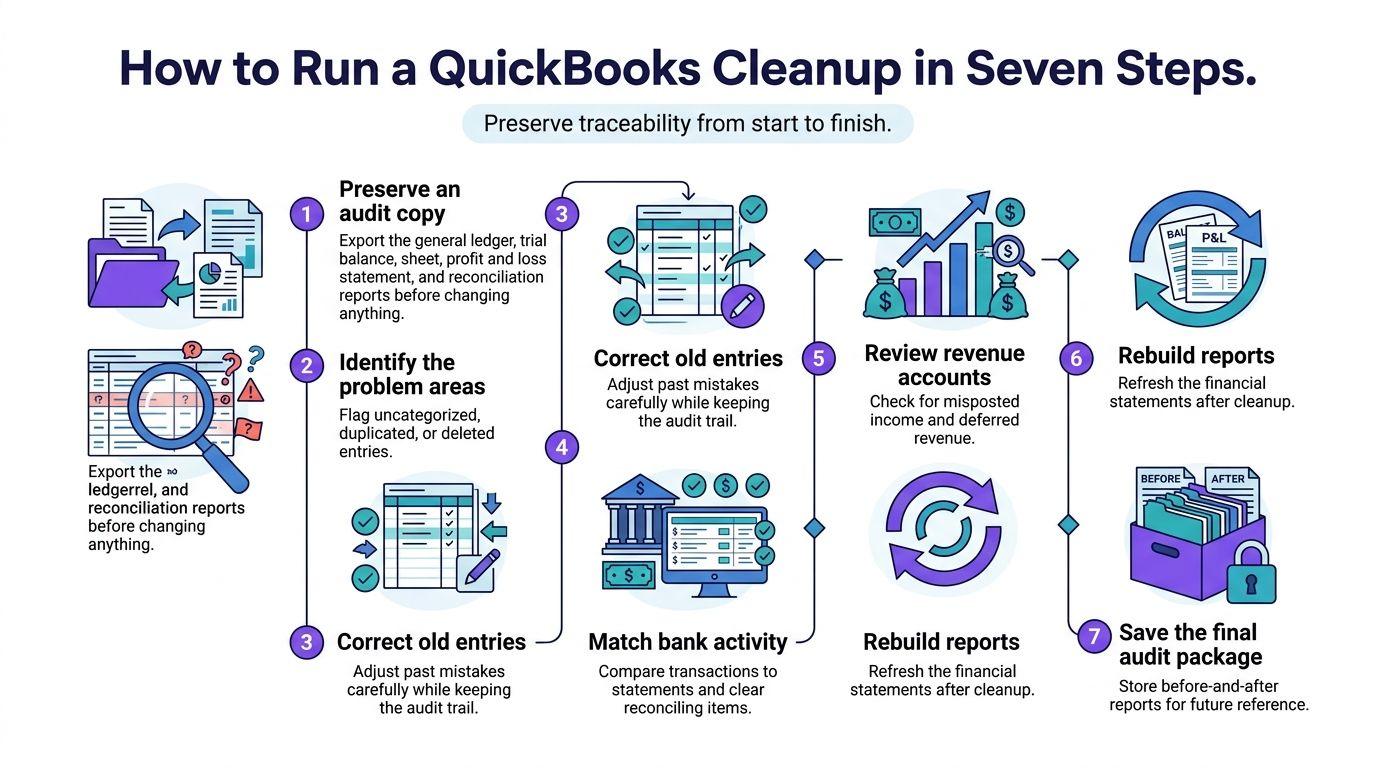
Order is the control, not the speed. Each step produces the evidence the next one depends on, and a fix made out of sequence hides its own trail.
-
Preserve an audit copy first. Export the general ledger, trial balance, balance sheet, profit and loss statement, and every reconciliation report before you change a thing. If a correction is challenged six months from now, that dated export is the only proof of what the file looked like when you started.
-
Verify each opening balance against the prior statement. Do this before you reconcile anything else, because a wrong opening balance makes every matched transaction downstream irrelevant.
-
Reconcile one statement period at a time, oldest first. A fix in March changes April's starting balance, so skipping around creates discrepancies you'll spend twice as long unwinding. QuickBooks' reconciliation guide sets the workflow: enter the statement ending date and ending balance, match each statement transaction, and work until the difference reads exactly $0.00.
-
Clear every downloaded transaction to one of four states. Matched, categorized, posted, or excluded. QuickBooks' guide to fixing previously reconciled accounts shows the disposition logic in practice: if a 30-day statement holds 180 downloaded transactions and 12 remain uncategorized, the account isn't ready. Code 8 software subscriptions totaling $3,200 to the right expense accounts, classify 2 owner transfers totaling $7,500 to equity, and exclude 2 duplicate feed entries totaling $1,100 rather than deleting the source records. The reviewed total is $11,800, and the accounting treatment differs by transaction type.
-
Review the balance-sheet accounts, not just the bank. Accounts receivable, accounts payable, payroll liabilities, loans, and Undeposited Funds each tie to a subledger or a statement. If one doesn't, you've found a cleanup item that a bank reconciliation will never surface.
-
Standardize the chart of accounts, classes, and locations. Recurring card charges hit operating expense and gross margin while transfers and customer receipts hit balance-sheet accounts and cash reporting. Unless the categories reflect that distinction, period-over-period comparisons are fiction.
-
Rerun the statements and document every adjustment. Date, amount, cause, approver, supporting document. A journal entry with no memo is a problem you're handing to your future self, or to whoever buys the company.
The exit test is arithmetic, not opinion. Every reconciliation difference reads exactly $0.00, the Balance Sheet ties to the AR and AP aging reports, and deferred revenue ties to the billing schedule. Fail any of those three and the cleanup isn't done, no matter how tidy the register looks.
Fix Reconciliation Gaps and Opening Balance Errors
Opening balance errors survive every other fix. QuickBooks' first-reconciliation guidance tells users to compare the opening balance in QuickBooks with the bank's balance for the same date and correct the Opening Balance Equity entry when the two don't agree. The arithmetic is easy. The discipline isn't.
Say the bank statement shows $80,000 on January 1 and QuickBooks shows $73,500. The difference is $6,500, and there are three plausible causes: omitted historical activity, a duplicated opening balance, or a prior reconciliation error. Notice what isn't on that list. Nothing justifies posting a $6,500 expense or revenue entry to make the screen go quiet.
Before you post anything, open the opening balance transaction, confirm the correct bank account and date were selected, and trace back to the statement that supports the number. If the records support $80,000, correct the opening balance to $80,000 and document the offset based on the actual cause instead of parking it in equity and moving on. This matters most when several bank accounts exist, when the company migrated from another system, or when a previous bookkeeper made manual balance adjustments.
| Symptom | Likely cause | Correct fix |
|---|---|---|
| Opening balance differs by $6,500 (bank $80,000, QuickBooks $73,500) | Omitted history, wrong account or date selected, or a duplicated opening balance | Identify the cause, correct the opening balance and document the offset |
| Difference remains after all items match | Wrong beginning balance, ending date or ending balance entered | Recheck the three inputs before making any entry |
| Statement transactions missing from QuickBooks | Feed gap or missed import | Add the item with its original date, amount and payee |
| Duplicate feed entries | Bank feed and a manual entry both recorded the same item | Exclude the duplicate and keep the source record |
| Owner transfers coded as income or expense | Transfer never classified | Reclassify to equity or a balance-sheet transfer account |
| Uncleared items at month end | Unmatched deposits or checks | Match or investigate each item; do not plug with a journal entry |
The rule for every row is identical. Recheck the inputs, then find the item. That habit is the whole difference between a reconciliation and a cover-up.
The gap is not the problem to hide. The changed transaction is the problem to resolve.
Retain the statement you used, write the calculation down ($80,000 minus $73,500 equals $6,500), name the offsetting account, and have a qualified accountant approve the correction before you close the period. Our walkthrough of bank reconciliation in QuickBooks Online covers the month-end sequence in more detail.
Correct Old Entries Without Erasing the Audit Trail
A $4,800 customer deposit was reconciled in March. In April someone deletes it because it looked like a duplicate. April's beginning balance is now $4,800 too low, and reconciling April harder will not fix it. QuickBooks' guidance on reconciliation discrepancies states it plainly: a deleted or modified transaction that was already reconciled shifts the next period's opening balance, so the job is to restore the transaction, not to re-reconcile the current month.
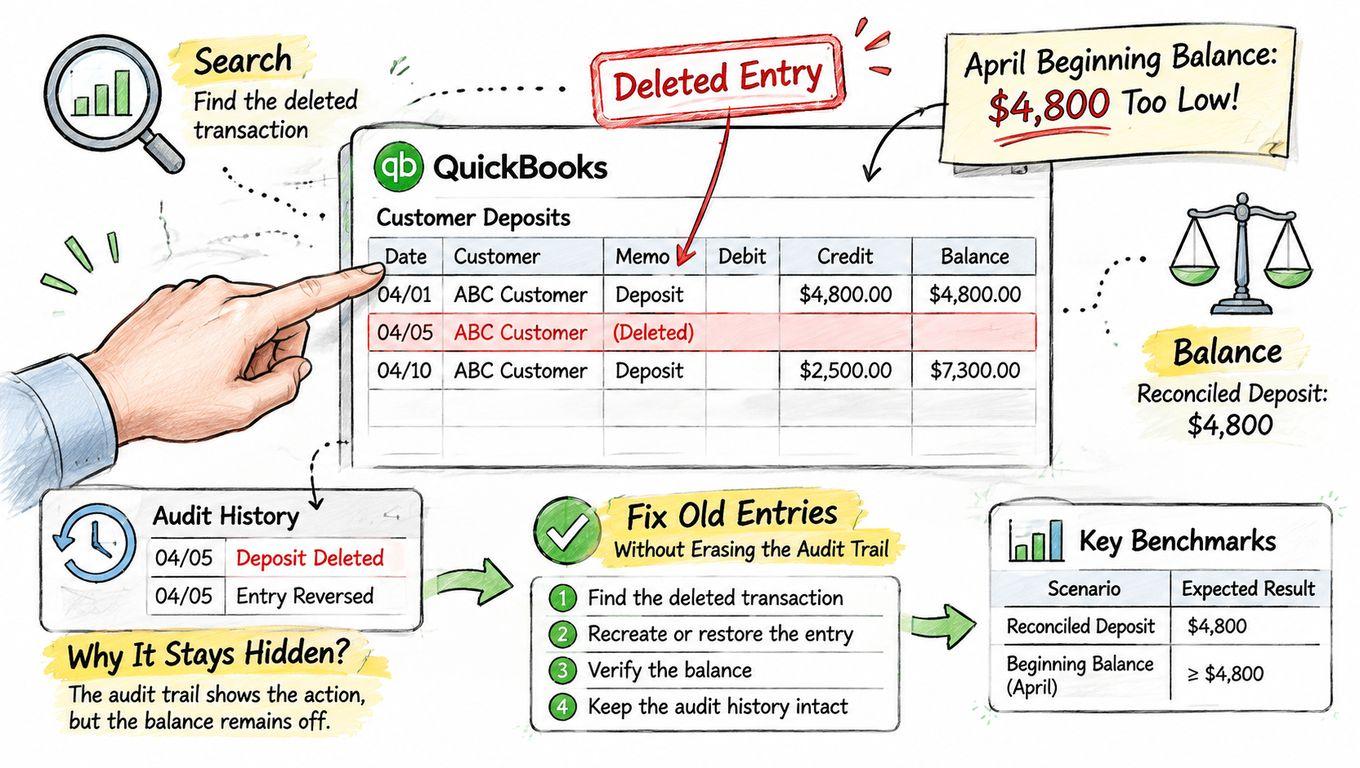
The wrong fix is the one most founders reach for. Post $4,800 to miscellaneous income and the register ties again, except you've either recognized revenue twice or reclassified a balance-sheet item as income, and that error rides along in every P&L you send out.
The repair sequence that leaves evidence behind
Review the discrepancy report, which identifies whether the item was edited, deleted, or voided and supplies its change history. Re-enter the missing deposit with its original date, amount, payee, and account coding. Open the bank register, set the transaction's reconciliation status to R, and confirm the discrepancy returns to $0. Then keep the original statement and the supporting invoice or payment record filed next to the correction, so a reviewer can see why the transaction exists, which period it belongs to, and why it was reconciled before.
Who did it matters as much as what happened. The Audit Log records financial transactions and account activity, including who made a change, when, and the original details. Intuit's documentation on using the Audit Log in QuickBooks Online notes that it displays up to 150 records at a time and retains history for two years. Filter by user, date, and event to isolate the change, export the filtered list, and attach it to the exception register entry.
The register repair in this short walkthrough is worth watching once before you touch a live file.
When history should stay untouched
Some periods can't be rewritten. If tax filings, lender reporting, investor packages, or board reports relied on the original numbers, an overwrite destroys the record that those documents were built on. Record a dated correction entry in the current period instead, log it in the exception register with the cause and approver, and reopen a closed period only with documented approval. For a plain-language explanation of what reviewers look for, see what an audit trail is.
Revenue, Deferred Revenue and Metrics After Cleanup
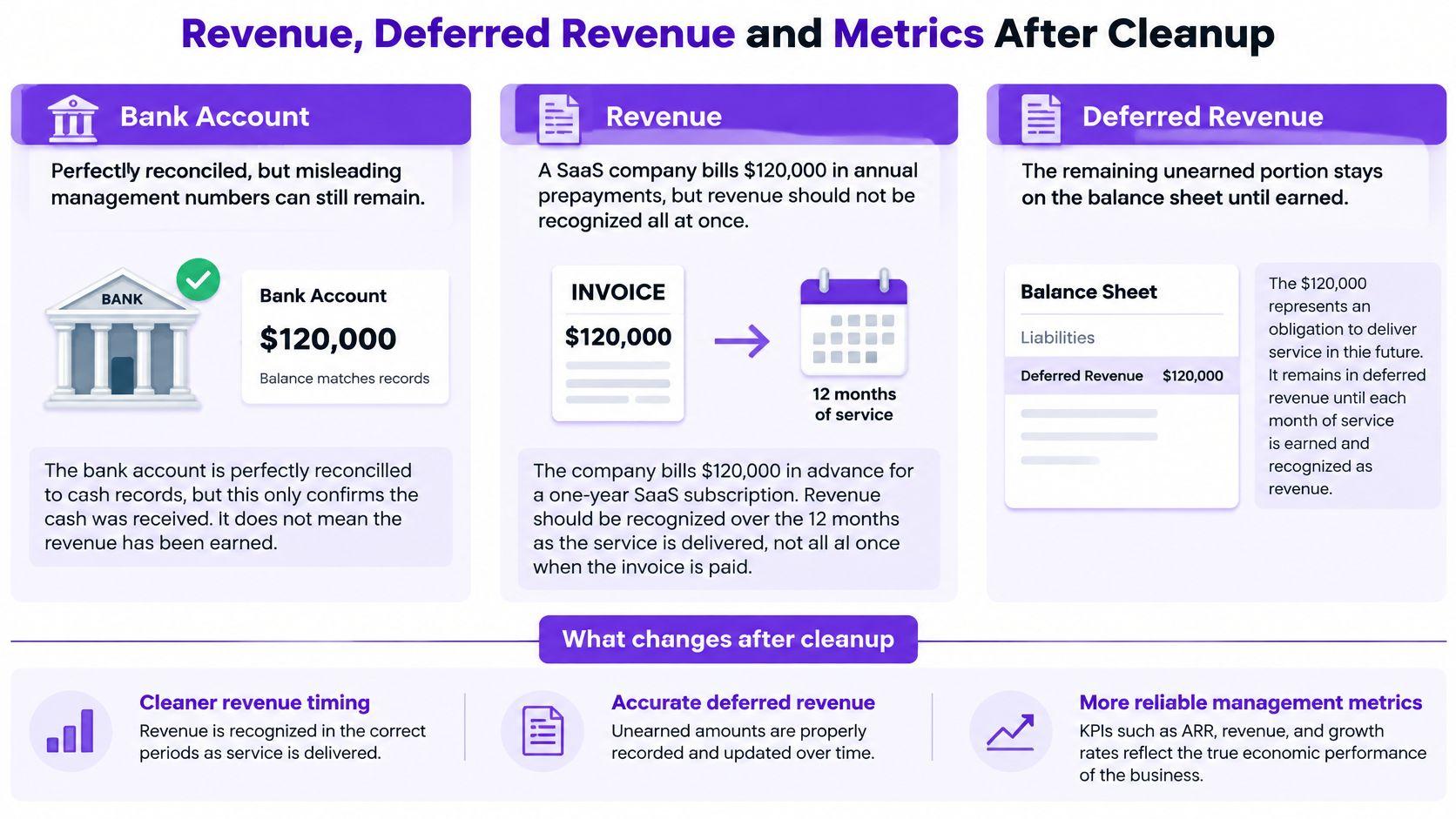
A bank account can reconcile to the penny and still produce management numbers you can't defend. This look at QuickBooks bookkeeping gaps makes the case that the highest-value cleanup work is revenue-related and operational, not cosmetic recategorization, and that a reconciliation certificate proves very little on its own.
Take a SaaS company that bills $120,000 in annual prepayments in January. Under ASC 606, subscription revenue is recognized at $10,000 a month across 12 months, which leaves $110,000 in deferred revenue at the end of January. Book the cash as January revenue and the month is overstated by $110,000. Every ARR figure, gross margin percentage, and CAC payback calculation built on that month is now wrong, and the error never shows up in the bank rec.
| Metric or area | Risk after a bank-only cleanup | Check after cleanup |
|---|---|---|
| Gross MRR and ARR | Built from invoices instead of contracts | Tie to billing platform data and the deferred revenue schedule |
| Subscription revenue timing (ASC 606) | Annual prepayments recognized on cash receipt | Spread recognition over the service term and tie to the deferred revenue schedule |
| Payment processor fees | Netted inconsistently | Record gross revenue, fees, refunds and chargebacks separately |
| Agency retainers | Booked as earned revenue | Separate deposits from revenue earned over time |
| Customer profitability | No client or product class | Add a class per client and rerun margin reports |
| Cash conversion | Bank ties but revenue timing is wrong | Compare collections with deferred revenue movement |
What each business type has to test
SaaS companies test whether billing-platform deposits, deferred revenue, refunds, credits, and implementation fees support ASC 606 reporting and reliable MRR and ARR. Agencies test deposits against retainers, reimbursable costs, work in progress, and revenue earned over time. E-commerce companies test processor settlements, returns, chargebacks, sales tax, inventory, and settlement timing, because a processor deposit is never equal to the revenue it represents.
Compare pre- and post-cleanup KPI definitions, revenue cutoffs, and subledger-to-GL balances before you trust a single dashboard. If you're unsure how the balance should move, start with what deferred revenue is and how it unwinds.
Decide Whether to Hand Off Your Cleanup
The decision rule is simple enough to apply today. Run the cleanup yourself when the red-flag count is one or two, you have a single bank account and one credit card, and the prior bookkeeper left working papers you can follow. Hand it off when the count reaches three or more, when several bank accounts or a system migration are involved, or when investor diligence, a lender review, or an audit lands inside the current quarter.
"The files that worry me aren't the messy ones. They're the ones where somebody made the balance sheet tie to the bank and called it clean. A quarter later, nobody can explain a six-figure swing in deferred revenue and diligence is already running." Steven, founder of Jumpstart Partners and former controller on a public B2B SaaS finance team.
A full reset isn't the answer either. The right engagement is CPA-led, starts with a fixed-scope diagnostic before any entry is changed, and works with your existing founder, operations, CPA, or bookkeeper setup rather than replacing it. That's how our catch-up bookkeeping work is structured, and it's the difference between a file you can defend and a file that's merely quiet.
What a starting point looks like
The Finance Ops Diagnostic is a $3,500 fixed fee delivered in five business days, with a 30-minute kickoff that the customer books. It maps your current stack, the handoff gaps, and the cleanup path, and it does not include tax preparation or transaction-only cleanup. Complimentary ROI assessments are also available if you want to test whether controller services make financial sense before committing to anything.
Three things to do this week:
- Score the file against the red-flag table and date the list.
- Export the audit copy before any correction, and store it somewhere your team can't edit.
- Book the ROI assessment if your score is three or more, and bring the flag list with you.
Jumpstart Partners runs fixed-fee QuickBooks Online cleanup and a five-day month-end close for SaaS, agency, and professional services teams between $500K and $20M in revenue, with CPA-led work that leaves an audit trail investors and lenders can verify. If your flag count came back at three or more, the fastest path is a diagnostic that names what to fix first and what can wait. Visit Jumpstart Partners to see how the engagement works and to book a kickoff.