Financial Operations
What Is Invoice Reconciliation? a Practical Guide for 2026
What is invoice reconciliation? Learn the three-way match, common exceptions, key KPIs and when to automate or outsource to keep payables accurate.
ByJumpstart Partners, CPA, QuickBooks ProAdvisor
··17 min readInvoice reconciliation confirms that an invoice agrees with the purchase order, the goods or services received, and the accounting entry before payment. It helps prevent paying for work you didn't authorize, items you didn't receive, or prices you didn't approve.
Invoices can contain missing details, incorrect amounts, or charges that don't match the agreement. At 10,000 invoices a year, even a small share of exceptions can create a meaningful review workload. For SaaS companies, agencies, and professional services firms, matching is usually the easy part. The harder work is deciding how to resolve exceptions and whether they belong in the current close. Those decisions affect payment timing, cash forecasts, and the evidence available for an audit.
Table of Contents
- What Invoice Reconciliation Means in Plain Terms
- Why Reconciliation Protects Accuracy, Cash and Audits
- How Invoice Reconciliation Works, Step by Step
- Common Reconciliation Problems and How to Resolve Them
- Best Practices for Reliable Three-Way Matching
- KPIs That Show Whether Reconciliation Works
- Choosing Between Manual Work, Platforms and Outsourced Controllers
- Confirm Your Reconciliation Gaps Before Your Next Close
What Invoice Reconciliation Means in Plain Terms
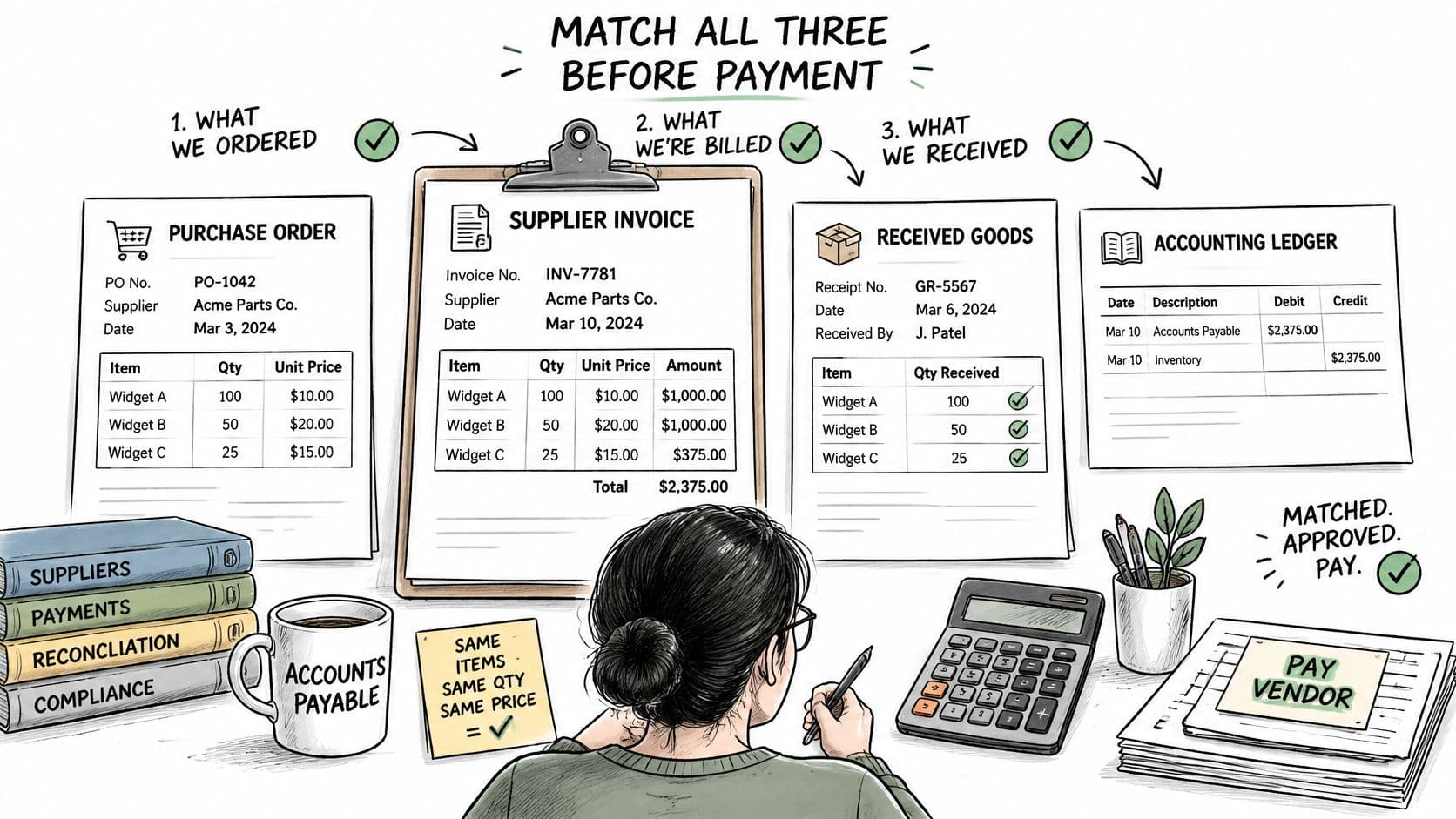
Invoice reconciliation confirms that a supplier invoice matches the purchase order, the goods or services you received, and the accounting entry before you pay it. Think of a restaurant bill. You don't just check that the total looks plausible. You check it against what you ordered and what reached the table.
In accounts payable, that's the three-way match. The purchase order says what you authorized. The receipt says what arrived. The invoice says what the supplier wants you to pay. Five fields must agree before cash leaves: supplier, quantity, price, tax, and payment terms.
What Counts as a Receipt When Nothing Ships
SaaS, agencies, and e-commerce companies rarely get a physical delivery note. Your receipt is the contract, subscription schedule, statement of work, project record, or platform settlement report. The principle doesn't change. You still need independent evidence that the service period, seat count, milestone, or project deliverable supports the amount billed.
Research cited by NetSuite reports that up to 20% of invoices contain incorrect or incomplete information, including missing billing details and inconsistent documentation. Those discrepancies signal data-entry mistakes, unauthorized purchases, duplicate invoices, incorrect quantities, or improper pricing.
Reconciliation connects that operational evidence to the liability in your general ledger. A finished reconciliation leaves every invoice approved, adjusted, accrued, or rejected, with a written reason for each difference. If you can't show an auditor why you paid it, you haven't reconciled it. You've just paid it.
Why Reconciliation Protects Accuracy, Cash and Audits
Run the math on 10,000 invoices a year and reconciliation stops looking like clerical work. It becomes a budget line you either control or subsidize.
Ardent Partners research reported an average invoice exception rate of 18.4%, and a separate survey summarized by Stampli and Probolsky found 70% of organizations reported accounts-payable error rates of at least 5%, according to Docsumo's summary of accounts payable statistics. At 5%, you get 500 problematic invoices. At 18.4%, you get 1,840 invoices needing manual intervention.
Accuracy, Cash, and Audit in One Table
| Metric | Average | Best-in-class | Annual difference |
|---|---|---|---|
| Invoices needing manual review | 18.4% (1,840 invoices) | 11.8% (1,180 invoices) | 660 fewer exceptions |
| Processing cost per invoice | $9.90 | $2.67 | $7.23 per invoice |
| Annual processing cost at 10,000 invoices | $99,000 | $26,700 | $72,300 |
That $72,300 gap is not a technology wish. It's staff time spent researching missing purchase orders, resolving quantity differences, correcting general-ledger coding, and stopping duplicate payments.
Accuracy suffers first. An unmatched invoice becomes a wrong expense line, a duplicate liability, or a missed accrual at month-end. Your department margins and subscription-period costs then misstate performance, even when the total spend looks right.
Cash suffers next. If you don't trust your payables list, you pay early out of caution or pay late and damage vendor terms. Say a $40,000 duplicate invoice slips past matching. That's $40,000 of cash gone until someone notices, contacts the vendor, and recovers it, and recovery can take months. I would take a two-day payment delay over that recovery project every time.
Audit readiness is the third payoff. An auditor who samples a payment asks for the purchase order, receipt evidence, and approval. A completed reconciliation supplies all three in one trail, which is why your audit preparation checklist should start with open exceptions, not with pulling bank statements. Strong controls also give you benchmarks you can manage: processing time, exception rate, correction volume, and duplicate-payment incidence.
How Invoice Reconciliation Works, Step by Step
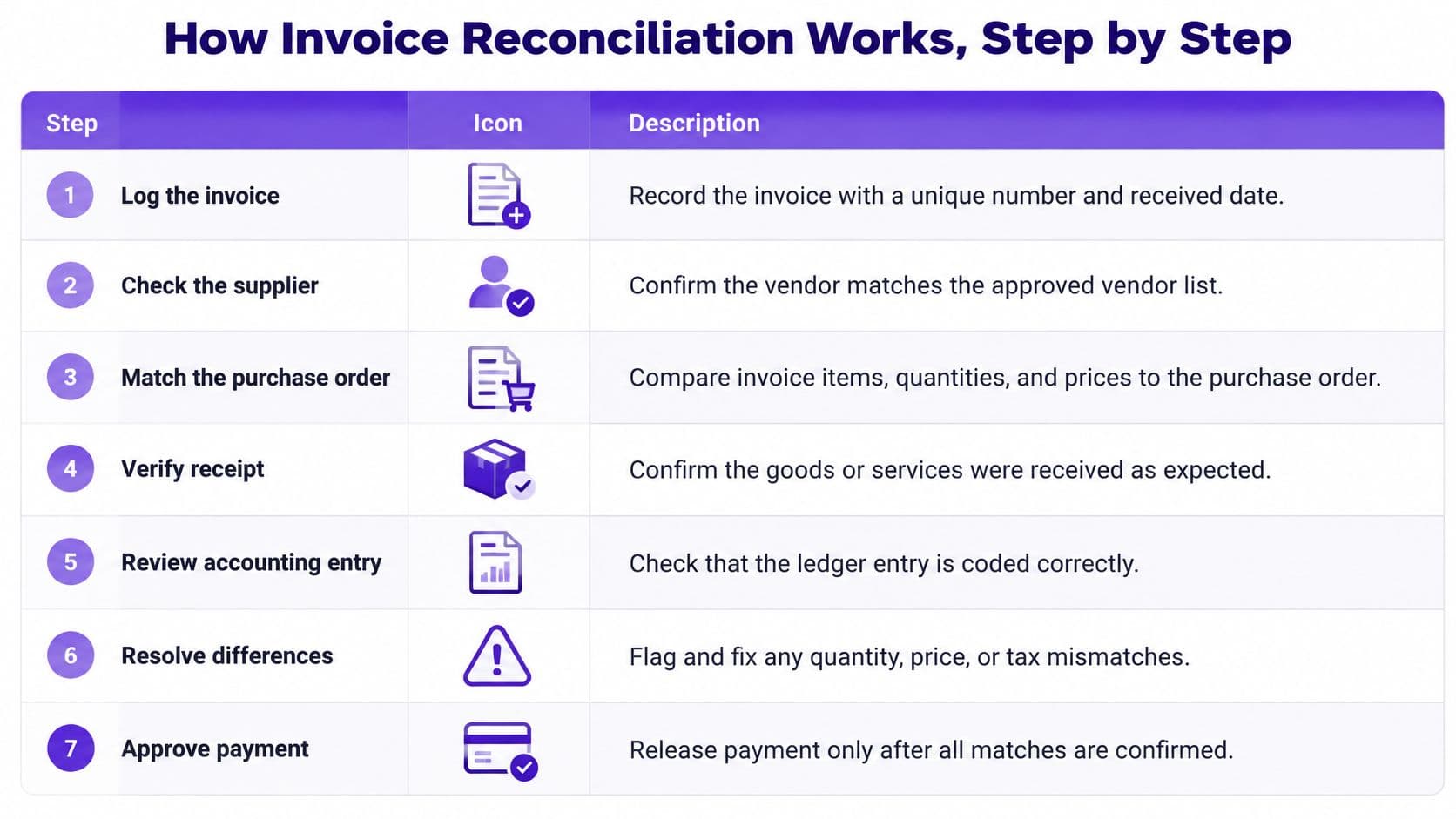
The seven steps below work whether you process invoices in QuickBooks, Xero, NetSuite, or a dedicated AP tool. The software changes. The evidence doesn't.
The Seven Steps
- Log the invoice. Record a unique invoice number, supplier, amount, and received date on intake. The received date drives aging and cutoff, so don't rely on the vendor's invoice date alone.
- Check the supplier. Confirm the vendor sits on your approved vendor list and the bank details haven't changed. Any bank-detail change needs independent verification with a known contact before payment.
- Match the purchase order. Compare PO number, supplier, and line items. No PO means no automatic approval, however familiar the vendor looks.
- Match the quantity. Compare billed quantity to the goods receipt for products, or to the service-completion sign-off for services. Partial delivery means partial approval.
- Match price and tax. Test unit price, tax, and payment terms against the PO or contract, then apply your tolerance rules. Freight and rounding need different treatment from a core rate change.
- Route the exception. Send each variance to the budget owner with the documents attached and record approve, adjust, or reject. An email that says "looks fine" isn't a decision record.
- Code, schedule, and file. Post to the correct account and accounting period, schedule payment on agreed terms, and file the PO, receipt, approval, and payment record together.
A short walkthrough shows how the approval and exception handoff should look in practice.
A Worked Variance Example
Say you ordered 50 units at $40 each, for $2,000. The invoice bills 50 units at $42 each, for $2,100. The variance is $100, or 5%. With a 2% price tolerance, your allowed variance on that line is $40. The $100 exceeds the limit, so the invoice routes to the budget owner instead of posting automatically.
Practical rule: Tolerances clear noise. They don't approve price increases. Treat those as two different decisions.
For services, use a two-way match instead. Compare the invoice to the PO, contract, or statement of work, and let the milestone or service-completion sign-off replace the goods receipt. If you're adding software here, review invoice processing automation for the intake and routing pieces, but keep the exception decision with a named person.
| Step | Core check | Evidence to file |
|---|---|---|
| 1. Log invoice | Unique number and received date | Intake record |
| 2. Verify vendor | Approved vendor, bank details unchanged | Vendor master check |
| 3. Match PO | PO number, supplier and line items agree | Matched PO reference |
| 4. Match quantity | Billed quantity equals received or completed quantity | Receipt or service sign-off |
| 5. Match price and tax | Price, tax and terms match PO or contract, within tolerance | Variance note |
| 6. Resolve exceptions | Budget owner approves, adjusts or rejects | Documented decision |
| 7. Code and pay | Correct account, period and payment date | Posted entry and payment record |
Common Reconciliation Problems and How to Resolve Them
Matching is the easy part. Most invoices either match or they don't, and your system can tell you which. Work starts after that, when someone must decide what an unmatched invoice means for expense, accrual, and payment.
That's why what is invoice reconciliation is really a question about judgment. An operationally valid invoice can still sit in the wrong department, subscription period, or accounting period. Automation accelerates the match. It doesn't own the cutoff decision.
The Decision Rule for Every Unmatched Invoice
Use four outcomes, and make the owner explicit:
- Approve when the variance sits within tolerance and receipt or service completion is confirmed.
- Accrue when goods or services were received in the period but the invoice hasn't arrived, then reverse the accrual when it does.
- Defer when the invoice is valid but belongs to a future service period.
- Reject when no PO, contract, receipt, or approved vendor supports the charge.
The budget owner documents business variances, such as a seat increase or extra project hours. The controller documents classification, period, and accrual decisions. If both questions are open, you need both sign-offs, not a compromise in the comments field.
Widening tolerances to clear the queue doesn't fix exceptions. It converts them into silent overpayments.
Say a $6,000 monthly SaaS invoice rises to $6,600 after a seat increase that isn't in the subscription schedule. Don't pay $6,600 and fix coding later. Confirm the approved seats, accrue or approve that portion, update the schedule, and query the unsupported balance with the vendor. If your backlog already spans several months, work it as an accounting clean up project first, then apply the rule weekly so it doesn't rebuild.
| Problem | Likely cause | Fix |
|---|---|---|
| Partial delivery | Goods shipped in batches but the full order was billed | Match received quantity, approve the partial, schedule the balance |
| Price change | Vendor raised rate without an updated PO | Get written change approval, update the PO before payment |
| Non-PO invoice | Purchase bypassed procurement | Raise a retroactive PO or approve as a documented exception |
| Credit memo not applied | Vendor issued a credit after the invoice | Net the credit against the open invoice and track it in the AP subledger |
| Recurring SaaS charge changed | Seat count or plan changed mid-period | Match to the subscription schedule, prorate and correct coding |
| Invoice arrives after month-end | Service delivered in period but billed later | Accrue received-not-invoiced cost, reverse the accrual when the invoice arrives |
| Duplicate invoice | Invoice resubmitted or sent twice | Check vendor, invoice number and amount, hold payment |
| Tax mismatch | Wrong rate or missing exemption | Verify tax ID and rate against the vendor master before posting |
Best Practices for Reliable Three-Way Matching
Three-way matching compares an invoice with its purchase order and goods-receipt record. The matching step is straightforward; the cost comes from deciding what to do when the records disagree. Supplier, PO number, item, quantity, price, tax, and payment terms should align before an invoice is approved. Missing receipts, duplicate invoices, price variances, and unapproved vendors need an exception decision, not automatic posting. See this guide to accounts payable processes for an overview of the matching flow.
Six Rules That Hold Up Under Volume
- Separate duties. The person requesting a purchase should not approve its invoice or release payment. For a $25,000 payment, that division adds a check against unauthorized spending.
- Set tolerances by risk. A $50 freight variance might clear automatically, while a price change above 2% on a line of $1,000 or more should go to the budget owner. Clear tolerances keep small differences from consuming review time without letting material changes pass unchecked.
- Check for duplicates weekly. Compare vendor, invoice number, and amount together. An invoice number alone may not catch a resubmitted invoice with a changed file name.
- Age unmatched items weekly. Escalate exceptions older than 30 days to the controller and budget owner. Unresolved items can distort cutoff and leave costs in the wrong period.
- Tie AP to the ledger at each close. Reconcile the AP subledger to the general ledger and resolve each difference. A plug figure hides the reason the balances do not agree.
- Verify changed bank details by callback. Call a known contact using a known number before paying to a new account. An email from the address requesting the change is not independent confirmation.
For SaaS and service invoices without a goods receipt, match against contracts, statements of work, service-period dates, milestone approvals, and recurring-billing schedules. These records provide the evidence a receipt would otherwise supply. A three-way matching process only works when its source records stay current. To streamline accounts payable before close, start by cleaning up vendor records and setting approval limits before adding more routing features.
Warning Signs
An exception rate rising two months in a row, unmatched items older than 30 days, or an AP subledger that does not tie to the ledger signals that decisions are being deferred. Assign an owner and a resolution date to each open exception, then document whether it should be approved, corrected, accrued, or held.
KPIs That Show Whether Reconciliation Works
Invoice reconciliation is easy to measure badly: a falling exception rate can mean faster decisions, or wider tolerances that let errors through. Track four KPIs consistently, then review the exceptions behind them.
Cost per invoice is total AP processing cost divided by invoices processed. Exception rate is invoices needing manual review divided by total invoices. Straight-through rate is invoices processed without manual touch divided by total invoices. Cycle time is days from invoice receipt to approval.
Ardent Partners benchmarks report an average invoice-processing cost of $9.90, an average cycle time of 11.6 days, a 19.9% exception rate, and a 38.3% straight-through rate. Best-in-class organizations report $2.67 per invoice and an 11.8% exception rate, according to Medius's guide to Ardent Partners AP metrics.
| KPI | How to calculate | Average | Best-in-class |
|---|---|---|---|
| Cost per invoice | Total AP processing cost divided by invoices processed | $9.90 | $2.67 |
| Exception rate | Invoices needing manual review divided by total invoices | 19.9% | 11.8% |
| Straight-through rate | Invoices processed without manual touch divided by total invoices | 38.3% | Not reported |
| Cycle time | Days from invoice receipt to approval | 11.6 days | Not reported |
Use the Benchmarks Without Mixing Them
Ardent-based sources cite an 18.4% average exception rate in one research set and a 19.9% average in another benchmark. Choose one benchmark for internal comparison, label its source, and keep using it. Switching benchmarks midyear makes it difficult to tell whether the process improved.
For example, at 10,000 invoices and a 19.9% exception rate, 1,990 invoices require manual review. At 15%, that falls to 1,500, or 490 fewer exceptions across the same volume. The reduction matters only if exceptions are resolved correctly, not waved through by loosening tolerances.
Pair the four KPIs with first-pass match rate by vendor and invoice type. Trace failed matches to inaccurate purchase orders, late receiving, inconsistent supplier data, missing contract metadata, or tax and freight rules. Set tolerances narrow enough to catch meaningful price and quantity differences, then assign an owner to decide whether each exception needs correction, approval, accrual, or rejection.
Choosing Between Manual Work, Platforms and Outsourced Controllers
Choose based on four facts, not on a software demo: monthly invoice volume, PO discipline, number of approvers, and whether you have an in-house controller with spare capacity. A tool can't compensate for missing answers on any of the four.
| Option | Best fit | Who decides exceptions | Main limit |
|---|---|---|---|
| Spreadsheet matching | Low invoice volume, few approvers | Founder or bookkeeper | Breaks down as volume and approvers grow |
| Accounting platform with PO matching | Growing teams with regular purchasing | Your AP team | Automates the match but not exception judgment |
| AP automation software | High invoice volume, many approvers | Your AP team with routing rules | Needs clean PO discipline to work well |
| Outsourced controller | Teams without an in-house controller | Controller with budget owner sign-off | Requires clear owners and review points |
The Verdict by Situation
No PO process? Fix that first. No platform can match an invoice to an order that was never created, and buying automation at that stage gives you faster exceptions, not fewer.
PO process exists, but exceptions sit unreviewed? Your constraint is ownership, not capture. Accounting platforms in QuickBooks, Xero, or NetSuite automate matching, but they don't decide whether a price increase gets approved, accrued, or rejected. Review reconciliation automation tools for routing, then assign a human owner to every exception type.
No in-house controller? Outsourcing often costs less than the rework it removes, because the controller owns the match review, exception decisions, accruals, and close sign-off together. I would not hire AP headcount before testing that option. More processors with no controller just move unmatched invoices faster.
Spreadsheets still work at low volume, provided one person ages exceptions weekly and ties AP to the ledger monthly. The moment approvers multiply across departments, spreadsheet matching loses its audit trail. That's your upgrade trigger, not an arbitrary invoice count.
Confirm Your Reconciliation Gaps Before Your Next Close
Do these three actions this week, in order.
- Count your exceptions. Pull unmatched invoices from your last closed month and divide by total invoices processed. That's your exception rate. If you had 63 unmatched invoices out of 420, your rate is 15%.
- Compare and classify. Set that rate against the best-in-class benchmark you chose, then identify which exception type dominates. Price variances, missing POs, late invoices, and changed SaaS charges each need a different fix.
- Decide who owns the fix. Assign it in-house with named owners and a weekly aging review, or get an outside diagnostic before you commit to software or headcount.
Our Finance Ops Diagnostic is a $3,500 fixed fee, delivered in five business days. It ends with a written workflow map handed over before either side commits to a retainer, covering your current stack, handoff gaps, unclear owners, and a recommended monthly routine. We also offer a complimentary ROI assessment to test whether controller services make financial sense for your specific situation.
Count your exceptions this week. If your rate sits above the best-in-class benchmark, book the ROI assessment before your next close turns those exceptions into another month of rework.
If your exception queue is deciding your close date, Jumpstart Partners can take ownership of your monthly close, reconciliation review, and AP controls with clear owners and review points. Start with the complimentary ROI assessment to see whether outsourced controller support pays for itself, or book the five-day Finance Ops Diagnostic for a written workflow map you keep either way.